
Dotplot
FreeNot checkedProduct analytics MCP server for early-stage startups: user behavior analysis, dot plots, aha moment discovery, retention curves, onboarding funnels, churn anal

About
Product analytics MCP server for early-stage startups: user behavior analysis, dot plots, aha moment discovery, retention curves, onboarding funnels, churn analysis — YC methodology, works with Claude Code & Cursor
README
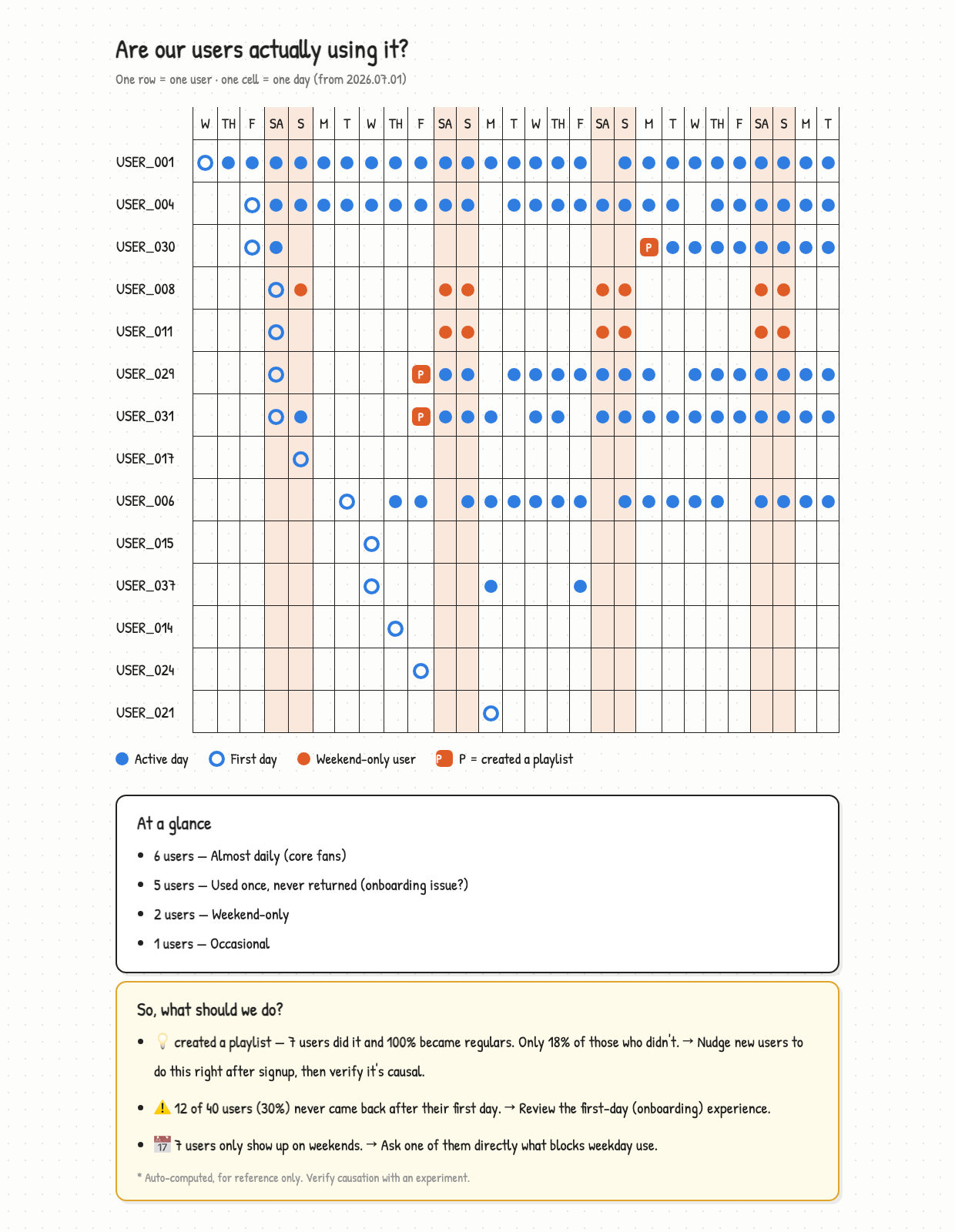
See individual users, not aggregate charts.
English | 한국어
Install
Paste this to your agent and it sets everything up:
Set up Dotplot (MCP + skills) — instructions are here https://dotplot-reports.vercel.app/setup.md
Or do it by hand
claude mcp add --scope user dotplot -- uvx dotplot-mcp
Use
Say this in any project:
"Analyze my product"
You get the report above. That's it.
Or use the slash commands:
/dotplot-analyze-product    full analysis and report
/dotplot-add-tracking       find and write the logging you're missing
/dotplot-whats-changed      compare with the previous report
Claude finds your data, picks the action that means "this user got value", and
writes the report. No events table needed — your orders table already is one:
SELECT user_id, created_at::date AS date, 'purchase' AS event FROM orders
UNION ALL
SELECT user_id, added_at::date, 'add_to_wishlist' FROM wishlist_items
Nothing tracked yet? Say "add the tracking I'm missing" and Claude reads your code, writes the logging that's absent, and tells you when to come back.
No product to analyze yet? Try the sample
git clone https://github.com/brownglasses/dotplot-mcp && cd dotplot-mcp
uv run sample_data.py   # 40 fake users with a pattern planted in them
uv run harness.py       # watch the whole pipeline run
Why this exists
DAU/MAU charts go "up and to the right" as long as new users arrive — even when nobody stays. Until you have hundreds of users, the most informative dashboard is YC's dot plot (David Lieb): one row per user, one cell per day.
Four rules keep it honest:
- Code computes, AI only interprets — same data, same numbers, every time
- Small samples withhold judgment — under 5 users in a group, it says nothing
- Correlation isn't cause — every finding ships with "test this before you believe it"
- Vanity metrics are refused — pick
open_appas your value event and the code says no
Reports come out in your language (English, 한국어, 日本語 built in; anything else translated on the fly with the numbers verified intact).
More
MIT
Installing Dotplot
This server has no published package — it is built from source. Open the repository and follow its README.
▸ github.com/brownglasses/dotplot-mcpFAQ
Is Dotplot MCP free?
Yes, Dotplot MCP is free — one-click install via Unyly at no cost.
Does Dotplot need an API key?
No, Dotplot runs without API keys or environment variables.
Is Dotplot hosted or self-hosted?
Self-hosted: the server runs locally on your machine via the install command above.
How do I install Dotplot in Claude Desktop, Claude Code or Cursor?
Open Dotplot on unyly.org, pick your client tab (Claude Desktop, Claude Code, Cursor) and press Install — the config is generated automatically, no JSON editing.
Related MCPs
GitHub
PRs, issues, code search, CI status
 by GitHub
Filesystem
Secure file operations with configurable access controls.
Memory
Knowledge graph-based persistent memory system.
Template MCP Server
A CLI tool to create a new Model Context Protocol server project with TypeScript support, dual transport options, and an extensible structure
 by mcpdotdirect
Amap Maps Mcp Server
MCP server for using the AMap Maps API
 by duxiaohui
Supabase
Database, auth and storage
 by Supabase
Everything
Reference / test server with prompts, resources, and tools.
Git
Tools to read, search, and manipulate Git repositories.
Sequential Thinking
Dynamic and reflective problem-solving through thought sequences.
Time
Time and timezone conversion capabilities.
Compare Dotplot with
Not sure what to pick?
Find your stack in 60 seconds
Author?
Embed badge for your README
Browse similar
All development MCPs