
Dsh Mcp View
FreeNot checkedMCP Tools panel for the DeepSeek Harness Web GUI: every MCP server & tool in your session, grouped by server, with JSON schemas, live search and last-used times

About
MCP Tools panel for the DeepSeek Harness Web GUI: every MCP server & tool in your session, grouped by server, with JSON schemas, live search and last-used times from real session logs.
README

🔌 dsh-mcp-view
See every MCP server & tool in your DeepSeek Harness session — right in the Web GUI.
License: MIT npm Platform DSH Node PRs Welcome Awesome DSH Plugin
A floating MCP inventory panel for the DSH sidebar: servers grouped, tools with JSON schemas, live search, and last-used times pulled from real session logs — nothing invented.
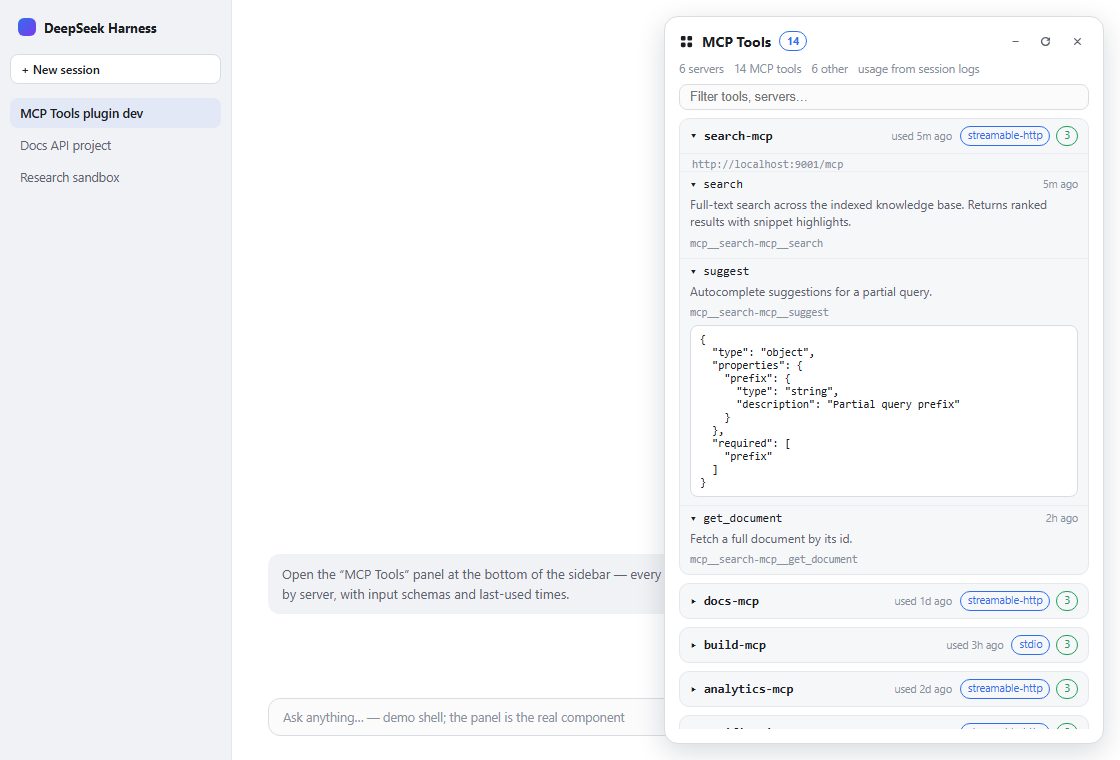
DSH runs your MCP servers (docs, build & analytics — whatever you have configured) and registers their tools into the shared mcp__* namespace — but there was no UI to see them. This plugin adds a one-click panel that answers: what MCP servers are configured, which tools are registered, what their input schemas look like, and when each was last used.
✨ Features
| 🖥 All servers, one panel | Every dsh-mcp-client instance in your profile, with transport (stdio / streamable-http) and endpoint (command or URL), plus connection state (active / disabled / no tools). |
| 🗂 Collapsed by default | Servers are folded into a single compact row; one click expands the tool list. + / − in the header expands or collapses everything. |
| 🧬 Full JSON schemas | Each tool shows its raw name, description and the exact inputSchema the model sees — expandable, prettified. |
| 🕘 Last-used times & usage | Derived from real tool/call events in ~/.dsh/sessions/**/session.jsonl[.zstd] — per tool and per server, plus a Usage tab with total calls, a calls-per-day chart and the most-used tools. |
| 🔍 Live search | Filter by tool name, raw name, description, server or parameter names; auto-refresh every 10 s plus a manual refresh button. |
| 🎯 Per-session view | Toggle to see only the tools the current session's agent really sees (resolved from the session's agent scope). |
| ❤️ Favorites & sorting | Star servers/tools; sort by name / tools / last-used / favorites. State persists in localStorage. |
| ⚕️ Health checks | One-click probe of streamable-http endpoints (HEAD) → up/down badge per server. |
| 📤 Export | Download the whole inventory as JSON or Markdown. |
| 🧩 Non-MCP context | A collapsible list of the other (built-in / plugin) globally-registered tools, so you can see the whole tool landscape at a glance. |
⚙️ Configuration
The plugin accepts an optional config object on its row in cordis.patch.yml:
- insert:
    - id: mcp-view
      name: 'dsh-mcp-view'
      config:
        enabled: true          # master switch (default true)
        announceToAgent: true  # announce the plugin in the model's prompt band (default true)
📸 Screenshots
| Light | Dark | |
|---|---|---|
| Servers | |
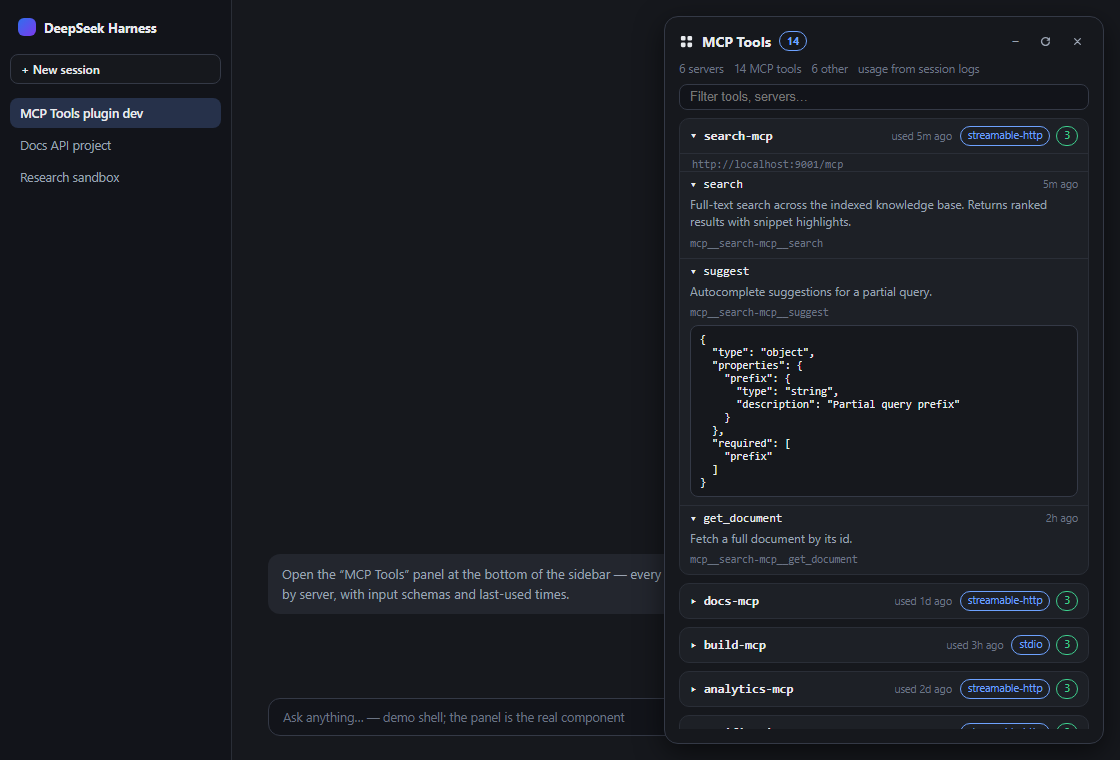 |
| Usage | 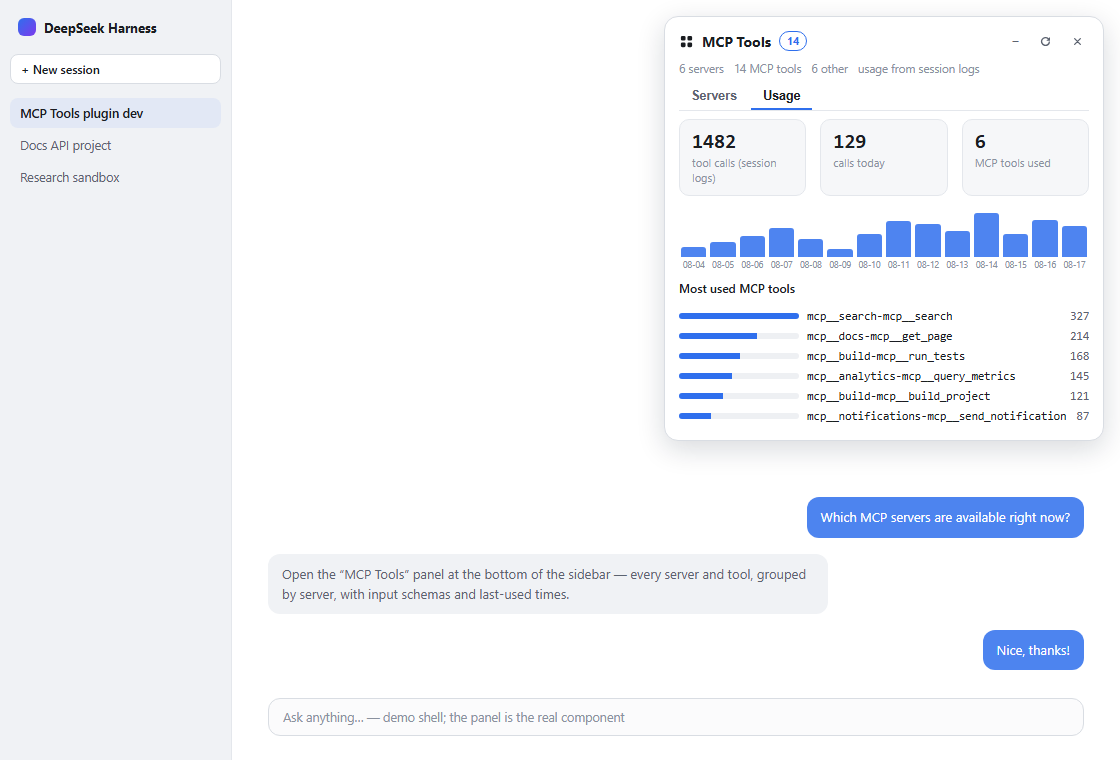 |
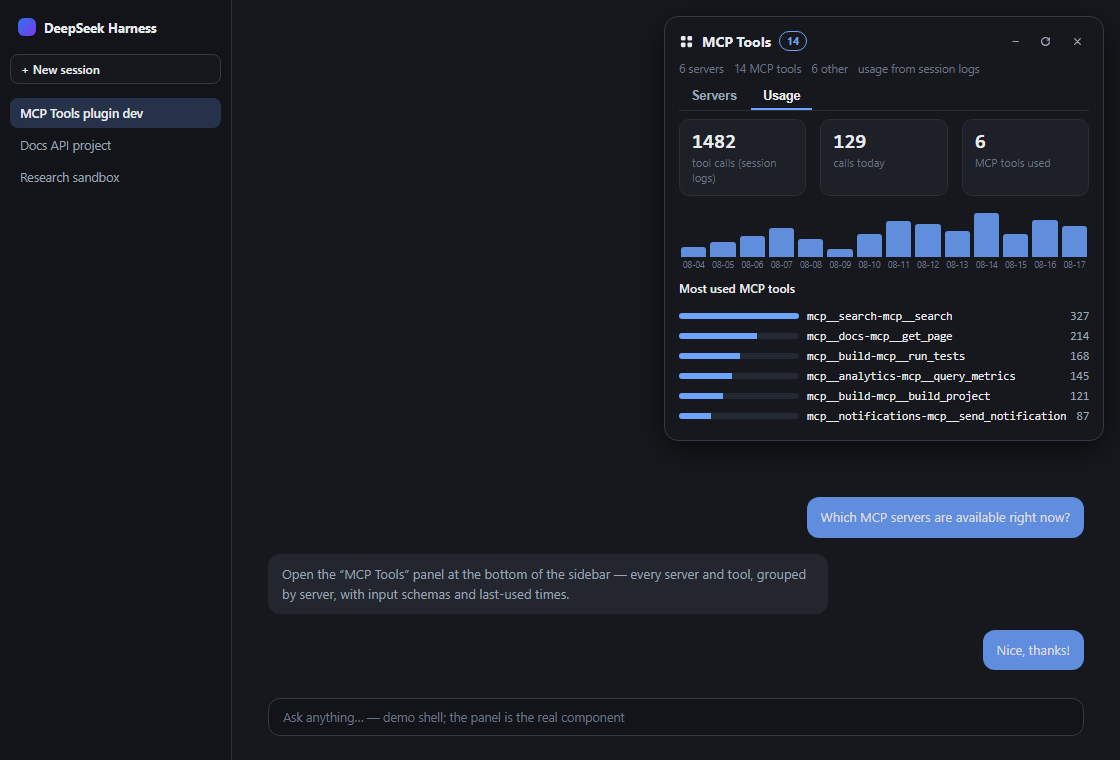 |
⚡ Quick start
git clone https://github.com/stopchewing/dsh-mcp-view.git
cd dsh-mcp-view
dsh plugin --profile web add link:$(pwd)
Then restart dsh web and refresh the page — a 「MCP Tools」 button appears at the bottom of the sidebar.
📦 Install
From npm
dsh plugin --profile web add dsh-mcp-view
From the repository
git clone https://github.com/stopchewing/dsh-mcp-view.git
dsh plugin --profile web add link:/absolute/path/to/dsh-mcp-view
Manual (no CLI)
Put this package into the profile's
node_modules(copy, or a junction on Windows):New-Item -ItemType Junction -Path "$env:USERPROFILE\.dsh\profiles\web\node_modules\dsh-mcp-view" -Target "<abs-path>\dsh-mcp-view"Append to
~/.dsh/profiles/web/cordis.patch.yml:- insert: - id: mcp-view name: 'dsh-mcp-view'Restart
dsh web, then F5 the page.
The profile patch is watched, so the host half activates live; the client bundle is served fresh at
/plugins/dsh-mcp-view/client.js— a page refresh is all the browser needs.
🎛 Usage
- Click 「MCP Tools」 in the sidebar footer (icon-only when the sidebar is collapsed).
- Browse servers — each row shows transport, tool count and last use; click to expand tools.
- Click a tool to see its description, full public name and JSON input schema.
- Type in the filter box to narrow tools and servers;
Escor ✕ closes the panel.
🗺 Architecture
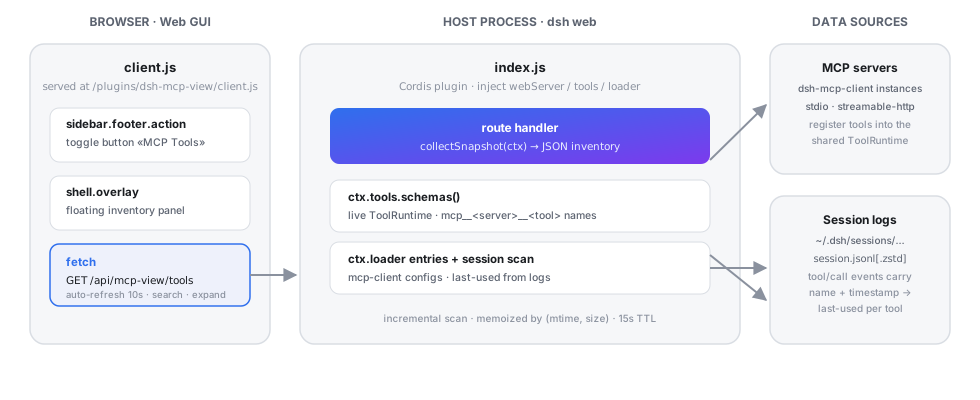
| Half | File | Role |
|---|---|---|
| Host | lib/index.js |
GET /api/mcp-view/tools returns the JSON inventory: MCP instances from the Cordis loader, live tool schemas from ctx.tools, and last-use history scanned from session logs (incremental scan memoized by file mtime/size, 15 s TTL). |
| Browser | lib/client.js |
Client plugin bundle: registers the sidebar toggle in the sidebar.footer.action slot and the floating panel in the shell.overlay slot. |
No changes to dsh sources — it is a hot-pluggable profile plugin, same mechanism as the @linxin666 web-ui family.
🔒 Security & privacy
- Local-only. Everything runs in your dsh host process and browser; the only network traffic is to the MCP servers you already configured.
- No telemetry, no analytics, no external calls — the panel never leaves your machine.
- The
/api/mcp-view/toolsroute is served by the same-origin webserver; it is read-only — it cannot call MCP tools, only list them. - Last-used times come from your own session logs on disk; nothing is sent anywhere.
- Passwords / credentials of your MCP servers are never exposed — only transport type and endpoint URL.
🧩 Compatibility
@deepseek-ai/dsh0.1.0-rc.6(web profile) — same cadence as the ecosystem's pinned SDK versions.- Node
^22.19.0 || >=24.0.0(the dsh runtime requirement — zstd session decoding is used). - Browser: Chrome / Edge / Firefox (React 18, no build step for the client bundle).
❓ FAQ
Are MCP servers per-session or shared?
Shared. MCP servers are configured once at the profile level (cordis.patch.yml), connect once per process, and register their tools into the process-wide ToolRuntime — every session and workspace sees the same set. A session whose agent preset restricts tools may hide them from the model, but the registry stays global.
Where does «used …» come from?
From tool/call events in your persisted session logs (~/.dsh/sessions). It is the real dispatch timestamp of the last call of that tool. If the log has no calls for a tool, the hint is simply absent.
Why are only some tools listed under "Other tools"?
The panel shows the global registry. Per-session agent tools (e.g. pwsh, read) register in the session's scope layer, so they are not part of the global view.
Does the panel slow things down? No. The session scan is incremental (only changed files are re-read) and rate-limited to once per 15 s; the browser auto-refresh is 10 s.
🛠 Development
dsh-mcp-view/
├─ src/
│  └─ index.ts      # host plugin (TypeScript): route + inventory + session scan
├─ lib/
│  ├─ index.js      # compiled host output (npm run build)
│  └─ client.js     # browser bundle (window.__ModuleLoader__)
├─ test/            # node --test unit tests
├─ cordis.patch.yml # profile roster insert
├─ docs/            # preview data, template, screenshots, architecture
└─ package.json     # dsh.bundle.patch + dsh.client manifest
The host plugin is written in TypeScript (src/index.ts); compile it with
npm run build (emits lib/index.js + types). The browser bundle
(lib/client.js) uses the DSH module-loader format and is maintained as a
checked JS bundle. Run npm test (Node's built-in test runner) and
npm run typecheck locally.
Rebuild the README preview screenshots (requires Chrome):
# 1. merge live inventory + session scan into docs/preview.html
#    (docs/preview-data.json + docs/preview.template.html → docs/preview.html)
# 2. screenshot with headless Chrome:
chrome --headless=new --screenshot=docs/screenshots/panel-light.png --window-size=1120,760 "file:///abs/path/docs/preview.html?theme=light"
#    repeat with ?theme=dark
🤝 Contributing
Found a bug, want a new view (per-session visibility, tool stats, dark-mode polish)? Open an issue or send a PR — they're welcome.
Star ⭐ this repo if the panel made your MCP tooling visible — it helps other DSH users find it (and it keeps the maintainers motivated). After your first release, submit it to awesome-dsh-plugin and awesome-deepseek-harness to reach the whole ecosystem.
📜 License
MIT © 2026 stopchewing
Installing Dsh Mcp View
This server has no published package — it is built from source. Open the repository and follow its README.
▸ github.com/stopchewing/dsh-mcp-viewFAQ
Is Dsh Mcp View MCP free?
Yes, Dsh Mcp View MCP is free — one-click install via Unyly at no cost.
Does Dsh Mcp View need an API key?
No, Dsh Mcp View runs without API keys or environment variables.
Is Dsh Mcp View hosted or self-hosted?
Self-hosted: the server runs locally on your machine via the install command above.
How do I install Dsh Mcp View in Claude Desktop, Claude Code or Cursor?
Open Dsh Mcp View on unyly.org, pick your client tab (Claude Desktop, Claude Code, Cursor) and press Install — the config is generated automatically, no JSON editing.
Related MCPs
LibreOffice Tools
Enables AI agents to read, write, and edit Office documents via LibreOffice with token-efficient design. Supports multiple formats including DOCX, XLSX, PPTX, a
 by passerbyflutter
dannote/figma-use
Full Figma control: create shapes, text, components, set styles, auto-layout, variables, export. 80+ tools.
 by dannote
Logo.dev
Search and retrieve company logos by brand or domain. Customize size, format, and theme to match your design needs. Accelerate design, prototyping, and content
 by NOVA-3951
Design Inspiration Server
Searches top design platforms like Dribbble and Behance to provide UI inspiration, color palettes, and layout patterns via the Serper API. It allows users to re
 by YonasValentin
PIX4Dmatic
Enables GUI automation for controlling PIX4Dmatic on Windows through MCP. Supports launching, focusing, capturing screenshots, sending hotkeys, clicking UI elem
 by jangjo123
Figma
Extract design specs and assets
 by Figma
mcp-dockmaster
An Open-Sourced UI to install and manage MCP servers for Windows, Linux and macOS.
ariekogan/ateam-mcp
Build, validate, and deploy multi-agent AI solutions on the ADAS platform. Design skills with tools, manage solution lifecycle, and connect from any AI environm
 by ariekogan
thinkchainai/mcpbundles
MCP Bundles: Create custom bundles of tools and connect providers with OAuth or API keys. Use one MCP server across thousands of integrations, with programmatic
 by thinkchainai
arikusi/nakkas
MCP server that turns AI into an SVG artist. One rendering engine with JSON config, AI controls all design parameters. CSS @keyframes + SMIL animations, 16+ ele
 by arikusi
Compare Dsh Mcp View with
Not sure what to pick?
Find your stack in 60 seconds
Author?
Embed badge for your README
Browse similar
All design MCPs