
Edt Bridge
FreeNot checkedstdio MCP front-end for the edt-bridge 1C:EDT plugin: proxies to a running EDT, or auto-starts a headless one

About
stdio MCP front-end for the edt-bridge 1C:EDT plugin: proxies to a running EDT, or auto-starts a headless one
README
A small 1C:EDT plugin that exposes EDT's live semantic model to AI agents and other tools over the Model Context Protocol (MCP).
Static parsers read source files; EDT-Bridge instead asks the running IDE. It answers things that need the live model: EDT's own validation problems, real metadata structure and types, semantic cross-references, query validation against the project's actual metadata, and the platform Syntax Helper bundled with EDT – plus write tools that create, refactor, build and deliver, all through EDT's own engine.
Read and write. Localhost only; writes are token-gated and dry-run by default. The plugin runs inside EDT, so an EDT (GUI or headless) must be up with your project.
English · Русский
Documentation: docs.keyfire.ru/edt-bridge
Development notes and updates (in Russian): the 1C × AI: engineering workshop Telegram channel.
Install (recommended: pipx)
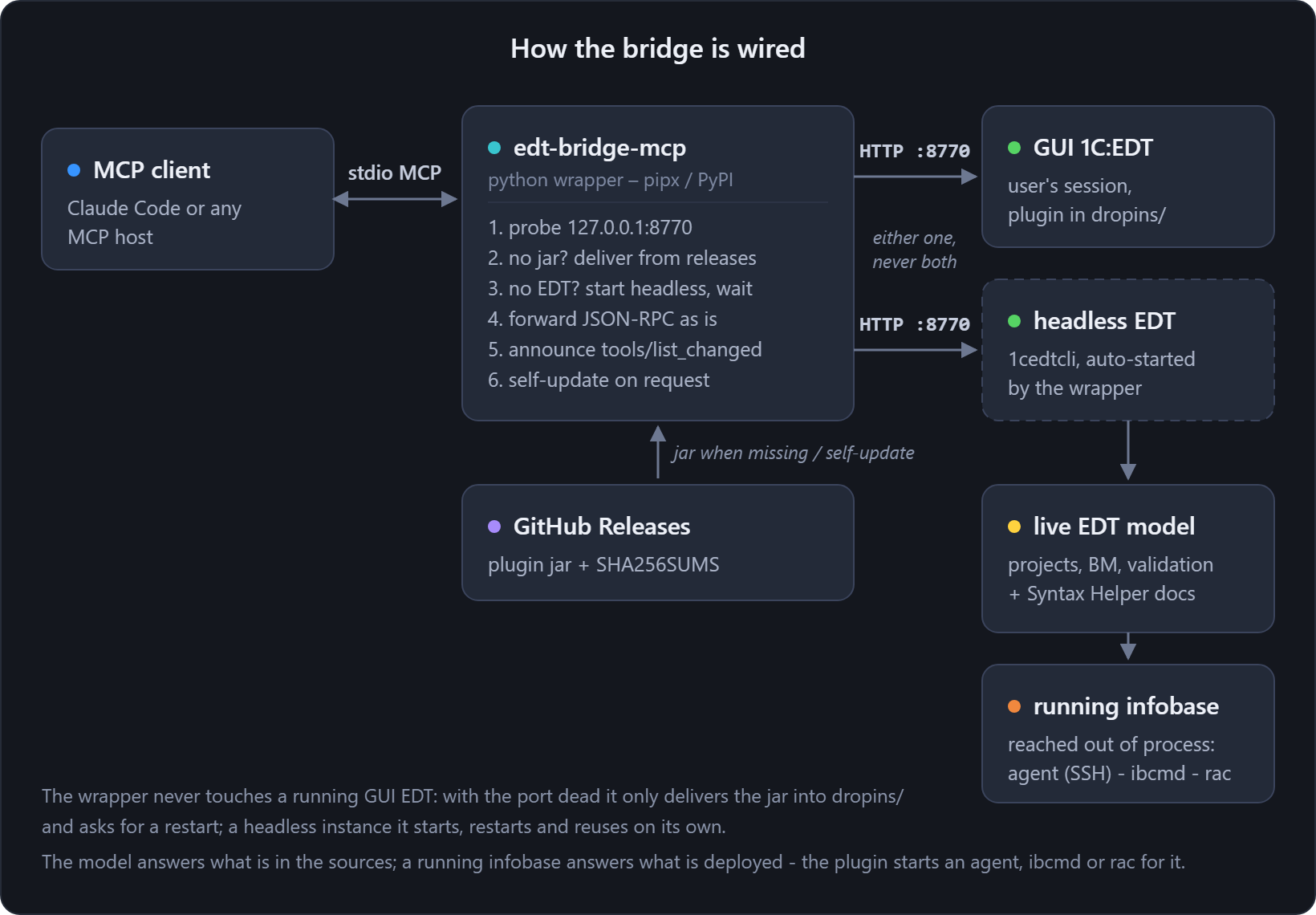
One command sets up everything – the client wrapper AND the plugin. The
edt-bridge-mcp wrapper is a stdio MCP server that your client talks to; it
forwards to a running EDT, auto-starts a headless EDT when none is open, and delivers the
plugin jar into EDT's dropins/ when it is missing. You do not copy any jar by hand.
pipx install edt-bridge-mcp
Then register it with your MCP client (Claude Code shown; --workspace is the EDT workspace to
serve when auto-starting headless):
claude mcp add edt-bridge -- edt-bridge-mcp --workspace "D:\\path\\to\\edt-workspace"
That is the whole setup. Wrapper flags, the write-tools token and self-update are documented in
python/README.md. Prefer to run the plugin yourself, without the wrapper? See
Manual install below.
Don't have pipx?
pipx installs Python CLI apps into isolated environments. Install it once:
python -m pip install --user pipx
python -m pipx ensurepath      # then reopen the terminal
macOS: brew install pipx && pipx ensurepath. More: https://pipx.pypa.io.
Settings inside EDT
The plugin has its own preference page – Window ▸ Preferences ▸ EDT-Bridge – and that is where the token comes from when the bridge runs inside a GUI EDT:
| Setting | What it is |
|---|---|
| Token for write tools | The shared secret every write tool requires. Empty means writes are refused, not unguarded. The same value goes to the client as EDT_BRIDGE_TOKEN. |
| MCP server port | Default 8770. Takes effect after EDT restarts, so the running server keeps the old port until then. |
| Allow arbitrary BSL evaluation while debugging | Off by default. It gates edt_evaluate, which executes code against a live infobase – test stands only. |
A launch parameter wins over this page. -Dedt.bridge.* system properties and EDT_BRIDGE_*
environment variables given at startup take precedence over the stored values – which is how the
wrapper drives a headless EDT, and why a token set here can look ignored when one was also passed on
the command line.
Tools
Tools are edt_* (snake_case); parameters are camelCase (projectName, fqn, queryText);
Object names are Cyrillic as in the configuration, the type prefix is English (Catalog.Контрагенты, Document.ЗаказКлиента). The edt_ prefix is deliberate: an MCP
host presents every server's tools to the agent as one flat list, so a name must carry its context
itself – edt_rename stays unambiguous where a bare rename is dangerously generic.
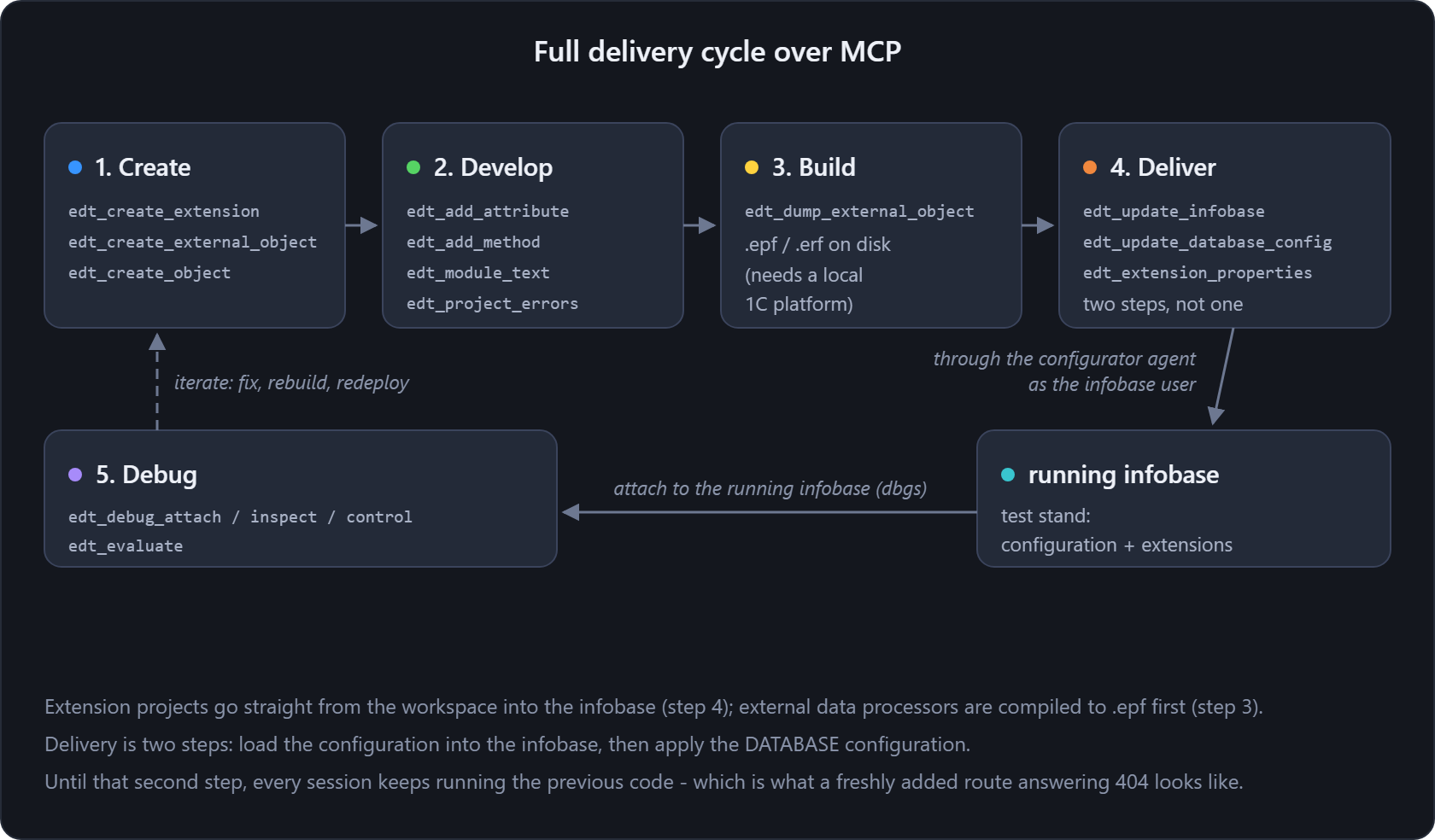
Together they close the full cycle without leaving MCP – create, develop, build, deliver, debug:
Read
| Tool | What it returns |
|---|---|
edt_projects · edt_project_errors |
The open workspace projects – name, disk location, natures, and whether each is a 1C:EDT project – and a project's EDT validation problems (message, severity, resource, line). Start here to discover what is addressable. |
edt_check_info |
What a validation check MEANS: its description, the non-compliant and compliant examples, and the links to the 1C development standards it enforces – in English or Russian. The companion of edt_project_errors, which reports which check fired: that answers what, this answers why. Ask by check id, or paste the problem message – a check whose id is a short code is found by its title. |
edt_metadata_objects · edt_metadata_details |
Top-level metadata objects, optionally filtered by type (Catalog, Document, ...) and a name substring; then one object's core properties and structure – attributes, tabular sections, forms, commands, templates, dimensions, resources, enum values – with each attribute's value type. |
edt_find_references · edt_outgoing_calls · edt_outgoing_structures |
Which way the calls go. Inbound references to a metadata object from EDT's cross-reference index (with method: the BSL call sites of CommonModule.X.method); the reverse, methods CALLED BY a module / method / form one level out, with call-site counts and an ExtAPI-layer flag; and, best-effort, the top-level keys of the Структура passed to each qualified outgoing call. |
edt_module_text · edt_go_to_definition · edt_symbol_info |
Reading BSL: a module's source (or one method) plus its procedure/function list with signatures, by FQN or modulePath; a symbol's definition at a position (kind, name, owning object, location); and the type info at a position – the element under the cursor and the computed value type(s) of the expression. |
edt_search_modules |
Full-text search across a project's BSL modules – substring or regular expression, optional path filter. Reads through Eclipse's file buffers, so a module open in an editor is searched as it currently stands, unsaved edits included. Where edt_find_references answers "who calls this method", this answers "where does this text appear". |
edt_validate_query |
Validates a 1C query against the project's live metadata: syntax and semantics (unknown tables/fields, type errors), with positions. |
edt_form_structure · edt_form_render · edt_picture_export |
Forms and images: a managed form's items tree (fields/groups/tables/buttons/decorations) with data bindings, static visible/enabled/readOnly, per-item event handlers, input-field props, button→command and the form's conditional appearance, plus its attributes, commands, parameters and handlers; the same form rendered to a PNG by EDT's native offscreen renderer (interface variant and theme selectable); and a CommonPicture's content from its Picture.zip. |
edt_platform_help |
The 1C:Enterprise platform Syntax Helper bundled with EDT (real API reference – objects, methods, properties, events, Ru+En): search by name, or read a page as text. Consult the actual API instead of guessing signatures. |
Write
Write tools mutate the model through EDT's own engine (not text edits). All are token-gated
and dry-run by default (apply=false returns a plan and changes nothing); apply=true
performs the change and serializes the .mdo.
| Write tool | What it does |
|---|---|
edt_create_object · edt_delete_object |
Create a new top object (Catalog/Document/Enum/InformationRegister/...) via EDT's factory + per-type initializer, registered in the Configuration – or delete one, cascading the removal of every reference in metadata AND BSL (force required). |
edt_add_attribute · edt_modify_attribute · edt_remove_attribute |
Add an attribute to a metadata object (type / klass / synonym / comment, validated), change an existing one's type, synonym or comment, or remove it – removal is reference-checked and refuses while references remain unless forced. |
edt_rename |
Rename an object or member and cascade every reference in metadata AND BSL via EDT's native refactoring engine (force required – a rename is breaking). |
edt_add_method · edt_delete_method |
Add or delete a procedure/function in a module's BSL, both model-guided. The insert refuses any result that would not re-parse cleanly; the cut takes adjacent doc comments with it and its dry-run returns the exact removed text (force required – deleting code is destructive). Both address a module by FQN, including HTTPService.X / WebService.X. |
edt_add_route |
Add a route – a URL template plus one HTTP method – to an HTTPService, the write tool for HTTP service routes alongside the attribute and method writers. Generates the uuid of both the url template and its method (hand-writing which is exactly what the bridge exists to avoid), resolves the httpMethod enum, and with createHandler splices a Функция <handler>(Запрос) stub into the service module. |
edt_add_form |
Add a managed form to a metadata object through EDT's own form generator – the engine behind the "New form" wizard – so the form, its items and its module are generated rather than hand-written as XML. |
edt_add_form_attribute · edt_modify_form_attribute · edt_remove_form_attribute |
Add, change and remove a form attribute – or, with columnOf, a column of a value-table attribute. Ids come from EDT's form identifier service; besides the metadata type grammar these accept platform types a form may hold (ТаблицаЗначений, СписокЗначений, ...). Removal lists the items bound to the attribute and needs force. |
edt_add_form_command · edt_modify_form_command · edt_remove_form_command |
Add, change and remove a form command. Adding can also write the handler procedure's stub into the form module, creating that module when the form has none. Removal lists the buttons wired to the command and needs force. |
edt_add_form_item · edt_modify_form_item · edt_remove_form_item |
Add, change and remove a form's visual items – field, table, button, group, decoration – through EDT's own IFormItemManagementService, the service the form editor calls. A table bound to a value-table attribute gets its columns auto-filled. Removal takes everything nested inside and needs force. |
edt_adopt_object |
Adopt an object of the base configuration into an extension project via EDT's own IModelObjectAdopter – the step that must happen before an extension can intercept anything on that object, and the one that completes edt_create_extension. |
edt_create_extension · edt_create_external_object |
Start a project. A configuration extension against a base project via IExtensionProjectManager, its root Configuration being the base configuration adopted – as the wizard does it, which is what makes the project loadable into an infobase – plus name prefix, purpose (Customization·AddOn·Patch) and synonym; or an external data processor project, the start of the "processor → .epf" cycle. |
edt_clean_project · edt_delete_project |
Finish with a project. Discard its build results so validation runs again (EDT's "Clean" dialog, programmatically – reports the problem count before and after, waiting until it stops changing, because a stale marker outliving its cause is worse than no marker), or remove it from the workspace through the Eclipse workspace so no ghost project is left behind (force required – deleting a project is irreversible). |
edt_build_extension · edt_dump_external_object |
Build the binaries: a .cfe from an extension project, or an .epf/.erf from an external data processor/report. Both can bypass EDT's platform resolver when it serves no thick client – exporting designer XML in-process, then assembling with a full on-disk 1C install in a throwaway temp infobase that is deleted afterwards. logPath keeps the platform's build log next to the artefact. |
Infobases, the cluster and the platform
Everything that talks to a RUNNING infobase rather than to the model in EDT. Four places to reach, and they are not interchangeable - the Through column says which one a tool uses:
- EDT's own synchronization – what the IDE uses. It opens its own infobase connection and has no way to take credentials from outside the UI, so it stops at an infobase that authenticates its users.
ibcmd– straight at the database, by file path or DBMS coordinates, so a clustered infobase needs no cluster access. Itsextensionmode has no 1C credentials at all.- the configurator agent – a designer started with
/AgentMode, taking commands over SSH and authenticating AS THE INFOBASE USER. It reaches what the other two cannot, and the bridge keeps one running per infobase because starting one is slow and holding one is cheap. rac– the cluster itself, which is where sessions live. Neither the agent noribcmdsees them.
Tools that change an infobase are token-gated and dry-run by default, exactly like the write tools above.
| Tool | Through | What it does |
|---|---|---|
edt_infobases · edt_platform_installations |
EDT | What the platform side has to work with: EDT's registered infobases (name, uuid, connection string) with the open projects' associations, and the 1C:Enterprise installations EDT resolves from when dumping an .epf/.erf or creating an infobase – each resolved to a concrete install carrying a thick client, plus the full installs found on disk. |
edt_designer_agent |
agent | Lifecycle of the configurator agents the bridge drives: list, start, stop. An agent is a configurator in /AgentMode holding an open infobase session, authenticating as the infobase user – which is how the bridge reaches an infobase the other transports cannot. Started on demand and kept between calls; stopping one frees the session it holds on the server. |
edt_infobase_config_state |
agent | Is the infobase's database configuration – the code sessions actually execute – up to date, or is an update still pending? The platform itself answers: the update is started and its confirmation refused, so nothing is applied and a pending update comes back as the full list of structure changes that are waiting. Driven through a configurator agent, so a server infobase that authenticates its users is reachable. |
edt_update_database_config |
agent | Applies the database configuration – the step that makes running sessions execute the configuration the infobase holds. Loading a project into an infobase does not do this, and until it happens every session keeps running the previous code (a freshly added HTTP route answering 404 is what that looks like). Dry-run by default; sessionTermination=force ends the sessions holding the base when an exclusive lock is needed. |
edt_update_infobase |
EDT · agent | Update an infobase's configuration from an EDT project. Through EDT's synchronization engine by default (db-structure changes auto-confirmed, a conflict aborts), which cannot authenticate to an infobase that has users; with transport=agent the project is exported to designer XML and loaded through the agent instead – the only route into a server infobase with users – and the database configuration is applied afterwards. |
edt_create_infobase · edt_register_platform |
EDT · disk install | Create an empty file infobase and register it in EDT's list, falling back to a full install found on disk when EDT resolves none for the version; or register a full install into EDT so its own engine can use it. |
edt_extension_properties |
agent · ibcmd | Read and set how an extension is REGISTERED in an infobase – safe mode, protection from dangerous actions, active, scope. Neither building a .cfe nor updating from EDT decides these, and a freshly registered extension gets safe mode and dangerous-action protection on; an extension that changes methods of the base configuration cannot run under them. Pass the extension project and the result says whether that is the case. Addressed by an EDT-registered name it goes through the agent, which reaches a server infobase with users; by explicit DBMS coordinates it goes through ibcmd, which cannot. |
edt_delete_extension |
agent | Removes an extension from an infobase – the step that closes the lifecycle (create · load · configure · delete). The dry-run reads its current properties first, so a wrong name is answered plainly. Needs force on top of apply: an extension's configuration lives in the infobase, and nothing here puts it back. |
edt_infobase_sessions |
rac | The 1C cluster's sessions through rac: list them (for one infobase or one application) and end them. Neither the agent nor ibcmd can – sessions live in the cluster manager. Reach for it when an infobase refuses to be configured: a designer session that was killed rather than closed still holds the configuration lock, and shows up here as a Designer session. Terminating is dry-run by default and needs force. |
edt_infobase_maintenance |
rac | A maintenance window around a database update: begin raises scheduled-jobs-deny (optionally sessions-deny with a permission code), watches the sessions drain by themselves and reports "clear to update"; end lowers the flags; status just reports. The point: on a lively base BackgroundJob sessions respawn every minute, so terminating them is useless – deny first, and nothing has to be killed. Needs the infobase administrator; dry-run by default. |
edt_infobase_dump |
ibcmd | Dump an infobase to a .dt through ibcmd – the backup to take before applying a configuration to the database, which the bridge previously had no way to make. Addresses the infobase by file path or DBMS coordinates, refuses to overwrite an existing file, and is dry-run by default. Nothing in the infobase changes, but the dump reads all of its data, so it is token-gated. |
Debug
Attach to a running infobase's debug server (dbgs) and drive execution. Use a test stand, not
production. All are token-gated; edt_evaluate is gated hardest.
| Debug tool | What it does |
|---|---|
edt_debug_attach · edt_debug_detach |
Attach a debug session to a running infobase's debug server (returns a sessionId for the other debug tools), and detach – terminating the session and freeing the infobase. |
edt_debug_inspect · edt_debug_control |
List a session's threads and, for suspended ones, their BSL stack frames + the top frame's variables (read-only); then control execution – suspend/resume, or stepOver/stepInto/stepReturn a suspended thread. |
edt_evaluate |
Evaluate an arbitrary BSL expression in a suspended frame – code execution against the live infobase. Needs the token and per-call allowCodeExecution=true and the server switch EDT_BRIDGE_ALLOW_EVALUATE=1 (off by default). |
Requirements
To use the bridge
- 1C:EDT with your project open – or let
edt-bridge-mcpauto-start a headless EDT. - For
edt_dump_external_object(building.epf/.erf) andedt_update_infobase: a locally installed 1C:Enterprise platform matching the project's version – EDT drives it to compile the binary and to update the infobase.
To build the plugin from source (contributors – end users install via pipx)
- A JDK 17+ (the bundle targets Java 17, the EDT runtime).
- The local EDT bundle pool. On Windows the p2 pool
%USERPROFILE%\.p2\pool\plugins; on macOS the pool inside the installed component.../1C/1CE/components/1c-edt-<ver>-x86_64/1cedt (<ver>).app/Contents/Eclipse/plugins(the shell build auto-detects it).
Manual install (without the wrapper)
The pipx wrapper delivers the jar and starts EDT for you. To run the plugin yourself instead:
- Get the jar – from the Releases page (with a
SHA256SUMS.txt), or build it (below). - Copy it into EDT's
dropins/– Windows.../installations/<EDT>/1cedt/dropins/, macOS.../1c-edt-<ver>-x86_64/1cedt (<ver>).app/Contents/Eclipse/dropins/(create it if absent). Keep only one EDT-Bridge jar there – two make Equinox load an arbitrary one. - Restart EDT. The plugin starts the MCP server on
http://127.0.0.1:8770/mcp(or the next free port if 8770 is busy).
To run EDT headless (no GUI): scripts/run-headless.ps1 -Workspace <ws> (Windows) or
scripts/run-headless.sh --workspace <ws> (macOS / Linux); scripts/toggle-headless.ps1 starts/stops it in one
action. A running GUI EDT is never touched. To start the GUI on a workspace:
scripts/run-gui.ps1 -Workspace <ws>.
Both launchers refuse to start a second EDT on a workspace that is already in use, and neither
removes a lock that a live instance holds – the shared check lives in scripts/edt-common.ps1.
Starting 1cedt.exe by hand skips that check: the second instance dies with "workspace is already
in use", and doing it twice leaves a pile of half-started windows.
An MCP client can also talk to the plugin over HTTP directly (no wrapper) – add
{ "edt-bridge": { "type": "http", "url": "http://127.0.0.1:8770/mcp" } } to its .mcp.json. The
server speaks plain JSON-RPC over HTTP (initialize / tools/list / tools/call).
Build from source
No Maven (quickest – pure local JDK + the EDT pool, no network):
# Windows – defaults: -Pool %USERPROFILE%\.p2\pool\plugins, -JdkHome %JAVA_HOME%
powershell -ExecutionPolicy Bypass -File scripts/build-nomaven.ps1
# macOS / Linux – --pool auto-detected from the installed 1C:EDT component pool
./scripts/build-nomaven.sh
Produces build/io.github.keyfire.edtbridge_<version>.<timestamp>.jar. Maven + Tycho
(mvn -f pom.xml clean verify, edit edt-bridge.target first) is available for CI.
Releases are cut from a locally built jar – CI cannot compile it (the 1C:EDT SDK bundles are
proprietary and cannot be fetched anonymously). The maintainer runs scripts/build-nomaven.ps1 -Dist,
commits the jar under dist/, tags vX.Y.Z and pushes the tag; .github/workflows/release.yml
attaches the jar + checksum. Verify an asset by rebuilding from the tagged source and comparing.
Dashboard
Open http://127.0.0.1:8770/ in a browser for a built-in dashboard: server status, the open EDT
projects, and an interactive runner for every tool. Light/dark theme and an EN/RU language toggle.
Reporting issues
EDT-Bridge is young and its tools may have bugs or rough edges. If something behaves unexpectedly, fails, or you have a feature request, please open a GitHub issue – include what you did, what you expected, and the tool's response (or the relevant EDT log line).
Security
- Binds
127.0.0.1only – never a public interface. - Writes are gated: every write tool requires a configured token, defaults to a dry-run, and
operates only on your local EDT model;
edt_rename,edt_delete_objectandedt_delete_methodadditionally need an explicitforce. - Optional shared-secret token – set
EDT_BRIDGE_TOKEN(or-Dedt.bridge.token=) and sendAuthorization: Bearer <token>(orX-Edt-Bridge-Token: <token>). Any local process can reach the port, so set a token on shared machines. - Port:
EDT_BRIDGE_PORT/-Dedt.bridge.port=(default 8770; the next free port is used if busy). - Found a security problem? Report it privately – see SECURITY.md, not a public issue.
Contributing
Bug reports and pull requests are welcome – see CONTRIBUTING.md (build, conventions, how to verify a change) and the Code of Conduct. Notable changes are tracked in the CHANGELOG. EDT-Bridge is an independent, clean-room implementation (ORIGIN.md).
License
Apache License 2.0. See NOTICE and ORIGIN.md.
Installing Edt Bridge
This server has no published package — it is built from source. Open the repository and follow its README.
▸ github.com/keyfire/edt-bridgeFAQ
Is Edt Bridge MCP free?
Yes, Edt Bridge MCP is free — one-click install via Unyly at no cost.
Does Edt Bridge need an API key?
No, Edt Bridge runs without API keys or environment variables.
Is Edt Bridge hosted or self-hosted?
Self-hosted: the server runs locally on your machine via the install command above.
How do I install Edt Bridge in Claude Desktop, Claude Code or Cursor?
Open Edt Bridge on unyly.org, pick your client tab (Claude Desktop, Claude Code, Cursor) and press Install — the config is generated automatically, no JSON editing.
Related MCPs
GitHub
PRs, issues, code search, CI status
 by GitHub
Filesystem
Secure file operations with configurable access controls.
Memory
Knowledge graph-based persistent memory system.
Template MCP Server
A CLI tool to create a new Model Context Protocol server project with TypeScript support, dual transport options, and an extensible structure
 by mcpdotdirect
Compare Edt Bridge with
Not sure what to pick?
Find your stack in 60 seconds
Author?
Embed badge for your README
Browse similar
All development MCPs