
Entrapulse Polyarchy
FreeNot checkedInteractive visualization of Microsoft Entra ID identity relationships, enabling exploration of org charts, groups, attributes, and access assignments through a

About
Interactive visualization of Microsoft Entra ID identity relationships, enabling exploration of org charts, groups, attributes, and access assignments through a D3 force-directed graph within MCP clients.
README
An interactive Microsoft Entra ID identity relationship visualization, served as an MCP App.
npm npm downloads License: MIT
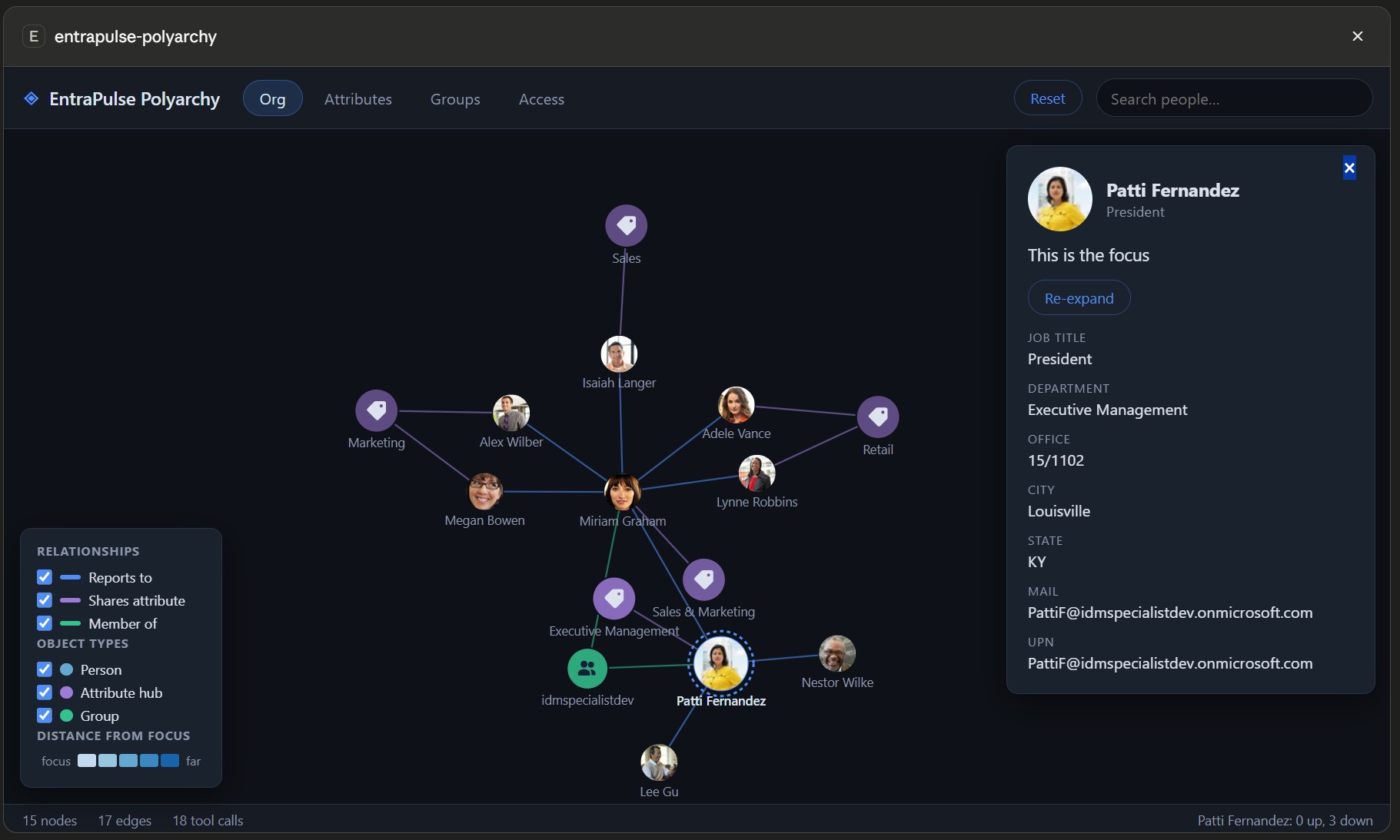
In 2003 Microsoft demoed PolyArchy Server — a web visual over identity data showing intersecting relationship hierarchies, where clicking a datapoint flipped the whole view to that context. It never shipped. This is it, finally real: a live D3 force-graph over your Entra ID tenant that renders inside your MCP client (Claude Desktop, VS Code Copilot, M365 Copilot, ChatGPT, Cursor, Goose, Postman — anything that supports the MCP Apps extension).
Ask your assistant "show me the identity polyarchy around Rebecca" and explore:
- Org — manager chains and direct reports
- Groups — memberships, and group fan-out to members
- Attributes — pivot hubs linking everyone who shares a value: pick from the
common defaults (department, office, city…) or type ahead into the full Graph
attribute catalog, including nested paths like
onPremisesExtensionAttributes/extensionAttribute9 - Access — directory roles and app assignments
Prefer data over pictures? polyarchy-report returns the same relationships as
structured JSON — manager chain, group memberships with type and assigned/dynamic,
roles, app assignments — for the assistant to reason over, no UI required.
Exploring
- Click a node to open its profile panel (photo, attributes, manager chain link).
- Double-click any node — or use the panel's Set as focus button — to flip the whole context to it: hop distances re-anchor, the view glides to center, and its relationships load. The original PolyArchy interaction.
- Reset (toolbar) clears the canvas for a fresh lineage without losing anything: everything fetched this session stays cached, so re-exploring the same people, groups or cohorts rebuilds instantly with zero extra Graph calls. The status bar shows when a neighbourhood was served from cache.
- Legend checkboxes filter relationship kinds and object types in place.
The graph accumulates across dimensions: one intersecting polyarchy, not four separate charts. People are shaded by degrees of separation from the focus (blue ramp); groups, roles, apps and attribute hubs wear the colour of the relationship that connects them — matching their edges — faded with distance so the hop cue survives. Light and dark theme follow your MCP client.
Install (Claude Desktop example)
{
  "mcpServers": {
    "entrapulse-polyarchy": {
      "command": "npx",
      "args": ["-y", "entrapulse-polyarchy"]
    }
  }
}
That's it for most tenants — no app registration needed. Be aware of what that
means: with no configuration the server signs you in through Microsoft's first-party
"Microsoft Graph Command Line Tools" public client
(client ID 14d82eec-204b-4c2f-b7e8-296a70dab67e) — the same well-known app the Graph
PowerShell/CLI tooling uses. It exists in every tenant and already has broad delegated
consent in many. Hardened environments commonly block or restrict this app (Conditional
Access, consent policies, or app management restrictions) — if that's your tenant, use
your own app registration instead;
everything else works identically.
Sign-in happens on the first tool call — and then never again:
- Tokens persist in your OS keychain (DPAPI/Keychain/libsecret).
- The signed-in account is remembered in
~/.entrapulse-polyarchy/auth-record.json, so freshly spawned server processes sign in silently — MCP clients respawn stdio servers freely, and none of those spawns re-prompt. - Token acquisition is single-flighted and cached in-process: a focus flip fires a dozen-plus concurrent Graph calls (expansion + photos), and they all share one token request instead of racing the MSAL cache.
- Every auth event is mirrored to
~/.entrapulse-polyarchy/auth.logwith timings (silent acquisitions are milliseconds; anything interactive is obvious) — the first place to look if you ever see a prompt you didn't expect.
Auth modes
| Mode | Configure | Notes |
|---|---|---|
| Interactive (default) | nothing — or TENANT_ID + CLIENT_ID to use your own app |
System browser sign-in (random loopback port — register http://localhost portless); delegated permissions; /me is the default focus |
| Device code | USE_DEVICE_CODE=true |
Headless/SSH — code printed to the server log |
| App-only | TENANT_ID + CLIENT_ID + CLIENT_SECRET |
Application permissions; no /me, so always pass a person to visualize-identity / polyarchy-report |
| Client-provided token | USE_CLIENT_TOKEN=true (+ optional ACCESS_TOKEN) |
The MCP client supplies/refreshes a Graph bearer token via the set-access-token tool — seamless SSO for hosts like EntraPulse that already hold one |
Other env vars: POLYARCHY_DISABLE_TOKEN_CACHE=true disables OS-keychain token
persistence; POLYARCHY_AUTH_RECORD=<path> relocates the persisted sign-in record
(delete the file to force a fresh sign-in).
Permissions (delegated)
| Scope | Used for |
|---|---|
User.Read.All |
org hierarchy, search, attribute pivots |
Group.Read.All |
group memberships and members |
RoleManagement.Read.Directory |
directory roles |
Application.Read.All |
app assignments |
The default first-party client typically has broad delegated consent already. Missing
consent shows up as a clear 403 message naming the scope — ask your assistant to run
get-auth-status to see exactly which app registration, scopes and account your token
contains.
Scopes and directory roles are separate gates: the token must always carry the scopes above (an admin role can't substitute for them), while on the user side plain member default permissions cover everything this app reads — no admin role required. Only tenants that restrict default user read access (or guest users) need a role that includes directory read, for which Directory Readers is the least-privileged fit.
Hardened tenants: bring your own app registration
If the Graph Command Line Tools app is blocked, unconsented, or you simply want an app you control (own Conditional Access targeting, own consent trail), point the server at your own registration — supported in both interactive and device-code modes:
- Entra admin center → App registrations → New registration — single tenant is fine.
- Authentication → Add a platform → Mobile and desktop applications — add redirect
URI
http://localhost(no port!), and enable Allow public client flows if you want device-code sign-in. The port matters: interactive sign-in listens on a random loopback port each time (e.g.http://localhost:51106), and Entra only ignores the port when the registered redirect is the portlesshttp://localhost. Registering a fixed port like:3000, or reusing an app that only has web redirects (Graph Explorer, for instance), fails with a reply-URL mismatch. - API permissions → Microsoft Graph → Delegated — add the four scopes from the table above, then Grant admin consent.
- Configure the server with your IDs:
{
  "mcpServers": {
    "entrapulse-polyarchy": {
      "command": "npx",
      "args": ["-y", "entrapulse-polyarchy"],
      "env": {
        "TENANT_ID": "<your-tenant-guid>",
        "CLIENT_ID": "<your-app-registration-client-id>"
      }
    }
  }
}
Setting TENANT_ID alone (without CLIENT_ID) is also useful on its own: it pins
sign-in to your tenant instead of the common endpoint, which multi-tenant users and
guest accounts often want regardless of which client app is used.
Attribute pivots
The Attributes view groups people around shared values. The toolbar picker offers the
everyday pivots (Department, Job title, Company, Office, City, State, Employee type),
plus Other attributes… which opens a type-ahead over the full Graph user-attribute
catalog — all fifteen onPremisesExtensionAttributes, employeeOrgData/costCenter,
onPremisesSamAccountName, employeeId and ~50 more. Matching is forgiving (ext9
finds extensionAttribute9), free text is accepted for anything uncatalogued, and
attributes you pick join the dropdown for the rest of the session. Nested paths are
resolved server-side: the needed property is $selected on demand and cohort filters
use Graph advanced queries, with attribute paths validated before they reach an OData
filter.
Tools
| Tool | Purpose |
|---|---|
visualize-identity |
Open the polyarchy focused on you, or {search: "name"} / {userId}. Ambiguous names don't guess: the tool returns the candidates (with object ids) so the assistant can ask which one you meant, then re-call with userId. A GUID passed as search is treated as an object id directly |
polyarchy-expand |
Relationships for one node as a nodes/edges delta (org/groups/access/attributes; group/role members; attribute cohorts — attr accepts nested paths). The full delta — every node with object id, and group type / assigned-vs-dynamic for groups — is returned to the caller; it does not redraw an already-open canvas (the UI fetches its own data on interaction) |
polyarchy-search |
Find people by name/UPN — returns each match with UPN, title/department and object id |
polyarchy-report |
Structured JSON report of a user's relationships, no UI needed: full manager chain + direct reports, group memberships (with group type and assigned/dynamic), directory roles, app assignments, core attributes — pick dimensions or take all |
set-access-token / get-auth-status |
Token passthrough + auth diagnostics |
(get-photo and get-manager also exist but are visible only to the app UI, not the model.)
Development
npm install
npm run build        # tsc (server → build/server) + vite single-file (UI → build/ui/mcp-app.html)
npm start            # run the server on stdio
Test interactively with the MCPJam inspector or any
MCP Apps-capable host pointed at node build/server/index.js. The UI is one
self-contained HTML file (D3 inlined) satisfying the MCP Apps default CSP — the iframe
makes zero network calls; all Graph traffic flows through the server via tools/call.
Releasing
npm version patch    # bumps package.json + server.json (synced automatically) and tags
git push --follow-tags
The tag triggers .github/workflows/release.yml, which publishes to npm (Trusted
Publishing — OIDC, provenance attested, no tokens) and then to the MCP registry
(mcp-publisher login github-oidc). No secrets are stored in the repo or in Actions.
Origin story
Microsoft demoed PolyArchy Server at TechEd 2003 and never shipped it. In 2017 Darren approximated it with MIM + Power BI + Journey Chart (blog post). In 2026, MCP Apps made the real thing possible — an identity polyarchy living inside whatever AI client you already use, part of the EntraPulse family.
MIT licensed.
Installing Entrapulse Polyarchy
This server has no published package — it is built from source. Open the repository and follow its README.
▸ github.com/darrenjrobinson/entrapulse-polyarchyFAQ
Is Entrapulse Polyarchy MCP free?
Yes, Entrapulse Polyarchy MCP is free — one-click install via Unyly at no cost.
Does Entrapulse Polyarchy need an API key?
No, Entrapulse Polyarchy runs without API keys or environment variables.
Is Entrapulse Polyarchy hosted or self-hosted?
A hosted option is available: Unyly runs the server in the cloud, no local setup required.
How do I install Entrapulse Polyarchy in Claude Desktop, Claude Code or Cursor?
Open Entrapulse Polyarchy on unyly.org, pick your client tab (Claude Desktop, Claude Code, Cursor) and press Install — the config is generated automatically, no JSON editing.
Related MCPs
GitHub
PRs, issues, code search, CI status
 by GitHub
Filesystem
Secure file operations with configurable access controls.
Memory
Knowledge graph-based persistent memory system.
Template MCP Server
A CLI tool to create a new Model Context Protocol server project with TypeScript support, dual transport options, and an extensible structure
 by mcpdotdirect
Compare Entrapulse Polyarchy with
Not sure what to pick?
Find your stack in 60 seconds
Author?
Embed badge for your README
Browse similar
All development MCPs