
Erick Wendel Contributions
FreeNot checkedProvides access to Erick Wendel's technical content contributions across platforms through specialized tools for filtering and querying talks, posts, and videos

About
Provides access to Erick Wendel's technical content contributions across platforms through specialized tools for filtering and querying talks, posts, and videos by language, title, and country.
README

A Model Context Protocol (MCP) server that provides tools to query Erick Wendel's contributions across different platforms. Query talks, blog posts, and videos using natural language through Claude, Cursor or similars. This project was built using Cursor IDE with the default agent (trial version).
Quick Start
Use this MCP server directly with Claude Desktop or Cursor without installation:
{
  "mcpServers": {
    "erickwendel-contributions": {
      "command": "npx",
      "args": ["-y", "@erickwendel/contributions-mcp"]
    }
  }
}
Add this configuration to:
- Claude Desktop:
~/Library/Application Support/Claude/claude_desktop_config.json(macOS) - Cursor:
~/.cursor/mcp.json
Available Tools
This MCP server provides the following capabilities:
Tools
get-talks: Retrieves a paginated list of talks with optional filtering- Supports filtering by ID, title, language, city, country, and year
- Can return counts grouped by language, country, or city
get-posts: Fetches posts with optional filtering and pagination- Supports filtering by ID, title, language, and portal
get-videos: Retrieves videos with optional filtering and pagination- Supports filtering by ID, title, and language
check-status: Verifies if the API is alive and responding
Prompts
find-content: Generate queries to find specific content by type, topic, and languagesummarize-activity: Create summaries of content activity by year
Resources
erickwendel://about: Server information and capabilities metadataerickwendel://statistics: Content statistics and available queries
Integration with AI Tools
Inspect MCP Server Capabilities
You can inspect this MCP server's capabilities using the MCP Inspector:
npm run inspect
This will show you all available tools, their parameters, and how to use them.
Setup
- Make sure you're using Node.js v20+
node -v
# v20.x.x or higher
- Clone this repository:
git clone https://github.com/erickwendel/erickwendel-contributions-mcp.git
cd erickwendel-contributions-mcp
- Install dependencies:
npm ci
- Run the server:
npm start
Integration with AI Tools
Cursor Setup
Add the following configuration to ~/.cursor/mcp.json:
{
  "mcpServers": {
    "erickwendel-contributions": {
      "command": "npx",
      "args": ["-y", "@erickwendel/contributions-mcp"]
    }
  }
}
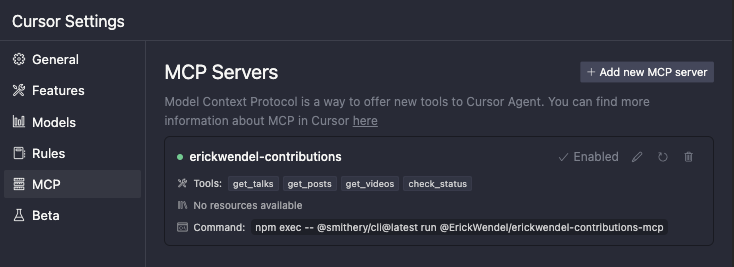
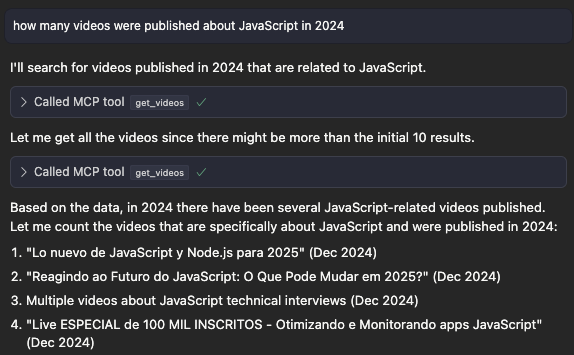
Make sure Cursor chat is in Agent mode by selecting "Agent" in the lower left side dropdown, then ask "how many videos were published about JavaScript in 2024":
Local Development
For local development, use the absolute path to the project:
{
  "mcpServers": {
    "erickwendel-contributions": {
      "command": "node",
      "args": ["--experimental-strip-types", "ABSOLUTE_PATH_TO_PROJECT/src/index.ts"]
    }
  }
}
Claude Desktop Setup
- Go to Claude settings
- Click in the Developer tab
- Click in edit config
- Open the config in a code editor
- Add the following configuration to
~/Library/Application Support/Claude/claude_desktop_config.json(macOS):
{
  "mcpServers": {
    "erickwendel-contributions": {
      "command": "npx",
      "args": ["-y", "@erickwendel/contributions-mcp"]
    }
  }
}
Local Development
For local development, use the absolute path to the project:
{
  "mcpServers": {
    "erickwendel-contributions": {
      "command": "node",
      "args": ["--experimental-strip-types", "ABSOLUTE_PATH_TO_PROJECT/src/index.ts"]
    }
  }
}
MCPHost with Ollama (Free Alternative)
If you don't have access to Claude Desktop or Cursor, you can use MCPHost with Ollama as a free alternative.
- Install MCPHost:
go install github.com/mark3labs/mcphost@latest
- Create a config file (e.g. ./mcp.jsonc):
{
  "mcpServers": {
    "erickwendel-contributions": {
      "command": "npx",
      "args": ["-y", "@erickwendel/contributions-mcp"]
    }
  }
}
- Run with Ollama:
ollama pull MODEL_NAME
mcphost --config ./mcp.jsonc -m ollama:MODEL_NAME
Local Development
For local development, update the config:
{
  "mcpServers": {
    "erickwendel-contributions": {
      "command": "node",
      "args": ["--experimental-strip-types", "ABSOLUTE_PATH_TO_PROJECT/src/index.ts"]
    }
  }
}
Example Queries
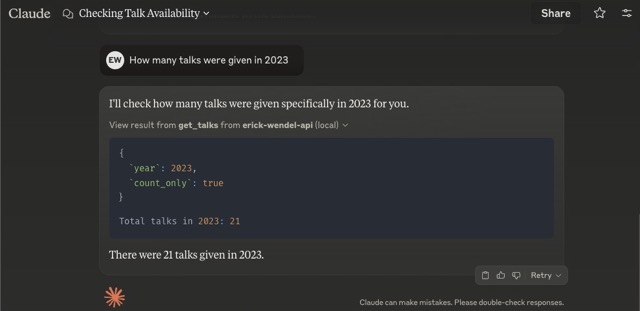
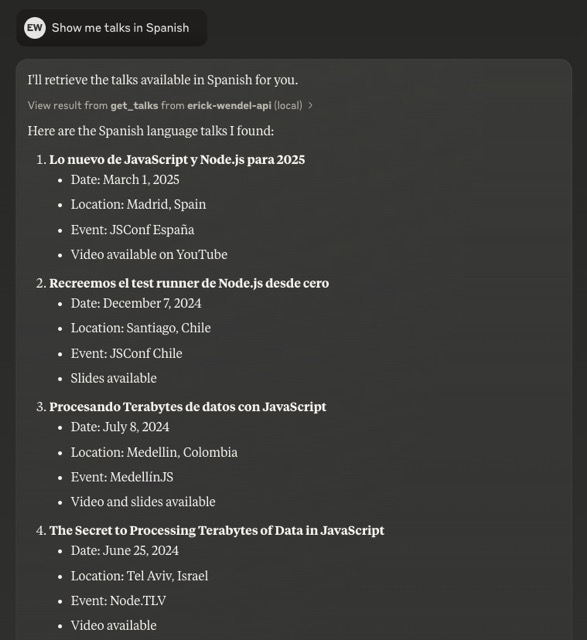
Here are some examples of queries you can ask Claude, Cursor or any MCP Client:
- "How many talks were given in 2023?"
- "Show me talks in Spanish"
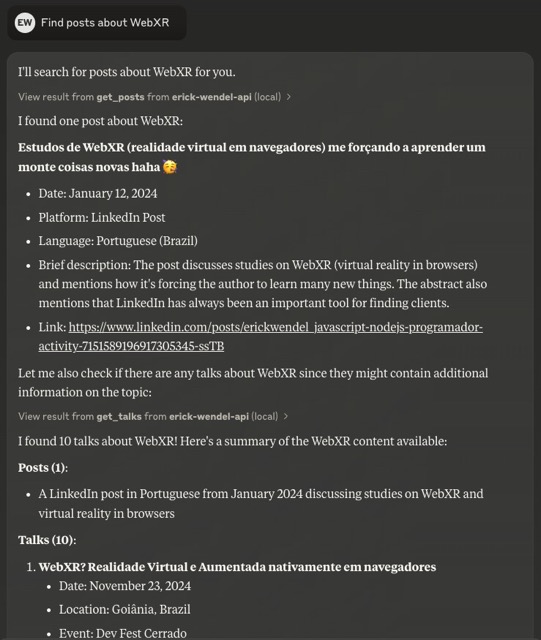
- "Find posts about WebXR"
Development
Features
- Built with Model Context Protocol (MCP)
- Full MCP Capabilities: Tools, Prompts, and Resources
- Type-safe with TypeScript and Zod schema validation
- Native TypeScript support in Node.js without transpilation
- Generated SDK using GenQL
- Modular architecture with separation of concerns
- Standard I/O transport for easy integration
- Structured error handling
- Compatible with Claude Desktop, Cursor, and MCPHost (free alternative)
Note: This project requires Node.js v23+ as it uses the native TypeScript support added in the last year.
Architecture
The codebase follows a modular structure:
src/
  ├── config/      # Configuration settings
  ├── types/       # TypeScript interfaces and types
  ├── tools/       # MCP tool implementations
  ├── utils/       # Utility functions
  ├── services/    # API service layer
  └── index.ts     # Main entry point
Testing
To run the test suite:
npm test
For development mode with watch:
npm run test:dev
Contributing
Contributions are welcome! Please feel free to submit a Pull Request.
Author
License
This project is licensed under the MIT License - see the LICENSE file for details.
Installing Erick Wendel Contributions
This server has no published package — it is built from source. Open the repository and follow its README.
▸ github.com/erickwendel/erickwendel-contributions-mcpFAQ
Is Erick Wendel Contributions MCP free?
Yes, Erick Wendel Contributions MCP is free — one-click install via Unyly at no cost.
Does Erick Wendel Contributions need an API key?
No, Erick Wendel Contributions runs without API keys or environment variables.
Is Erick Wendel Contributions hosted or self-hosted?
Self-hosted: the server runs locally on your machine via the install command above.
How do I install Erick Wendel Contributions in Claude Desktop, Claude Code or Cursor?
Open Erick Wendel Contributions on unyly.org, pick your client tab (Claude Desktop, Claude Code, Cursor) and press Install — the config is generated automatically, no JSON editing.
Related MCPs
GitHub
PRs, issues, code search, CI status
 by GitHub
Filesystem
Secure file operations with configurable access controls.
Memory
Knowledge graph-based persistent memory system.
Template MCP Server
A CLI tool to create a new Model Context Protocol server project with TypeScript support, dual transport options, and an extensible structure
 by mcpdotdirect
Compare Erick Wendel Contributions with
Not sure what to pick?
Find your stack in 60 seconds
Author?
Embed badge for your README
Browse similar
All development MCPs