
Fermat
FreeNot checked🚀 Fermat MCP: The Ultimate Math Engine - Unifying SymPy, NumPy & Matplotlib in one powerful server! Perfect for devs & researchers.

About
🚀 Fermat MCP: The Ultimate Math Engine - Unifying SymPy, NumPy & Matplotlib in one powerful server! Perfect for devs & researchers.
README
This project provides a FastMCP server for mathematical computations, including numerical and symbolic calculations, as well as plotting.
Modules
1. mpl_mcp - Matplotlib Integration
| Feature | Description |
|---|---|
plot_barchart |
Plots bar charts of given data values |
plot_scatter |
Creates scatter plots from data points |
plot_chart |
Plots line, scatter, or bar charts |
plot_stem |
Creates stem plots for discrete data |
plot_stack |
Generates stacked area/bar charts |
eqn_chart |
Plots mathematical equations |
2. numpy_mcp - NumPy Integration
| Category | Operations |
|---|---|
| Basic Math | add, sub, mul, div, power, abs, exp, log, sqrt |
| Trigonometric | sin, cos, tan |
| Statistics | mean, median, std, var, min, max, argmin, argmax, percentile |
| Linear Algebra | dot, matmul, inv, det, eig, solve, svd |
| Matrix Operations | create, zeros, ones, full, arange, linspace |
| Array Manipulation | reshape, flatten, concatenate, transpose, stack |
3. sympy_mcp - SymPy Integration
| Category | Operations |
|---|---|
| Algebra | simplify, expand, factor, collect |
| Calculus | diff, integrate, limit, series |
| Equations | solve, solveset, linsolve, nonlinsolve |
| Matrix Operations | create, det, inv, rref, eigenvals |
Setup
Requirements
Python 3.12 or higher (To install Python3.12 follow Python Download)
uv (To install uv follow uv Installation)
Clone the repository
git clone https://github.com/abhiphile/fermat-mcp
Visual Studio Code, Windsurf
You can find the mcp.json file in the
MCP: Open User Configuration or MCP: Open Workspace Configuration
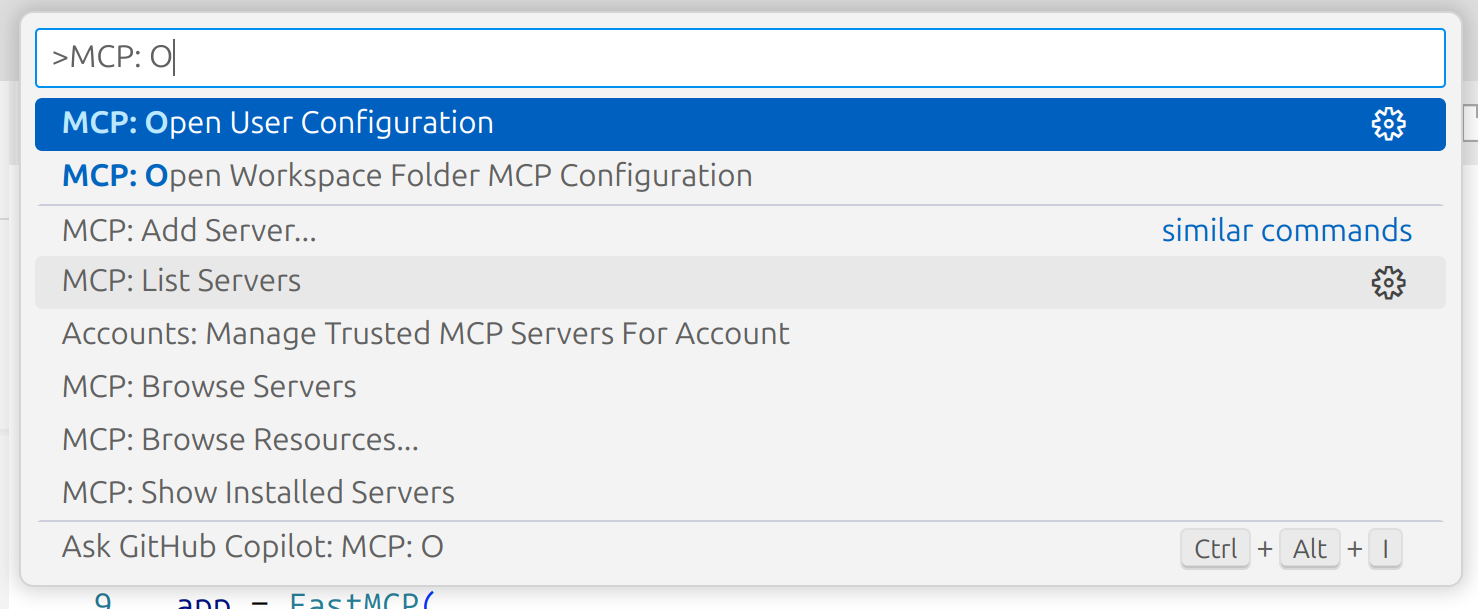
Add the following to your mcp.json:
{
  "mcpServers": {
    "fmcp": {
      "command": "bash",
      "args": ["MCP_SERVER_ABSOLUTE_PATH/setup.sh"],
      "description": "fmcp server is for mathematical computations, including numerical and symbolic calculations, as well as plotting."
    }
  }
}
Claude (Anthropic)
If you're using Claude or the Anthropic MCP client, add this working MCP configuration to your mcp.json (update the directory path to your local clone):
{
  "mcpServers": {
    "fmcp": {
      "command": "uv",
      "args": [
        "--directory",
        "/home/ty/Repositories/fermat-mcp",
        "run",
        "server.py"
      ]
    }
  }
}
Gemini CLI
Open your Gemini settings JSON located in ~/.gemini/settings.json where ~ is your home directory.
Add the following to your settings.json:
{
  "mcpServers": {
    "fmcp": {
      "command": "bash",
      "args": ["MCP_SERVER_ABSOLUTE_PATH/setup.sh"],
      "description": "fmcp server is for mathematical computations, including numerical and symbolic calculations, as well as plotting."
    }
  }
}
Installing via Smithery
To install Fermat MCP for local usage automatically via Smithery:
npx -y @smithery/cli install @abhiphile/fermat-mcp --client gemini
Example Usage
- Using Gemini CLI
╭──────────────────────────────────────────────────────────────────────────────────────────────────────────────╮
│  > Can you use fmcp server and using numpy method find the eigen values of this 8*8 matrix,                  |
│    2 1 3 1 1 8 4 2                                                                                           |
│    6 6 0 7 1 4 6 1                                                                                           │
│    9 2 1 8 7 9 9 0                                                                                           │
│    2 5 6 6 9 8 0 1                                                                                           │
│    1 3 6 2 3 8 8 1                                                                                           │
│    9 4 2 2 1 2 2 9                                                                                           │
│    8 6 4 4 2 0 2 8                                                                                           │
│    0 0 0 6 6 7 5 6                                                                                           │
╰──────────────────────────────────────────────────────────────────────────────────────────────────────────────╯

 ╭─────────────────────────────────────────────────────────────────────────────────────────────────────────────────────────────────────────╮
 │ ✔  numpy_mcp_numerical_operation (fmcp MCP Server) {"a":[[2,1,3,1,1,8,4,2],[6,6,0,7,1,4,6,1],[9,2,1,8,7,9,9,0],[2,5,6,6,9,8,0,1],[1,3,… │
 │                                                                                                                                         │
 │    {"eigenvalues":["32.077244457548815+0j","-11.531090644775198+0j","-6.6653982146786195+0j","0.6715984762411508+3.37024850             │
 │    10270413j","0.6715984762411508-3.3702485010270413j","4.541270555490195+2.776364664923869j","4.541270555490195-2.77636466             │
 │    4923869j","3.6935063384423428+0j"],"eigenvectors":[["-0.23263835483680192+0j","-0.2264723575289234+0j","-0.4308391916391             │
 │    0195+0j","-0.012346573390129022+0.17748655663058255j","-0.012346573390129022-0.17748655663058255j","-0.21221572277027187             │
 │    +0.3524396218277479j","-0.21221572277027187-0.3524396218277479j","0.3451499664861578+0j"],["-0.31955742545335186+0j","-0             │
 │    .2569860493445581+0j","0.05691886770041556+0j","-0.35591013681869693-0.2242364092694275j","-0.35591013681869693+0.224236             │
 │    4092694275j","0.1932161673963751-0.39527849111641133j","0.1932161673963751+0.39527849111641133j","-0.7979681696063214+0j             │
 │    "],["-0.46626263247473404+0j","-0.4684914620112376+0j","0.5469400556350749+0j","0.34325164099973565+0.06607019711949293j             │
 │    ","0.34325164099973565-0.06607019711949293j","0.21312270185159682+0.28822307710358636j","0.21312270185159682-0.288223077             │
 │    10358636j","0.42707422750984786+0j"],["-0.41589316441674523+0j","0.2291771012892302+0j","0.09410792992600435+0j","0.6375             │
 │    92441360358+0j","0.637592441360358+-0j","0.46446646137729414+0j","0.46446646137729414+-0j","0.08171661775583623+0j"],["-             │
 │    0.35812884189789035+0j","-0.26551071423139044+0j","-0.649979374400915+0j","-0.2999153430497845+0.20110182336747695j","-0             │
 │    .2999153430497845-0.20110182336747695j","0.04424367733961273-0.020400357434930304j","0.04424367733961273+0.0204003574349             │
 │    30304j","-0.037276545325188024+0j"],["-0.3042416233100104+0j","0.4027405071320744+0j","0.2343447346668298+0j","-0.119224             │
 │    87219398595+0.10317726668781271j","-0.11922487219398595-0.10317726668781271j","-0.3387759141362585+0.15790241128043445j"             │
 │    ,"-0.3387759141362585-0.15790241128043445j","0.11473144194899779+0j"],["-0.35389732755448017+0j","0.5359362131480812+0j"             │
 │    ,"0.13989902586074168+0j","-0.16008513226461316-0.26111873108374495j","-0.16008513226461316+0.26111873108374495j","0.055             │
 │    729749650881726-0.22748184206919145j","0.055729749650881726+0.22748184206919145j","-0.19838514696566653+0j"],["-0.327615             │
 │    5213691367+0j","-0.30122843153433887+0j","0.07858579556736099+0j","0.00042251379361638556-0.11670182367986544j","0.00042             │
 │    251379361638556+0.11670182367986544j","-0.18590228871569267-0.2479130526139182j","-0.18590228871569267+0.247913052613918             │
 │    2j","-0.03374593856285834+0j"]]}                                                                                                     │
 ╰─────────────────────────────────────────────────────────────────────────────────────────────────────────────────────────────────────────╯
✦ Of course, I can do that. Here are the eigenvalues for the given matrix:

  32.077244457548815
  -11.531090644775198
  -6.6653982146786195
  0.6715984762411508 + 3.3702485010270413j
  0.6715984762411508 - 3.3702485010270413j
  4.541270555490195 + 2.776364664923869j
  4.541270555490195 - 2.776364664923869j
  3.6935063384423428
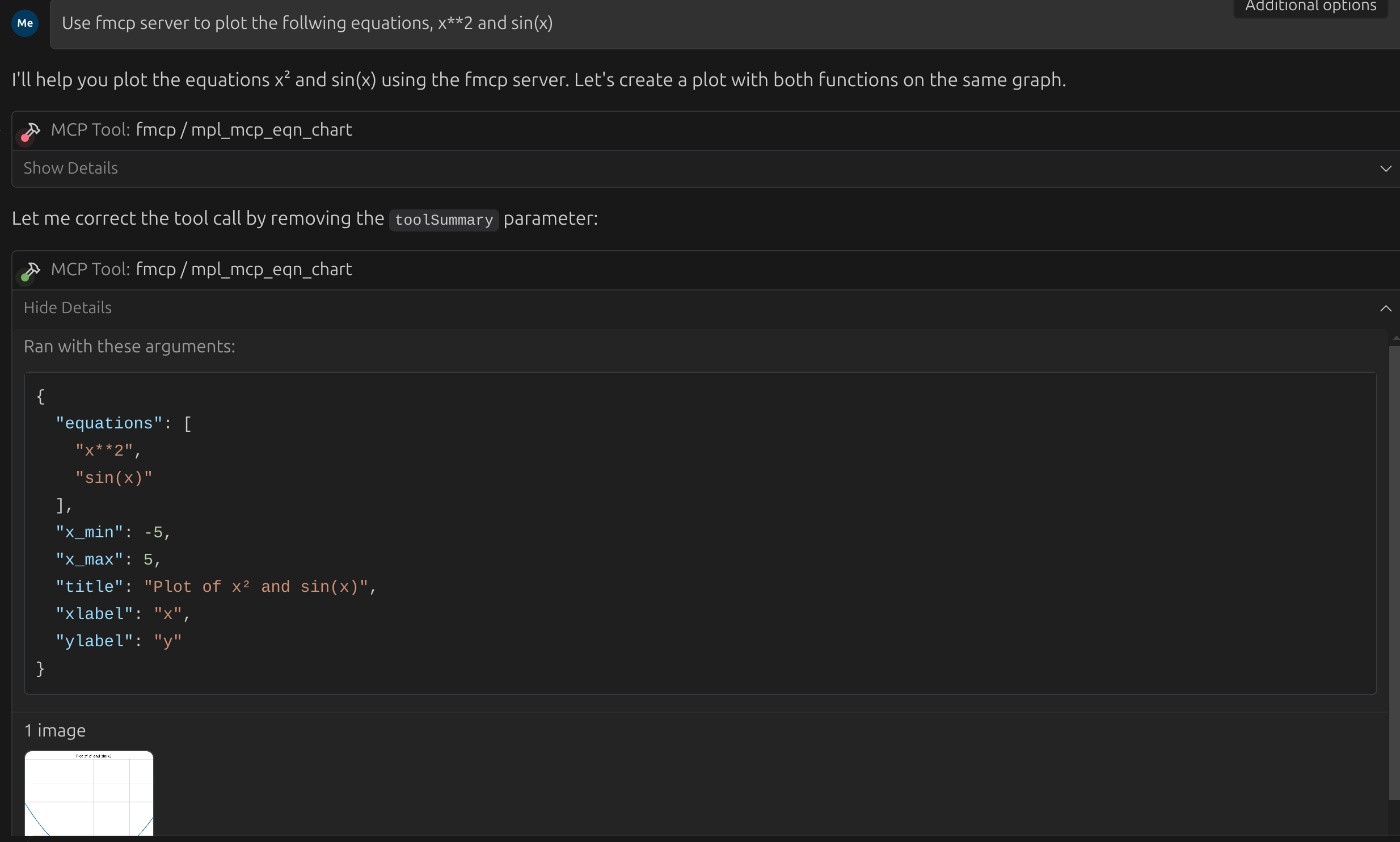
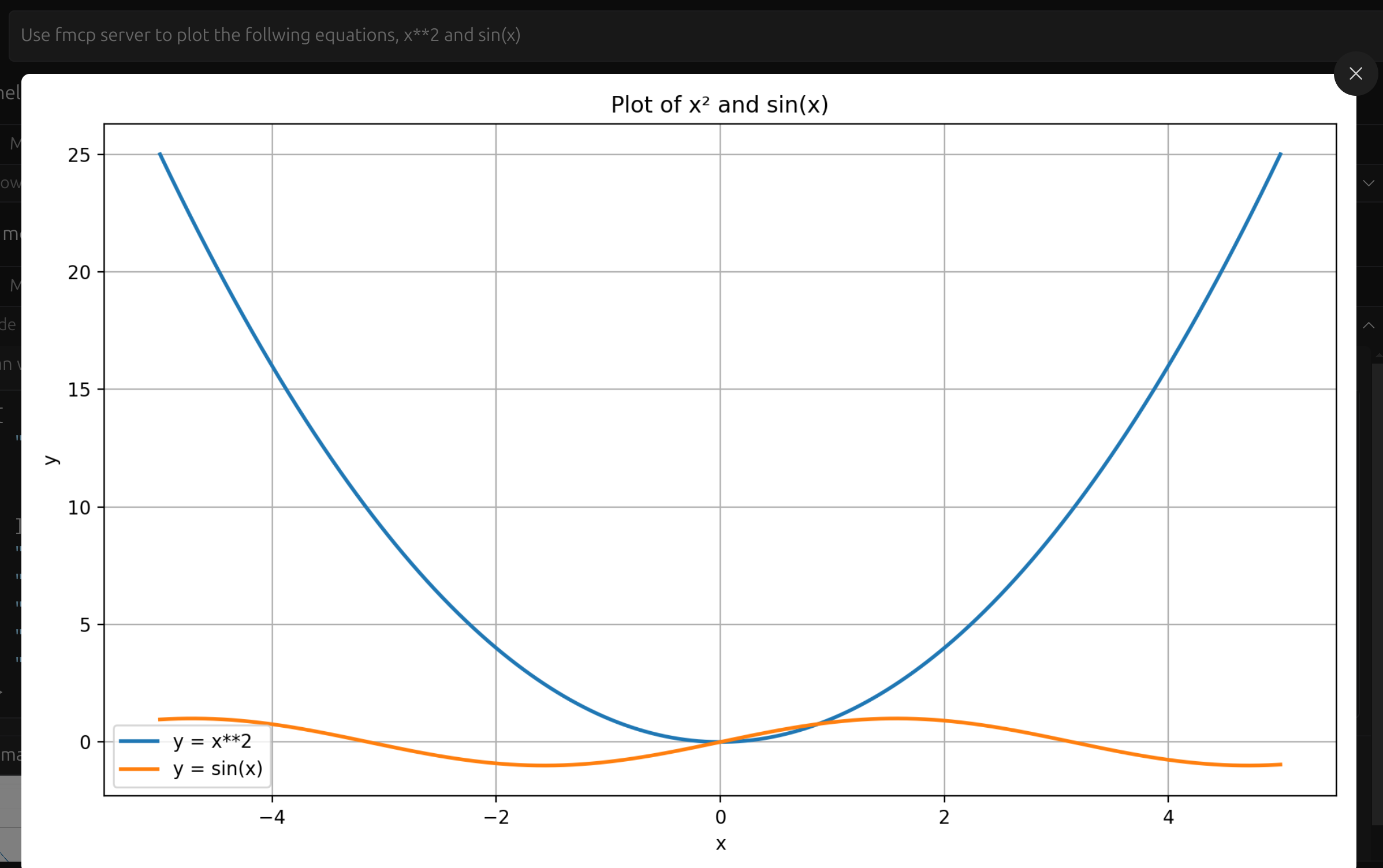
- Using Visual Studio Code, Windsurf
Here the task was to plot both x**2 and sin(x) in the same plot.
Installing Fermat
This server has no published package — it is built from source. Open the repository and follow its README.
▸ github.com/abhiphile/fermat-mcpFAQ
Is Fermat MCP free?
Yes, Fermat MCP is free — one-click install via Unyly at no cost.
Does Fermat need an API key?
No, Fermat runs without API keys or environment variables.
Is Fermat hosted or self-hosted?
Self-hosted: the server runs locally on your machine via the install command above.
How do I install Fermat in Claude Desktop, Claude Code or Cursor?
Open Fermat on unyly.org, pick your client tab (Claude Desktop, Claude Code, Cursor) and press Install — the config is generated automatically, no JSON editing.
Related MCPs
GitHub
PRs, issues, code search, CI status
 by GitHub
Filesystem
Secure file operations with configurable access controls.
Memory
Knowledge graph-based persistent memory system.
Template MCP Server
A CLI tool to create a new Model Context Protocol server project with TypeScript support, dual transport options, and an extensible structure
 by mcpdotdirect
Compare Fermat with
Not sure what to pick?
Find your stack in 60 seconds
Author?
Embed badge for your README
Browse similar
All development MCPs