
Figjam Context
FreeNot checkedExposes tools to ingest FigJam boards, retrieve context summaries, and answer free-form questions about the board content.

About
Exposes tools to ingest FigJam boards, retrieve context summaries, and answer free-form questions about the board content.
README
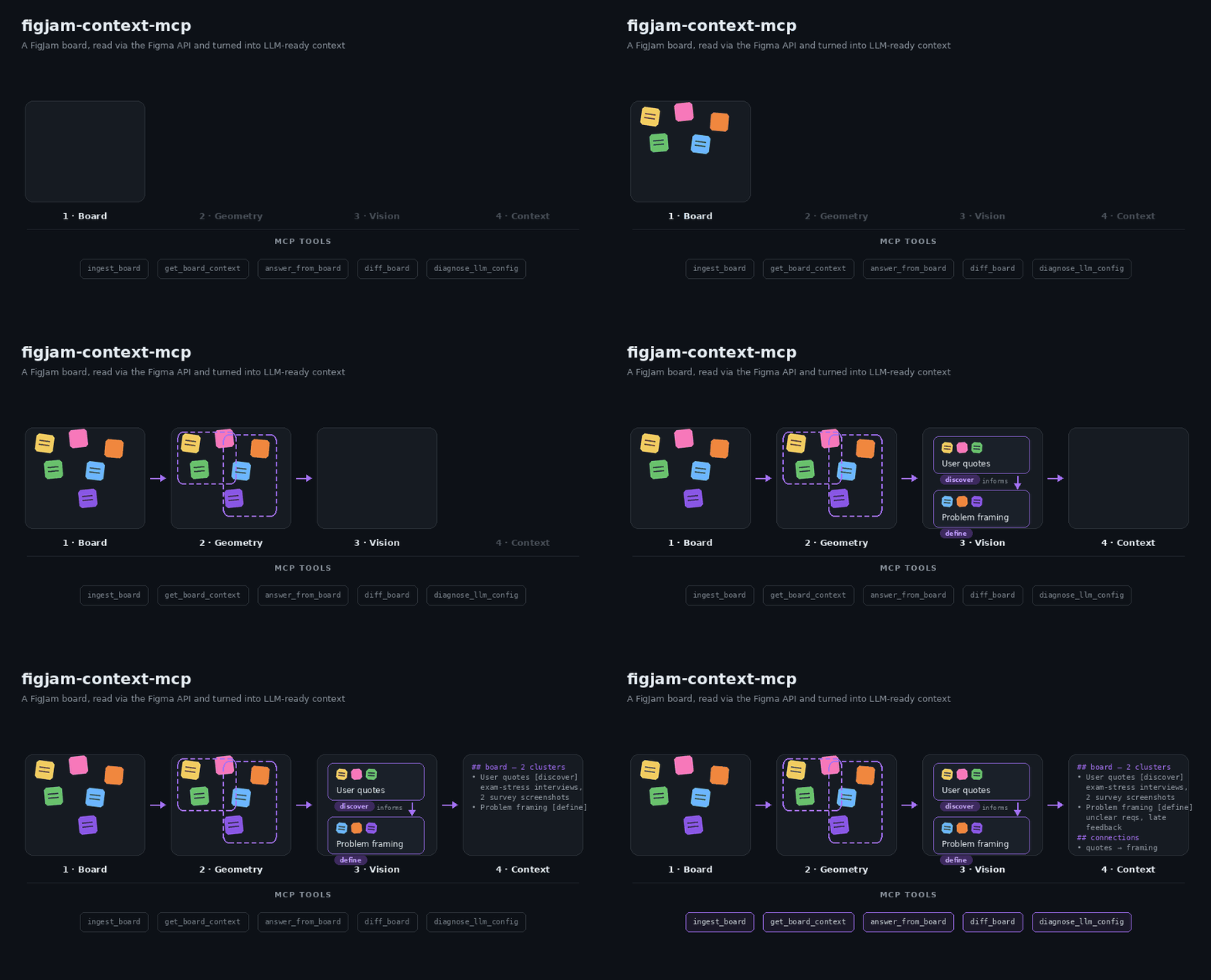
Illustrative overview of the ingest pipeline — not a screen recording.
MCP server that turns a FigJam board into queryable context for LLMs — read directly via the Figma REST API, no manual PDF-export detour. It exposes five tools:
- ingest_board — reads a FigJam/Figma file, clusters its content
spatially, verifies and labels each cluster with a vision model, extracts
connector arrows as cluster-to-cluster relations, and caches the result
under a
boardId(= the Figma file key). - get_board_context — returns a compact, paste-ready context block (clusters + connector relations) for an ingested board, optionally scoped to a topic.
- answer_from_board — answers a free-form question about an ingested board, citing the clusters the answer was derived from.
- diff_board — compares two ingest snapshots of the same board and reports what changed: new/removed/modified clusters, edited nodes, and connector changes ("what came in since the last workshop?").
- diagnose_llm_config — runs small text + vision JSON checks against the active model setup and reports actionable failures.
Ingested boards survive server restarts: get_board_context and
answer_from_board transparently restore the last finished ingest from
.cache/figjam-mcp/ when the in-memory store is empty.
Re-ingests are incremental: every cluster's member content is hashed, and
clusters that didn't change simply reuse their previous label/summary — only
new or edited clusters hit the vision model. Re-ingesting a mostly unchanged
board is therefore almost free. Pass forceFullIngest: true to bypass all
caching and reuse (e.g. after switching models).
How it works
FigJam boards are spatially chaotic: rotated stickies, overlapping shapes, embedded screenshots, no reading order. The pipeline therefore combines geometry with vision:
fetchFileTree+flattenNodeTree— pull the raw node tree and flatten it into normalized nodes (position, size, rotation, text, image refs, connector endpoints), dropping empty structural noise.geometricPreCluster— rotation-aware distance clustering into coarse groups. Neighbor search runs over a spatial grid (near-linear instead of O(n²)), and the gap threshold adapts to the board's density (median nearest-neighbor gap) so dense and airy boards both cluster sensibly. Huge footprints use a bounded overflow path, and connected components over 250 nodes are spatially bisected before reaching an LLM.extractConnectorEdges+buildClusterRelations— connector arrows are excluded from geometric clustering (they deliberately span groups) but captured as a graph: "cluster A → cluster B (label)". These relations are included inget_board_contextoutput and theanswer_from_boardprompt — arrows are the board's semantic structure.refineClusterWithVision— per cluster, node screenshots + extracted text go to a vision model in one request; it confirms which nodes belong together, labels the group, describes embedded images, and writes a 3–5 sentence summary. Clusters are refined concurrently (INGEST_BOARD_VISION_CONCURRENCY, default 3) within the vision budget.mapClustersToPhases(optional) — assigns each cluster to a phase of the chosen framework:double_diamond,lean_canvas,retro,user_journey, or a free-formcustomPhaseslist (or "unclear").- Results are cached in-memory AND persisted per file key;
get_board_contextandanswer_from_boardread from the cache and restore from disk after a restart.
Setup
npm install
cp .env.example .env
Fill in .env:
FIGMA_ACCESS_TOKEN — log in at figma.com, go
to Settings → Security → Personal access tokens, generate a token. (Can
also be passed per-call via the figmaAccessToken input on ingest_board.)
LLM_BASE_URL / LLM_API_KEY / LLM_MODEL_PRESET — any
OpenAI-compatible endpoint. Free options:
- OpenRouter (default in
.env.example): get a key at openrouter.ai/keys. The defaultstudent-freepreset uses explicit free models for each role:google/gemma-4-26b-a4b-it:freefor vision andqwen/qwen3-next-80b-a3b-instruct:freeplusnvidia/nemotron-nano-9b-v2:freefor text/Q&A.openrouter/freeremains a last-resort fallback, not the primary model. - GitHub Models: free with any GitHub account — create a token at
github.com/marketplace/models,
set
LLM_BASE_URL=https://models.github.ai/inference.
Optional overrides:
LLM_MODEL_PRESET— currently supported:student-free.LLM_VISION_MODELS— comma-separated vision model candidates.LLM_TEXT_MODELS— comma-separated text/Q&A candidates.LLM_FAST_TEXT_MODELS— comma-separated small/fast text candidates.- Legacy
LLM_VISION_MODEL/LLM_TEXT_MODELstill work as first-candidate overrides.
Run
npm run dev
This starts the MCP server over stdio using tsx watch. To try the tools
interactively:
npx @modelcontextprotocol/inspector npx tsx src/index.ts
Note: don't pass plain
npm run devto the Inspector (or any MCP client) — npm prints a lifecycle banner to stdout before the server starts, which corrupts the JSON-RPC stream the client expects there. Either invoketsxdirectly as above, or add--silent:npx @modelcontextprotocol/inspector npm run dev --silent.
MCP UI timeouts
ingest_board can be slow because it calls Figma and a vision LLM for board
clusters. If the MCP UI shows MCP error -32001: Request timed out, the client
gave up before those external calls finished.
The server now keeps provider calls bounded by default:
FIGMA_REQUEST_TIMEOUT_MS=15000FIGMA_FILE_REQUEST_TIMEOUT_MS=60000LLM_REQUEST_TIMEOUT_MS=20000LLM_RATE_LIMIT_RETRIES=1LLM_ANSWER_MAX_OUTPUT_TOKENS=800LLM_VISION_MAX_OUTPUT_TOKENS=4096LLM_ANSWER_TOP_K=6LLM_ANSWER_PROMPT_MAX_CHARS=24000INGEST_BOARD_VISION_BUDGET_MS=35000INGEST_BOARD_VISION_CONCURRENCY=3FIGMA_SCREENSHOT_DOWNLOAD_CONCURRENCY=3FIGJAM_MCP_MEMORY_CACHE_MAX_BOARDS=10
ingest_board defaults to ingestMode: "balanced": text-rich clusters use
deterministic summaries, while image-heavy or low-text clusters use vision
within the budget. max_speed skips vision; max_quality attempts vision for
every cluster. Finished ingests are persisted under .cache/figjam-mcp/, keyed
by file state, node hash, model preset, document hint, and ingest mode.
Vision candidates are prioritized by information gain rather than canvas
position. Each request has bounded node/text inventory, and the phase returns
at its configured deadline even if a provider stalls. answer_from_board
retrieves the most relevant clusters plus direct connector neighbours and keeps
the complete prompt under its configured character budget. The in-memory cache
uses LRU eviction; persisted history keeps 20 states and removes snapshots that
become safely unreferenced.
Run diagnose_llm_config after changing model env vars. It verifies structured
text replies with small arithmetic challenges and checks actual image
understanding with a known color image, without ingesting a board.
Usage example
Paste in a Figma board link and ingest it:
// tool: ingest_board
{
  "figmaFileUrl": "https://www.figma.com/board/AbC123XyZ456/Semester-Project-Research",
  "docStructureHint": "double_diamond"
}
// → { "boardId": "AbC123XyZ456", "clusterCount": 5, "relationCount": 3,
//     "summary": "Ingested board AbC123XyZ456: 5 clusters — \"User interview quotes\", \"Problem framing\", …" }
Instead of a built-in framework (double_diamond, lean_canvas, retro,
user_journey) you can pass your own phase names — clusters are then mapped
onto them by keyword match:
{ "figmaFileUrl": "…", "customPhases": ["Ideen", "Feedback", "Offene Fragen"] }
The boardId is the file key itself — re-running ingest_board on the same
file refreshes the cache entry. Then pull context, optionally scoped to a
topic:
// tool: get_board_context
{ "boardId": "AbC123XyZ456", "topic": "user research" }
// → contextText:
// FigJam board AbC123XyZ456 — 2 of 5 clusters (topic: user research):
//
// ## User interview quotes [discover]
// Sticky notes with verbatim quotes from six student interviews about exam
// stress. Two embedded screenshots show survey results (bar charts of study
// habits). Main pain points: unclear requirements and late feedback. …
//
// ## Connections between clusters (from connector arrows)
// - "User interview quotes" → "Problem framing" — "informs"
The contextText block is deliberately token-lean — paste it straight into
a documentation-writing chat (e.g. for a semester report). Or ask directly:
// tool: answer_from_board
{ "boardId": "AbC123XyZ456", "question": "What were the main user pain points?" }
// → { "answer": "Unclear requirements and late feedback …",
//     "citedClusters": ["User interview quotes", "Problem framing"] }
After the board evolved (say, workshop 2), ingest again — unchanged clusters are reused, so this is fast — and diff the snapshots:
// tool: diff_board
{ "boardId": "AbC123XyZ456" }
// → summaryText:
// FigJam board AbC123XyZ456 — changes from 2026-07-03T14:02:11Z to 2026-07-10T09:41:52Z:
//
// New clusters (1):
// - "Feedback round 2": Sticky notes with feedback from the second usability test.
// Modified clusters (1):
// - "User interview quotes": +3 nodes, 1 edited
// Connections: +1 / -0
// - new: "Feedback round 2" → "Problem framing" — "confirms"
// Nodes: +9 added / -0 removed / 1 edited.
// Unchanged clusters: 4.
compareTo selects an older baseline (2 = two ingests back, …); the history
keeps the last 20 distinct board states per file.
Scripts
npm run dev— run the server withtsx watch(auto-restart on change).npm run build— clean and compile TypeScript todist/, preserving an executable CLI.npm start— run the compiled server fromdist/.npm test— run the Vitest test suite.npm run typecheck— type-check both source and tests without emitting files.npm run check— type-check, test, build, and validate the package metadata/binary.npm run package:smoke— pack the npm tarball, execute its CLI, and verify MCP initialization/tool discovery.
Publishing runs the same checks automatically through prepack; CI exercises
that complete package path on the minimum supported Node version and an LTS line.
Project layout
src/
├── index.ts        # stdio entrypoint
├── server.ts       # McpServer setup + tool registration
├── tools/          # tool handlers (ingest pipeline, context, Q&A)
├── schemas/        # Zod input/output schemas per tool
├── lib/            # Figma API, node tree, clustering, vision, LLM, cache
└── types.ts        # shared domain types
Install Figjam Context in Claude Desktop, Claude Code & Cursor
unyly install figjam-context-mcpInstalls into Claude Desktop, Claude Code, Cursor & VS Code — handles npx, uvx and build-from-source repos for you.
First time? Get the CLI: curl -fsSL https://unyly.org/install | sh
Or configure manually
Run in your terminal:
claude mcp add figjam-context-mcp -- npx -y github:ecestnrkl/figjam-mcpFAQ
Is Figjam Context MCP free?
Yes, Figjam Context MCP is free — one-click install via Unyly at no cost.
Does Figjam Context need an API key?
No, Figjam Context runs without API keys or environment variables.
Is Figjam Context hosted or self-hosted?
A hosted option is available: Unyly runs the server in the cloud, no local setup required.
How do I install Figjam Context in Claude Desktop, Claude Code or Cursor?
Open Figjam Context on unyly.org, pick your client tab (Claude Desktop, Claude Code, Cursor) and press Install — the config is generated automatically, no JSON editing.
Related MCPs
GitHub
PRs, issues, code search, CI status
 by GitHub
Filesystem
Secure file operations with configurable access controls.
Memory
Knowledge graph-based persistent memory system.
Template MCP Server
A CLI tool to create a new Model Context Protocol server project with TypeScript support, dual transport options, and an extensible structure
 by mcpdotdirect
Compare Figjam Context with
Not sure what to pick?
Find your stack in 60 seconds
Author?
Embed badge for your README
Browse similar
All development MCPs