
Figma to Code
FreeNot checkedBridges Figma design files to code generation, enabling direct conversion of designs into HTML, CSS, and other assets with customizable output paths and file or

About
Bridges Figma design files to code generation, enabling direct conversion of designs into HTML, CSS, and other assets with customizable output paths and file organization.
README
smithery badge
npm version
npm downloads
github
node
Due to Figma REST API rate limits, if you are affected, please switch to @f2c/mcp-plugin for normal operation.
English | 简体中文
A Model Context Protocol server for Figma Design to Code using F2C.
Features
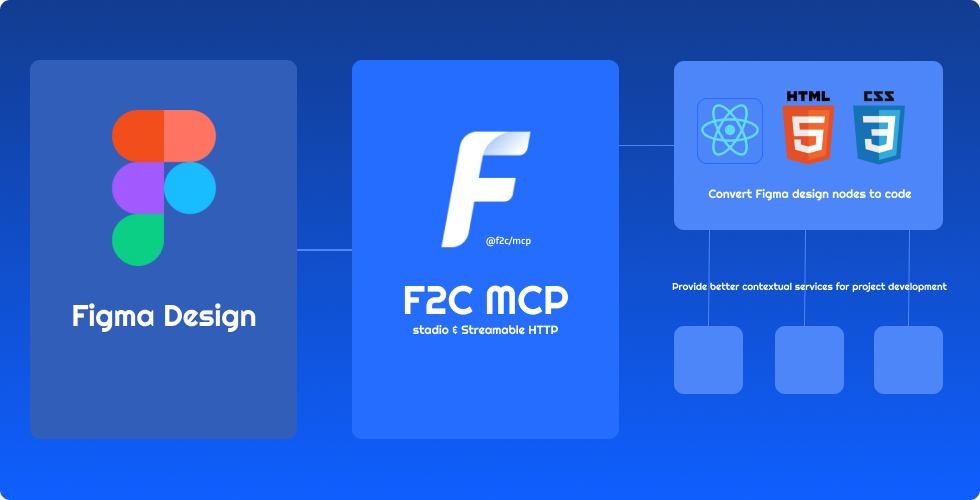
- 🎨 Pixel-Perfect HTML/CSS:F2C converts Figma designs to pixel-perfect HTML/CSS with precision.
- ⚛️ Multi-Framework Support:F2C generates React, CSS Modules, and Tailwind CSS code for fast development.
- 🧠 Figma Design Context:F2C integrates design context, ensuring compatibility with AI tools like Cursor.
- 🔗 Figma File URL Parsing:F2C converts design nodes via Figma URLs, streamlining workflows.
- 🖼️ Remote Image Localization:F2C automates downloading Figma images to local assets for efficiency.
How it works
- Configure the Server in an MCP-supported IDE (e.g., Cursor, Trae).
recommended to use Comate AI IDE
- Open your chat in IDE (e.g. agent mode in Cursor).
- Paste a link to a Figma Node (Right-click any node in the Figma Layer panel to copy it).
- Enter your requirements in the chat, such as fetching node data, downloading images, converting to code, etc.
Configuration and Development
See Configuration and Development
Data Privacy Notice
The logging tools integrated in this project are used solely for basic usage statistics and error log reporting. No sensitive information or user data is collected. All reported data is used exclusively to improve product quality and user experience.
FAQ
See FAQ
Credits
Thanks to:
- Framelink Figma MCP Server Give Cursor and other AI-powered coding tools access to your Figma files with this Model Context Protocol server.
- Cursor Talk to Figma MCP Allowing Cursor to communicate with Figma for reading designs and modifying them programmatically.
- Figma MCP Server This server provides tools for viewing, commenting, and analyzing Figma designs directly through the ModelContextProtocol.
Install Figma to Code in Claude Desktop, Claude Code & Cursor
unyly install figma-to-codeInstalls into Claude Desktop, Claude Code, Cursor & VS Code — handles npx, uvx and build-from-source repos for you.
First time? Get the CLI: curl -fsSL https://unyly.org/install | sh
Or configure manually
Run in your terminal:
claude mcp add figma-to-code -- npx -y @f2c/mcpStep-by-step: how to install Figma to Code
FAQ
Is Figma to Code MCP free?
Yes, Figma to Code MCP is free — one-click install via Unyly at no cost.
Does Figma to Code need an API key?
No, Figma to Code runs without API keys or environment variables.
Is Figma to Code hosted or self-hosted?
Self-hosted: the server runs locally on your machine via the install command above.
How do I install Figma to Code in Claude Desktop, Claude Code or Cursor?
Open Figma to Code on unyly.org, pick your client tab (Claude Desktop, Claude Code, Cursor) and press Install — the config is generated automatically, no JSON editing.
Related MCPs
GitHub
PRs, issues, code search, CI status
 by GitHub
Filesystem
Secure file operations with configurable access controls.
Memory
Knowledge graph-based persistent memory system.
Template MCP Server
A CLI tool to create a new Model Context Protocol server project with TypeScript support, dual transport options, and an extensible structure
 by mcpdotdirect
Compare Figma to Code with
Not sure what to pick?
Find your stack in 60 seconds
Author?
Embed badge for your README
Browse similar
All development MCPs