
Fiji Server
FreeNot checkedEnables AI agents to control Fiji/ImageJ for microscopy image analysis through natural language commands, supporting operations like image opening, filtering, p

About
Enables AI agents to control Fiji/ImageJ for microscopy image analysis through natural language commands, supporting operations like image opening, filtering, particle analysis, and automated workflows.
README
Python 3.10+ PyPI License: BSD-3-Clause CI
Ask your AI Agent in plain English to use Fiji / ImageJ to quickly analyze microscopy image also set pipelines from Cursor, Claude, Gemini, etc. You simply paste the image or ask it to navigate to the correct file.
The goal is that the AI agent should use the right ImageJ plugin, see what you are seeing and then verify its own results by writing codes without relying on vibes. I plan to setup SKILL and AI plugins in future. Would be happy to collaborate.
See it in action
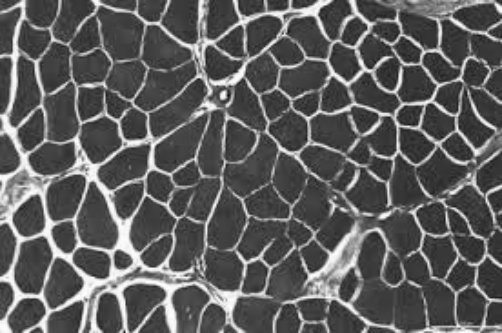
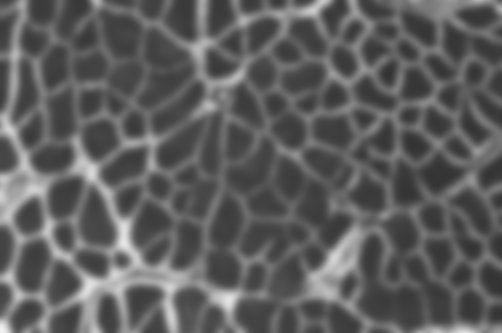
"Open the image, apply a Gaussian blur, show me before and after."
| Before | After |
|---|---|
 |
 |
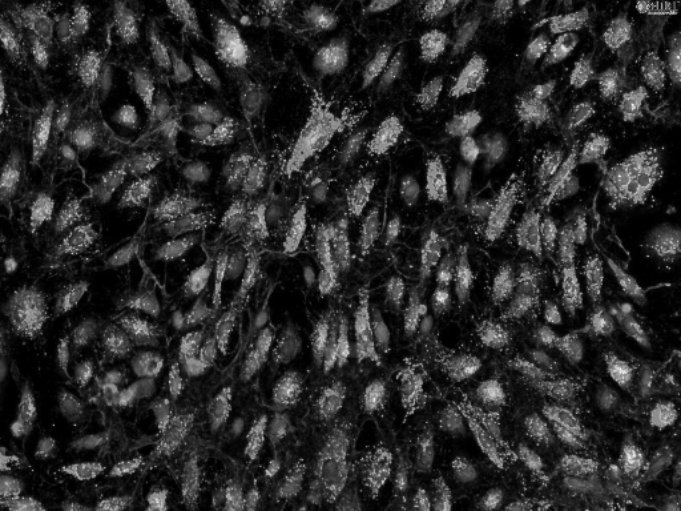
"Threshold the bright spots, outline each object, report area and circularity."
| Input | Outlined objects |
|---|---|
 |
 |
| # | Area | Circularity |
|---|---|---|
| 1 | 1052 | 0.89 |
| 2 | 2840 | 0.72 |
| 3 | 641 | 0.91 |
| 4 | 1902 | 0.68 |
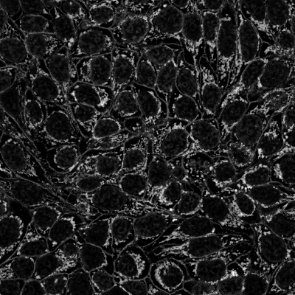
"Skeletonize the mask and summarize branches per tree."
| Mask | Skeleton |
|---|---|
 |
 |
| Tree | Branches | Junctions |
|---|---|---|
| 1 | 14 | 6 |
| 2 | 9 | 7 |
Get started in 3 steps
1 — Install
pip install fiji-mcp-server
You need Python 3.10+, Fiji installed on your machine, and Java (required by PyImageJ). See quickstart if anything needs clarification.
2 — Connect to your AI app
Replace /Applications/Fiji with your actual Fiji folder (the one containing jars/ and plugins/).
| App | One command |
|---|---|
| Claude Desktop | fiji-mcp-install install claude-desktop --fiji-path /Applications/Fiji |
| Cursor | fiji-mcp-install install cursor --fiji-path /Applications/Fiji |
| Claude Code | fiji-mcp-install install claude-code --fiji-path /Applications/Fiji |
| Gemini CLI | fiji-mcp-install install gemini --fiji-path /Applications/Fiji |
| Windsurf | fiji-mcp-install install windsurf --fiji-path /Applications/Fiji |
Then restart the app.
3 — Verify it works
In chat, type:
Run the Fiji MCP health_check tool
You should get back the Fiji version and mode. First startup takes 30–90 seconds while the JVM loads — that's normal.
What to ask
Once connected, just describe what you want:
"Open ./images/cells.tif and tell me the dimensions."

"Apply a Gaussian blur with sigma 4 and show me the result."

"Count the bright objects and give me their areas."

"Search for ImageJ commands related to 'threshold'."

"Open the image, subtract background, threshold, count particles — show me a screenshot after each step."
No macro knowledge needed. The assistant finds the right Fiji plugin, runs it, and can show you a screenshot to verify.
Available tools (19 total)
| Category | Tools |
|---|---|
| Run & I/O | health_check run_macro run_batch_macros open_image save_image |
| Screenshots | screenshot_fiji — full screen, active image, or results table |
| Discover plugins | list_all_commands search_commands describe_plugin list_extensions |
| Image info | list_open_images get_image_info |
| Workflows | run_workflow — chain steps with screenshot verification |
| Results | parse_macro_output compare_screenshots list_macro_templates get_macro_template |
| Session | get_session_trace clear_session_trace |
Documentation
| Quick start | Install, configure, verify — step by step |
| All tools | What every tool does and when to use it |
| Configuration | Environment variables and troubleshooting |
| Architecture | How the pieces fit together |
Author: Suraj Sahu · UC Merced Physics · [email protected]
Related: cellpose_mcp · PyImageJ · FastMCP
License: BSD-3-Clause
Install Fiji Server in Claude Desktop, Claude Code & Cursor
unyly install fiji-mcp-serverInstalls into Claude Desktop, Claude Code, Cursor & VS Code — handles npx, uvx and build-from-source repos for you.
First time? Get the CLI: curl -fsSL https://unyly.org/install | sh
Or configure manually
Run in your terminal:
claude mcp add fiji-mcp-server -- uvx fiji-mcp-serverFAQ
Is Fiji Server MCP free?
Yes, Fiji Server MCP is free — one-click install via Unyly at no cost.
Does Fiji Server need an API key?
No, Fiji Server runs without API keys or environment variables.
Is Fiji Server hosted or self-hosted?
Self-hosted: the server runs locally on your machine via the install command above.
How do I install Fiji Server in Claude Desktop, Claude Code or Cursor?
Open Fiji Server on unyly.org, pick your client tab (Claude Desktop, Claude Code, Cursor) and press Install — the config is generated automatically, no JSON editing.
Related MCPs
Omni Video
An MCP server that transforms LLM-enabled IDEs into professional video editors by pre-processing footage into text proxies, generating motion graphics via HTML/
 by buildwithtaza
ARA
Generate images, video and audio from any AI agent — one connector.
 by ARA
YouTube
Transcripts, channel stats, search
 by YouTube
EverArt
AI image generation using various models.
 by modelcontextprotocol
Compare Fiji Server with
Not sure what to pick?
Find your stack in 60 seconds
Author?
Embed badge for your README
Browse similar
All media MCPs