
Focus SQL
FreeNot checkedConverts natural language queries into SQL by registering database schema information and handling text-to-SQL transformations through a Spring Boot implementat

About
Converts natural language queries into SQL by registering database schema information and handling text-to-SQL transformations through a Spring Boot implementation.
README
A Model Context Protocol (MCP) server enables artificial intelligence assistants to convert natural language into SQL statements.
There are already so many Text-to-SQL frameworks. Why do we still need another one?
In simple terms, focus_mcp_sql adopts a two-step SQL generation solution, which enables control over the hallucinations of LLM and truly builds the trust of non-technical users in the generated SQL results.
Below is the comparison table between focus_mcp_sql and others:
Comparison Analysis Table
Here’s a side-by-side comparison of focus_mcp_sql with other LLM-based frameworks:
| Feature | Traditional LLM Frameworks | focus_mcp_sql |
|---|---|---|
| Generation Process | Black box, direct SQL generation | Transparent, two-step (keywords + SQL) |
| Hallucination Risk | High, depends on model quality | Low, controllable (keyword verification) |
| Speed | Slow, relies on large model inference | Fast, deterministic keyword-to-SQL |
| Cost | High, requires advanced models | Low, reduces reliance on large models |
| Non-Technical User Friendliness | Low, hard to verify results | High, easy keyword checking |
Features
-Initialize the model -Convert natural language to SQL statements
Prerequisites
- jdk 23 or higher. Download jdk
- gradle 8.12 or higher. Download gradle
- register Datafocus to obtain bearer token:
- Register an account in Datafocus
- Create an application
- Enter the application
- Admin -> Interface authentication -> Bearer Token -> New Bearer Token
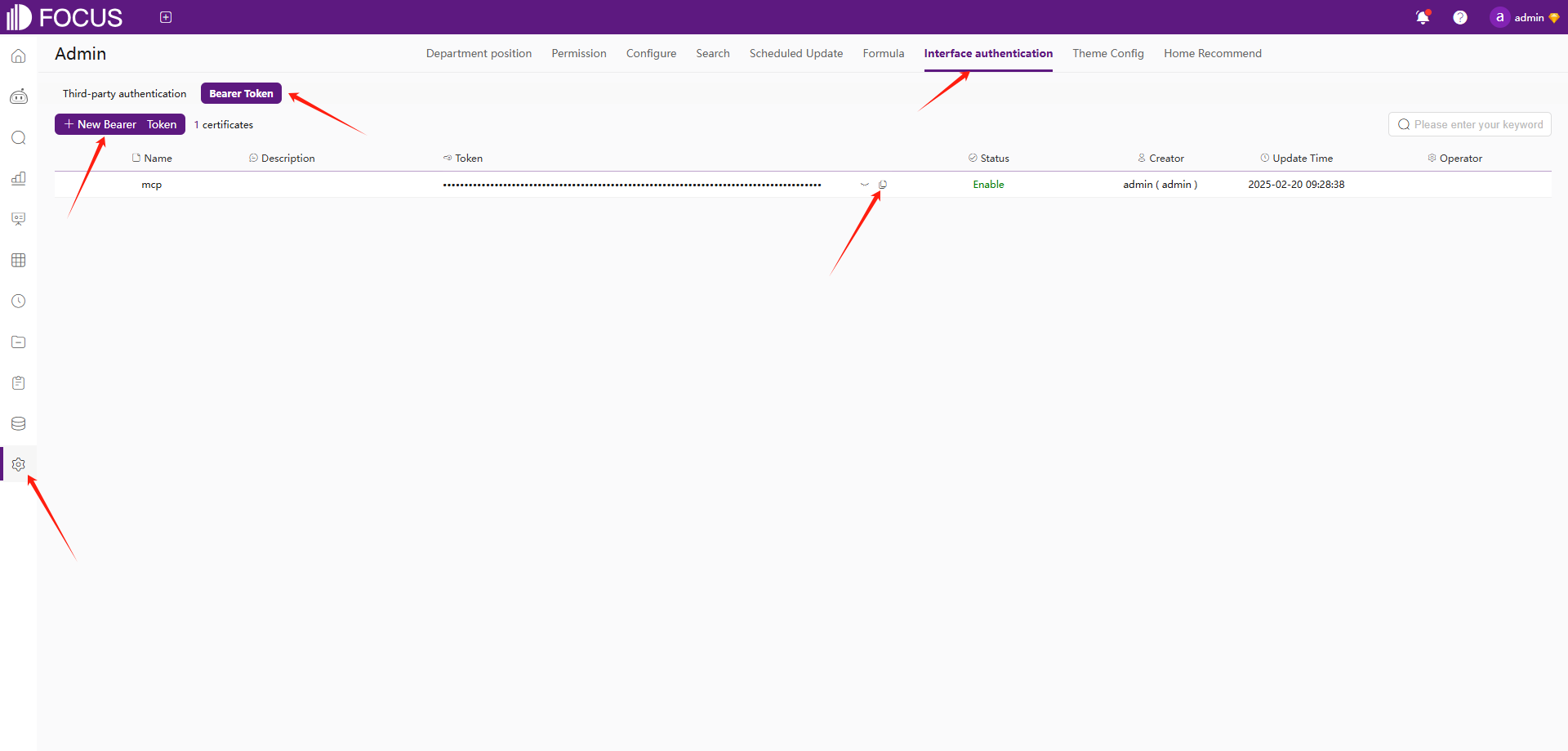
Installation
- Clone this repository:
git clone https://github.com/FocusSearch/focus_mcp_sql.git
cd focus_mcp_sql
- Build the server:
gradle clean
gradle bootJar

The jar path: build/libs/focus_mcp_sql.jar
MCP Configuration
Add the server to your MCP settings file:
{
  "mcpServers": {
    "focus_mcp_data": {
      "command": "java",
      "args": [
        "-jar",
        "path/to/focus_mcp_sql/focus_mcp_sql.jar"
      ],
      "autoApprove": [
        "gptText2sqlStart",
        "gptText2sqlChat"
      ]
    }
  }
}
Available Tools
1. gptText2sqlStart
initial model.
Parameters:
model(required): table modelbearer(required): bearer tokenlanguage(optional): language ['english','chinese']
Example:
{
  "model": {
    "tables": [
      {
        "columns": [
          {
            "columnDisplayName": "name",
            "dataType": "string",
            "aggregation": "",
            "columnName": "name"
          },
          {
            "columnDisplayName": "address",
            "dataType": "string",
            "aggregation": "",
            "columnName": "address"
          },
          {
            "columnDisplayName": "age",
            "dataType": "int",
            "aggregation": "SUM",
            "columnName": "age"
          },
          {
            "columnDisplayName": "date",
            "dataType": "timestamp",
            "aggregation": "",
            "columnName": "date"
          }
        ],
        "tableDisplayName": "test",
        "tableName": "test"
      }
    ],
    "relations": [

    ],
    "type": "mysql",
    "version": "8.0"
  },
  "bearer": "ZTllYzAzZjM2YzA3NDA0ZGE3ZjguNDJhNDjNGU4NzkyYjY1OTY0YzUxYWU5NmU="
}
model 参数说明:
| 名称 | 位置 | 类型 | 必选 | 说明 |
|---|---|---|---|---|
| model | body | object | 是 | none |
| » type | body | string | 是 | 数据库类型 |
| » version | body | string | 是 | 数据库版本 |
| » tables | body | [object] | 是 | 表结构列表 |
| »» tableDisplayName | body | string | 否 | 表显示名 |
| »» tableName | body | string | 否 | 表原始名 |
| »» columns | body | [object] | 否 | 表列列表 |
| »»» columnDisplayName | body | string | 是 | 列显示名 |
| »»» columnName | body | string | 是 | 列原始名 |
| »»» dataType | body | string | 是 | 列数据类型 |
| »»» aggregation | body | string | 是 | 列聚合方式 |
| » relations | body | [object] | 是 | 表关联关系列表 |
| »» conditions | body | [object] | 否 | 关联条件 |
| »»» dstColName | body | string | 否 | dimension 表关联列原始名 |
| »»» srcColName | body | string | 否 | fact 表关联列原始名 |
| »» dimensionTable | body | string | 否 | dimension 表原始名 |
| »» factTable | body | string | 否 | fact 表原始名 |
| »» joinType | body | string | 否 | 关联类型 |
2. gptText2sqlChat
Convert natural language to SQL.
Parameters:
chatId(required): chat idinput(required): Natural languagebearer(required): bearer token
Example:
{
  "chatId": "03975af5de4b4562938a985403f206d4",
  "input": "what is the max age",
  "bearer": "ZTllYzAzZjM2YzA3NDA0ZGE3ZjguNDJhNDjNGU4NzkyYjY1OTY0YzUxYWU5NmU="
}
Response Format
All tools return responses in the following format:
{
  "errCode": 0,
  "exception": "",
  "msgParams": null,
  "promptMsg": null,
  "success": true,
  "data": {
  }
}
Visual Studio Code Cline Sample
- vsCode install cline plugin
- mcp server config
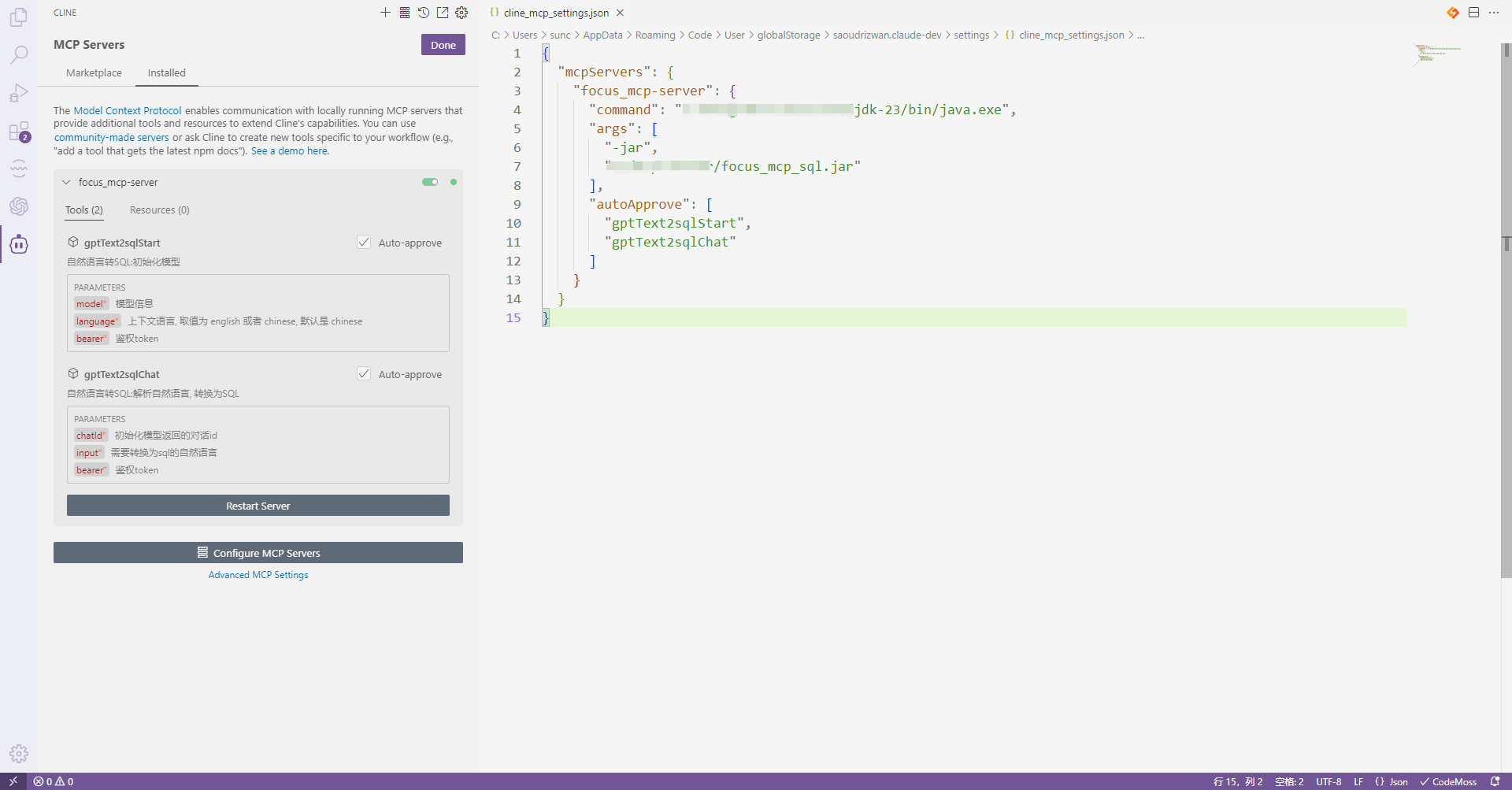
- use
- initial model
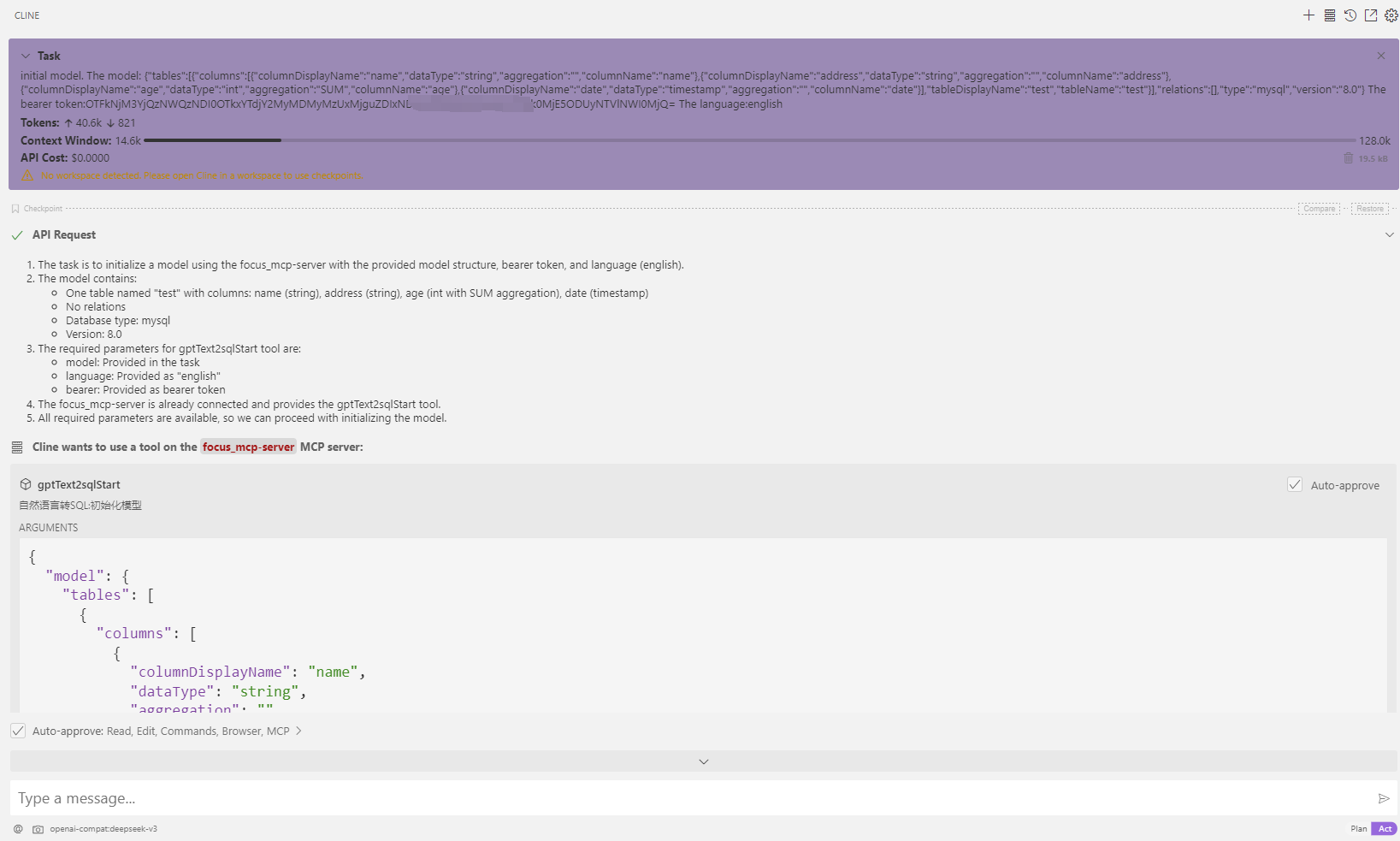
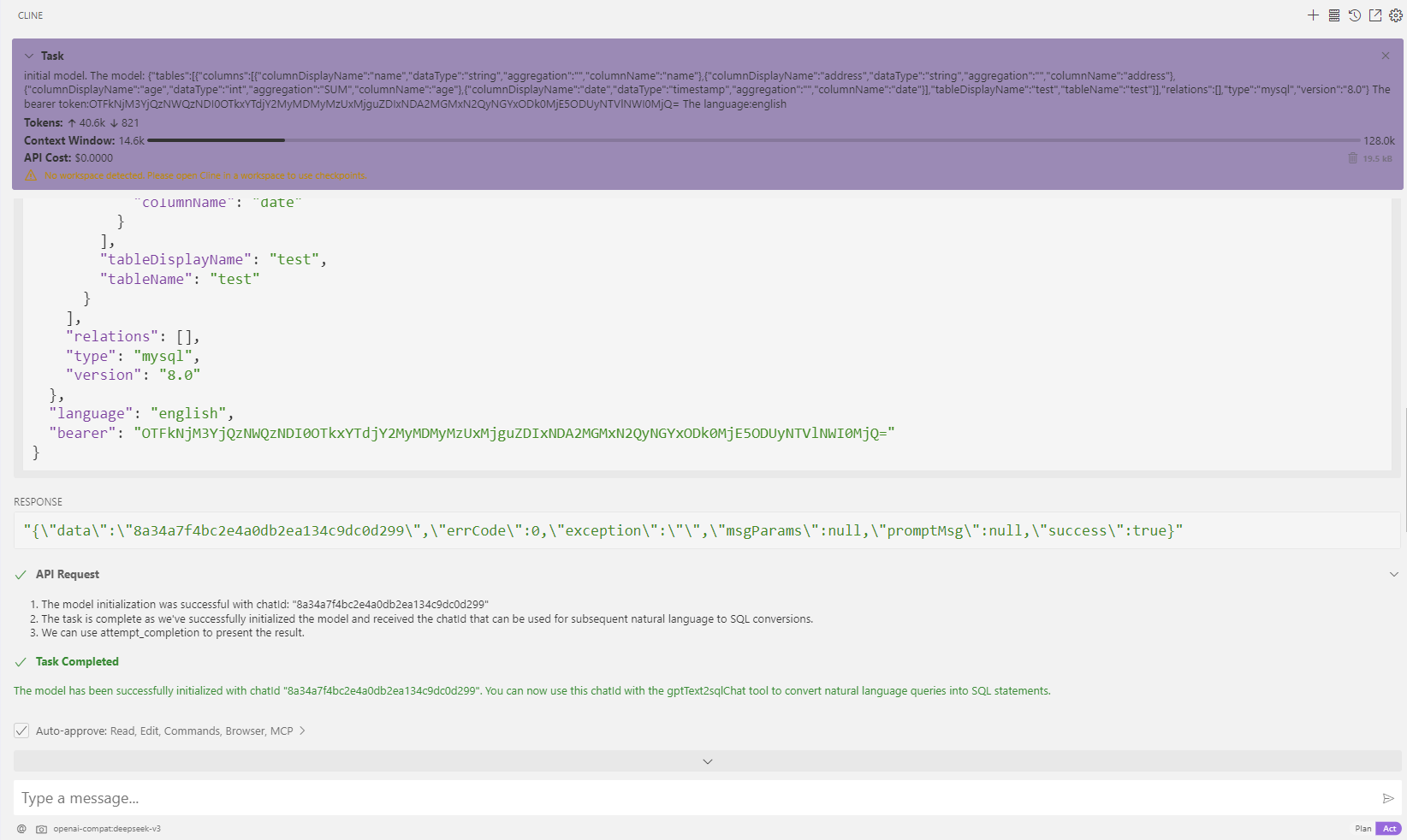
- transfer: what is the max age
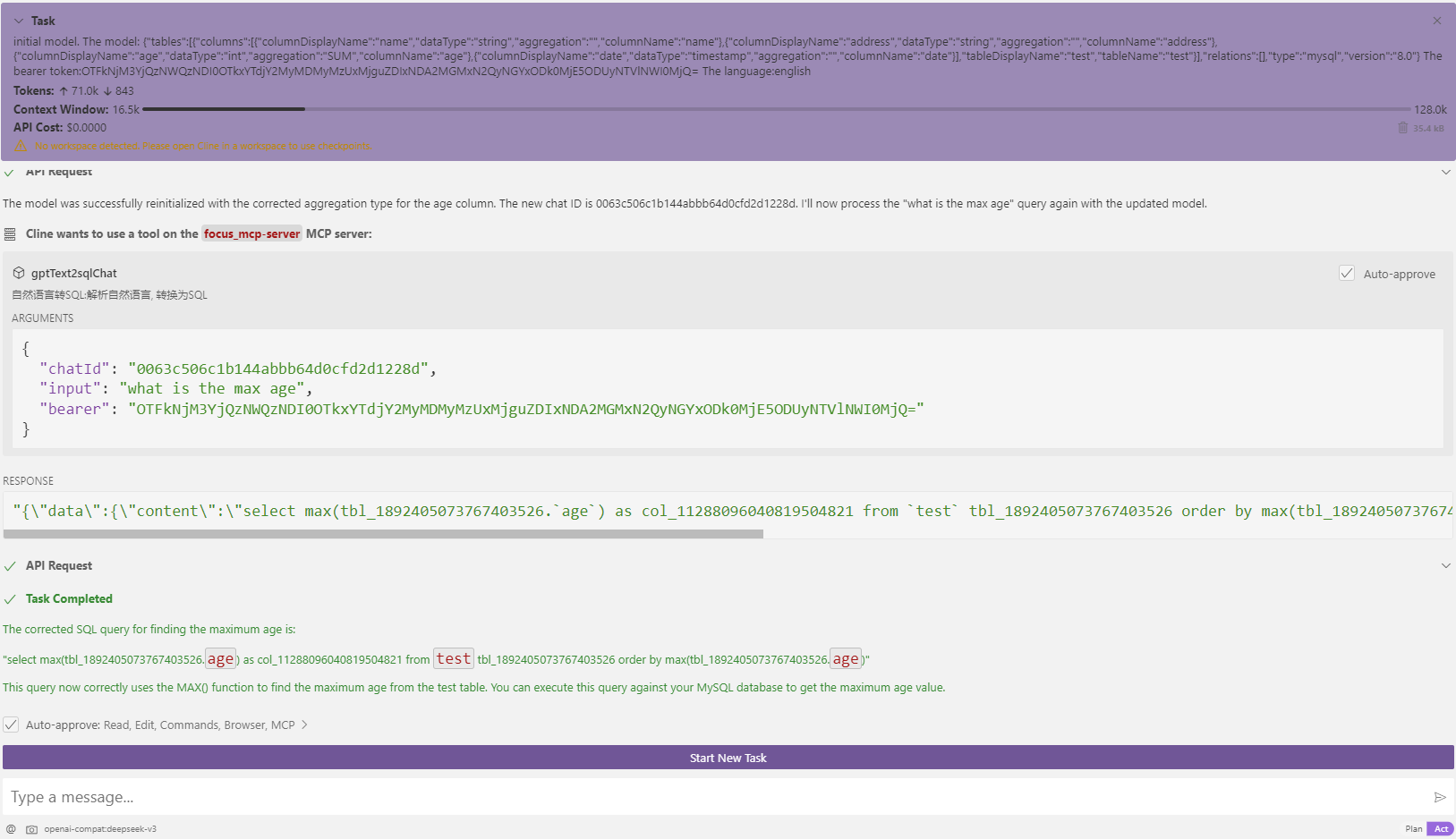
- initial model
Contact:

Installing Focus SQL
This server has no published package — it is built from source. Open the repository and follow its README.
▸ github.com/focussearch/focus_mcp_sqlFAQ
Is Focus SQL MCP free?
Yes, Focus SQL MCP is free — one-click install via Unyly at no cost.
Does Focus SQL need an API key?
No, Focus SQL runs without API keys or environment variables.
Is Focus SQL hosted or self-hosted?
Self-hosted: the server runs locally on your machine via the install command above.
How do I install Focus SQL in Claude Desktop, Claude Code or Cursor?
Open Focus SQL on unyly.org, pick your client tab (Claude Desktop, Claude Code, Cursor) and press Install — the config is generated automatically, no JSON editing.
Related MCPs
wenb1n-dev/SmartDB_MCP
A universal database MCP server supporting simultaneous connections to multiple databases. It provides tools for database operations, health analysis, SQL optim
 by wenb1n-dev
Postgres Server
This server enables interaction with PostgreSQL databases through the Model Context Protocol, optimized for the AWS Bedrock AgentCore Runtime. It provides tools
 by madhurprash
Postgres
Query your database in natural language
 by Anthropic
PostgreSQL
Read-only database access with schema inspection.
by modelcontextprotocolCompare Focus SQL with
Not sure what to pick?
Find your stack in 60 seconds
Author?
Embed badge for your README
Browse similar
All data MCPs