
Food Hygiene
FreeNot checkedQuery UK food hygiene ratings via MCP. Enables searching establishments by name, location, or rating.

About
Query UK food hygiene ratings via MCP. Enables searching establishments by name, location, or rating.
README
Query UK food hygiene ratings via MCP.
PyPI Python 3.14+ License: MIT MCP
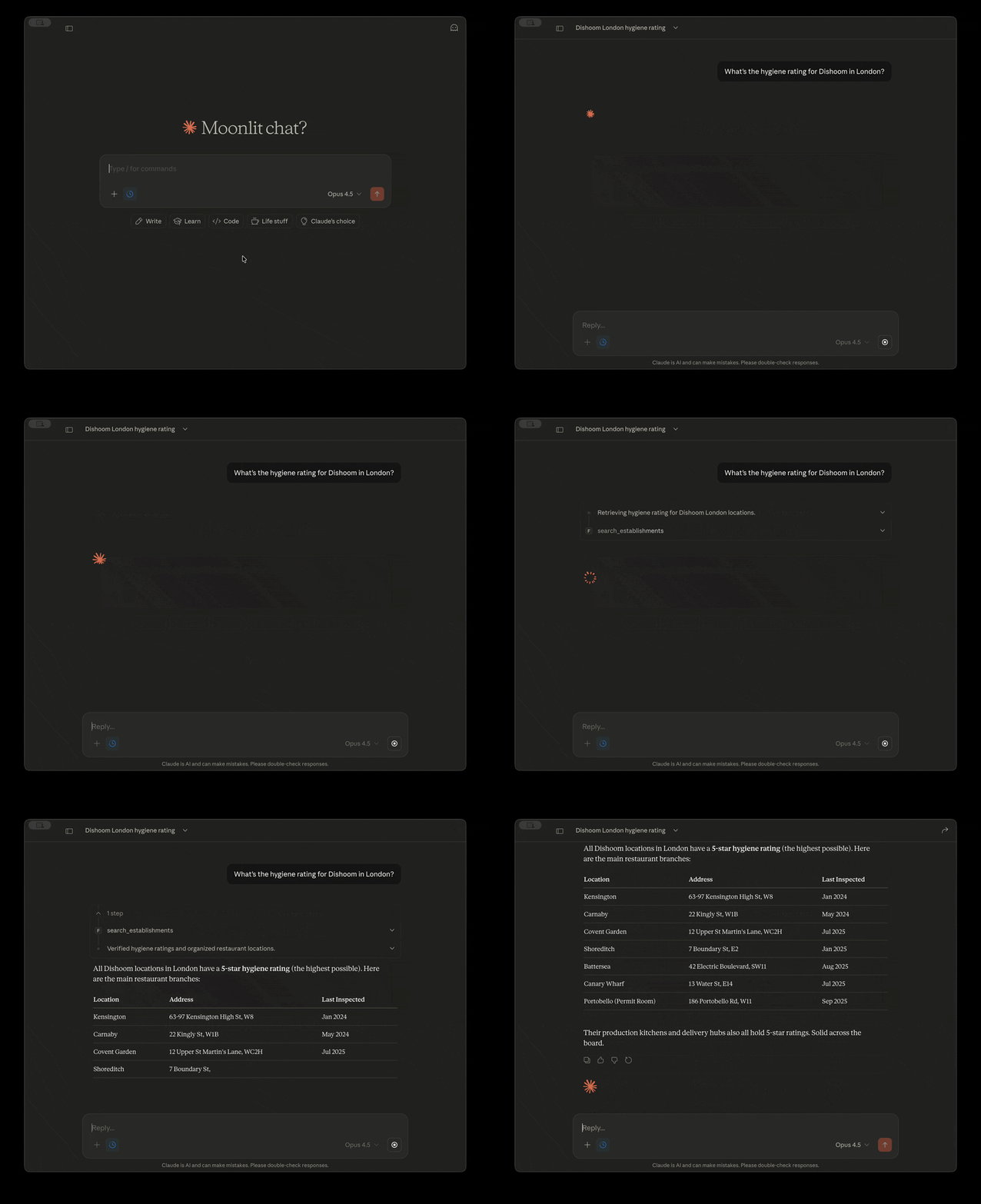
Demo
Quick Start
Works with any MCP-compatible client (Claude Desktop, VS Code, Cursor, etc.). Example for Claude Desktop:
- macOS:
~/Library/Application Support/Claude/claude_desktop_config.json - Windows:
%APPDATA%\Claude\claude_desktop_config.json
Option 1: Via PyPI (recommended)
{
  "mcpServers": {
    "food-hygiene": {
      "command": "uvx",
      "args": ["food-hygiene-mcp"]
    }
  }
}
Option 2: From source
git clone https://github.com/w4sspr/food-hygiene-mcp.git
cd food-hygiene-mcp
uv sync
{
  "mcpServers": {
    "food-hygiene": {
      "command": "uv",
      "args": ["run", "--directory", "/path/to/food-hygiene-mcp", "food-hygiene-mcp"]
    }
  }
}
Troubleshooting: If you get
spawn uvx ENOENTorspawn uv ENOENT, Claude Desktop can't find the executable. Use the full path instead (runwhich uvxorwhich uvto find it, e.g.,/Users/you/.local/bin/uvx).
Restart Claude Desktop, then try:
"What's the hygiene rating for Dishoom in London?"
Example Prompts
- "What's the hygiene rating for Dishoom in London?"
- "Find restaurants in Manchester with at least a 4-star rating"
- "Show me takeaways in SW1A 1AA"
- "Get full inspection details for establishment 1662145"
- "Find cafes within 2 miles of 51.5074, -0.1278"
Tools
search_establishments
Search for food establishments by name, location, or rating.
| Parameter | Type | Description |
|---|---|---|
name |
string | Business name (partial match) |
address |
string | Street or area |
postcode |
string | UK postcode |
latitude |
float | Latitude for geo-search |
longitude |
float | Longitude for geo-search |
radius_miles |
float | Max distance in miles (default: 1) |
business_type |
string | "restaurant", "takeaway", "pub", "cafe", "hotel", etc. |
min_rating |
int | Minimum hygiene rating (0-5) |
max_rating |
int | Maximum hygiene rating (0-5) |
get_establishment_details
Get full details for a specific establishment by FHRS ID.
Returns: rating breakdown (hygiene, structural, confidence in management), inspection date, local authority info.
Limitations
- England, Wales, and Northern Ireland only — Scotland uses a different system
- No aggregate statistics — can't calculate "% of 5-star restaurants" without fetching all data
- Limited business types — ~15 common types mapped; niche categories may not work
- Geo-search requires coordinates — city names alone won't trigger distance filtering
Roadmap
-
get_local_authority_stats— aggregate ratings by area (requires pagination through all establishments) - Scotland support via FHIS API
- Cache business type mappings
See Also
Why I built this: MCP integration with UK public sector data APIs. See also: uk-charities-mcp for Charity Commission data.
Data Source
FSA Food Hygiene Rating Scheme API — free, public, no authentication required.
License
MIT
Install Food Hygiene in Claude Desktop, Claude Code & Cursor
unyly install food-hygiene-mcpInstalls into Claude Desktop, Claude Code, Cursor & VS Code — handles npx, uvx and build-from-source repos for you.
First time? Get the CLI: curl -fsSL https://unyly.org/install | sh
Or configure manually
Run in your terminal:
claude mcp add food-hygiene-mcp -- uvx food-hygiene-mcpFAQ
Is Food Hygiene MCP free?
Yes, Food Hygiene MCP is free — one-click install via Unyly at no cost.
Does Food Hygiene need an API key?
No, Food Hygiene runs without API keys or environment variables.
Is Food Hygiene hosted or self-hosted?
A hosted option is available: Unyly runs the server in the cloud, no local setup required.
How do I install Food Hygiene in Claude Desktop, Claude Code or Cursor?
Open Food Hygiene on unyly.org, pick your client tab (Claude Desktop, Claude Code, Cursor) and press Install — the config is generated automatically, no JSON editing.
Related MCPs
GitHub
PRs, issues, code search, CI status
 by GitHub
Filesystem
Secure file operations with configurable access controls.
Memory
Knowledge graph-based persistent memory system.
Template MCP Server
A CLI tool to create a new Model Context Protocol server project with TypeScript support, dual transport options, and an extensible structure
 by mcpdotdirect
Compare Food Hygiene with
Not sure what to pick?
Find your stack in 60 seconds
Author?
Embed badge for your README
Browse similar
All development MCPs