
Foundryiq Ft Cosmos
FreeNot checkedDemo environment comparing RAG implementation patterns on Azure: Microsoft Foundry IQ with Content Understanding vs. classic Azure AI Search. Includes MCP serve

About
Demo environment comparing RAG implementation patterns on Azure: Microsoft Foundry IQ with Content Understanding vs. classic Azure AI Search. Includes MCP server for Cosmos DB, Infrastructure as Code (Bicep), and sample data. Learning resource for AI agent development on Azure.
README
⚠️ Important: This repository is designed as a demo and learning environment to showcase RAG implementation patterns on Azure. It is not intended for production use without additional hardening, security reviews, and operational considerations. Use this as a foundation to understand capabilities and build upon for your specific requirements.
This repository demonstrates and compares two approaches for implementing Retrieval-Augmented Generation (RAG) on Azure, showcasing how Microsoft Foundry IQ with Content Understanding simplifies and accelerates enterprise RAG scenarios compared to manually orchestrating Azure AI Search components.
🎯 Repository Purpose
The goal is to provide a practical, hands-on comparison between:
- Microsoft Foundry IQ — A comprehensive agent framework with built-in Content Understanding that abstracts index management, enrichment pipelines, and semantic retrieval.
- Classic Azure AI Search — A manual approach requiring explicit configuration of indexes, indexers, data sources, and skillsets.
This repository includes fully automated Infrastructure as Code (Bicep) and GitHub Actions workflows to deploy a demo environment that illustrates both approaches on Azure. Use this as a starting point to explore, learn, and build your own production-grade solutions.
📦 Sample Data
To help you get started quickly, this repository provides sample data as a release attachment. The data is entirely fictional and designed to demonstrate RAG capabilities in a realistic enterprise scenario.
What's Included
The sample data ZIP file contains information for 5 fictional technology companies:
| Company | Description |
|---|---|
| FinovateX | Fintech innovation platform |
| FitBite | Health and fitness technology |
| LinguatechAI | Language processing and translation AI |
| NovaAgentics | Multi-agent AI orchestration platform |
| SentinelAI | AI-powered security and threat detection |
Data Types
1. Documents for Indexing (Azure AI Search / Foundry Content Understanding)
The following document types are provided for each company:
- Architecture Diagrams — Visual representations of each company's Azure infrastructure
- Architecture Review Transcripts — Meeting notes and technical discussions from design reviews
- Company Information — Business profiles, technology stack details, and strategic objectives
- Sales Policies — Guidelines and best practices for selling Azure services to each company
These documents are designed to be ingested into:
- Azure AI Search (via indexers and skillsets)
- Foundry Content Understanding (for semantic retrieval and agent grounding)
2. Structured Data for Cosmos DB
The ZIP file also includes Azure spending data for each company in JSON format, designed to be loaded into the Cosmos DB customer_spent container:
- Monthly Azure service consumption
- Cost breakdowns by service category
How to Use the Sample Data
- Download the ZIP file from the Releases page
- Extract the contents to a local directory
- For document indexing:
- Upload documents to the
customer-infoblob container in your Storage Account - Configure Azure AI Search indexers or Foundry Content Understanding to process the files
- Upload documents to the
- For Cosmos DB:
- Use the Azure Cosmos DB Data Explorer or the MCP server API to insert spending records
- Test queries like "Show me NovaAgentics' Azure spending trends" or "Which company spent the most on AI services?"
Use Cases Demonstrated
With this sample data, you can demonstrate:
- Semantic search across company documentation
- Grounded agent responses using architecture review transcripts
- Multi-source RAG combining documents (AI Search/Foundry) with structured data (Cosmos DB)
- Sales enablement scenarios like "What are the best practices for selling Azure OpenAI to LinguatechAI?"
- Financial analysis using Cosmos DB queries combined with document context
🚀 Next Steps
After deploying the infrastructure and uploading sample data, follow these steps to complete the setup:
1. Configure Foundry Connections
The deployed Foundry resource is not automatically connected to other Azure resources. However, the associated User Assigned Managed Identity ({projectName}-foundry-umi) has already been granted the necessary permissions via the Bicep deployment.
Action Required:
You must manually create connections in the Azure AI Foundry management center to enable Foundry to access:
- Azure AI Search (for semantic retrieval)
- Storage Account (for document access)
- Key Vault (for secrets management)
📖 Step-by-step guide: Set up Key Vault connection in Azure AI Foundry
Tip: When creating connections, select "Use managed identity" and choose the
{projectName}-foundry-umiidentity. This ensures connections use the pre-configured RBAC permissions.
2. Configure Azure AI Search (Classic Approach)
The sample data ZIP includes JSON definition files for manually configuring Azure AI Search resources:
- Index definition — Schema for searchable fields and vector embeddings
- Data source definition — Connection to the Storage Account blob container
- Skillset definition — Cognitive skills for text extraction, chunking, and embedding generation
- Indexer definition — Automation for ingestion and enrichment pipeline
How to Use:
- Navigate to your Azure AI Search resource in the Azure Portal
- Go to Indexes → Add Index → JSON and paste the index definition (replace placeholders like
{storageAccountName}) - Repeat for Data Sources, Skillsets, and Indexers
- Run the indexer to process documents from the
customer-infoblob container
Note: Placeholders in the JSON files (e.g.,
{projectName},{storageAccountName}) must be replaced with your actual resource names from the deployment.
🏗️ Architecture Overview
The solution consists of three core components working together to enable agent-driven RAG scenarios:
1. Model Context Protocol (MCP) Server for Cosmos DB
A Web API implementing the Model Context Protocol (MCP) specification based on this repo, providing:
- Structured access to Azure Cosmos DB data for Microsoft Foundry agents
- Tool-based interface for retrieving recent documents and querying by ID
- Identity-based authentication using Azure Managed Identities
- Built-in observability via Application Insights
⚠️ Security Notice: This demo implementation does not include authentication or authorization on the MCP API endpoints. All HTTP endpoints are publicly accessible without authentication. This approach is intentionally simplified for learning and debugging purposes only. In a production environment, you must implement proper authentication (e.g., Azure AD, API keys, managed identity validation) and authorization controls to secure your MCP server endpoints.
Key Features:
- Exposes Cosmos DB operations as MCP tools
- Consumed by Foundry as a registered Tool
- Enables agents to securely retrieve enterprise data stored in Cosmos DB
- Follows Azure best practices for service-to-service authentication
2. Azure Infrastructure (Bicep Templates)
Fully automated deployment of all required Azure resources:
- Azure Cosmos DB for NoSQL — Document database storing customer data
- Azure Web App (Linux, .NET 10) — Hosts the MCP server API
- App Service Plan — Compute resources for the Web App
- Azure AI Search — Enterprise search service with vector capabilities
- Storage Account — Blob storage for content ingestion and indexing
- Microsoft Foundry — AI Services account with project for agent orchestration
- Key Vault — Secure storage for secrets and certificates
- Log Analytics Workspace — Centralized logging and diagnostics
- Application Insights — Application performance monitoring
3. Managed Identity Security Model
All inter-service communication uses User Assigned Managed Identities (UAMI) and System Assigned Managed Identities (SAMI):
- No secrets, keys, or connection strings stored in code or configuration
- Role-based access control (RBAC) at every layer
- Azure-native identity federation for secure, zero-trust architecture
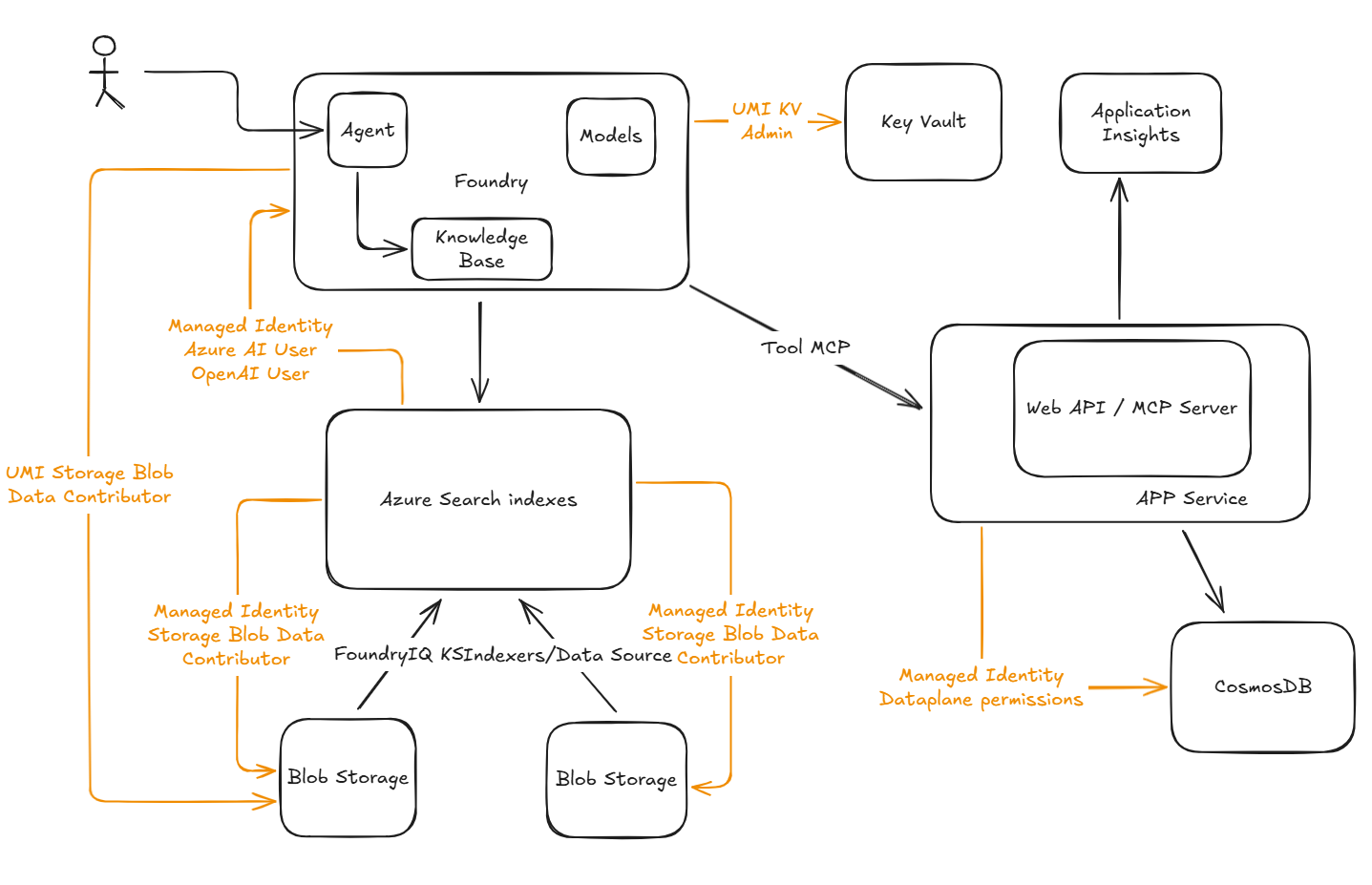
The diagram above illustrates the complete solution architecture, showing how the three core components work together to enable agent-driven RAG scenarios with dual approaches for content retrieval.
🔐 Security Architecture: Managed Identities Only
This solution implements identity-based authentication exclusively, following Azure security best practices:
Managed Identities Created
| Identity | Type | Purpose |
|---|---|---|
{projectName}-ais-umi |
User Assigned | Used by Azure AI Search to access Storage and Foundry services |
{projectName}-foundry-umi |
User Assigned | Used by Foundry to access Key Vault |
| Web App Identity | System Assigned | Automatically created for the MCP API Web App |
| Foundry Project Identity | System Assigned | Automatically created for the Foundry project resource |
Why Managed Identities?
- Eliminates credential management: No keys to rotate or secrets to leak
- Least-privilege access: Each service has only the permissions it needs
- Audit trail: All access is logged via Azure Activity Log and Azure Monitor
- Compliance: Meets enterprise security and governance requirements
🔑 Permissions and Role Assignments
The following role assignments are automatically configured via Bicep templates:
Azure AI Search User Assigned Managed Identity
The {projectName}-ais-umi identity is granted the following roles to enable Azure AI Search to ingest, index, and enrich content:
| Role | Scope | Purpose |
|---|---|---|
| Storage Blob Data Contributor | Storage Account | Read and write access to blob containers for document ingestion |
| Storage Table Data Contributor | Storage Account | Track indexer progress and state using Azure Tables |
| Azure AI User | Foundry Resource | Query AI models for content enrichment (e.g., embeddings, summarization) |
| Cognitive Services OpenAI User | Foundry Resource | Access OpenAI models for vectorization and semantic understanding |
| Cognitive Services User | Foundry Resource | General access to AI Services capabilities |
Why these permissions?
Azure AI Search requires read/write access to storage for document retrieval, table storage for state management, and AI Services access to execute cognitive skillsets (e.g., text embedding, entity extraction).
Foundry User Assigned Managed Identity
The {projectName}-foundry-umi identity is granted:
| Role | Scope | Purpose |
|---|---|---|
| Key Vault Contributor | Key Vault | Manage vault configuration and policies |
| Key Vault Secrets Officer | Key Vault | Read and write secrets required for Foundry operations |
Why these permissions?
Foundry agents may need to store and retrieve API keys, connection strings, or other sensitive configuration data securely.
Web App System Assigned Managed Identity
The Web App hosting the MCP server requires Cosmos DB data plane permissions to query containers and retrieve documents.
Configured via PowerShell script:
The Set-CosmosDB-Dataplane-Owner.ps1 script assigns a custom Cosmos DB role with the following permissions:
{
  "RoleName": "Azure Cosmos DB for NoSQL Data Plane Owner",
  "Type": "CustomRole",
  "DataActions": [
    "Microsoft.DocumentDB/databaseAccounts/readMetadata",
    "Microsoft.DocumentDB/databaseAccounts/sqlDatabases/containers/*",
    "Microsoft.DocumentDB/databaseAccounts/sqlDatabases/containers/items/*"
  ]
}
Permissions Explained:
readMetadata— Read account-level informationcontainers/*— Manage container lifecycle (create, read, update, delete)items/*— Full CRUD operations on items within containers
Scope: All databases and containers in the Cosmos DB account.
Why a custom role?
Azure Cosmos DB supports RBAC via data plane roles. Since the built-in roles may be too permissive or restrictive, a custom role ensures least-privilege access tailored to the MCP server's needs.
📊 Foundry IQ vs Classic Azure AI Search
Classic Azure AI Search Approach
When implementing RAG manually with Azure AI Search, developers must:
Define an Index Schema
- Map fields, data types, and analyzers
- Configure vector fields for embeddings
- Set up scoring profiles for ranking
Create a Data Source
- Connect to storage (Blob, Cosmos DB, SQL)
- Configure change tracking for incremental updates
- Manage connection strings or managed identities
Build an Indexer
- Schedule data ingestion
- Handle errors and retries
- Monitor indexing progress
Design a Skillset (Optional)
- Extract entities, key phrases, or OCR text
- Generate vector embeddings via AI models
- Chain multiple cognitive skills together
Query and Retrieve
- Write complex search queries (Lucene or OData syntax)
- Integrate semantic ranking and vector search
- Handle pagination, filtering, and faceting
Operational Overhead:
- Manual schema evolution and versioning
- Complex debugging when indexers or skillsets fail
- Tight coupling between data source, index, and application logic
- Requires deep Azure AI Search expertise
Foundry IQ with Content Understanding
Foundry IQ abstracts and automates much of the manual work:
Automatic Content Ingestion
- Upload files or connect data sources
- Foundry detects formats (PDF, Word, JSON, etc.) and extracts content
Built-in Enrichment
- Text chunking and embedding generation
- Entity extraction and metadata tagging
- No skillset configuration required
Semantic Index Management
- Foundry creates and manages indexes internally
- Automatic schema inference based on content
- Optimized for agent-driven retrieval
Agent-Native Retrieval
- Agents query content using natural language
- Contextual search with grounding and citations
- Seamless integration with chat completions
Developer Experience Benefits:
- Faster time to value — Deploy RAG in minutes, not days
- Less code to maintain — No indexer or skillset JSON files
- Integrated agent framework — Content Understanding + Agents + Tools in one platform
- Iterative development — Easily test and refine retrieval quality
When to Use Each Approach:
| Scenario | Recommended Approach |
|---|---|
| Agent-based applications requiring conversational RAG | Foundry IQ |
| Rapid prototyping of AI experiences | Foundry IQ |
| Multi-modal content (images, documents, structured data) | Foundry IQ |
| Fine-grained control over indexing pipelines | Classic Azure AI Search |
| Custom scoring/ranking algorithms | Classic Azure AI Search |
| Integration with existing Azure Search workloads | Classic Azure AI Search |
🚀 Deployment
Prerequisites
- Azure Subscription with permissions to create resources
- GitHub Repository with the following secrets and variables configured
- Azure CLI or Portal access for initial setup
GitHub Secrets (Required)
| Secret Name | Description |
|---|---|
AZURE_CLIENT_ID |
Application (client) ID of the Entra ID App Registration |
AZURE_TENANT_ID |
Azure Active Directory tenant ID |
AZURE_SUBSCRIPTION_ID |
Target Azure subscription ID |
GitHub Variables (Required)
| Variable Name | Example Value | Description |
|---|---|---|
PROJECT_NAME |
fiqftcosmos |
Unique project identifier (lowercase, no spaces) |
AZURE_RESOURCE_GROUP |
rg-foundryiq-ft-cosmos |
Resource group name |
AZURE_LOCATION |
swedencentral |
Azure region for deployment |
Note:
PROJECT_NAMEis used as a prefix for all resource names (e.g.,{PROJECT_NAME}-cdbfor Cosmos DB).
Setup Instructions
Refer to SETUP-DEPLOYMENT.md for detailed step-by-step instructions on:
- Creating an Entra ID App Registration
- Configuring federated credentials for GitHub Actions (OIDC)
- Assigning Azure RBAC permissions
- Running the automated deployment workflows
📂 Automated Workflows
1. Infrastructure Deployment
Workflow: .github/workflows/deploy-infra.yaml
Triggers:
- Push to
mainwith changes ininfra/** - Manual trigger via
workflow_dispatch
What It Deploys:
- Cosmos DB account with
customersdatabase andcustomer_spentcontainer - Storage account with
customer-infoblob container - Azure Web App (Linux, .NET 10) for MCP server
- Azure AI Search with managed identity
- Microsoft Foundry resource with project
- Key Vault with RBAC enabled
- Log Analytics Workspace and Application Insights
Outputs:
- Cosmos DB endpoint
- Application Insights connection string
- Web App name
2. MCP API Deployment
Workflow: .github/workflows/deploy-mcp.yaml
Triggers:
- Push to
mainwith changes insrc/Customers.MCP/** - Manual trigger via
workflow_dispatch
What It Does:
- Builds the .NET 10 MCP server API
- Publishes and packages the application
- Deploys to Azure Web App via ZIP deploy
- Automatically configures app settings:
COSMOS_ENDPOINT(from infrastructure output)APPLICATIONINSIGHTS_CONNECTION_STRING(from infrastructure output)
🛠️ Post-Deployment Configuration
After deploying the infrastructure and MCP API, assign Cosmos DB data plane permissions to the Web App managed identity, Foundry user managed identity and yourself:
# Get the Web App's system assigned managed identity principal ID
PRINCIPAL_ID=$(az webapp identity show \
  --name {PROJECT_NAME}-mcpapi \
  --resource-group {RESOURCE_GROUP_NAME} \
  --query principalId -o tsv)

# Run the PowerShell script to grant Cosmos DB access
pwsh ./scripts/Set-CosmosDB-Dataplane-Owner.ps1 \
  $PRINCIPAL_ID \
  {RESOURCE_GROUP_NAME} \
  {PROJECT_NAME}-cdb
What This Does:
- Creates a custom Cosmos DB RBAC role (if it doesn't exist)
- Assigns the role to the Web App's managed identity
- Grants full data plane access to all databases and containers
🧪 Testing the MCP Server
Health Check
curl https://{PROJECT_NAME}-mcpapi.azurewebsites.net/health
MCP Protocol Initialization
curl -X POST https://{PROJECT_NAME}-mcpapi.azurewebsites.net/mcp \
  -H "Content-Type: application/json" \
  -d '{
    "jsonrpc": "2.0",
    "method": "initialize",
    "id": 1
  }'
Expected Response:
{
  "jsonrpc": "2.0",
  "id": 1,
  "result": {
    "protocolVersion": "2024-11-05",
    "capabilities": {
      "tools": {}
    },
    "serverInfo": {
      "name": "azure-cosmosdb-mcp-toolkit",
      "version": "1.0.0"
    }
  }
}
List Available Tools
curl -X POST https://{PROJECT_NAME}-mcpapi.azurewebsites.net/mcp \
  -H "Content-Type: application/json" \
  -d '{
    "jsonrpc": "2.0",
    "method": "tools/list",
    "id": 2
  }'
📖 MCP Server Tools
The MCP server exposes the following tools for Foundry agents to interact with Cosmos DB data:
get_recent_documents
Retrieves the N most recent documents from a Cosmos DB container, ordered by timestamp (_ts DESC).
Parameters:
databaseId(string, required) — Database IDcontainerId(string, required) — Container IDn(integer, required) — Number of documents to return (1-20)
Example:
{
  "jsonrpc": "2.0",
  "method": "tools/call",
  "params": {
    "name": "get_recent_documents",
    "arguments": {
      "databaseId": "customers",
      "containerId": "customer_spent",
      "n": 5
    }
  },
  "id": 3
}
find_document_by_id
Finds a document by its unique id field.
Parameters:
databaseId(string, required) — Database IDcontainerId(string, required) — Container IDid(string, required) — Document ID
Example:
{
  "jsonrpc": "2.0",
  "method": "tools/call",
  "params": {
    "name": "find_document_by_id",
    "arguments": {
      "databaseId": "customers",
      "containerId": "customer_spent",
      "id": "f9399883-e28c-4737-9249-c350849c67b1"
    }
  },
  "id": 4
}
get_customer_services
Gets a list of all distinct Azure services used by a specific customer.
Parameters:
databaseId(string, required) — Database IDcontainerId(string, required) — Container IDcustomerName(string, required) — Name of the customer (e.g., "FinovateX", "NovaAgentics")
Example:
{
  "jsonrpc": "2.0",
  "method": "tools/call",
  "params": {
    "name": "get_customer_services",
    "arguments": {
      "databaseId": "customers",
      "containerId": "customer_spent",
      "customerName": "NovaAgentics"
    }
  },
  "id": 5
}
Response:
{
  "customer_name": "NovaAgentics",
  "services": [
    {
      "service_name": "Azure Disk Storage",
      "service_family": "Storage"
    },
    {
      "service_name": "Azure OpenAI",
      "service_family": "AI + Machine Learning"
    }
  ],
  "count": 2
}
get_customer_service_spending
Gets the total spending and transaction count for a specific customer on a specific Azure service.
Parameters:
databaseId(string, required) — Database IDcontainerId(string, required) — Container IDcustomerName(string, required) — Name of the customerserviceName(string, required) — Name of the Azure service (e.g., "Azure Disk Storage", "Azure OpenAI")
Example:
{
  "jsonrpc": "2.0",
  "method": "tools/call",
  "params": {
    "name": "get_customer_service_spending",
    "arguments": {
      "databaseId": "customers",
      "containerId": "customer_spent",
      "customerName": "FinovateX",
      "serviceName": "Azure Disk Storage"
    }
  },
  "id": 6
}
Response:
{
  "total_spending": 15250.50,
  "transaction_count": 12,
  "customer_name": "FinovateX",
  "service_name": "Azure Disk Storage",
  "service_family": "Storage"
}
📚 Additional Resources
- Model Context Protocol (MCP) Specification
- Azure Cosmos DB Best Practices
- Azure AI Search Documentation
- Microsoft Foundry (Azure AI Foundry)
- Azure Managed Identities
📝 License
This project is provided as-is for educational and demonstration purposes. It is not production-ready and should be used as a learning resource and foundation for building your own solutions.
⚠️ Production Considerations
Before using this architecture in production, consider:
- Network Security: Implement Private Endpoints, VNets, and NSGs
- Data Encryption: Enable encryption at rest with customer-managed keys
- Backup & DR: Configure geo-redundancy and backup policies
- Monitoring & Alerts: Set up comprehensive monitoring, alerting, and log retention
- Cost Management: Implement budgets, cost alerts, and resource tagging
- Compliance: Review data residency, audit logging, and regulatory requirements
- High Availability: Configure zone redundancy and multi-region deployments
- Security Hardening: Implement WAF, DDoS protection, and threat detection
- Access Control: Review and restrict permissions following least-privilege principles
- Testing: Implement comprehensive testing, including load, security, and chaos testing
Installing Foundryiq Ft Cosmos
This server has no published package — it is built from source. Open the repository and follow its README.
▸ github.com/fjgomariz/foundryiq-ft-cosmosFAQ
Is Foundryiq Ft Cosmos MCP free?
Yes, Foundryiq Ft Cosmos MCP is free — one-click install via Unyly at no cost.
Does Foundryiq Ft Cosmos need an API key?
No, Foundryiq Ft Cosmos runs without API keys or environment variables.
Is Foundryiq Ft Cosmos hosted or self-hosted?
Self-hosted: the server runs locally on your machine via the install command above.
How do I install Foundryiq Ft Cosmos in Claude Desktop, Claude Code or Cursor?
Open Foundryiq Ft Cosmos on unyly.org, pick your client tab (Claude Desktop, Claude Code, Cursor) and press Install — the config is generated automatically, no JSON editing.
Related MCPs
GitHub
PRs, issues, code search, CI status
 by GitHub
Filesystem
Secure file operations with configurable access controls.
Memory
Knowledge graph-based persistent memory system.
Template MCP Server
A CLI tool to create a new Model Context Protocol server project with TypeScript support, dual transport options, and an extensible structure
 by mcpdotdirect
Compare Foundryiq Ft Cosmos with
Not sure what to pick?
Find your stack in 60 seconds
Author?
Embed badge for your README
Browse similar
All development MCPs