
Frame Pulse
FreeNot checkedAI-native MCP server for creative workstation telemetry—let Claude/Hermes monitor CPU/thermal, throttle background apps, alert Discord/Telegram. Python + Stream

About
AI-native MCP server for creative workstation telemetry—let Claude/Hermes monitor CPU/thermal, throttle background apps, alert Discord/Telegram. Python + Streamlit.
README
in progress
🎬 Frame Pulse MCP
GitHub Sponsor PayPal Python 3.10+ MCP Protocol Streamlit
AI-native telemetry for creative workstations.
Give your AI assistant (Claude, Hermes, Cursor) a "nervous system" to monitor and govern heavy creative workloads—Blender renders, Unreal builds, Houdini simulations—preventing thermal crashes and lost work during crunch.
🎯 The Problem Frame Pulse Solves
Digital content creation (DCC) tools are resource-intensive. During overnight renders or UE5 lighting builds, workstations overheat, hang, or crash—destroying hours of work and missing deadlines.
Existing tools (Glances, htop) show data. Frame Pulse lets AI act.
| Traditional Monitoring | Frame Pulse with AI |
|---|---|
| You watch numbers | Claude asks "Is my system safe?" |
| Crash after the fact | Throttle before thermal damage |
| Manual Task Manager | Natural language "deprioritize Chrome" |
| Silent failure | Discord/Telegram alerts at 2AM |
🚀 Quick Start
Option A: Claude Desktop (Recommended)
- Clone and install
git clone [https://github.com/idaakiwumi/frame-pulse-mcp.git](https://github.com/idaakiwumi/frame-pulse-mcp.git)
cd frame-pulse-mcp
pip install -r requirements.txt
- Add to Claude Desktop config
Windows (MSIX/Store):
%LOCALAPPDATA%\Packages\Claude_pzs8sxrjxfjjc\LocalCache\Roaming\Claude\claude_desktop_config.json**Other possible paths
\AppData\Roaming\Claude\claude_desktop_config.json\AppData\Local\Claude\claude_desktop_config.jsonStandard:
%APPDATA%\Claude\claude_desktop_config.json
{
  "mcpServers": {
    "frame-pulse": {
      "command": "py",
      "args": [
        "-3.14",
        "-u",
        "C:\\Users\\YOUR_PATH\\frame-pulse-mcp\\src\\frame_pulse\\server.py"
      ]
    }
  }
}
Then ask Claude: "Check my system status" or "Deprioritize my background apps"
Option B: The "Hero Demo" (Streamlit)
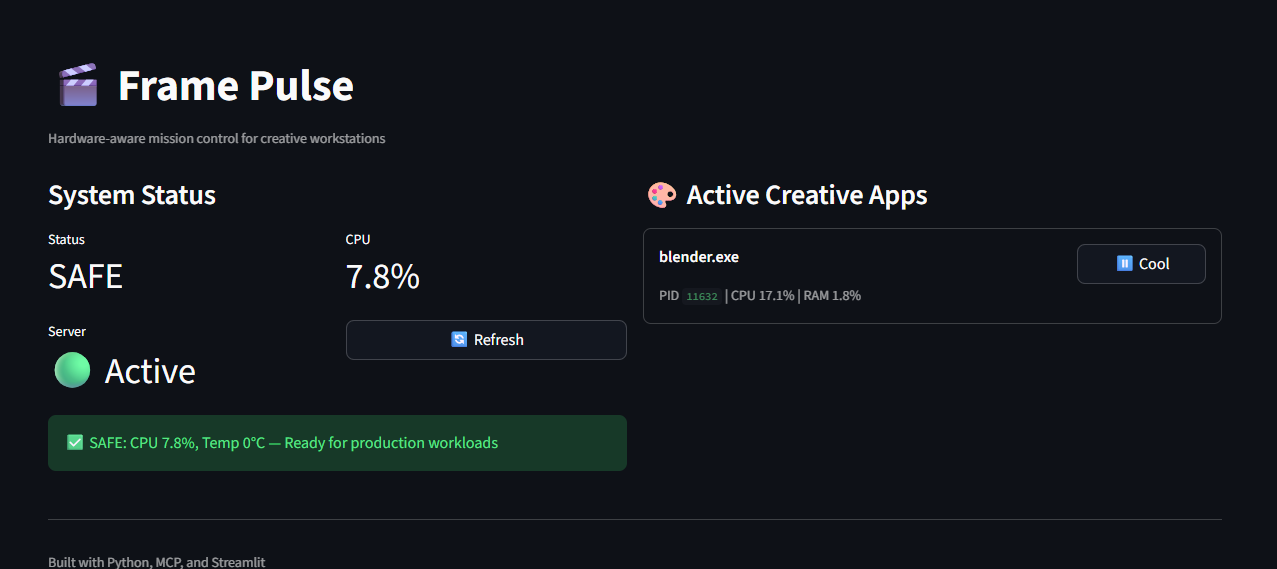
I built a high-fidelity Mission Control Dashboard using Streamlit. While the MCP runs in the background, this dashboard serves as the visual command center for the project.
streamlit run streamlit_app/mission_control.py
📱 The "Digital Pager" Ecosystem (Telegram & Discord)
As a Product Architect, I designed Frame Pulse to be "Headless." Creative professionals don't want another window to monitor; they want an assistant that pings them when they are away from their desk.
- Telegram Bot: Acts as a private production pager. Get a message on your phone if your CPU hits 90°C while you're grabbing coffee.
- Discord Webhooks: Rich, color-coded embeds sent to your studio's Discord server for team-wide render farm monitoring.
Setup: Configure your .env file with your TELEGRAM_BOT_TOKEN and TELEGRAM_CHAT_ID.
🛠️ MCP Tools for AI Agents
| Tool | Function | Use Case |
|---|---|---|
check_system_health() |
CPU, RAM, and Thermal scan | "Is it safe to start a 6-hour render?" |
scan_creative_apps() |
Identifies Blender, Unreal, Maya, etc. | "What's currently taxing the GPU?" |
emergency_throttle() |
Immediate CPU priority reduction | "CRITICAL: Throttle background apps now." |
get_thermal_status() |
Real-time temperature read | "Am I at risk of a thermal shutdown?" |
🤝 Community & Recognition
**Featured on Lobehub — AI tools discovery platform.
🛠️ Built With
- MCP — Model Context Protocol for AI tool interoperability
- FastMCP — Python SDK for MCP servers
- psutil — Cross-platform system monitoring
- Streamlit — Rapid Python dashboarding
📸 Demo
[30-second GIF: Claude asking "Start my render?" → Frame Pulse responding "CAUTION: CPU 89%" → User clicking throttle → Success toast]
🤝 Who's Using This
"Frame Pulse caught a thermal spike before our overnight farm render. Saved us 14 hours of redo work."
— Anonymous VFX Supervisor (via DM)
☕ Support the Mission
If this tool saved your render from thermal throttling, prevented a 3AM crash, or helped your AI agent make hardware-aware decisions—consider fueling continued development:
👩🏽💻 Developed by Ida Akiwumi
Lead Product Designer | Creative Technologist | Narrative Strategist
Translating user friction into product opportunities.
Installing Frame Pulse
This server has no published package — it is built from source. Open the repository and follow its README.
▸ github.com/IdaAkiwumi/frame-pulse-mcpFAQ
Is Frame Pulse MCP free?
Yes, Frame Pulse MCP is free — one-click install via Unyly at no cost.
Does Frame Pulse need an API key?
No, Frame Pulse runs without API keys or environment variables.
Is Frame Pulse hosted or self-hosted?
Self-hosted: the server runs locally on your machine via the install command above.
How do I install Frame Pulse in Claude Desktop, Claude Code or Cursor?
Open Frame Pulse on unyly.org, pick your client tab (Claude Desktop, Claude Code, Cursor) and press Install — the config is generated automatically, no JSON editing.
Related MCPs
Gmail
Read, send and search emails from Claude
 by Google
Slack
Send, search and summarize Slack messages
 by Slack
Runbear
No-code MCP client for team chat platforms, such as Slack, Microsoft Teams, and Discord.
Discord Server
A community discord server dedicated to MCP by [Frank Fiegel](https://github.com/punkpeye)
Compare Frame Pulse with
Not sure what to pick?
Find your stack in 60 seconds
Author?
Embed badge for your README
Browse similar
All communication MCPs