
GID Server
FreeNot checkedEnables AI to analyze, query, and manage a graph-based representation of software architecture for impact analysis, dependency tracking, and design.

About
Enables AI to analyze, query, and manage a graph-based representation of software architecture for impact analysis, dependency tracking, and design.
README
Model Context Protocol server for Graph-Indexed Development
Give AI assistants structural awareness of your codebase. GID represents software systems as typed, directed graphs — so AI can reason about architecture, not just syntax.
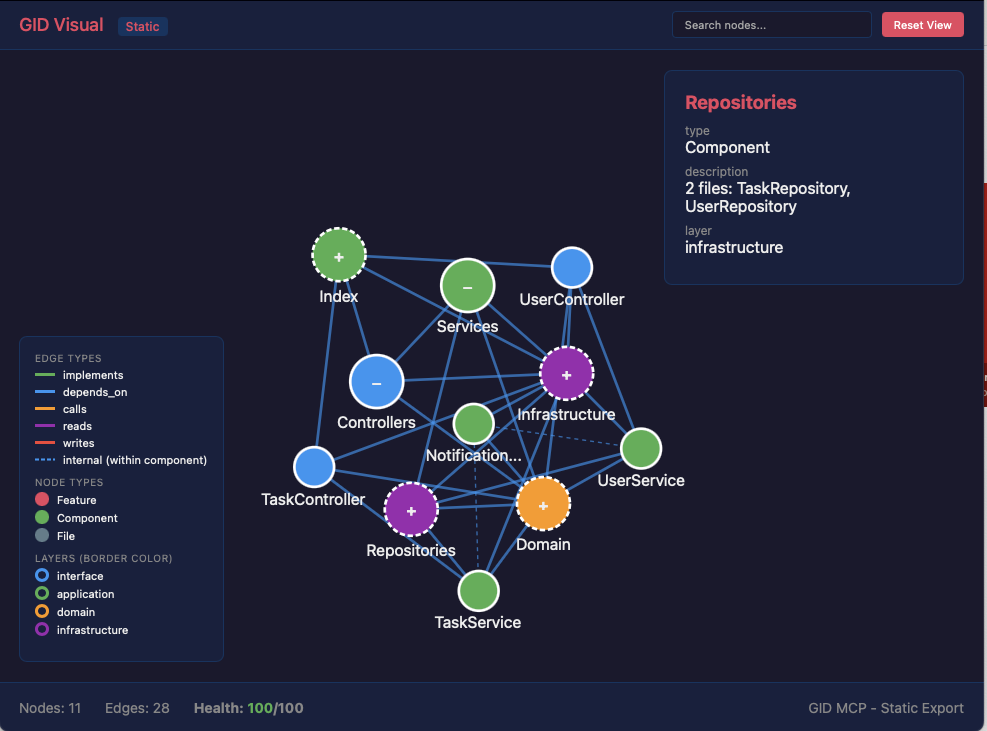
Why GID?
AI can generate code, but it can't answer:
- "What breaks if I change UserService?"
- "Which components implement the auth feature?"
- "What's the dependency path from Controller to Database?"
GID fills this gap by providing a graph-based map of your software architecture that AI assistants can query and update.
Two workflows:
- Top-down: Describe what you want to build → GID generates the architecture graph → AI implements against it
- Bottom-up: Extract a graph from existing code → Use it for impact analysis, safe refactoring, and planning new changes
The graph evolves with your project. Every time you add a feature or refactor, the graph updates — so AI always has the current map.
Dogfooding: GID's own architecture is defined as a GID graph. We used GID to build GID — tracking components, querying impact before refactoring, and planning new features. See the self-referential graph.
Tools
Query & Analysis
| Tool | Description |
|---|---|
gid_query_impact |
Analyze what components and features are affected by changing a node |
gid_query_deps |
Get dependencies or dependents of a node (with depth control) |
gid_query_common_cause |
Find shared dependencies between two nodes (useful for debugging) |
gid_query_path |
Find dependency path between two nodes |
gid_analyze |
Deep analysis of a file (functions, classes, complexity) |
gid_get_file_summary |
Structured file analysis for AI summarization |
gid_advise |
Graph health score, validation issues, and improvement suggestions |
gid_get_schema |
Get the GID graph schema with dynamic relations |
Graph Management
| Tool | Description |
|---|---|
gid_read |
Read graph structure (YAML, JSON, or summary) |
gid_init |
Initialize a new GID graph in a project |
gid_edit_graph |
Add, update, or delete nodes, edges, and relation types |
gid_refactor |
Rename, move, or delete nodes with cascade |
gid_history |
Version history — list, diff, or restore previous versions |
AI-Assisted
| Tool | Description |
|---|---|
gid_design |
Generate a graph from natural language requirements |
gid_extract |
Extract dependency graph from existing code (TypeScript/JavaScript) |
gid_semantify |
Propose semantic upgrades — map files to components, assign layers, detect features |
gid_complete |
Analyze docs to identify gaps and suggest graph additions |
gid_visual |
Generate interactive D3.js HTML visualization |
Resources
| Resource | Description |
|---|---|
gid://graph |
Current dependency graph (YAML) |
gid://health |
Health score and validation results |
gid://features |
List of all features in the graph |
Installation
Claude Desktop
Add to ~/Library/Application Support/Claude/claude_desktop_config.json:
{
  "mcpServers": {
    "gid": {
      "command": "npx",
      "args": ["graph-indexed-development-mcp"]
    }
  }
}
Claude Code
claude mcp add gid -- npx graph-indexed-development-mcp
Cursor / VS Code
Add to your MCP settings:
{
  "gid": {
    "command": "npx",
    "args": ["graph-indexed-development-mcp"]
  }
}
Quick Start
- Install the MCP server (see above)
- Initialize a graph in your project:
You: "Initialize a GID graph for this project"
→ Claude uses gid_init
- Extract dependencies from your code:
You: "Extract the dependency graph from the codebase"
→ Claude uses gid_extract
- Start querying:
You: "What would break if I change UserService?"
→ Claude uses gid_query_impact

You: "Design the architecture for a notification feature"
→ Claude uses gid_design

You: "Show me the project health score"
→ Claude uses gid_advise
Example Conversations
Top-Down: Design First, Then Build
You: "Design an e-commerce backend with auth, payments, and order tracking"
Claude uses gid_design →
  Created 4 features: UserAuth, Payment, OrderTracking, ProductCatalog
  Created 8 components across 4 layers
  Created 15 dependency edges
  Health score: 95/100

You: "Now implement the AuthService based on the graph"
Claude uses gid_query_deps →
  AuthService depends on: UserRepository, TokenManager
  Implements: UserAuth feature
  Layer: application
Claude generates code that fits the architecture.
Bottom-Up: Extract from Existing Code
You: "Extract the dependency graph from this project"
Claude uses gid_extract →
  Found 42 files, 156 dependencies
  Grouped into 12 components across 4 layers

You: "I need to refactor UserService. What would break?"
Claude uses gid_query_impact →
  Direct dependents: AuthController, ProfileController, OrderService
  Affected features: UserRegistration, OrderPayment
  5 components impacted, 2 features at risk

You: "Why do OrderService and PaymentService keep failing together?"
Claude uses gid_query_common_cause →
  Shared dependency: DatabaseService
  Both services depend on it — that's likely the root cause.
Continuous: Keep the Graph Updated
You: "I just added a NotificationService. Update the graph."
Claude uses gid_edit_graph →
  Added node: NotificationService (Component, application layer)
  Added edges: depends_on EmailClient, implements Notifications feature

You: "Check the project health"
Claude uses gid_advise →
  Health: 87/100
  Warning: NotificationService has no tests
  Warning: EmailClient has 6 dependents (high coupling)
  Suggestion: Consider splitting EmailClient into smaller modules
Visualization
You: "Visualize the current project architecture"
Claude uses gid_visual → Generates an interactive D3.js HTML file
Graph Format
GID uses a YAML-based graph format (.gid/graph.yml):
nodes:
  UserAuth:
    type: Feature
    description: User authentication and authorization
    priority: core
    status: active
  AuthService:
    type: Component
    layer: application
    description: Handles authentication logic
    path: src/services/auth.ts
  AuthController:
    type: Component
    layer: interface
    path: src/controllers/auth.ts

edges:
  - from: AuthService
    to: UserAuth
    relation: implements
  - from: AuthController
    to: AuthService
    relation: depends_on
Node types: Feature, Component, Interface, Data, File, Test, Decision
Relation types: implements, depends_on, calls, reads, writes, tested_by, defined_in, enables, blocks, requires, precedes, refines, validates, related_to, decided_by — plus custom relations you define.
Task Tracking
Nodes can have an optional tasks field for inline step tracking:
webhook-push:
  type: Component
  layer: infrastructure
  status: in_progress
  description: "Webhook push notifications HMAC-SHA256"
  tasks:
    - "[x] Implement HMAC signing"
    - "[x] DM webhook events"
    - "[ ] Run migration 011 on prod"
    - "[ ] Add retry logic"
Convention: When all tasks are done, remove the tasks field and set status: active.
Tools
| Tool | Description |
|---|---|
gid_tasks |
Query tasks across the graph. No args = all pending. --node <id> for specific node. --done to include completed. |
gid_task_update |
Toggle task completion: --node <id> --task "task text" --done true/false |
gid_read |
Now shows tasks inline in summary output |
Display Format
webhook-push [Component, infrastructure, in_progress]
  "Webhook push notifications HMAC-SHA256"
  Tasks: 2/4 done
    ✅ Implement HMAC signing
    ✅ DM webhook events
    ☐ Run migration 011 on prod
    ☐ Add retry logic
Requirements
- Node.js >= 20.0.0
Related
- GID Methodology — Specification, examples, and dogfood graph
- GID CLI — Command line interface
- GID Paper — Formal methodology (Zenodo)
License
AGPL-3.0 — See LICENSE for details.
For commercial licensing, see COMMERCIAL-LICENSE.md.
Author
Toni Tang — @tonioyeme
from github.com/potatouniverse/graph-indexed-development-mcp
Install GID Server in Claude Desktop, Claude Code & Cursor
unyly install gid-mcp-serverInstalls into Claude Desktop, Claude Code, Cursor & VS Code — handles npx, uvx and build-from-source repos for you.
First time? Get the CLI: curl -fsSL https://unyly.org/install | sh
Or configure manually
Run in your terminal:
claude mcp add gid-mcp-server -- npx -y graph-indexed-development-mcpFAQ
Is GID Server MCP free?
Yes, GID Server MCP is free — one-click install via Unyly at no cost.
Does GID Server need an API key?
No, GID Server runs without API keys or environment variables.
Is GID Server hosted or self-hosted?
Self-hosted: the server runs locally on your machine via the install command above.
How do I install GID Server in Claude Desktop, Claude Code or Cursor?
Open GID Server on unyly.org, pick your client tab (Claude Desktop, Claude Code, Cursor) and press Install — the config is generated automatically, no JSON editing.
Related MCPs
LibreOffice Tools
Enables AI agents to read, write, and edit Office documents via LibreOffice with token-efficient design. Supports multiple formats including DOCX, XLSX, PPTX, a
 by passerbyflutter
dannote/figma-use
Full Figma control: create shapes, text, components, set styles, auto-layout, variables, export. 80+ tools.
 by dannote
Logo.dev
Search and retrieve company logos by brand or domain. Customize size, format, and theme to match your design needs. Accelerate design, prototyping, and content
 by NOVA-3951
PIX4Dmatic
Enables GUI automation for controlling PIX4Dmatic on Windows through MCP. Supports launching, focusing, capturing screenshots, sending hotkeys, clicking UI elem
 by jangjo123
Compare GID Server with
Not sure what to pick?
Find your stack in 60 seconds
Author?
Embed badge for your README
Browse similar
All design MCPs