
Gmail Telegram Server
FreeNot checkedConnects Gmail and Telegram via an MCP server, enabling users to interact with their emails through a Telegram bot with commands for summaries and audio.

About
Connects Gmail and Telegram via an MCP server, enabling users to interact with their emails through a Telegram bot with commands for summaries and audio.
README
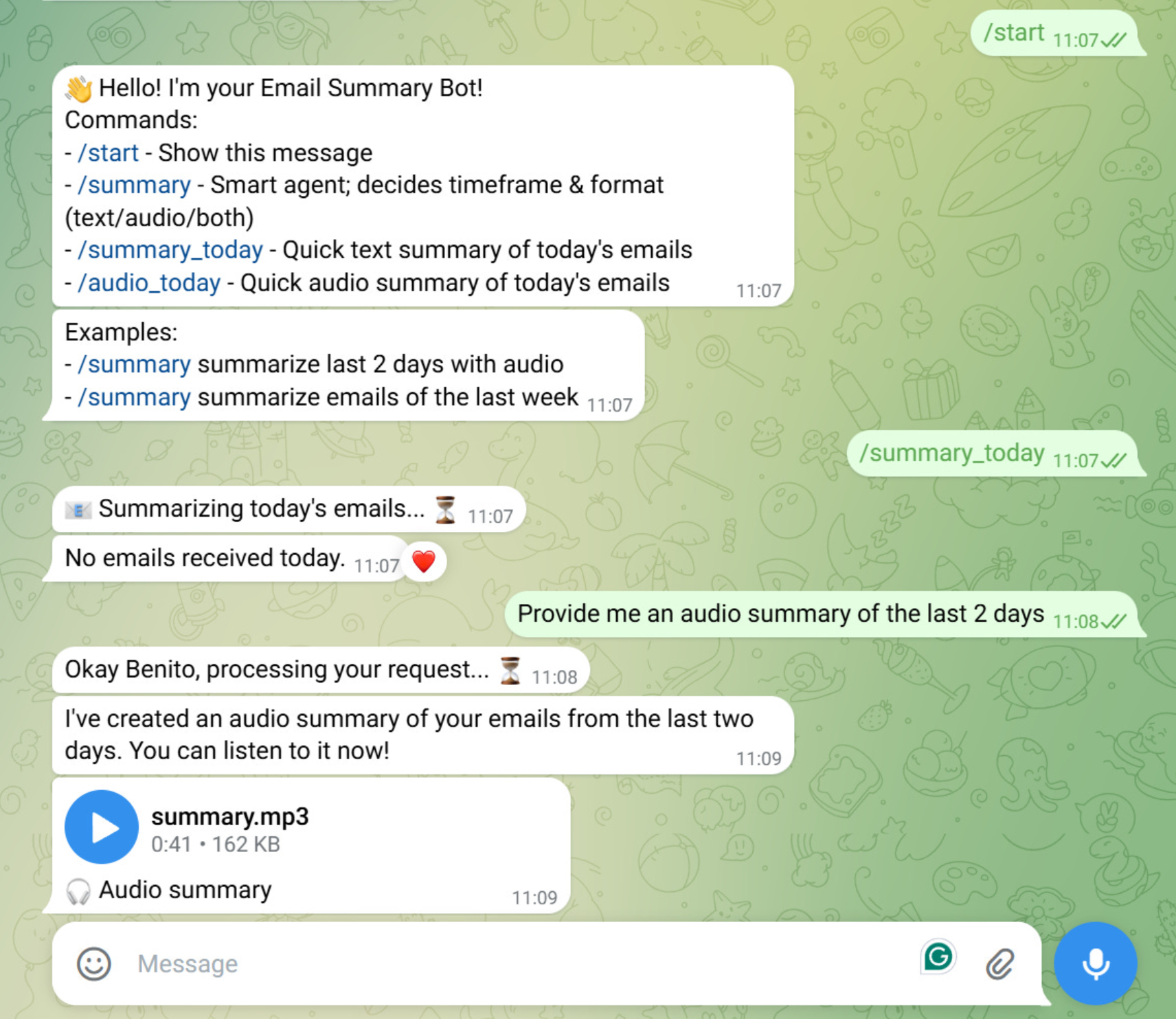
Table of Contents
Overview
Gmail Telegram MCP Server is a Python project that connects Gmail and Telegram using a Model Context Protocol (MCP) server.
It allows to interact with Gmail emails via a Telegram bot. The following commands are available:
- /start - Start interaction with the bot
- /summary_today - Quick text summary of today's emails
- /audio_today - Quick audio summary of today's emails
- /summary - Smart agent; decides timeframe & format (text/audio/both)
You can read the article about this project in my Substack Newsletter:
Project Structure
├── Makefile
├── pyproject.toml
├── pre-commit-config.yaml
├── README.md
├── run_bot.py
├── uv.lock
├── src/
│   └── voice_agent/
│       ├── config.py                    # Configuration settings
│       ├── client/                      # Client-side code
│       │   └── agent.py                 # Voice agent client
│       ├── host/
│       │   └── bot.py                   # Telegram bot
│       ├── server/
│       │   ├── gmail_server.py          # Gmail server logic
│       │   ├── prompts/
│       │   │   ├── email_prompts.py     # Email-related prompts
│       │   │   └── prompt_calls.py      # Prompt call definitions
│       │   └── tools/
│       │       ├── get_emails.py        # Email retrieval tool
│       │       └── tts_reply.py         # Text-to-speech tool
│       └── utils/
│           ├── email_parser_util.py     # Email parsing utilities
│           ├── gmail_auth_util.py       # Gmail authentication utilities
│           ├── logger_util.py           # Logging utilities
│           └── openai_utils.py          # OpenAI API utilities
├── test/                                # Unit/Integration tests
Prerequisites
- Python 3.12
- uv (for environment and package management)
- Google Cloud Project
- Telegram Bot with a bot token
- OpenAI API key
Environment Variables
Create a .env file in the root directory with the following variables:
TELEGRAM__BOT_TOKEN=your_bot_token
OPENAI__API_KEY=your_openai_api
OPENAI__MODEL=gpt-4o-mini
GOOGLE__CLIENT_ID=your_client_id
GOOGLE__CLIENT_SECRET=your_client_secret
GOOGLE__APPLICATION_CREDENTIALS=path_to_your_credentials.json
GOOGLE__SCOPES='["https://www.googleapis.com/auth/gmail.readonly"]'
GOOGLE__REDIRECT_URIS='["http://localhost"]'
GOOGLE__AUTH_URI=https://accounts.google.com/o/oauth2/auth
GOOGLE__TOKEN_URI=https://oauth2.googleapis.com/token
Additionally, after the first authentication, this token will be generated and added automatically to the .env file to make the session persistent:
GOOGLE__GMAIL_TOKEN=your_gmail_token
Installation
- Clone the repository:
   git clone [email protected]:benitomartin/gmail-telegram-mcp-server.git
   cd gmail-telegram-mcp-server
Create a virtual environment:
uv venvActivate the virtual environment:
source .venv/bin/activateInstall the required packages:
uv sync --all-groupsCreate a
.envfile in the root directory:cp env.example .env
Usage
Configuration
Configure API keys, model names, and other settings in:
src/voice_agent/config.py.envfile
Google Cloud Project Setup
Create a Google Cloud Project.
Enable the Gmail API and Cloud Text-to-Speech API for your project.
Under "APIs & Services" > "OAuth consent screen", create your app (external) and configure the necessary scopes.
- Add the following scopes (also in the
.envfile):https://www.googleapis.com/auth/gmail.readonly
- Add the following scopes (also in the
Add your email address as an authorized tests user.
Create OAuth 2.0 credentials (application type: Desktop App) and copy the client ID and secret to your
.envfile.Run the following command to set the
GOOGLE__APPLICATION_CREDENTIALSvariable. Add the path of the credentials JSON file to the.envfile. In Linux/Ubuntu is under/home/user/.config/gcloud/application_default_credentials.jsongcloud auth application-default login
Modules
- Voice Agent: Handles voice interactions and agent logic.
- Client: Contains the agent for client-side operations.
- Host: Telegram bot integration.
- Server: Gmail server logic, prompt management, and tools for email and TTS.
- Utils: Utilities for email parsing, Gmail authentication, logging, and OpenAI integration.
Run the Telegram bot
uv run run_bot.py
Testing
Run all tests:
make tests
Quality Checks
Run all quality checks (lint, format, type check, clean):
make all
Individual Commands:
Display all available commands:
make helpCheck code formatting and linting:
make all-checkFix code formatting and linting:
make all-fixClean cache and build files:
make clean
License
This project is licensed under the MIT License - see the LICENSE file for details.
Installing Gmail Telegram Server
This server has no published package — it is built from source. Open the repository and follow its README.
▸ github.com/benitomartin/gmail-telegram-mcp-serverFAQ
Is Gmail Telegram Server MCP free?
Yes, Gmail Telegram Server MCP is free — one-click install via Unyly at no cost.
Does Gmail Telegram Server need an API key?
No, Gmail Telegram Server runs without API keys or environment variables.
Is Gmail Telegram Server hosted or self-hosted?
A hosted option is available: Unyly runs the server in the cloud, no local setup required.
How do I install Gmail Telegram Server in Claude Desktop, Claude Code or Cursor?
Open Gmail Telegram Server on unyly.org, pick your client tab (Claude Desktop, Claude Code, Cursor) and press Install — the config is generated automatically, no JSON editing.
Related MCPs
Gmail
Read, send and search emails from Claude
 by Google
Slack
Send, search and summarize Slack messages
 by Slack
Runbear
No-code MCP client for team chat platforms, such as Slack, Microsoft Teams, and Discord.
Discord Server
A community discord server dedicated to MCP by [Frank Fiegel](https://github.com/punkpeye)
Klavis AI
Open Source MCP Infra. Hosted MCP servers and MCP clients on Slack and Discord.
Work90210/APIFold
Turn any REST API into a hosted MCP server, with ready-made public servers for GitHub, Stripe, Slack, OpenAI, Notion and more.
 by Work90210
arikusi/deepseek-mcp-server
DeepSeek AI chat and reasoning with multi-turn sessions, function calling, thinking mode and cost tracking.
 by arikusi
hashgraph-online/hashnet-mcp-js
Discover, register and chat with AI agents on the Hashgraph network via the Registry Broker.
 by hashgraph-online
profullstack/mcp-server
Developer utilities: SEO optimization, document conversion, domain lookup, email validation, QR codes, weather data, social media posting and security scanning.
 by profullstack
WayStation-ai/mcp
Connect MCP hosts to apps such as Notion, Slack, Monday and Airtable.
 by waystation-ai
Compare Gmail Telegram Server with
Not sure what to pick?
Find your stack in 60 seconds
Author?
Embed badge for your README
Browse similar
All communication MCPs