
Google Drive CRUD Server
FreeNot checkedMCP server that gives Claude full read-write access to Google Drive, Docs, Sheets, and Slides using your own Google OAuth credentials and hosted server.

About
MCP server that gives Claude full read-write access to Google Drive, Docs, Sheets, and Slides using your own Google OAuth credentials and hosted server.
README
Give Claude full read-write access to your Google Drive, Docs, Sheets, and Slides, running on a server you own with Google credentials you control.
CRUD stands for create, read, update, delete - the four things this server lets Claude do to your files, as opposed to read-only access.
Start here if you are not a developer
The Railway button above deploys the server, but it still needs a Google Cloud project and an OAuth client before it will connect to Claude. The guided setup walks through every step, including a copy-paste prompt that has Claude do the Google Cloud and Railway configuration with you:
atlanticlabs.ai/mcp-google-drive
That is the recommended path. The manual instructions further down are for people who would rather run the commands themselves.
Once it is deployed, the connector URL to paste into claude.ai is:
https://<your-railway-domain>/mcp
The /mcp path matters. A request to the bare domain returns an error.
What it does
The server exposes Google Drive, Docs, Sheets, and Slides to Claude as MCP tools. MCP is the Model Context Protocol, the open standard Claude uses to talk to outside systems.
Drive files
| Tool | What it does |
|---|---|
search_files |
Query-based search across every drive the account can reach |
list_recent_files |
Most recently modified files, excluding trashed ones |
get_file_metadata |
Metadata for a single file by ID |
read_file_content |
Extract text from Docs, Sheets, PDF, and Office files |
download_file_content |
Raw bytes, returned inline as base64, capped at 25 MB by default |
create_file |
Create a file or folder, converting to a native Google type unless told not to |
create_resumable_upload_session |
Return an upload URL so large files go straight to Google instead of through Claude |
import_to_google_doc |
Import Markdown, DOCX, TXT, HTML, RTF, or ODT and convert to a native Doc |
list_drive_items |
List the children of a folder |
create_drive_folder |
Create a folder |
copy_drive_file |
Copy a file |
update_drive_file |
Rename, move, or trash a file (metadata only, not content) |
get_drive_shareable_link |
Get a shareable link |
get_drive_file_permissions, check_drive_file_public_access |
Inspect who has access |
manage_drive_access, set_drive_file_permissions |
Grant or revoke access |
Google Docs
| Tool | What it does |
|---|---|
docs_get |
Read a document's content and structure, including the character indexes needed to edit it |
docs_batch_update |
Apply a batch of structural edits: insert text, style, tables, images, and so on |
docs_replace_all_text |
Replace every occurrence of a string, which is how template filling works |
Google Sheets
| Tool | What it does |
|---|---|
spreadsheets_get |
Read a spreadsheet's structure and values |
spreadsheets_batch_update |
Apply batch changes, including native charts, formatting, and sheet operations |
Google Slides
| Tool | What it does |
|---|---|
presentations_get |
Read a presentation's slides and elements |
presentations_batch_update |
Apply batch changes: create slides, insert text and shapes, place native charts |
The Docs, Sheets, and Slides tools expose the underlying batch update APIs rather than a simplified wrapper, so Claude can build a formatted document, a real spreadsheet chart, or a slide layout rather than only writing plain text into a file.
How it works
The server runs on your own hosting account and authenticates with your own Google OAuth client. Nothing routes through infrastructure belonging to me or to anyone else.
- Your Google Cloud project. You create the OAuth client, so the consent screen names your project and the access tokens are issued to it.
- Your server. Railway is the one-click option, but the server is a normal Python application with a Dockerfile and runs anywhere that can run a container.
- OAuth 2.1, multi-user. Each person who connects authorizes with their own Google account and sees only their own files. The server validates bearer tokens against Google on every call.
- No stored copies of your files. Downloads and inline uploads are held in memory only. When
create_fileis given a URL to fetch from, the bytes are buffered while they transfer: in stateless mode that buffer stays in memory up to 5 MB and spills to a temporary file beyond it, and otherwise it is a temporary file regardless of size. Either way the buffer is deleted when the call ends. - Scopes. Drive read and write, Sheets read and write, Slides read and write, plus basic profile and email for identifying the signed-in user. Read-only mode is available and drops the write scopes entirely.
Manual self-host
Prerequisites
- Python 3.10 or newer (
.python-versionpins the exact version) - The
uvpackage manager:curl -LsSf https://astral.sh/uv/install.sh | sh - A Google account and a Google Cloud project (the free tier is enough)
1. Configure Google Cloud
In console.cloud.google.com, select or create a project.
Enable the APIs. Under APIs and Services, then Library, enable each of: Google Drive API, Google Docs API, Google Sheets API, Google Slides API.
Configure the OAuth consent screen. Under APIs and Services, then OAuth consent screen:
- User type: External, or Internal if you have a Google Workspace organization.
- Add yourself under Test users so you can authorize while the consent screen is still in testing mode.
- Add these scopes:
openidhttps://www.googleapis.com/auth/userinfo.emailhttps://www.googleapis.com/auth/userinfo.profilehttps://www.googleapis.com/auth/drivehttps://www.googleapis.com/auth/drive.readonlyhttps://www.googleapis.com/auth/drive.filehttps://www.googleapis.com/auth/spreadsheetshttps://www.googleapis.com/auth/spreadsheets.readonlyhttps://www.googleapis.com/auth/presentationshttps://www.googleapis.com/auth/presentations.readonly
Create an OAuth 2.0 client ID. Under APIs and Services, then Credentials, choose Create credentials, then OAuth client ID.
- Application type: Web application, not Desktop app.
- Authorized redirect URI:
http://localhost:8000/oauth2callbackfor local work, orhttps://<your-domain>/oauth2callbackfor a deployed server. - Save the client ID and client secret.
2. Configure the environment
cp env.example .env
Fill in the client ID and secret. The recommended local configuration matches production:
GOOGLE_OAUTH_CLIENT_ID=your-client-id.apps.googleusercontent.com
GOOGLE_OAUTH_CLIENT_SECRET=your-client-secret
GOOGLE_OAUTH_REDIRECT_URI=http://localhost:8000/oauth2callback

WORKSPACE_MCP_TRANSPORT=streamable-http
WORKSPACE_MCP_PORT=8000
WORKSPACE_MCP_HOST=0.0.0.0
WORKSPACE_EXTERNAL_URL=http://localhost:8000

MCP_ENABLE_OAUTH21=true
WORKSPACE_MCP_STATELESS_MODE=true
Always set WORKSPACE_EXTERNAL_URL explicitly on a deployed server. It is the base URL the OAuth endpoints are built from. If it is unset, that base falls back to WORKSPACE_MCP_BASE_URI and the port, which defaults to http://localhost:8000 - correct locally, wrong anywhere else, and the usual cause of a redirect_uri_mismatch error. Setting GOOGLE_OAUTH_REDIRECT_URI explicitly, as above, pins the callback itself.
3. Install and run
uv sync
uv run main.py --transport streamable-http
The server listens on http://localhost:8000/mcp. To check it before wiring up a client:
npx @modelcontextprotocol/inspector
# Transport: streamable-http
# URL: http://localhost:8000/mcp
# Connect, complete the OAuth handshake, then list tools
Docker works too and reads the same .env:
docker compose up --build
4. Deploy
The Dockerfile is ready for Railway as it stands:
railway up --service gdrive-mcp
Set GOOGLE_OAUTH_CLIENT_ID, GOOGLE_OAUTH_CLIENT_SECRET, WORKSPACE_EXTERNAL_URL=https://<your-domain>, MCP_ENABLE_OAUTH21=true, WORKSPACE_MCP_STATELESS_MODE=true, and WORKSPACE_MCP_TRANSPORT=streamable-http in the Railway service variables, then add https://<your-domain>/oauth2callback to the authorized redirect URIs on the Google OAuth client.
5. Connect claude.ai
claude.ai fetches the server from Anthropic's servers, not from your browser, so it needs a public HTTPS URL. A deployed Railway service gives you one. For local testing, a tunnel works: run ngrok http 8000, then set WORKSPACE_EXTERNAL_URL and GOOGLE_OAUTH_REDIRECT_URI to the tunnel URL and add that callback to the Google OAuth client. Free ngrok URLs change on every restart, which means editing both places again each time.
In claude.ai, go to Settings, then Connectors, then Add custom connector, and enter https://<your-domain>/mcp. Authorize with a Google account that is listed under Test users on the consent screen.
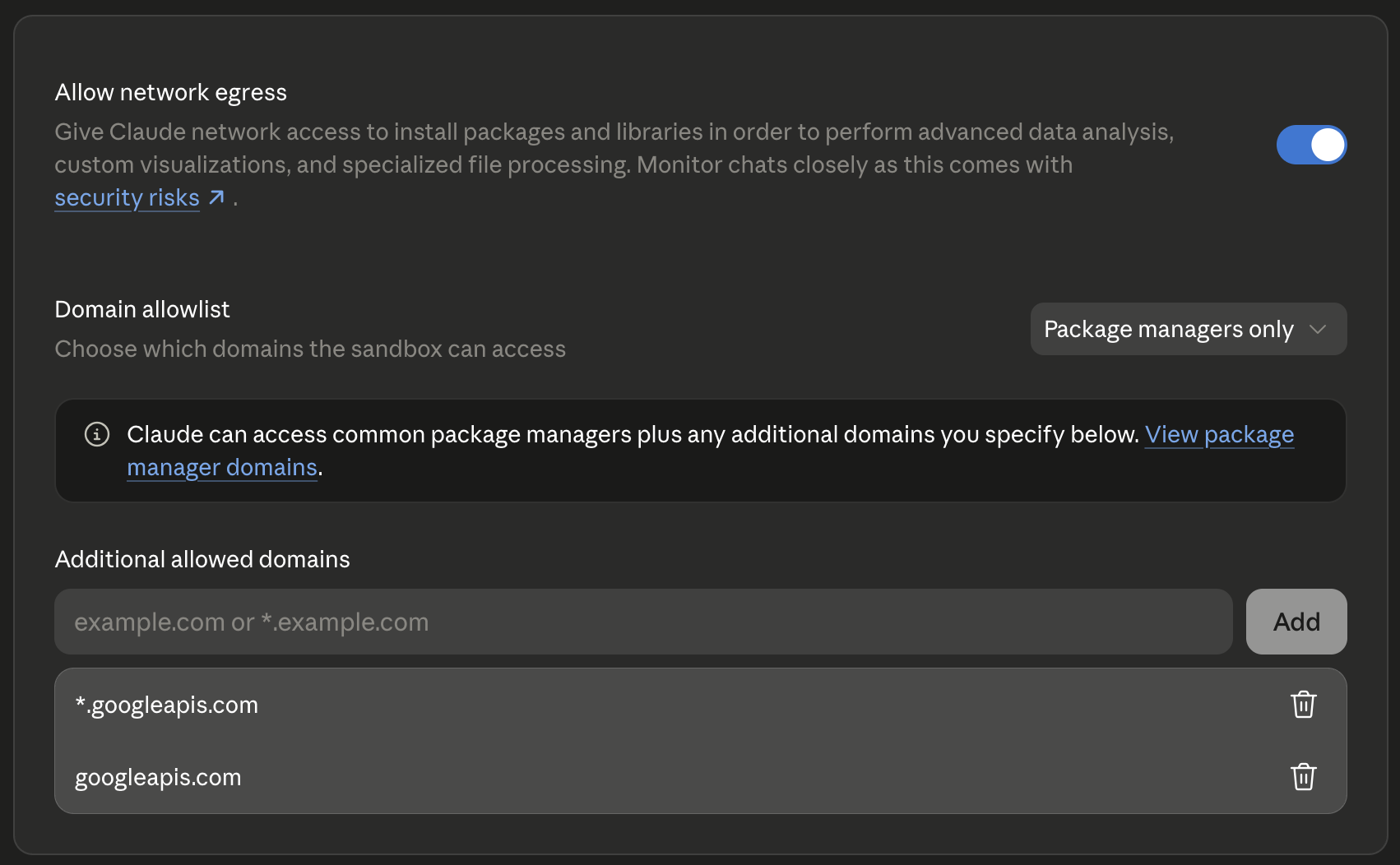
One extra step if you want Claude to upload files it generates in code: in claude.ai, under Settings, then Capabilities, enable network egress and add *.googleapis.com and googleapis.com to the allowed domains. Without that, the connector itself still works, but a code execution step that pushes bytes out to Google is blocked by the sandbox firewall.
Local use with Claude Desktop
Claude Desktop speaks stdio rather than HTTP. Comment out WORKSPACE_MCP_TRANSPORT, MCP_ENABLE_OAUTH21, and WORKSPACE_MCP_STATELESS_MODE, then set:
[email protected]
MCP_SINGLE_USER_MODE=1
WORKSPACE_MCP_CREDENTIALS_DIR=./store_creds
In this mode the server also exposes a start_google_auth tool for kicking off the browser authorization flow. It is hidden when OAuth 2.1 is enabled, because the client handles authorization there instead.
Run uv run main.py --single-user, and add this to ~/Library/Application Support/Claude/claude_desktop_config.json:
{
  "mcpServers": {
    "gdrive": {
      "command": "uv",
      "args": ["run", "/absolute/path/to/this/repo/main.py", "--single-user"]
    }
  }
}
Environment variables
These are the variables a normal deployment needs. The code reads a number of others for reverse proxy, service account, and alternate credential store setups, which env.example and the source cover.
| Variable | Required | Default | What it does |
|---|---|---|---|
GOOGLE_OAUTH_CLIENT_ID |
Yes | none | OAuth client ID from Google Cloud |
GOOGLE_OAUTH_CLIENT_SECRET |
Yes | none | OAuth client secret from Google Cloud |
GOOGLE_OAUTH_REDIRECT_URI |
No | <base URL>/oauth2callback |
Callback URI, and it must match one registered on the OAuth client |
WORKSPACE_EXTERNAL_URL |
Yes when deployed | none | Public URL the server is reachable at, used as the base for the OAuth endpoints |
WORKSPACE_MCP_BASE_URI |
No | http://localhost |
Base used with the port when WORKSPACE_EXTERNAL_URL is unset |
WORKSPACE_MCP_TRANSPORT |
No | stdio |
stdio or streamable-http. Deployed servers need streamable-http |
WORKSPACE_MCP_PORT |
No | 8000 |
Port to bind. Railway sets PORT, which takes precedence |
WORKSPACE_MCP_HOST |
No | 0.0.0.0 |
Bind address |
MCP_ENABLE_OAUTH21 |
No | false |
Multi-user mode where each caller sends their own bearer token |
WORKSPACE_MCP_STATELESS_MODE |
No | off | Keep no per-session state on disk, needed behind a stateless proxy |
WORKSPACE_MCP_CREDENTIALS_DIR |
No | ~/.google_workspace_mcp/credentials |
Where credentials persist when not stateless, for local use |
WORKSPACE_MCP_READ_ONLY |
No | off | Drop the write scopes and disable every mutating tool |
USER_GOOGLE_EMAIL |
No | none | Pin the server to one Google account in single-user mode |
MCP_SINGLE_USER_MODE |
No | off | Single-user mode, an alternative to OAuth 2.1 |
DOWNLOAD_FILE_CONTENT_MAX_MB |
No | 25 |
Largest file download_file_content will return inline |
Troubleshooting
| Symptom | Cause and fix |
|---|---|
redirect_uri_mismatch |
The redirect URI does not exactly match the one registered in Google Cloud. Check protocol, port, and path. |
Access blocked: This app's request is invalid |
The consent screen is unpublished and your account is not in the test-users list. |
Drive API has not been used in project ... before or it is disabled |
An API was not enabled. The error message includes a direct link to enable it. |
A deployed server sends users to a localhost URL during authorization |
WORKSPACE_EXTERNAL_URL is not set, so the OAuth base fell back to http://localhost:8000. Point it at the public URL. |
| A POST to the server returns 405 | The connector URL is missing the /mcp path. |
--single-user is incompatible with OAuth 2.1 mode |
Both MCP_ENABLE_OAUTH21=true and --single-user are set. Pick one. |
| Claude can call tools but uploading a generated file fails | Claude's sandbox is blocking outbound traffic to Google. Add *.googleapis.com to the egress allowlist in claude.ai settings. |
Attribution
This is a fork of the google_workspace_mcp project, taken at commit 5495c83cd3ac503d00cd8015de944c9949cd6443. The OAuth machinery, server scaffold, tool registry, and Drive helpers are that project's work, and this fork would not exist without it.
What changed here: the Google services this fork does not need were removed (Gmail, Calendar, Forms, Chat, Tasks, Contacts, Search, and Apps Script), which keeps the consent screen and the authorization blast radius down to Drive, Docs, Sheets, and Slides; the overlapping Drive tools were renamed and reshaped to match the tool surface of Claude's built-in Drive connector, so skills written against the built-in tools work unchanged; binary uploads were fixed, since upstream encoded content as UTF-8 regardless of the file type and turned an uploaded xlsx or pptx into a file containing the literal base64 text; and the Docs, Sheets, and Slides batch update tools were added for native-chart and template-filling workflows.
License
MIT, inherited from upstream. See LICENSE.
Maintained by Adam Walker at Atlantic Labs AI. Questions: [email protected]
Installing Google Drive CRUD Server
This server has no published package — it is built from source. Open the repository and follow its README.
▸ github.com/adampaulwalker/claude-gdrive-mcpFAQ
Is Google Drive CRUD Server MCP free?
Yes, Google Drive CRUD Server MCP is free — one-click install via Unyly at no cost.
Does Google Drive CRUD Server need an API key?
No, Google Drive CRUD Server runs without API keys or environment variables.
Is Google Drive CRUD Server hosted or self-hosted?
Self-hosted: the server runs locally on your machine via the install command above.
How do I install Google Drive CRUD Server in Claude Desktop, Claude Code or Cursor?
Open Google Drive CRUD Server on unyly.org, pick your client tab (Claude Desktop, Claude Code, Cursor) and press Install — the config is generated automatically, no JSON editing.
Related MCPs


Compare Google Drive CRUD Server with
Not sure what to pick?
Find your stack in 60 seconds
Author?
Embed badge for your README
Browse similar
All productivity MCPs