
Graphmemory
FreeNot checkedAn MCP server that builds a semantic graph memory from a project directory, indexing documentation and code into graph structures and exposing 70+ MCP tools for

About
An MCP server that builds a semantic graph memory from a project directory, indexing documentation and code into graph structures and exposing 70+ MCP tools for search, knowledge management, task management, and more.
README
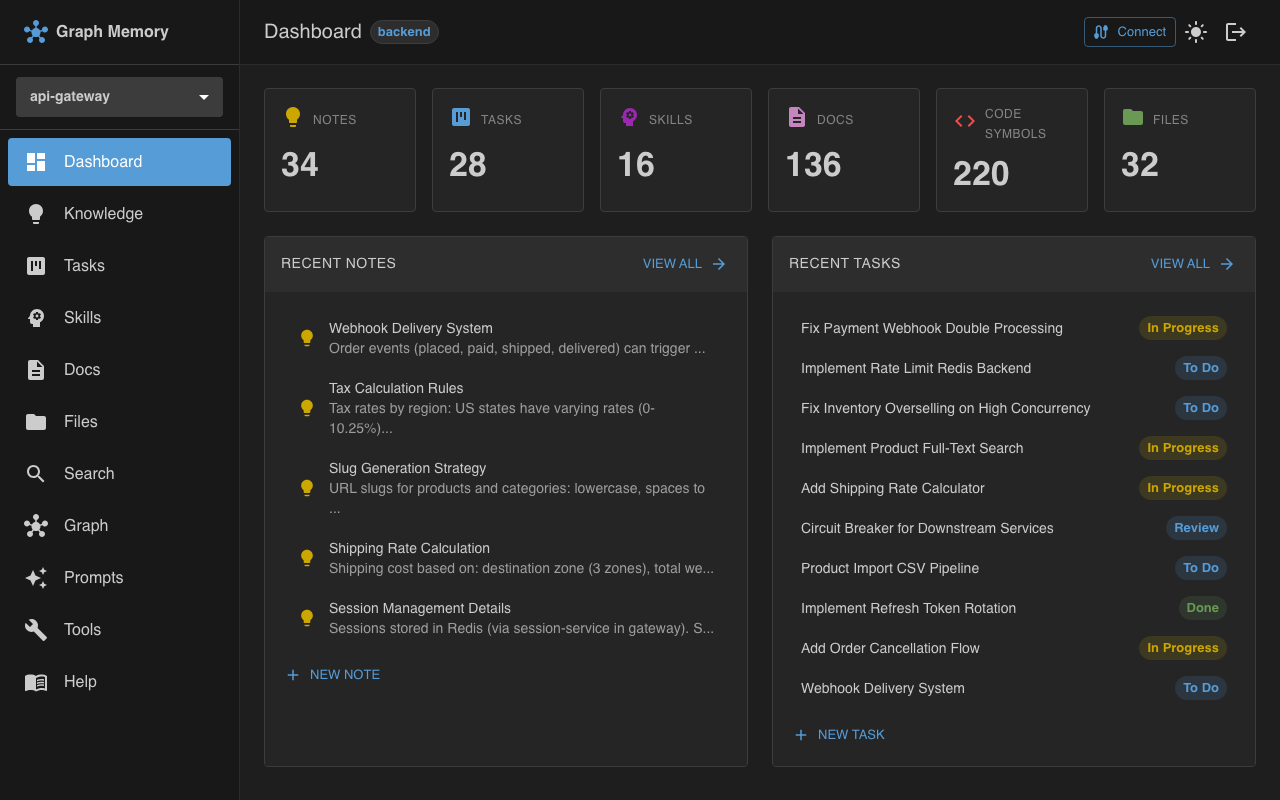
An MCP server that builds a semantic graph memory from a project directory. Indexes markdown docs, TypeScript/JavaScript source code, and all project files into graph structures, then exposes them as 70 MCP tools + REST API + Web UI.
Quick start
npm install -g @graphmemory/server
cd /path/to/my-project
graphmemory serve
That's it. No config file needed — the current directory becomes your project. Open http://localhost:3000 for the web UI.
The embedding model (~560 MB) downloads on first startup and is cached at ~/.graph-memory/models/.
Connect an MCP client
Claude Code:
claude mcp add --transport http --scope project graph-memory http://localhost:3000/mcp/my-project
Claude Desktop — add via Settings > Connectors, enter the URL:
http://localhost:3000/mcp/my-project
Cursor / Windsurf / other clients — enter the URL directly in settings:
http://localhost:3000/mcp/my-project
The project ID is your directory name. Multiple clients can connect simultaneously.
With a config file
For multi-project setups, custom embedding models, auth, or workspaces — create graph-memory.yaml:
projects:
  my-app:
    projectDir: "/path/to/my-app"
  docs-site:
    projectDir: "/path/to/docs"
    graphs:
      code:
        enabled: false
graphmemory serve --config graph-memory.yaml
See docs/configuration.md for full reference and graph-memory.yaml.example for all options.
Docker
docker run -d \
  --name graph-memory \
  -p 3000:3000 \
  -v $(pwd)/graph-memory.yaml:/data/config/graph-memory.yaml:ro \
  -v /path/to/my-app:/data/projects/my-app:ro \
  -v graph-memory-models:/data/models \
  ghcr.io/graph-memory/graphmemory-server
Docker Compose:
services:
  graph-memory:
    image: ghcr.io/graph-memory/graphmemory-server
    ports:
      - "3000:3000"
    volumes:
      - ./graph-memory.yaml:/data/config/graph-memory.yaml:ro
      - /path/to/my-app:/data/projects/my-app
      - models:/data/models
    restart: unless-stopped
    depends_on:
      redis:
        condition: service_healthy

  redis:
    image: redis:7-alpine
    restart: unless-stopped
    volumes:
      - redis-data:/data
    healthcheck:
      test: ["CMD", "redis-cli", "ping"]
      interval: 10s
      timeout: 3s
      retries: 3

volumes:
  models:
  redis-data:
Redis is optional. Remove the
redisservice anddepends_onif you don't need shared session store or embedding cache.
See docs/docker.md for details.
What it does
| Feature | Description |
|---|---|
| Docs indexing | Parses markdown into heading-based chunks with cross-file links and code block extraction |
| Code indexing | Extracts AST symbols (functions, classes, interfaces) via tree-sitter |
| File index | Indexes all project files with metadata, language detection, directory hierarchy |
| Knowledge graph | Persistent notes and facts with typed relations and cross-graph links |
| Task management | Kanban workflow with priorities, assignees, and cross-graph context |
| Skills | Reusable recipes with steps, triggers, and usage tracking |
| Hybrid search | BM25 keyword + vector cosine similarity with BFS graph expansion |
| Real-time | File watching + WebSocket push to UI |
| Multi-project | One process manages multiple projects from a single config |
| Workspaces | Share knowledge/tasks/skills across related projects |
| Auth & ACL | Password login (JWT), API keys, OAuth 2.0 (PKCE), 4-level access control |
70 MCP tools
| Group | Tools |
|---|---|
| Context | get_context |
| Docs | docs_list_files, docs_get_toc, docs_search, docs_get_node, docs_search_files, docs_find_examples, docs_search_snippets, docs_list_snippets, docs_explain_symbol, docs_cross_references |
| Code | code_list_files, code_get_file_symbols, code_search, code_get_symbol, code_search_files |
| Files | files_list, files_search, files_get_info |
| Knowledge | notes_create, notes_update, notes_delete, notes_get, notes_list, notes_search, notes_create_link, notes_delete_link, notes_list_links, notes_find_linked, notes_add_attachment, notes_remove_attachment |
| Tasks | tasks_create, tasks_update, tasks_delete, tasks_get, tasks_list, tasks_search, tasks_move, tasks_reorder, tasks_link, tasks_create_link, tasks_delete_link, tasks_find_linked, tasks_add_attachment, tasks_remove_attachment |
| Epics | epics_create, epics_update, epics_delete, epics_get, epics_list, epics_search, epics_link_task, epics_unlink_task |
| Skills | skills_create, skills_update, skills_delete, skills_get, skills_list, skills_search, skills_recall, skills_bump_usage, skills_link, skills_create_link, skills_delete_link, skills_find_linked, skills_add_attachment, skills_remove_attachment |
Web UI
Dashboard, Knowledge (notes CRUD), Tasks (kanban board with drag-drop), Skills (recipes), Docs browser, Code browser (symbols, edges, source), Files browser, Prompts (AI prompt generator), Search (cross-graph), Tools (MCP explorer), Help.
Light/dark theme. Real-time WebSocket updates. Login page when auth is configured.
Authentication
users:
  alice:
    name: "Alice"
    email: "[email protected]"
    apiKey: "mgm-key-abc123"
    passwordHash: "$scrypt$65536$..."   # generated by: graphmemory users add

server:
  jwtSecret: "your-secret"
  defaultAccess: rw
  redis:                              # optional: session store + embedding cache
    enabled: true
    url: "redis://localhost:6379"
- UI login: email + password → JWT cookies (httpOnly, SameSite=Strict)
- API access:
Authorization: Bearer <apiKey> - OAuth 2.0: Authorization Code + PKCE (S256) with frontend consent page at
/ui/auth/authorize; also supports client credentials and refresh tokens - OAuth endpoints:
/api/oauth/userinfo,/api/oauth/introspect,/api/oauth/revoke,/api/oauth/end-session - ACL: graph > project > workspace > server > defaultAccess (
deny/r/rw) - Redis (optional): when
server.redisis configured, used for OAuth session store and embedding cache
Development
npm run dev              # tsc --watch (backend)
cd ui && npm run dev     # Vite on :5173, proxies /api → :3000
npm test                 # 1809 tests across 45 suites
Documentation
Full documentation is in docs/:
- Concepts: docs indexing, code indexing, tasks, skills, knowledge, file index
- Architecture: system architecture, graphs overview, search algorithms, embeddings
- API: REST API, MCP tools guide, WebSocket
- Operations: CLI, configuration, Docker, npm
- Security: authentication, security
- UI: architecture, features, patterns
- Development: testing, API patterns
Contributing
Contributions are welcome! See CONTRIBUTING.md for guidelines.
For security vulnerabilities, see SECURITY.md.
License
Elastic License 2.0 (ELv2) — free to use, modify, and self-host. Not permitted to offer as a managed/hosted service.
Install Graphmemory in Claude Desktop, Claude Code & Cursor
unyly install graphmemoryInstalls into Claude Desktop, Claude Code, Cursor & VS Code — handles npx, uvx and build-from-source repos for you.
First time? Get the CLI: curl -fsSL https://unyly.org/install | sh
Or configure manually
Run in your terminal:
claude mcp add graphmemory -- npx -y @graphmemory/serverFAQ
Is Graphmemory MCP free?
Yes, Graphmemory MCP is free — one-click install via Unyly at no cost.
Does Graphmemory need an API key?
No, Graphmemory runs without API keys or environment variables.
Is Graphmemory hosted or self-hosted?
Self-hosted: the server runs locally on your machine via the install command above.
How do I install Graphmemory in Claude Desktop, Claude Code or Cursor?
Open Graphmemory on unyly.org, pick your client tab (Claude Desktop, Claude Code, Cursor) and press Install — the config is generated automatically, no JSON editing.
Related MCPs
GitHub
PRs, issues, code search, CI status
 by GitHub
Filesystem
Secure file operations with configurable access controls.
Memory
Knowledge graph-based persistent memory system.
Template MCP Server
A CLI tool to create a new Model Context Protocol server project with TypeScript support, dual transport options, and an extensible structure
 by mcpdotdirect
Compare Graphmemory with
Not sure what to pick?
Find your stack in 60 seconds
Author?
Embed badge for your README
Browse similar
All development MCPs