
Gretl MCP
FreeNot checkedRun Hansl/Gretl econometrics workflows via MCP with GUI launch and artifacts.

About
Run Hansl/Gretl econometrics workflows via MCP with GUI launch and artifacts.
README
Built for AI agents: run Hansl/Gretl workflows, get graph screenshots, and view calculations in the real Gretl GUI.
It lets MCP clients run Gretl/Hansl scripts, raw Gretl command lines, existing
.inp files, package operations, package builds, help lookups, dataset
summaries, and OLS models. The generic gretl_run_script tool is the main path
for prompt-generated Gretl workflows: the client writes Hansl from the user's
request, runs it through Gretl, and returns Gretl's output plus generated
artifacts.
Keywords: Claude Gretl, MCP econometrics, Hansl AI, Gretl GUI automation.
Key Features
- Scriptable Gretl control through
gretlcli. - GUI-first workflow tools that launch
gretl.exeand fail if the GUI did not open. - Capability discovery for Gretl commands, functions, and package commands.
- Generic execution tools for full Hansl scripts, command lists, and local
.inpscript files. - Package tools for
pkgandmakepkgworkflows from the Gretl Function Package Guide. - High-level tools for version checks, command help, dataset summaries, and OLS.
- Stdio transport, compatible with common MCP clients.
- Safe defaults for arbitrary scripts, with documented escape hatches.
Requirements
- Node.js 20 or newer.
- Gretl 2026b or newer with
gretlcliavailable. - An MCP client that supports stdio servers.
Getting Started
One-command install (after npm publish):
npx -y gretl-mcp@latest --version
Local install from GitHub:
git clone https://github.com/OndrejLapes/GretlMCP.git
cd GretlMCP
npm install
npm run build
Then point your MCP client at the built server:
{
  "mcpServers": {
    "gretl": {
      "command": "node",
      "args": ["C:\\Users\\YOUR_USER\\GretlMCP\\dist\\index.js"],
      "env": {
        "GRETL_CLI": "C:\\Users\\YOUR_USER\\tools\\gretl\\gretlcli.exe",
        "GRETL_GUI": "C:\\Users\\YOUR_USER\\tools\\gretl\\gretl.exe"
      }
    }
  }
}
Visual Walkthrough
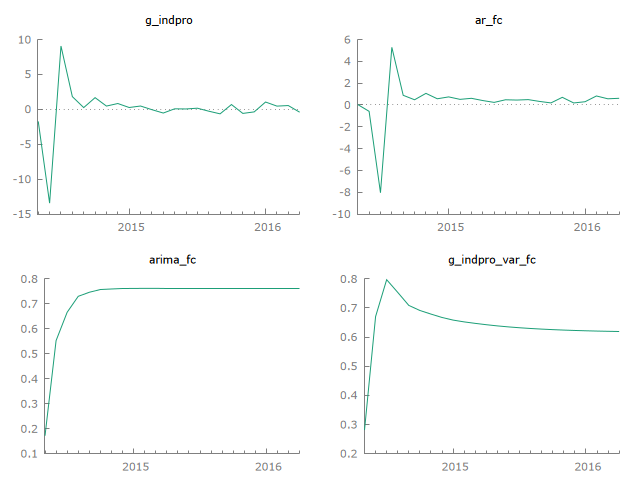
Forecast output example (actual vs forecast):
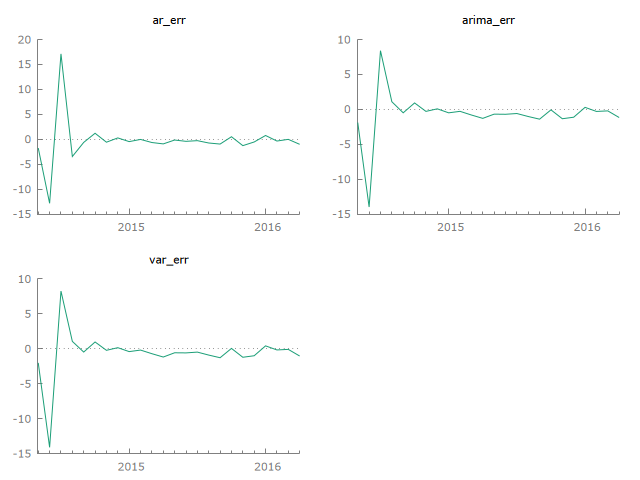
Forecast error panel:
Install Gretl
Windows
Download Gretl from the official page: https://gretl.sourceforge.net/win32/
For a no-admin setup, extract the zip archive to:
C:\Users\YOUR_USER\tools\gretl
Verify:
& C:\Users\YOUR_USER\tools\gretl\gretlcli.exe --version
macOS
Install via Homebrew (if available on your setup) or the Gretl project site:
brew install gretl
gretlcli --version
Linux
Install from your distro packages, then verify:
sudo apt-get install gretl    # Debian/Ubuntu example
gretlcli --version
MCP Client Config
Use this JSON config for stdio MCP clients:
{
  "mcpServers": {
    "gretl": {
      "command": "node",
      "args": ["C:\\Users\\YOUR_USER\\GretlMCP\\dist\\index.js"],
      "env": {
        "GRETL_CLI": "C:\\Users\\YOUR_USER\\tools\\gretl\\gretlcli.exe",
        "GRETL_GUI": "C:\\Users\\YOUR_USER\\tools\\gretl\\gretl.exe"
      }
    }
  }
}
After npm publication, the standard MCP config is:
{
  "mcpServers": {
    "gretl": {
      "command": "npx",
      "args": ["-y", "gretl-mcp@latest"],
      "env": {
        "GRETL_CLI": "C:\\Users\\YOUR_USER\\tools\\gretl\\gretlcli.exe",
        "GRETL_GUI": "C:\\Users\\YOUR_USER\\tools\\gretl\\gretl.exe"
      }
    }
  }
}
Client Setup
Claude Code
Local GitHub build:
claude mcp add gretl node C:\Users\YOUR_USER\GretlMCP\dist\index.js
npm install path:
claude mcp add gretl npx -y gretl-mcp@latest
Codex
Local GitHub build:
[mcp_servers.gretl]
command = "node"
args = ["C:\\Users\\YOUR_USER\\GretlMCP\\dist\\index.js"]

[mcp_servers.gretl.env]
GRETL_CLI = "C:\\Users\\YOUR_USER\\tools\\gretl\\gretlcli.exe"
GRETL_GUI = "C:\\Users\\YOUR_USER\\tools\\gretl\\gretl.exe"
npm install path:
[mcp_servers.gretl]
command = "npx"
args = ["-y", "gretl-mcp@latest"]

[mcp_servers.gretl.env]
GRETL_CLI = "C:\\Users\\YOUR_USER\\tools\\gretl\\gretlcli.exe"
GRETL_GUI = "C:\\Users\\YOUR_USER\\tools\\gretl\\gretl.exe"
Cursor, Windsurf, Cline, and similar clients
Use the local JSON config above. If the client asks for a command and args separately, use:
command: node
args: C:\Users\YOUR_USER\GretlMCP\dist\index.js
VS Code
code --add-mcp "{\"name\":\"gretl\",\"command\":\"node\",\"args\":[\"C:\\\\Users\\\\YOUR_USER\\\\GretlMCP\\\\dist\\\\index.js\"],\"env\":{\"GRETL_CLI\":\"C:\\\\Users\\\\YOUR_USER\\\\tools\\\\gretl\\\\gretlcli.exe\",\"GRETL_GUI\":\"C:\\\\Users\\\\YOUR_USER\\\\tools\\\\gretl\\\\gretl.exe\"}}"
Try It Quickly
Ask your agent:
Run a Gretl forecasting dashboard with AR, ARIMA, and VAR. Save plots and compare RMSE/MAE.
The MCP response includes generated artifact paths, workspace/script paths, and GUI launch details.
Configuration
gretl-mcp supports environment variables and CLI flags.
Environment variables:
GRETL_CLI: optional path togretlcliorgretlcli.exe.GRETL_GUI: optional path togretlorgretl.exe.GRETLMCP_WORKSPACE_DIR: optional directory for Gretl run workspaces.GRETLMCP_OPEN_GUI: set tofalseto stop tools from opening Gretl windows by default.GRETLMCP_REQUIRE_GUI: set tofalseto allow CLI-only success when GUI opening is disabled or unavailable.GRETLMCP_ENFORCE_GUI_ONLY: set totrueto reject any headless workflow request.
CLI options:
gretl-mcp --gretl-cli C:\Users\YOUR_USER\tools\gretl\gretlcli.exe
gretl-mcp --gretl-gui C:\Users\YOUR_USER\tools\gretl\gretl.exe
gretl-mcp --workspace C:\Users\YOUR_USER\gretl-mcp-runs
gretl-mcp --enforce-gui-only
gretl-mcp --allow-headless
gretl-mcp --help
gretl-mcp --version
Tools
gretl_version: checks Gretl availability.gretl_gui_version: checks Gretl GUI availability.gretl_gui_launch: launches the visible Gretl desktop GUI.gretl_capabilities: lists installed Gretl commands, functions, and package help.gretl_run_script: runs a Gretl/Hansl script and requires GUI opening by default.gretl_run_commands: runs raw Gretl command lines and requires GUI opening by default.gretl_run_script_file: runs an existing local.inpfile and requires GUI opening by default.gretl_package: runs nativepkgactions such as install, query, run-sample, unload, remove, and index.gretl_make_package: builds.gfnor.zipfunction packages withmakepkg.gretl_help: returns Gretl help for a command.gretl_dataset_summary: opens a local dataset, returns summary statistics, and requires GUI opening by default.gretl_ols: opens a local dataset, estimates an OLS model, and requires GUI opening by default.
Safety
gretl_run_script, gretl_run_commands, and gretl_run_script_file default to
safeMode: true, which blocks common shell-like commands and absolute file
reads/writes. This is a guardrail, not a complete sandbox. Use safeMode: false
only for trusted local work.
Dataset helper tools reject URLs and require paths to existing local files.
Examples
examples/homework-variance-ftest.inp: Gretl script for a homework-style F test with critical-value and p-value calculations.examples/forecasting-dashboard.inp: Macro forecasting dashboard with AR, ARIMA, VAR, forecast plots, and an RMSE/MAE comparison table.examples/specification-curve-analysis.inp: 32-model robustness sweep for an education coefficient with curve, confidence bands, and histogram plots.
Use Cases
- Econometrics teaching aid with visible Gretl GUI workflows.
- Textbook replication and assignment automation.
- Forecasting dashboards (AR/ARIMA/VAR) with artifact outputs.
- Monte Carlo and stress-testing workflows for research.
- Reproducible research pipelines via saved scripts and Gretl
.inpfiles.
GUI Mode
By default, the workflow tools open their generated Hansl script in the real
Gretl desktop app while also returning structured MCP output. More importantly,
they now treat GUI opening as required outside CI. If the Gretl window does not
open, the tool returns ok: false even when the CLI script itself succeeded.
Set displayInGretl: false and requireGui: false on a tool call, or set
GRETLMCP_OPEN_GUI=false together with GRETLMCP_REQUIRE_GUI=false, to allow
CLI-only automation.
For clients that should never bypass the desktop app, set
GRETLMCP_ENFORCE_GUI_ONLY=true or launch the server with --enforce-gui-only.
In that mode, the workflow tools reject displayInGretl: false and
requireGui: false instead of honoring them.
gretl_gui_launch can also be called directly. It starts the real Gretl desktop
application, opens a local dataset/script file, or writes a prompted Hansl script
and launches Gretl with --run.
This is not full click-by-click GUI control by itself. If you want the agent to observe screenshots, click menus, and make choices exactly like a human, the MCP client also needs desktop automation or computer-use capability. Gretl MCP now provides the Gretl-side launch surface for that workflow.
Local Development
npm install
npm run typecheck
npm test
npm run build
npm run smoke
npm run stress
npm run stress drives the built MCP server through broader prompt-style
workflows: macro forecasting, structural breaks, Monte Carlo simulation,
textbook replication, diagnostic automation, NLS, mixed-frequency compaction,
panel models, GARCH graphs, IV simulation, and a reproducible project. The
foreign-language stress case is dependency-gated and requires a real Python,
Rscript, or Octave executable on PATH.
To surface stress outputs for docs or QA snapshots:
npm run stress
Then inspect the reported workspace for generated graphs/tables.
Run the built server:
node dist/index.js
Publishing
This project is structured for GitHub, npm, and MCP Registry metadata:
- GitHub hosts source code, issues, docs, releases, and CI.
- npm will provide the easiest user install path after publication.
server.jsonis included for registry publish.
Before publishing to npm or the MCP Registry, review docs/publishing.md.
Community
Issues and pull requests are welcome. See CONTRIBUTING.md for contribution
flow and expectations.
Install Gretl MCP in Claude Desktop, Claude Code & Cursor
unyly install gretl-mcpInstalls into Claude Desktop, Claude Code, Cursor & VS Code — handles npx, uvx and build-from-source repos for you.
First time? Get the CLI: curl -fsSL https://unyly.org/install | sh
Or configure manually
Run in your terminal:
claude mcp add gretl-mcp -- npx -y gretl-mcpFAQ
Is Gretl MCP MCP free?
Yes, Gretl MCP MCP is free — one-click install via Unyly at no cost.
Does Gretl MCP need an API key?
No, Gretl MCP runs without API keys or environment variables.
Is Gretl MCP hosted or self-hosted?
Self-hosted: the server runs locally on your machine via the install command above.
How do I install Gretl MCP in Claude Desktop, Claude Code or Cursor?
Open Gretl MCP on unyly.org, pick your client tab (Claude Desktop, Claude Code, Cursor) and press Install — the config is generated automatically, no JSON editing.
Related MCPs
GitHub
PRs, issues, code search, CI status
 by GitHub
Filesystem
Secure file operations with configurable access controls.
Memory
Knowledge graph-based persistent memory system.
Template MCP Server
A CLI tool to create a new Model Context Protocol server project with TypeScript support, dual transport options, and an extensible structure
 by mcpdotdirect
Compare Gretl MCP with
Not sure what to pick?
Find your stack in 60 seconds
Author?
Embed badge for your README
Browse similar
All development MCPs