
Halaxy
FreeNot checkedMCP server that lets AI assistants query your Halaxy practice-management data—appointments, invoices, referrals, and practitioners—via natural language, exposin

About
MCP server that lets AI assistants query your Halaxy practice-management data—appointments, invoices, referrals, and practitioners—via natural language, exposing read-only tools for daily schedules, billing status, and session limits.
README
An MCP server for the Halaxy practice-management API, written in Python. It lets an MCP client (Claude, GitHub Copilot, etc.) answer questions like "what's on my calendar today", "which of today's appointments haven't been invoiced yet", or "what invoices are outstanding with a given insurer", by talking to your own Halaxy account.
This is a small, single-tenant tool built for one practice's own use, not a general-purpose Halaxy SDK - see What it deliberately doesn't do below.
Tools
list_invoices(date)- invoices dated a given day (defaults to today). Each invoice has apayer_name(always present) and apatientobject (only present when the payer is an actual patient, not an insurer/employer).list_appointments(date, appointment_type)- appointments for a given day, each tagged"session"(a real client appointment) or"meeting"(a blocker/reminder/internal note - anything with no linked patient). Sessions also carry:session_mode-"F2F"or"Telehealth", resolved from the HealthcareService the appointment is booked againstpatient-id/name/initials/telecom/patient_status/is_active_client(see Patient data below)invoice- the linked invoice, if one's been raised, via Halaxy's direct appointment→invoice reference (more reliable than matching by date - see the notes in the code)awaiting_insurer_invoice- populated only when there's no invoice yet and the patient has an active Coverage on file flagged "billed to an organisation" - i.e. flags a session that's expected to be billed to an insurer/employer but hasn't been yetreferrals- the patient's active Referral(s) (seelist_referralsbelow), so their current session count is right there without a second call
Cancelled appointments are excluded entirely (
cancelled_countreports how many). This was a real bug, found and fixed: Halaxy'sAppointment?date=eq...search returns cancelled appointments right alongside real ones, with nothing at the top level marking them as such - one showed up looking like a perfectly ordinary upcoming session. The obvious-lookingcancellationReasonfield is not reliable by itself (confirmed against real data - many genuinely-cancelled appointments don't have it set); the signal that held up is the Patient participant'sappointment-participant-statusmodifierExtension (notextension) being"cancelled".Meetings also carry
availability_hint- a best-effort guess at whether the meeting is non-working/blocked time (a break, leave, etc.), matching keywords indescriptionor a blank description. This is not a real Halaxy field and not availability data -likely_non_working: truemust never be read as "free to book a client into". Confirmed against real calendar screenshots: Halaxy's own UI shows generic blocker titles (e.g. "BREAK") for meetings the API returns with a completely blankdescription- there's no field anywhere carrying that title, so keyword-matching alone would miss real blockers entirely; the blank-description signal is what actually catches them, at lower confidence.list_practitioners()- clinical staff, each with their PractitionerRole ID and name, so a client can resolve "what's on for Alice today" to a role ID before matching it againstlist_appointments.list_invoices_by_payer(payer_name)- every invoice ever billed to a specific insurer/employer/organisation (e.g. "Acme Insurance"), not tied to any date - searches Halaxy'sInvoice?recipient=directly, so it doesn't havelist_invoices's lookback-window blind spot (see below).list_referrals(flag)- every active Referral in the practice - Halaxy's model for a GP/other referral authorizing a set number of sessions and/or dollars under a funding scheme (most commonly a Medicare Mental Health Treatment Plan - "6 sessions to start", as most people know it - but also DVA, WorkCover, etc). Each carriessessions_total/sessions_used/sessions_remaining,amount_total/amount_used, expiry, and computedflags:"over_limit"(used ≥ authorized),"expiring_soon"(ends within 30 days),"expired". Optionally filter to just one flag - e.g. "who's about to run out of sessions".
Required Halaxy API key scopes
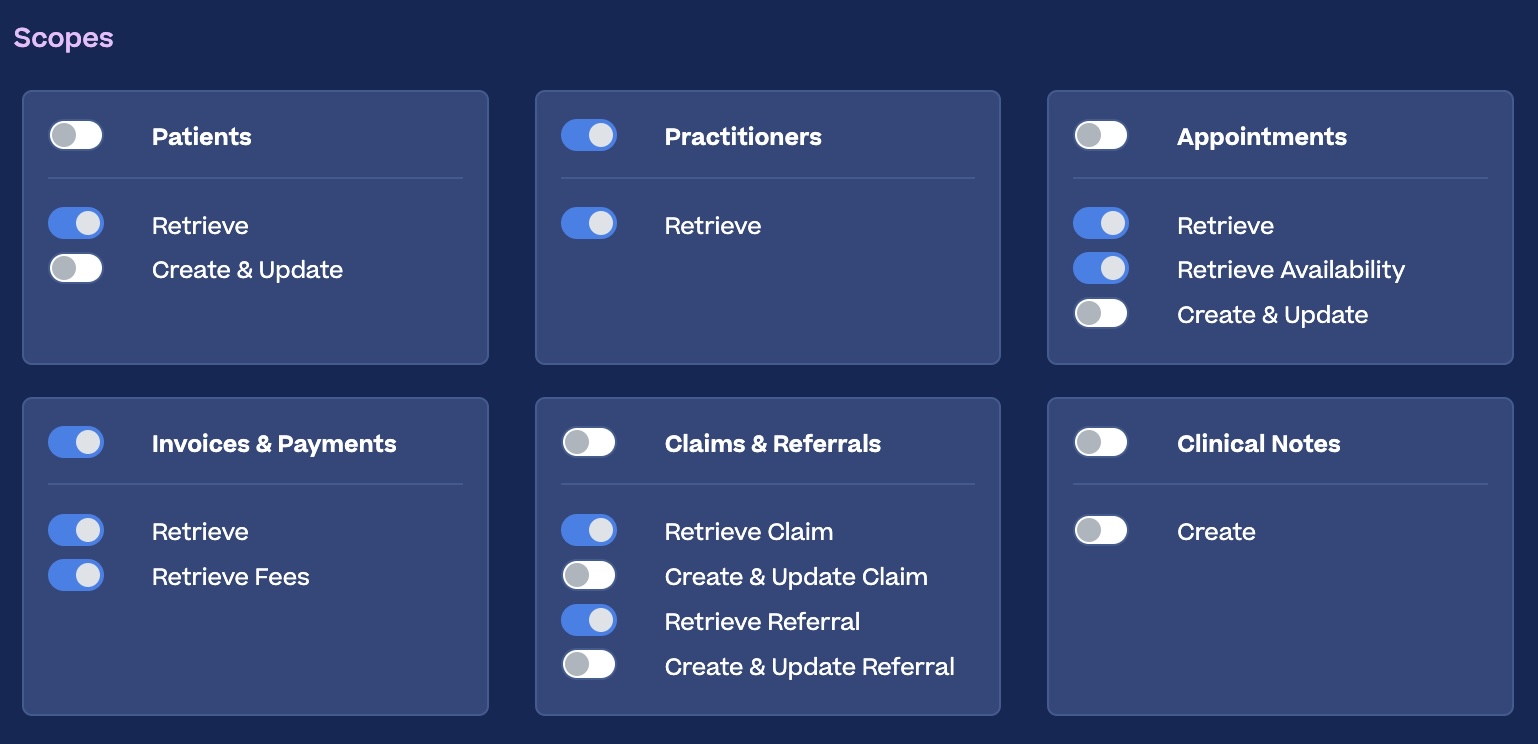
Create an API key in Halaxy (Settings → API Keys) with whichever of these you need - the server degrades gracefully if a scope is off, it'll just fail on the tools that need it:
| Scope (as labelled in Halaxy's UI) | Used by |
|---|---|
| Appointments → Retrieve | list_appointments |
| Invoices & Payments → Retrieve, Retrieve Fees | list_invoices, list_invoices_by_payer |
| Practitioners → Retrieve | list_practitioners, practitioner names in list_appointments |
| Patients → Retrieve | Patient names/telecom/status in list_appointments |
| Claims & Referrals → Retrieve Claim | awaiting_insurer_invoice, list_invoices_by_payer (this is Halaxy's plain-English label for read access to the FHIR Coverage resource) |
| Claims & Referrals → Retrieve Referral | list_referrals, referrals in list_appointments (read access to the FHIR Referral resource) |
Example of what this looks like in Halaxy's own API key scope screen:
Patient data
This server deliberately minimises what it exposes about a patient. Halaxy's Patient resource also carries DOB, address, gender, emergency contact, and referral-source notes - none of that is needed here, and it's enforced in code (ALLOWED_PATIENT_FIELDS in halaxy_mcp.py), not just by convention: every patient lookup is filtered down to id/name/initials/telecom/patient_status/is_active_client before it can reach the MCP client, regardless of what's asked for.
Clinical/session notes are not retrievable through this API at all, for any key or scope. Halaxy's own /metadata capability statement shows its clinical-notes resource (DocumentReference) supports create/patch only - no read, matching what the Halaxy UI itself shows (Clinical Notes only has a Create toggle). This is a whole-API limitation, not something this server chooses not to expose.
Referrals and session limits
Halaxy models a GP Mental Health Treatment Plan (and similar - DVA, WorkCover) as a Referral linked to a ReferralDefinition (the referral type, which carries the session/dollar cap - e.g. one real ReferralDefinition in testing was literally named "Medicare: MHTP Referral" with a 6-session limit). sessions_remaining isn't returned by Halaxy directly; it's computed here as sessions_total - sessions_used.
A few things confirmed against real data, worth knowing if you extend this further:
- A patient can have more than one simultaneously-active Referral (e.g. one per referred-to practitioner) - this server doesn't try to guess "the" one; it returns all of them.
sessions_usedcan exceedsessions_totalin practice (Medicare doesn't hard-stop bookings at the cap) - that's what the"over_limit"flag is for.- Some Referral records have no structured type/referrer at all, just a free-text
comment- surfaced as-is when that's the only clue available. - Halaxy's own
activefield on a Referral doesn't appear to auto-flip to false once its period lapses - the"expired"/"expiring_soon"flags are computed fromperiod.end, not read offactive.
If a scope isn't enabled
Every tool needs its matching scope switched on for the API key it's using (see the table above). If a scope is missing, Halaxy responds with a 401/403 or an OperationOutcome error - the server raises a clear HalaxyPermissionError (naming the resource, the HTTP status, and Halaxy's own error text) rather than silently treating that as "zero results". Without this check, a missing scope and a genuinely empty result (e.g. "no invoices today") would look identical to the MCP client.
Install
Requires Python 3.10+.
git clone https://github.com/ryanhunt/halaxy-mcp.git
cd halaxy-mcp
python3 -m venv .venv
source .venv/bin/activate
pip install -r requirements.txt
cp .env.example .env
# then edit .env with your Halaxy API key's client_id/client_secret
Sanity-check it runs:
source .venv/bin/activate
python3 halaxy_mcp.py
It won't print anything and will just sit there - that's correct, it's waiting for an MCP client to talk to it over stdin/stdout. Ctrl+C to stop it.
Wiring it into an MCP client
All of these spawn the same script as a local subprocess and talk to it over stdio - no network port, no separate deployment. Use the full, absolute path to the .venv's Python and to halaxy_mcp.py in every case.
Claude Desktop - add to claude_desktop_config.json (~/Library/Application Support/Claude/claude_desktop_config.json on macOS):
{
  "mcpServers": {
    "halaxy-mcp": {
      "command": "/absolute/path/to/halaxy-mcp/.venv/bin/python3",
      "args": ["/absolute/path/to/halaxy-mcp/halaxy_mcp.py"]
    }
  }
}
Fully quit and reopen the app afterwards (not just close the window).
VS Code (GitHub Copilot) - add .vscode/mcp.json in a workspace:
{
  "servers": {
    "halaxy-mcp": {
      "type": "stdio",
      "command": "/absolute/path/to/halaxy-mcp/.venv/bin/python3",
      "args": ["/absolute/path/to/halaxy-mcp/halaxy_mcp.py"]
    }
  }
}
GitHub Copilot CLI - add to ~/.copilot/mcp-config.json (or run /mcp add inside the CLI):
{
  "mcpServers": {
    "halaxy-mcp": {
      "type": "local",
      "command": "/absolute/path/to/halaxy-mcp/.venv/bin/python3",
      "args": ["/absolute/path/to/halaxy-mcp/halaxy_mcp.py"],
      "tools": ["*"]
    }
  }
}
No env block is needed in any of these - the script loads its own .env file from next to halaxy_mcp.py.
Docker / HTTP transport
For a remote MCP client that connects from cloud infrastructure rather than a local device (Claude's "custom connector", Microsoft 365 Copilot's "federated connector"), run the same script over HTTP instead of stdio: MCP_TRANSPORT=http starts a uvicorn server instead of talking over stdin/stdout - the Dockerfile sets this for you.
Auth: real OAuth 2.1, not a static token. Confirmed against Claude's actual "Add custom connector" dialog: it requires a genuine OAuth flow (there's no field to paste a bearer token into - only optional "OAuth Client ID/Secret" fields).
Leave those OAuth Client ID/Secret fields blank. This server supports Dynamic Client Registration - Claude registers itself automatically the first time someone connects, generating its own client_id on the fly. Confirmed live: pre-filling either field breaks the connection, since Dynamic Client Registration is the only registration path this server implements - there's no pre-registered client for Claude to use instead.
Rather than standing up a separate identity provider, this server acts as its own minimal, self-contained OAuth authorization server - adapted from Anthropic's own reference pattern (examples/servers/simple-auth in modelcontextprotocol/python-sdk, the "legacy" combined authorization-server-plus-resource-server mode). _SimpleOAuthProvider handles client registration, /authorize, a plain login page (/login), authorization codes, and access tokens, all kept in-memory (lost on restart - fine for a small internal tool). "Signing in" is one shared username/password (MCP_LOGIN_USERNAME/MCP_LOGIN_PASSWORD in .env) - not a per-person identity system, which is a reasonable simplification for a small practice/team. MCP_PUBLIC_URL is the public HTTPS URL clients actually reach this server at (behind Caddy on a real deployment) - the OAuth issuer/redirect base, and not the same as the internal MCP_HOST/MCP_PORT the container binds to.
Test locally (no TLS - fine for local testing, not for internet exposure):
cp .env.example .env   # fill in your Halaxy credentials + MCP_LOGIN_USERNAME/PASSWORD
docker compose up --build
curl http://127.0.0.1:8000/health   # -> 200, no auth needed
curl http://127.0.0.1:8000/mcp      # -> 401, no token
curl http://127.0.0.1:8000/.well-known/oauth-authorization-server  # -> OAuth discovery metadata
An MCP client does the rest automatically (register → authorize → login → token exchange) - verified this full flow by hand with curl through the actual container before relying on it.
Deploy it somewhere internet-facing (e.g. a Raspberry Pi behind your own router): use docker-compose.pi.yml instead, which adds Caddy in front for TLS (Let's Encrypt, auto-issued/renewed) and doesn't publish the app's port directly - only Caddy is reachable from outside the container network.
This builds directly on the target device - no cross-compilation needed. Docker just produces whatever architecture image matches the device's own CPU, automatically. Verified working on both 64-bit (arm64/aarch64 - a Pi 3B+ and up) and 32-bit (armv7/armhf - a Pi 2, or a Pi 3/4 on 32-bit Raspberry Pi OS) by actually building and running the image under QEMU emulation for both, not just assuming it'd work.
# check what you're running, if unsure:
uname -m   # armv7l = 32-bit, aarch64 = 64-bit

# install Docker via its official apt repo (not the get.docker.com script -
# Docker's own docs say that's not recommended for anything you'll keep
# running). Covers armhf as well as arm64/amd64:
sudo apt update
sudo apt install -y ca-certificates curl
sudo install -m 0755 -d /etc/apt/keyrings
sudo curl -fsSL https://download.docker.com/linux/debian/gpg -o /etc/apt/keyrings/docker.asc
sudo chmod a+r /etc/apt/keyrings/docker.asc
echo \
  "deb [arch=$(dpkg --print-architecture) signed-by=/etc/apt/keyrings/docker.asc] https://download.docker.com/linux/debian \
  $(. /etc/os-release && echo "$VERSION_CODENAME") stable" | \
  sudo tee /etc/apt/sources.list.d/docker.list > /dev/null
sudo apt update
sudo apt install -y docker-ce docker-ce-cli containerd.io docker-buildx-plugin docker-compose-plugin
sudo usermod -aG docker $USER   # log out/in afterwards

git clone https://github.com/ryanhunt/halaxy-mcp.git
cd halaxy-mcp
cp .env.example .env && nano .env   # Halaxy credentials, MCP_LOGIN_USERNAME/PASSWORD, MCP_PUBLIC_URL
cp Caddyfile.example Caddyfile && nano Caddyfile   # your real domain/DDNS hostname

docker compose -f docker-compose.pi.yml up -d --build
MCP_PUBLIC_URL (in .env) must be the real https://your-domain clients will connect to - it's used as the OAuth issuer/redirect base and has to match exactly. docker compose -f docker-compose.pi.yml ps/logs -f to check it's up; restart: unless-stopped means it survives a reboot as long as Docker itself starts on boot (the install script above enables that by default). To update later: git pull && docker compose -f docker-compose.pi.yml up -d --build.
Building for 32-bit ARM (armv7) needs a bit more than pip install, already handled in the Dockerfile: cryptography (pulled in for the OAuth code) has prebuilt wheels for 64-bit platforms but not armv7 - there it compiles a small piece (cffi) from source, which needs a C compiler and libc's headers. The Dockerfile installs gcc/libc6-dev/libffi-dev before pip install and removes them again afterwards to keep the image small - worth knowing if you ever modify the Dockerfile yourself, since libc6-dev in particular is easy to leave out by mistake (it's only a "Recommends" of gcc on Debian, not a hard dependency, so --no-install-recommends silently drops it and the build fails with a stdlib.h: No such file or directory error).
You'll still need to handle port-forwarding (80+443) and firewall rules on your own network/router - and as defense-in-depth on top of the login gate, consider restricting inbound traffic to your MCP client's currently-published outbound IP ranges (these change over time, so check the current values rather than hardcoding them).
Known limitations, worth knowing about
list_invoices's lookback window can miss invoices. Halaxy'sInvoicesearch has no parameter for the invoice's owndatefield, onlycreated/_lastUpdated- solist_invoicesfetches invoices created in the last 45 days and filters client-side for an exactdatematch. Insurer/employer-billed invoices (e.g. workers' comp) are sometimes created months before the session they end up dated for, which can fall outside that window.list_appointmentsdoesn't have this problem (it follows the appointment→invoice link directly), andlist_invoices_by_payerdoesn't either (it searches by recipient, unbounded by date) - prefer those when the date-based blind spot matters.sessionvs.meetingis inferred from whether the appointment has a linkedPatientparticipant, not from any explicit Halaxy field - a real session booked without linking a patient record in Halaxy would be miscategorised as a meeting.- No write operations (create/update anything) are implemented, on purpose.
- The HTTP transport's OAuth authorization server is a minimal, self-contained implementation with one shared login (not per-person accounts) and in-memory state (tokens don't survive a restart) - see Docker / HTTP transport above. Verified working against Claude's connector requirements specifically; other MCP clients may expect something different.
What it deliberately doesn't do
This wraps a handful of read-only endpoints matching one practice's own needs, not a general Halaxy/FHIR client. It does not implement patient creation/updates, clinical notes, scheduling changes, or most of Halaxy's ~50-resource FHIR surface (referral tracking is covered - see above - but not creating/updating referrals). If you need more of the API, the tool functions in halaxy_mcp.py are a reasonably short, readable starting point to extend from.
License
GPLv3 - see LICENSE.
Installing Halaxy
This server has no published package — it is built from source. Open the repository and follow its README.
▸ github.com/ryanhunt/halaxy-mcpFAQ
Is Halaxy MCP free?
Yes, Halaxy MCP is free — one-click install via Unyly at no cost.
Does Halaxy need an API key?
No, Halaxy runs without API keys or environment variables.
Is Halaxy hosted or self-hosted?
Self-hosted: the server runs locally on your machine via the install command above.
How do I install Halaxy in Claude Desktop, Claude Code or Cursor?
Open Halaxy on unyly.org, pick your client tab (Claude Desktop, Claude Code, Cursor) and press Install — the config is generated automatically, no JSON editing.
Related MCPs
Stripe
Payments, customers, subscriptions
 by Stripe
malamutemayhem/unclick-agent-native-endpoints
110+ tools for AI agents spanning social media, finance, gaming, music, AU-specific services, and utilities. Zero-config local tools plus platform connectors. n
 by malamutemayhem
whiteknightonhorse/APIbase
Unified API hub for AI agents with 56+ tools across travel (Amadeus, Sabre), prediction markets (Polymarket), crypto, and weather. Pay-per-call via x402 micropa
 by whiteknightonhorse
trackerfitness729-jpg/sitelauncher-mcp-server
Deploy live HTTPS websites in seconds. Instant subdomains ($1 USDC) or custom .xyz domains ($10 USDC) on Base chain. Templates for crypto tokens and AI agent pr
 by trackerfitness729-jpg
embeddedlayers/mcp-analytics
Statistical analysis, forecasting, and ML for business data (Shopify, Stripe, WooCommerce, eBay, GA4, Search Console). Upload a CSV or connect live data sources
 by embeddedlayers
carrierone/verilexdata-mcp
20 structured datasets (NPI healthcare, SEC filings, OFAC sanctions, crypto whales, Polymarket signals, patents, economic indicators) via x402 pay-per-query wit
 by carrierone
tipdotmd/tip-md-x402-mcp-server
MCP server for cryptocurrency tipping through AI interfaces using x402 payment protocol and CDP Wallet.
 by tipdotmd
laundromatic/shopgraph
Structured product data from the open web — Schema.org + AI extraction for e-commerce enrichment. Pay per call via Stripe. [shopgraph.dev](https://shopgraph.dev
 by laundromatic
mrslbt/xendit-mcp
Xendit payment gateway for Southeast Asia. Invoices, disbursements, balance checks, and bank transfers across Indonesia, Philippines, Thailand, Vietnam, and Mal
 by mrslbt
@arbitova/mcp-server
Non-custodial on-chain escrow + AI dispute arbitration for agent-to-agent USDC payments on Base. Seven tools covering the full EscrowV1 contract surface: create
 by jiayuanliang0716-max
Compare Halaxy with
Not sure what to pick?
Find your stack in 60 seconds
Author?
Embed badge for your README
Browse similar
All finance MCPs