
Harness
FreeNot checkedEnterprise AI Bootstrapping Harness — governed AI-assisted coding for enterprise workstations and repos: TLS trust, repo canon, skill supply chain, evidence

About
Enterprise AI Bootstrapping Harness — governed AI-assisted coding for enterprise workstations and repos: TLS trust, repo canon, skill supply chain, evidence
README
CI CodeQL OpenSSF Scorecard codecov License: Apache-2.0 Node ≥20

A cross-platform CLI that helps prepare developer workstations and repositories for
reviewable, governed AI-assisted coding in enterprise environments — from
locked-down, TLS-intercepted networks to open ones. It extracts corporate trust,
tunes local inference, adds repo guardrails, wires up MCP / observability /
sandboxing, and lays down a tool-agnostic context architecture — all from one
command surface. On top of that setup it runs a governance loop for external
agent skills — vet → approve → pack → marketplace → evidence — anchored in a
committed approval lock (aih-skills.lock.json).
See docs/ARCHITECTURE.md for the shipped architecture and current trust boundaries, and docs/CONTROL_MATRIX.md for the claim -> implementation -> test proof map.
Provided as open-source software under Apache-2.0 on an "AS IS" basis. No warranty, support obligation, SLA, indemnity, consulting, or professional advice is provided.
aihis dry-run by default — review the plan before running--apply. See DISCLAIMER.md.
The stable command contract
For the current v2 line, pin @aihq/harness@^2 unless your organization pins an
exact release for reproducible rollout. Every command, flag, and deprecated alias is
snapshot-tested in CI against a committed fixture, the --json envelope is
schema-pinned, and exit-code semantics are pinned — a surface change fails the build
until it ships as a reviewed contract decision. Renames ship as deprecated aliases
(the old name keeps working, with a one-line warning) before a major removes them,
and security fixes land on the latest minor — upgrading is the fix path. The full
policy: STABILITY.md.
Design posture

Install
Install and verify a published release. Current releases publish npm provenance plus GitHub release checksums and a keyless cosign bundle:
npm install -g @aihq/[email protected]      # then run: aih --help
aih verify-release 2.11.0   # checks npm signatures, GitHub release sums, and cosign evidence for 2.11.0
Full release verification requires local npm, gh, and cosign; proceed only when all three legs
pass. A skipped leg is incomplete evidence, not a successful rollout gate.
From source (contributors)
npm install        # deps
npm run build      # → dist/cli.js  (bin: aih)
node dist/cli.js --help
Quickstart
aih doctor              # read-only: is the workstation ready for AI coding?
aih init .              # preview the full repo bootstrap (dry-run — nothing is written)
aih init . --apply      # apply it
Guides by workflow
Use the command reference for exact CLI behavior; use the guides when you need the right workflow for a reader or rollout stage.
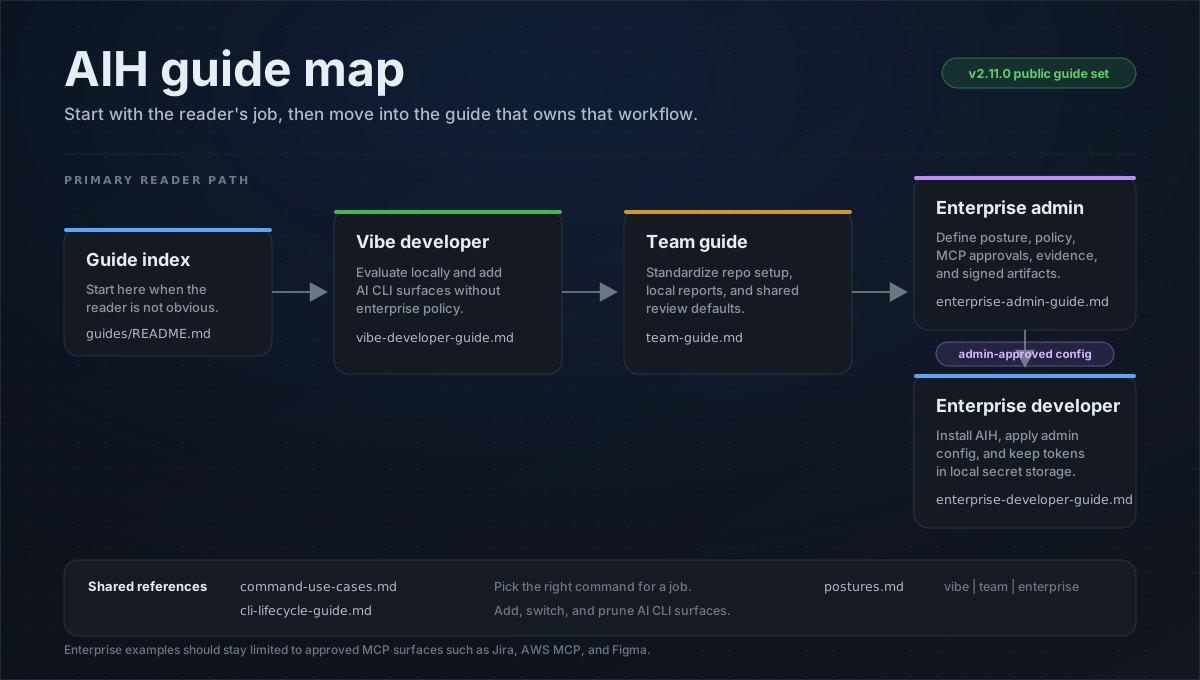
| Reader need | Start here |
|---|---|
| Pick the right command for a task | Command Use Cases |
| Add, switch, or prune AI CLI surfaces | CLI Lifecycle |
| Understand posture behavior and boundaries | Postures |
| Individual developer or evaluator | Vibe Developer |
| Shared repository or platform team | Team Guide |
| Governed organization or enterprise rollout | Enterprise Admin |
| Developer consuming an admin-approved config | Enterprise Developer |
Command surface
One honest line per command — the long-form behavior detail for every command lives in
docs/commands.md, and aih <command> --help is authoritative for flags.
Keep this table as a navigation index: do not add flag-level behavior or workflow recipes here.
Workstation & runtime
| Command | What it does |
|---|---|
| aih certs | Extract the corporate root CA from the OS trust store and propagate trust to npm/pip/cargo/conda. |
| aih heal | Diagnose and repair the broken runtime behind any TLS-intercepting proxy — corporate trust, npm, PATH, MCP pre-flight. |
| aih tools | Install the agent shell tools the harness leans on (rg/fd/jq, ast-grep, gh, …) through the platform package manager. |
| aih ready | Grade a blocker-aware readiness verdict: can a developer start work with an AI agent here, now? |
| aih session-guard | Inspect session/action text offline for secret-like values and dangerous local actions. |
| aih hardware | Profile CPU/RAM/GPU and emit tuned Ollama/llama.cpp settings. |
| aih vdi | Detect VDI (Citrix/WorkSpaces/RES/RDP) and redirect caches + SQLite to local scratch. |
| aih bootstrap | Orchestrate the workstation 4-phase rollout (certs → hardware/vdi → telemetry). |
Repo canon & bootstrap
| Command | What it does |
|---|---|
| aih init | Initialize a repo in one pass: profile + superpowers + bootstrap-ai + scaffold + contract + secrets + guardrails + mcp + sandbox + usage. |
| aih profile | Detect the repo's stack recursively and synthesize Cursor stack rules (.cursor/rules/*.mdc). |
| aih scaffold | Scaffold repo hygiene — secret deny-list, pre-commit hook, .gitignore entries; --canon legacy adds the full context-doc family. |
| aih bootstrap-ai | Emit and verify the repo's Layer-2 canon — RULE_ROUTER.md, per-CLI adapters, root bootloaders; --verify is the drift gate. |
| aih contract | Synthesize the machine-readable repo contract (project.json) from the detected stack. |
| aih capability | Resolve repo agent-capability needs into committed intent and a rebuildable machine cache. |
| aih adopt | Converge an existing AI canon onto aih's managed model without overwriting your work (brownfield migration). |
| aih prune | Remove stale per-CLI artifacts and reconcile orphaned aih-managed ECC components from the machine registration ledger. |
| aih uninstall | Remove the marker-backed core aih install footprint from a repo; aih clean is an alias. |
| aih ecc | Register the additive common + project-scoped ECC/MCP union from an evidence-verified exact pin. |
| aih superpowers | Verify exact-pinned Superpowers components and emit evidence-bound target guidance. |
| aih crispy | Run the CRISPY context-engineering stage machine (deterministic, gate-ordered). |
| aih workspace | Scaffold and restore a multi-repo workspace at the parent folder: cross-repo map, declared-repo graph MCP, snapshots, hydrate. |
Skill governance & supply chain
| Command | What it does |
|---|---|
| aih trust | Vet, pin, and gate external GitHub repos and skills before an agent acquires them. |
| aih skill | Govern the skill lifecycle — vet → approve → inventory → quarantine → remove — anchored in aih-skills.lock.json. |
| aih pack | Curate committed sets of approved skills (aih-packs.json); every ref is cross-checked against the lock, fail-closed. |
| aih marketplace | Build, validate, and publish a reproducible, verifiable distribution artifact for hostable approved skills — never a registry. |
| aih policy | Project the committed org policy into generated settings, validate it, or verify it against a pinned hash/bundle. |
| aih evidence | Vet exact-pinned baseline components and package local audit artifacts into deterministic signed evidence bundles. |
| aih truth | Create and verify an external project-truth sidecar; commit, version, claim, decision, acceptance-preflight, and agent-evidence assertions fail closed before a pack helps govern evidence. |
| aih bundle | Build a deterministic fleet bundle with checksums; aih verify-bundle --require-signature turns missing/unverifiable signatures into failures. |
| aih verify-bundle | Re-check a fleet or evidence bundle's checksums and signature/provenance evidence. |
| aih verify-release | Verify a published aih release: npm signatures, GitHub release cosign bundle, and tarball hash. |
| aih secrets | Scan for plaintext secret paths and hardcoded MCP config credentials without emitting values; --verify is warning-only at vibe and non-zero at team/enterprise. |
| aih guardrails | Generate local gitleaks/pre-commit policy files and a CI license/secret workflow; enforcement requires installing tools and wiring Git hooks or required CI checks. |
Enterprise packs, skill governance, and safety

Trust configuration notes
trust.internalScopes is intentionally inert until an org configures internal package scopes in
policy. Without that scope list, dependency-confusion checks still report general package risk but do
not guess which names are private to your organization.
Baseline component evidence
aih ecc and aih superpowers acquire only exact Git commits into quarantine. Selected component
paths must match the vendor lock shipped in the npm release or an attributable GitHub-attested org
bundle. Covered user seats verify hashes and signatures; they do not rerun the release analyzers.
Missing/mismatched coverage warns without an authorization receipt at vibe and denies at
team/enterprise. A signed blocked verdict denies at every posture and cannot be waived by org
evidence for the same bytes. See Baseline Component Evidence
for the vet/sign/policy flow.
Analytics & operations
| Command | What it does |
|---|---|
| aih report | Render the read-only analytics digest — context footprint, adoption, trends; --v9/--open build the offline HTML dashboard. |
| aih track | Record one metrics sample (commits, LOC delta, adoption) to .aih/history.jsonl — the time-series behind aih report trends. |
| aih usage | Install the multi-tool usage-capture layer → .aih/usage.jsonl — local activity counts only, no cost, no prompts. |
| aih telemetry | Inject OpenTelemetry env, a redacting Bindplane collector, and an analytics fetcher. |
| aih mcp | Generate MCP config for targeted CLIs, warn when first-run detection selects global config targets, and use --mcp-compliant to omit denied generated servers from targeted configs. |
| aih sandbox | Generate a devcontainer + managed sandbox settings (egress allowlist, failIfUnavailable). |
Verification
| Command | What it does |
|---|---|
| aih docs-lint | Run the read-only BetterDoc prose check and claim-ledger gate over public Markdown; hard claim orphans fail closed, while prose guidance is advisory. |
| aih doctor | Verify the workstation/repo configuration fail-closed; workspace mode validates each child repo, and Enterprise posture attests declared capability surfaces. |
| aih status | Show a read-only inventory of what the harness has configured. |
Shared flags: --apply, --force, --verify, --json, --posture <vibe|team|enterprise>, --support-out <dir>, --no-log, --context-dir <dir>, --root <dir>, --cli <list>, --all-tools, --detect, --yes (read-only commands take the relevant subset).
Settings also read from AIH_* env vars (AIH_APPLY, AIH_CONTEXT_DIR, AIH_LOG, …).
Plugins
At startup aih probes for exactly one optional peer package: @aihq/enterprise — the literal
name, never env- or config-selectable, so nothing can point the probe at other code. The package name
is a reserved extension point; the open-source harness does not require it to be published. When installed,
it contributes additive enterprise command capabilities through its aihCommands export
(CommandSpec[]) as defined in the
enterprise extension point spec. Those commands register
as native subcommands through the identical path as the built-ins: shared flags, posture resolution,
the dirty-worktree gate, and the run ledger all apply unchanged. Not installed → zero output, fully
local. AIH_NO_PLUGINS=1 disables the
probe. A plugin that fails to load, exports the wrong shape, or ships an invalid spec degrades to
local-only with a one-line aih: plugin: warning on stderr — and a plugin command can never shadow
a built-in (built-ins always win). Installing the plugin package is the trust decision:
importing it runs its code, exactly like any other dependency you install.
The probe is hardened at its seams. The package must resolve from the install tree aih itself
runs from (the node_modules chain above the aih binary), so a global or npx-run aih pointed
at an untrusted repo never imports a node_modules/@aihq/enterprise planted inside that repo.
Honesty note: when aih is installed inside the target repo, the repo already controls the binary
itself — the boundary is exactly "the tree aih runs from", nothing stronger. The import also races
a 2-second startup budget (timeout → local-only with a warning), and aih --version skips the
probe entirely. Plugin specs cannot claim shared or reserved flags (--apply, --json, --help,
…), cannot take the names help/version, and alias fields plus any skipWorktreeGate field are
stripped — aliases are core-owned and the dirty-worktree preflight always applies to plugin commands.
Dashboard
aih report --open builds a self-contained, offline HTML dashboard (dark by default with a
light toggle; fonts embedded) — context footprint + a KPI strip, an adoption ring, output-velocity
and code-quality panels, and trend sparklines from recorded history (aih track). Add --v9 for
the newer developer-console dashboard: every panel is explicitly LIVE, PREVIEW, or EMPTY, so demo
data never reads as real. When the report derives findings (see Support tickets),
a Suggested actions section leads with copy-to-clipboard tickets. Add --demo for showcase data,
or --refresh <sec> to keep it live.
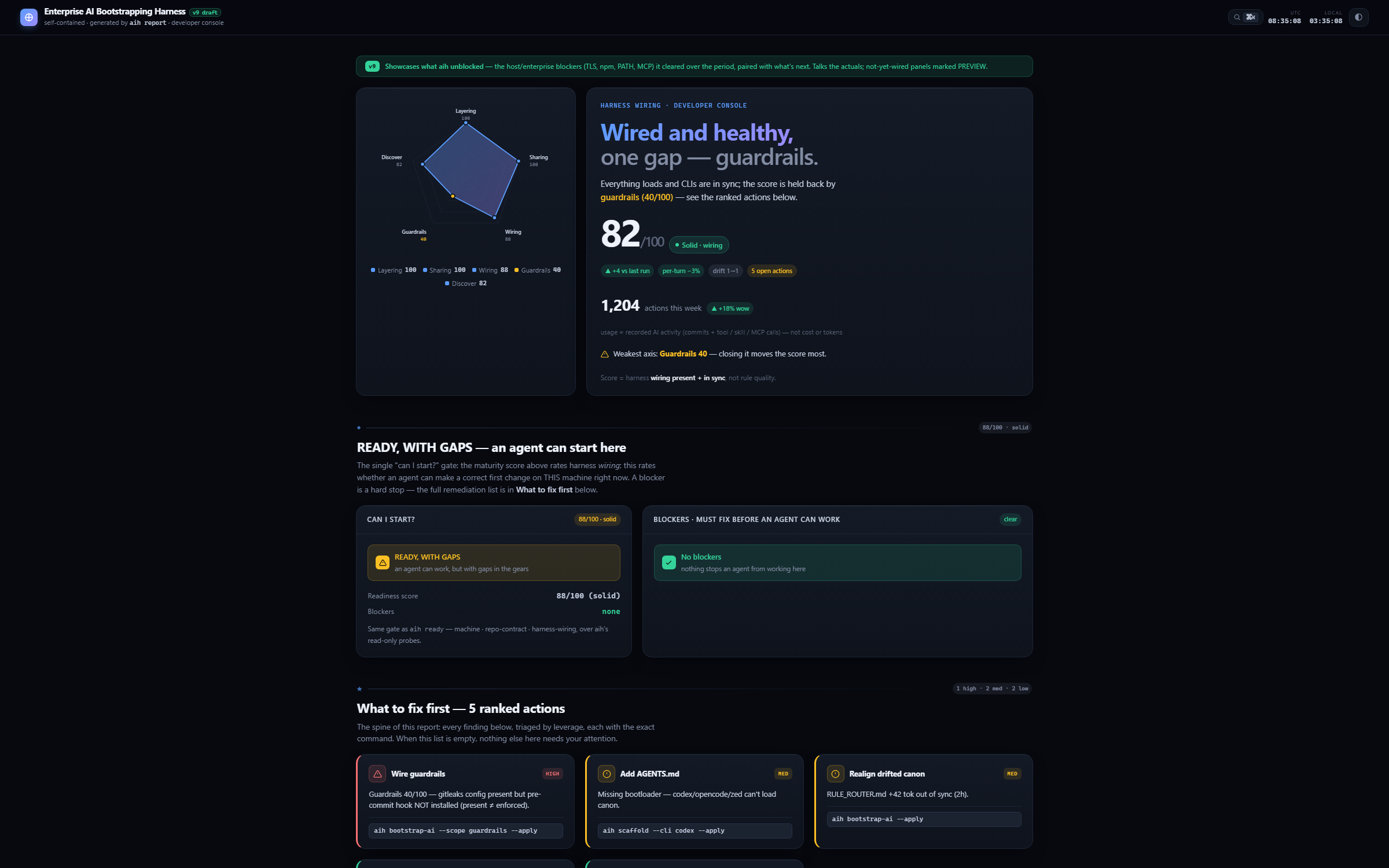
The --v9 developer console with --demo showcase data: harness-wiring score, ranked
fix actions, and the remediation ledger. This image uses demo/local data, not customer
telemetry. aih report --demo --v9 opens the same dashboard locally.
Targeting CLIs
aih ecc, aih superpowers, and aih bootstrap-ai only touch the agent CLIs you actually use.
Pass --cli with a comma-separated list, --all-tools for every supported CLI, or --detect to
auto-target the CLIs found on this machine; the default is claude. Supported:
claude, codex, cursor, antigravity, gemini, copilot, windsurf, opencode, zed, kimi, kiro.
aih bootstrap-ai --cli claude       # writes CLAUDE.md (the default target, auto-loaded)
# repeatable declarations add to detection and the prior machine union
aih ecc --cli claude,codex --with framework:react --with lang:typescript
aih superpowers --cli antigravity   # verify exact pin; guidance only (no mutable plugin exec)
aih bootstrap-ai --cli kiro         # Kiro: .kiro/steering/00-canon.md (inclusion: always)
aih bootstrap-ai --detect           # target only the CLIs installed here
aih init . --all-tools              # bootstrap a repo for every CLI at once
Each CLI gets its native entry: Claude → CLAUDE.md (the default target, auto-loaded),
Codex/OpenCode/Zed/Kimi/Antigravity → AGENTS.md, Gemini → GEMINI.md, Cursor →
.cursor/rules/*.mdc, Windsurf → .windsurfrules, Copilot → .github/copilot-instructions.md,
Kiro → .kiro/steering/00-canon.md (inclusion: always, with a #[[file:…/RULE_ROUTER.md]]
live-reference). For a tool aih doesn't target yet, <context-dir>/adapters/other-tools.md
documents how to point it at RULE_ROUTER.md.
Per-tool depth (Kiro example). Claude reuses your ~/.claude baseline, so its entry is just
CLAUDE.md. Tools that can't read ~/.claude get fuller native content instead — Kiro is the
deepest case (schemas verified against Kiro's docs and ECC's
real .kiro/ tree):
aih bootstrap-ai --cli kiro→.kiro/steering/agent-tools.md(stack-aware CLI usage) + stack-aware.kiro/hooks/*.kiro.hookfiles (aih-secret-scan-on-create,aih-tests-on-edit,aih-quality-gaterunning the repo's real lint/test) in Kiro's real hook schema.aih ecc --cli kiro→ emits scoped consult guidance; Kiro's native installer cannot yet materialize the component union safely, so aih does not run it.aih superpowers --cli kiro→.kiro/steering/superpowers-methodology.md(the brainstorm → plan → TDD → review routing, since Kiro can't load~/.claude/superpowers).
Detection (--detect) targets runnable CLI binaries on PATH. Config dirs (~/.claude,
~/.codex, ~/.gemini, ~/.cursor, ~/.kiro, …) are still reported as config-only traces, but
they are advisory and may be stale; they do not drive setup unless you explicitly type the CLI with
--cli or --all-tools. Precedence: --all-tools > --cli > --detect > committed marker >
runnable CLIs > default claude. When --detect finds no runnable CLI it defaults to claude and
says so. In an interactive terminal, --detect shows the runnable list and any config-only traces
before asking you to confirm or edit it (press Enter to accept, or type a comma-separated list to
add/remove tools) before anything installs — pass --yes (or run non-interactively / piped /
--json) to skip the prompt and use the runnable list as-is. aih doctor reports runnable vs
config-only CLIs, and aih bootstrap-ai --verify adds a per-CLI "installed" confirm step (pass =
runnable binary on PATH, skip = config-only/not here yet, bootloader still written) alongside the
drift gate.
Canon directory name. Every generated file and reference adopts --context-dir <name> — use any
name you like; the default is the visible ai-coding/:
aih init                          # → ai-coding/   (default, visible)
aih init --context-dir my-canon   # → my-canon/    (any name; everything adapts)
aih init --context-dir .ai-context  # → hidden, the old default
ECC install actions execute under --apply only after exact component evidence clears and the same
quarantined tree re-hashes. By default, aih ecc materializes the additive union of its common
baseline, detected or repeatably declared project riders, posture-selected security, and validated
MCPs; --profile full is the explicit full-surface opt-in. Evidence verdicts apply per component:
authorized components install, while held components are quarantined and reported with their exact
codes and reasons. No install process starts unless ECC's installer runtime is also authorized.
The project contribution keeps the requested intent, while each target record contains only the
surface actually installed. The primary project/target contribution ledger lives at
~/.aih/ecc/registration-ledger.json and commits only after every install step succeeds. A bare
aih prune also checks that ledger: missing project roots are retired, the live
component/MCP union is recomputed, and only state-recorded aih-managed operations no longer shared
by a live project are removed. Dry-run reports the diff without mutation; --apply hash-binds all
inputs, rolls back partial failure, and replaces target state before committing the ledger last.
Superpowers marketplace/TUI paths cannot bind installed bytes to that
tree, so aih executes none of them; it emits pin-aware guidance and says those marketplace selections
are not evidence-covered. ECC and Superpowers are complementary — ECC supplies stack-aware rules,
agents, and memory; Superpowers supplies the disciplined agent loop that uses them.
For Codex, installed ECC skills are consumed on demand by name, such as $configure-ecc, from the
literal Codex skills path (~/.codex/skills/<name>/SKILL.md); they are not an ambient auto-loaded
.agents/skills/ surface. aih ecc --cli codex still installs the selected ECC Codex
skills/agents from ECC's manifest, but uses add-only Codex TOML merge helpers and a fenced AGENTS
merge rather than the upstream ecc-install --target codex copy mode for shared ~/.codex files.
Its scoped MCP block contains pinned sequential-thinking plus GitHub at team/enterprise (and
repo-declared local graph/memory servers); Context7 and Exa are never defaults.
Layered AI canon (bootstrap-ai)
The harness models the same two-layer setup used in the reference repos (eicp / ai-os / syntegris):
- Layer 1 — user baseline: selectable with
--baseline ecc|gstack|gsd(defaultecc, ECC + Superpowers installed per CLI byaih ecc/aih superpowers). - Layer 2 — repo canon: the committed
ai-coding/(or--context-dir) tree —RULE_ROUTER.md(stack-aware routing entry point), the contract filesproject.json,project.md, andsetup.md,adapters/<cli>.md(per-tool wiring notes), and the root bootloaders (CLAUDE.md,AGENTS.md,GEMINI.md, Cursor/Windsurf/Copilot).REGENERATION.mdis emitted only for--canon legacy.
aih bootstrap-ai generates and verifies Layer 2. Each bootloader is hand-editable tool-specific
content plus one marker-delimited shared block that bootstrap-ai regenerates idempotently —
your edits outside the markers survive (merged in, with an .aih.bak backup). aih bootstrap-ai --verify
is the drift gate: it fails if the router is missing or a bootloader's block has been hand-edited
away from the canonical source — wire it into CI to keep every tool's entry point in sync.
aih bootstrap-ai --all-tools --apply   # lay down RULE_ROUTER + adapters + bootloaders for every CLI
aih bootstrap-ai --baseline gstack     # use garrytan/gstack as the Layer-1 baseline
aih bootstrap-ai --verify              # CI drift gate (no writes; exit 1 on drift)
Precedence: Layer 2 wins on conflict — repo canon overrides the generic baseline. Run
aih contract to refresh the contract files the compact router points at.
Multi-repo workspaces
Most orgs split a product across separate repos (a UI repo and a backend repo in one git org). An
agent editing the UI then has no view into the backend — no cross-repo blast radius. aih workspace
is a federated bridge, not a monorepo replacement: the child repo owns truth, and the parent workspace
owns routing, contract edges, snapshots, MCP wiring, and report rollups. It bridges that gap from the
parent folder that holds the repos:
aih workspace ./my-org --repos ui,backend --apply
It writes, at the parent (it does not touch the child repos — run aih init in each):
<context-dir>/cross-repo-architecture.md— per-repo responsibilities + a cross-repo feature map (UI column · backend column · the contract). Write-once — aih seeds it from your repo list, then you own it; re-running never overwrites it.<context-dir>/repo-discipline.md— load a repo's own canon before editing it.- Targeted CLI bootloaders —
CLAUDE.mdby default;--cli/--all-toolscan addAGENTS.md,GEMINI.md,.kiro/steering/00-canon.md, and other tool-native entries. <name>.code-workspace— opens every repo in one VS Code window..mcp.json— one code-review graph MCP per present declared child repo, using absolute root-anchored child paths so MCP clients work from any launch directory..aih-workspace.json— marker that putsaih doctorinto workspace mode (validates each child repo is scaffolded); object-form repos can retain optionalremote/refsource metadata.- Child repos are an explicit allowlist: use
--reposor an existing.aih-workspace.json. If child Git repos are present without an allowlist,aih workspacereports candidates but does not add them to.aih-workspace.jsonor workspace MCP scope. aih workspace snapshot --lock --applywrites the recorded child remote into<context-dir>/workspace-lock.jsonwhen present, so a lock captures both the commit and fetch location. A manifest-declaredremotetakes precedence; otherwise snapshot collection reads only child-localoriginconfig and never fetches.aih workspace hydrate --applyrestores a declared workspace from.aih-workspace.jsonplus the committed workspace lock: missing children are cloned from recorded remotes, present clean children are checked out to the recorded ref, and children with no recorded remote are skipped with a note. Until a declared child exists,aih workspace --applyskips that child's graph MCP scope and emits a hydrate note instead of wiring an empty path.
Support tickets
Any verifying command (aih doctor, aih heal, aih secrets --verify, …) turns a failed or skipped
check that carries a Check.code into a ticket-ready support template — three registers keyed off who
fixes the issue, and external tickets are tool-neutral by contract (they never name aih). Labels print
by default; --support-out <dir> writes full tickets, --json carries them. Registers, redaction, and
the SETUP.md context markers: docs/commands.md.
Run ledger
Every aih invocation appends one structured row to .aih/runs/YYYY-MM.jsonl (UTC, month-sharded,
append-only) — a "what happened" diagnostics trail: schema version, run id, capability, redacted argv,
status (success / failed / partial / error), exit code, mode (apply/verify/json/sarif), platform,
host hash, repo remote hash, write tally, and verification + support counts. It's distinct from
.aih/history.jsonl (the per-commit metrics behind aih report trends). Logging is on only after the
repo is initialised (a committed .aih-config.json marker exists) and never fails a command; opt out
with --no-log or AIH_LOG=0. Like all of .aih/, the ledger is gitignored local diagnostics
— never committed. aih evidence build packages it into a checksummed bundle; use
aih evidence build --sign <signer> --require-signature when the bundle crosses a
sharing boundary that requires tamper evidence.
Examples
aih doctor --json                 # what's configured? (read-only)
aih init . --apply                # bootstrap the current repo
aih certs --ca-pattern Zscaler --apply --verify
aih hardware                      # preview the tuned inference env block
AIH_CONTEXT_DIR=ai-coding aih scaffold --apply
aih doctor --support-out .aih/tickets   # write IT/support tickets for failing checks (kept local)
aih report --v9 --apply --out .aih/reports/local-v9.html
aih usage --apply --cli claude,codex,gemini
aih usage --rollup ../repo-a,../repo-b
Releases & roadmap
- Roadmap — ROADMAP.md, tracked as GitHub Milestones.
- Changelog — CHANGELOG.md; tagged builds on Releases.
- Versioning & support — VERSIONING.md. SemVer; security fixes land on the latest minor — upgrade to the latest release line to stay fixed.
- Supply chain — the current release workflow publishes via npm Trusted Publishing with build
provenance and ships an SPDX SBOM, a SHA256 checksum, its keyless cosign
signature bundle (
SHA256SUMS.txt.sigstore.json), and the Sigstore build-provenance bundle on the GitHub Release. Releases fromv0.6.0onward include the sigstore/provenance assets; earlier historical tags have a narrower asset set. Tagged release artifacts claim SLSA Build L2 under SLSA v1.2; no Build L3 claim is made. Verify a published release withaih verify-release [version]; a skipped verification leg is incomplete evidence. Consumers with provenance-aware policy can also usegh attestation verify. - Support — SUPPORT.md · Security — SECURITY.md (private reporting) · Contributing — CONTRIBUTING.md.
Development
npm test          # vitest
npm run typecheck # tsc --noEmit
npm run lint      # biome
npm run build     # tsup → dist/
Stack: TypeScript (ESM) · commander · zod · vitest · biome · tsup. Coverage floors are enforced in vitest.config.ts — set just below the achieved levels so coverage only ratchets up; CI and releases fail on regression. See CONTRIBUTING.md for the contributor workflow.
Stability
The tests behind the stable command contract live in
tests/contract/: every command and option is snapshotted against a
committed fixture (command-surface.json), the
--json envelope is schema-pinned, and exit-code semantics are pinned. Additive changes
regenerate the fixture in the same PR (label it contract:additive); removals or renames
of anything pinned are breaking and ship in majors only, per STABILITY.md.
License
Install Harness in Claude Desktop, Claude Code & Cursor
unyly install harnessInstalls into Claude Desktop, Claude Code, Cursor & VS Code — handles npx, uvx and build-from-source repos for you.
First time? Get the CLI: curl -fsSL https://unyly.org/install | sh
Or configure manually
Run in your terminal:
claude mcp add harness -- npx -y @aihq/harnessFAQ
Is Harness MCP free?
Yes, Harness MCP is free — one-click install via Unyly at no cost.
Does Harness need an API key?
No, Harness runs without API keys or environment variables.
Is Harness hosted or self-hosted?
Self-hosted: the server runs locally on your machine via the install command above.
How do I install Harness in Claude Desktop, Claude Code or Cursor?
Open Harness on unyly.org, pick your client tab (Claude Desktop, Claude Code, Cursor) and press Install — the config is generated automatically, no JSON editing.
Related MCPs
GitHub
PRs, issues, code search, CI status
 by GitHub
Filesystem
Secure file operations with configurable access controls.
Memory
Knowledge graph-based persistent memory system.
Template MCP Server
A CLI tool to create a new Model Context Protocol server project with TypeScript support, dual transport options, and an extensible structure
 by mcpdotdirect
Compare Harness with
Not sure what to pick?
Find your stack in 60 seconds
Author?
Embed badge for your README
Browse similar
All development MCPs