
Hetzner Cloud
FreeNot checkedIntegrates with Hetzner Cloud API to enable management of cloud infrastructure resources including servers, volumes, firewalls, and SSH keys for automated provi

About
Integrates with Hetzner Cloud API to enable management of cloud infrastructure resources including servers, volumes, firewalls, and SSH keys for automated provisioning and infrastructure-as-code scenarios.
README
A Model Context Protocol (MCP) server for interacting with the Hetzner Cloud API. This server allows language models to manage Hetzner Cloud resources through structured functions.
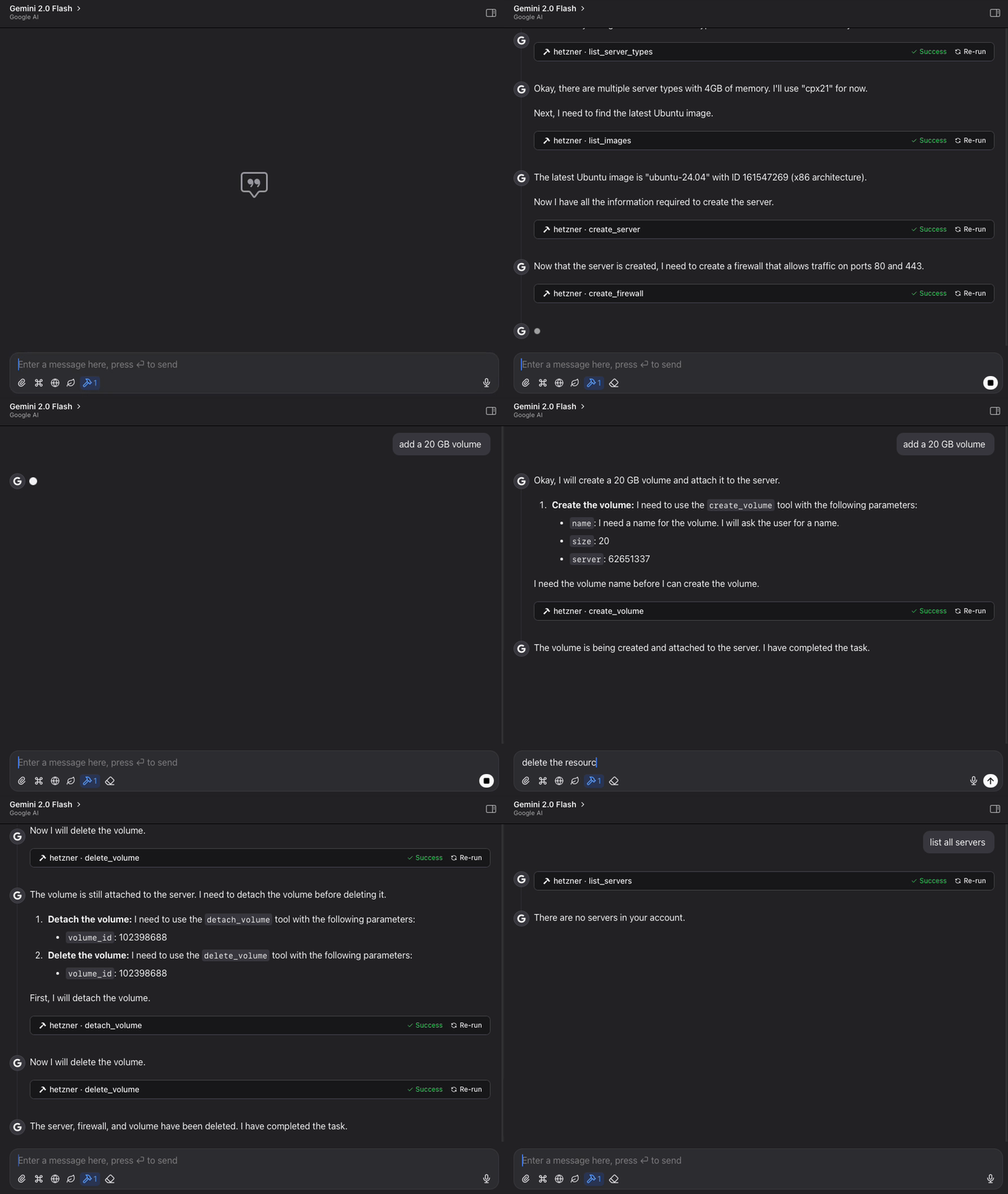
Features
- List, create, and manage Hetzner Cloud servers
- Create, attach, detach, and resize volumes
- Manage firewall rules and apply them to servers
- Create and manage SSH keys for secure server access
- View available images, server types, and locations
- Power on/off and reboot servers
- Simple, structured API for language model interaction
- Claude Code integration for managing Hetzner resources directly from Claude
Requirements
- Python 3.11+
- Hetzner Cloud API token
Installation
Method 1: Direct Installation
- Clone this repository:
git clone https://github.com/dkruyt/mcp-hetzner.git
cd mcp-hetzner
- Install dependencies:
pip install -e .
- Create a
.envfile and add your Hetzner Cloud API token:
HCLOUD_TOKEN=your_hetzner_cloud_api_token_here
Method 2: Install as a Package
# Install directly from the repository
pip install git+https://github.com/dkruyt/mcp-hetzner.git
After installing as a package, create a .env file in your working directory with your Hetzner Cloud API token.
Usage
Starting the Server
Option 1: Run the installed package:
# Using default stdio transport
mcp-hetzner

# Using SSE transport
mcp-hetzner --transport sse

# Setting a custom port
mcp-hetzner --transport sse --port 8000
Option 2: Run as a module:
python -m mcp_hetzner
# or
python -m mcp_hetzner.server
The server supports two transport modes:
stdio(default): Standard I/O transport, typically used with Claude Codesse: Server-Sent Events transport, suitable for HTTP clients
By default, the server runs on localhost:8080. You can customize the host and port by:
- Setting the
MCP_HOSTandMCP_PORTenvironment variables in your.envfile - Using the
--portcommand line argument (overrides the environment variable)
Using with Claude Code
To use with Claude Code, run the server with SSE transport:
# Start the server with SSE transport
mcp-hetzner --transport sse --port 8080

# In another terminal, connect Claude Code to the server
claude-code --mcp-server localhost:8080
Testing the API
A test client is included to verify the server functionality:
python -m mcp_hetzner.client
Example Workflows
Basic Server Management
# List all your servers
list_servers

# Create a new server
create_server {
  "name": "web-server",
  "server_type": "cx11",
  "image": "ubuntu-22.04"
}

# Power operations
power_off {"server_id": 12345}
power_on {"server_id": 12345}
reboot {"server_id": 12345}

# Delete a server when no longer needed
delete_server {"server_id": 12345}
Volume Management
# List all volumes
list_volumes

# Create a new volume
create_volume {
  "name": "data-volume",
  "size": 10,
  "location": "nbg1",
  "format": "ext4"
}

# Attach volume to a server
attach_volume {
  "volume_id": 12345,
  "server_id": 67890,
  "automount": true
}

# Detach volume from server
detach_volume {
  "volume_id": 12345
}

# Resize a volume (can only increase size)
resize_volume {
  "volume_id": 12345,
  "size": 50
}

# Delete a volume when no longer needed
delete_volume {
  "volume_id": 12345
}
Firewall Management
# List all firewalls
list_firewalls

# Create a firewall for web servers
create_firewall {
  "name": "web-firewall",
  "rules": [
    {
      "direction": "in",
      "protocol": "tcp",
      "port": "80",
      "source_ips": ["0.0.0.0/0", "::/0"]
    },
    {
      "direction": "in",
      "protocol": "tcp",
      "port": "443",
      "source_ips": ["0.0.0.0/0", "::/0"]
    }
  ]
}

# Apply firewall to a server
apply_firewall_to_resources {
  "firewall_id": 12345,
  "resources": [
    {
      "type": "server",
      "server_id": 67890
    }
  ]
}
SSH Key Management
# List all SSH keys
list_ssh_keys

# Create a new SSH key
create_ssh_key {
  "name": "my-laptop",
  "public_key": "ssh-rsa AAAAB3NzaC1yc2EAAA... user@laptop"
}

# Use the SSH key when creating a server
create_server {
  "name": "secure-server",
  "server_type": "cx11",
  "image": "ubuntu-22.04",
  "ssh_keys": [12345]
}

# Update an SSH key's name
update_ssh_key {
  "ssh_key_id": 12345,
  "name": "work-laptop"
}

# Delete an SSH key
delete_ssh_key {
  "ssh_key_id": 12345
}
Infrastructure Planning
# Explore available resources
list_server_types
list_images
list_locations

# Get specific server information
get_server {"server_id": 12345}
Available Functions
The MCP server provides the following functions:
Server Management
list_servers: List all servers in your Hetzner Cloud accountget_server: Get details about a specific servercreate_server: Create a new serverdelete_server: Delete a serverpower_on: Power on a serverpower_off: Power off a serverreboot: Reboot a server
Volume Management
list_volumes: List all volumes in your Hetzner Cloud accountget_volume: Get details about a specific volumecreate_volume: Create a new volumedelete_volume: Delete a volumeattach_volume: Attach a volume to a serverdetach_volume: Detach a volume from a serverresize_volume: Increase the size of a volume
Firewall Management
list_firewalls: List all firewalls in your Hetzner Cloud accountget_firewall: Get details about a specific firewallcreate_firewall: Create a new firewallupdate_firewall: Update firewall name or labelsdelete_firewall: Delete a firewallset_firewall_rules: Set or update firewall rulesapply_firewall_to_resources: Apply a firewall to servers or server groupsremove_firewall_from_resources: Remove a firewall from servers or server groups
SSH Key Management
list_ssh_keys: List all SSH keys in your Hetzner Cloud accountget_ssh_key: Get details about a specific SSH keycreate_ssh_key: Create a new SSH keyupdate_ssh_key: Update SSH key name or labelsdelete_ssh_key: Delete an SSH key
Information
list_images: List available OS imageslist_server_types: List available server typeslist_locations: List available datacenter locations
License
MIT
Installing Hetzner Cloud
This server has no published package — it is built from source. Open the repository and follow its README.
▸ github.com/dkruyt/mcp-hetznerFAQ
Is Hetzner Cloud MCP free?
Yes, Hetzner Cloud MCP is free — one-click install via Unyly at no cost.
Does Hetzner Cloud need an API key?
No, Hetzner Cloud runs without API keys or environment variables.
Is Hetzner Cloud hosted or self-hosted?
Self-hosted: the server runs locally on your machine via the install command above.
How do I install Hetzner Cloud in Claude Desktop, Claude Code or Cursor?
Open Hetzner Cloud on unyly.org, pick your client tab (Claude Desktop, Claude Code, Cursor) and press Install — the config is generated automatically, no JSON editing.
Related MCPs
GitHub
PRs, issues, code search, CI status
 by GitHub
Filesystem
Secure file operations with configurable access controls.
Memory
Knowledge graph-based persistent memory system.
Template MCP Server
A CLI tool to create a new Model Context Protocol server project with TypeScript support, dual transport options, and an extensible structure
 by mcpdotdirect
Compare Hetzner Cloud with
Not sure what to pick?
Find your stack in 60 seconds
Author?
Embed badge for your README
Browse similar
All development MCPs