
Homelab Cmdb
FreeNot checkedHomelab CMDB — Ansible-fed, SQLite-backed inventory: dashboard, topology graph, Trivy CVE tracking, Tailscale + K8s awareness, and a 23-tool MCP server for Clau

About
Homelab CMDB — Ansible-fed, SQLite-backed inventory: dashboard, topology graph, Trivy CVE tracking, Tailscale + K8s awareness, and a 23-tool MCP server for Claude
README
Ansible-fed, SQLite-backed CMDB for your homelab — see every host, container, CVE, and Tailscale node in one offline-capable web UI, and query it all from Claude via MCP.

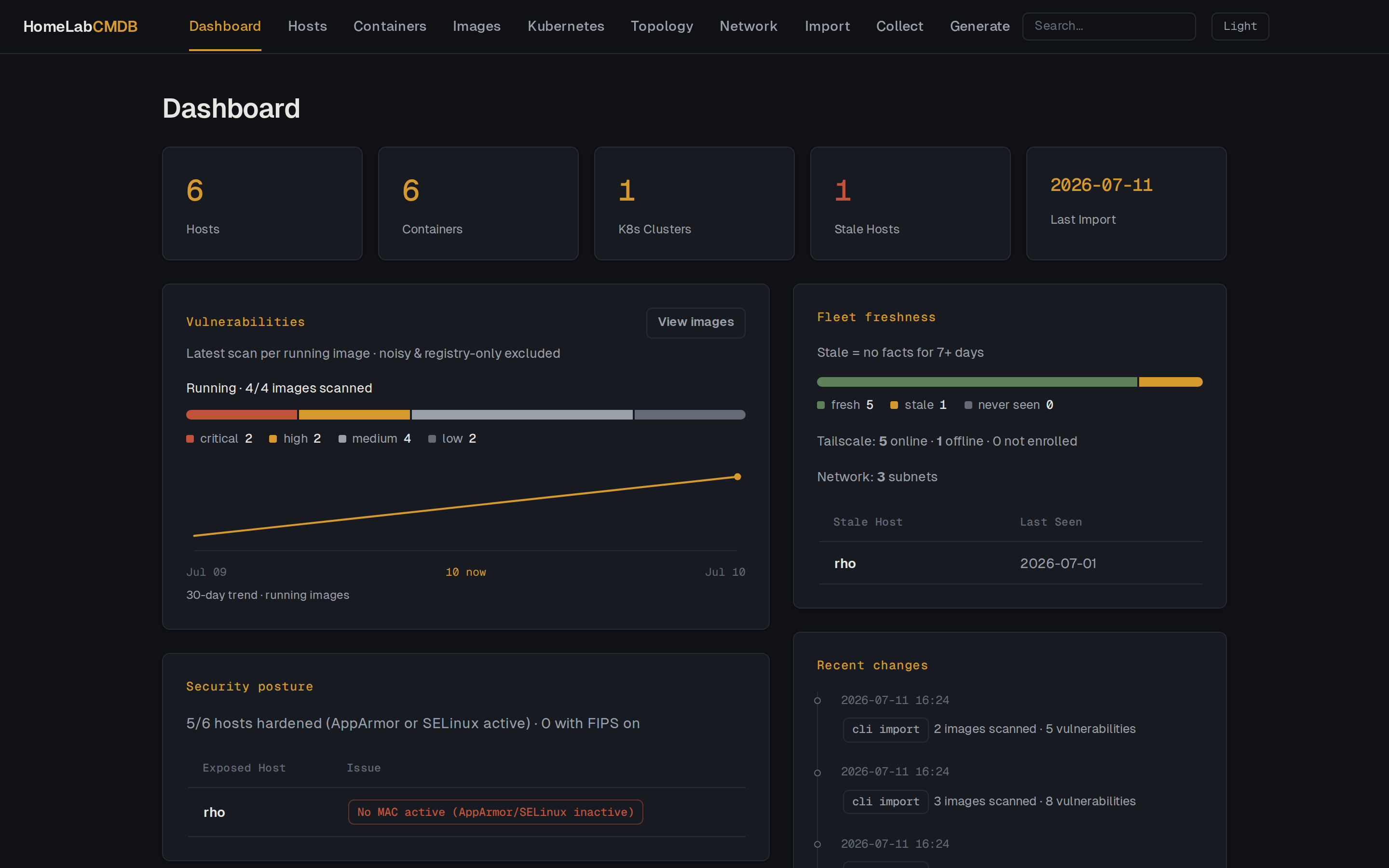
Dashboard: severity breakdown, 30-day vulnerability trend, fleet freshness (one stale host), and security posture — all from the built-in demo dataset.
| Topology | Images |
|---|---|
| Topology graph of the demo lab | Image vulnerability view |
| Interactive topology: containers nested by compose project, a K8s cluster, two subnets, the tailnet, and exposure rings. | Trivy image scans: per-image history, severity counts, and browsable findings. |
More views: host detail · network. All screenshots are from the built-in fictional demo dataset.
Try it in 60 seconds
git clone https://github.com/osaljehani/homelab-cmdb && cd homelab-cmdb
uv sync
uv run cmdb demo
Or with Docker (no uv needed):
docker compose --profile demo up cmdb-demo
Either path seeds a fictional sample fleet — 6 hosts, a Kubernetes cluster, Docker containers, and
trivy CVE scans — and serves it at http://127.0.0.1:8080 (http://localhost:8080 under Docker). The
demo uses a throwaway database in your temp directory; your real cmdb.db is never touched.
The
docker composedemo builds the image locally on first run. Prebuiltghcr.io/osaljehani/homelab-cmdbimages are published starting with the first release.
Why HomeLabCMDB?
- Homelab-scale, not enterprise DCIM. NetBox and friends are excellent but heavyweight for a 5–20 host lab. This is one binary and one file.
- Single SQLite file, no external services. No Postgres, no Redis, no message broker — the
whole CMDB is
data/cmdb.db. - Agentless. Facts come from SSH + Ansible; nothing is installed on your hosts. File-based import works too, for machines you can't reach from the controller.
- One inventory, linked. Hosts, Docker containers, Kubernetes topology, trivy CVEs, and Tailscale state live in the same database — containers link to scanned images by ref.
- Interactive topology graph. See the whole lab at once: compose-nested containers, K8s clusters, subnets, the tailnet, and exposure rings for listening ports and serve/funnel.
- Fully offline. Fonts, HTMX, and Cytoscape are vendored — no CDN, no outbound calls. Charts are server-rendered SVG, no JS chart library. Graphite terminal-style dark theme, with a light theme included.
- LLM-native. A 23-tool MCP server lets you ask Claude "what's stale?" or "what's exposed?" against your live inventory.
Features
- Hosts identity, OS, hardware, network, storage, security (AppArmor / SELinux / FIPS) and virtualization, imported from Ansible facts. Tag and search hosts.
- Security posture each host is judged hardened (AppArmor enabled or SELinux
enforcing/enabled) or exposed, surfaced as a dashboard panel, a Security column on the hosts
list, and a line in
cmdb hosts show. FIPS is reported as informational. - Docker inventory track containers per host (image, state, ports, compose project). Re-importing a host replaces its container set, so removed containers disappear.
- Kubernetes model clusters, nodes (by role) and namespaces, imported from
kubectl. - Tailscale per-host tailnet identity (Tailscale IP, MagicDNS name, tags, exit-node, online state) plus any serve/funnel-exposed services.
- Listening ports open TCP/UDP listeners per host (proto, address, port, owning process),
collected from
ss. - Image vulnerabilities ingest trivy image scans (per-image history, severity counts, browsable findings); flag expected-noisy images (e.g. a pentest arsenal) out of the rollup. Deleting a remediated image keeps its past trend history (immutable daily snapshots).
- Change history every import snapshots a host's meaningful fields and records a per-host diff timeline (e.g. a kernel upgrade or IP change), skipping volatile values like uptime.
- Dashboard severity breakdown with a 30-day vulnerability trend built from immutable
daily snapshots (remediations show as real drops; history never rewrites), security posture,
fleet freshness (stale-host detection via
CMDB_STALE_DAYS, Tailscale online/offline), a recent-changes feed and OS mix all as server-rendered SVG/CSS charts, no JS chart library. - Topology visualizer an interactive Cytoscape map of the whole lab: hosts with containers nested by compose project, K8s clusters with member roles, subnets and the tailnet (exit nodes, online state), exposure rings for listening ports and serve/funnel, and container→image edges colored by scan severity. Layers (infra / network / exposure / images) toggle client-side.
- Global search the nav search box finds hosts, containers and images by name, IP, MagicDNS name or image ref, with live results.
- On-demand collection pull facts, Docker, Kubernetes, Tailscale and port state live over SSH from the CMDB host (via Ansible), instead of running export scripts on each device. The Ansible inventory is generated from the database by default. See below.
- Generate Ansible inventory (YAML/INI) and SSH config from your inventory.
- MCP server query and manage the CMDB from LLM clients (Claude Code, Claude Desktop) via a Model Context Protocol server over stdio. See below.
- Read-only JSON API
GET /api/v1/{hosts,containers,clusters,images,vuln-summary}for scripting and dashboards, using the same response models as the MCP server. Interactive docs at/docs. Unauthenticated, like the rest of the app — keep the port LAN-only. - Export / restore dump the whole CMDB to JSON/YAML (
cmdb export, or download from the Generate page) and restore it into an empty database (cmdb restore). Portability and inspection — copyingdata/cmdb.dbremains the real backup.
See docs/ROADMAP.md for planned features.
Running against your own data
The demo above serves a throwaway fleet. To stand up an empty instance for your own inventory, use one of the two paths below, then import Ansible facts.
Docker
docker compose up
The web UI is available at http://localhost:8080. The database persists in ./data/cmdb.db.
After the first release, docker compose pull cmdb fetches the prebuilt image — otherwise
docker compose up builds it locally, since the compose file has both image: and build:
and only pulls when the image is absent.
Local
Requires Python 3.12+ and uv.
uv sync --all-groups
uv run cmdb db upgrade
uv run cmdb serve        # web UI on :8080
uv sync --all-groups includes the optional collect dependency group (ansible-core), needed
for on-demand collection. Use uv sync alone if you only need file-based import.
Collecting Ansible facts
Single host (localhost)
ansible -m setup localhost > homelab.json
Multiple hosts via inventory file
ansible -i inventory.ini all -m setup > homelab.json
Both commands write all host output to a single file. The importer handles the multi-host format
automatically, splitting each hostname | SUCCESS => block and upserting each host separately.
If you prefer one file per host, use --tree to write directly into a directory:
ansible -i inventory.ini all -m setup --tree out/
Importing facts
Web UI
Open http://localhost:8080/import and upload the JSON file. Single-host and multi-host files are both accepted.
CLI
# Import a single file
uv run cmdb import ansible ./homelab.json

# Import a directory of per-host files (from --tree)
uv run cmdb import ansible ./out/
File-based Docker & Kubernetes import
For hosts you can't (or don't want to) reach over SSH from the controller, the export helpers in
scripts/ generate import JSON you can upload or import by file. The host must already exist in
the CMDB (imported via Ansible) records are matched to it by hostname/FQDN.
# Docker: run on the Docker host (requires docker + jq)
./scripts/docker-export.sh > my-host-docker.json
uv run cmdb import docker ./my-host-docker.json

# Kubernetes: run where kubectl is configured (requires jq)
./scripts/k8s-export.sh <cluster-name> "description" [--context <ctx>] > my-cluster.json
uv run cmdb import k8s ./my-cluster.json
The Docker JSON format is {"host": "<hostname>", "containers": [ ... ]}; raw
docker ps --format json fields are also accepted. Re-importing a host replaces its entire
container set. K8s import is additive re-runs never duplicate nodes or namespaces.
Automating image scans
CMDB ingests container-image vulnerability scans but never runs a scanner itself. An external
job produces trivy output, wraps it in an envelope JSON, and pushes it in via
cmdb import trivy <file> or the web upload at /import. Two ready-to-use example scripts
scan on a schedule and import for you:
# Docker runtime scan: scans the images of running containers (requires docker + jq)
./scripts/trivy-scan.sh

# Optional OCI-registry scan: scans a Zot-style registry catalog (requires curl + jq)
./scripts/trivy-scan-registry.sh
Run them from the systemd timer template in scripts/systemd/ (or cron). A running container
appears under Images only once its image has been scanned & imported — the Images view is
scan-driven, separate from the container inventory. See
docs/image-scanning.md for the envelope contract, setup, and how to
roll your own scanner.
On-demand collection (agentless)
Instead of running export scripts on each device and uploading files, the CMDB host can reach out
over SSH and collect state itself, then load it through the same import pipeline. Collection
drives the ansible binary, so it needs:
The optional
collectdependency group (bundled in the Docker image):uv sync --all-groups # or: uv sync --group collectSSH access from the CMDB host to your machines. The Ansible inventory is generated from the database by default every host already in the CMDB is targeted automatically, with SSH credentials injected from config:
export CMDB_ANSIBLE_USER=ansible                 # SSH user
export CMDB_SSH_PRIVATE_KEY=~/.ssh/id_ed25519    # SSH private key
To use a fixed, hand-written inventory instead, set
CMDB_ANSIBLE_INVENTORY=./inventory.ini(or pass-i/ upload a file on the/collectpage for a single run). Inventory resolution order is: explicit-i/ uploaded file →CMDB_ANSIBLE_INVENTORY→ generated from the database.
Then collect from the CLI or the Collect page in the web UI (which also adds a "Collect now" button on each host's detail page):
uv run cmdb collect facts          # gather Ansible facts for all hosts
uv run cmdb collect docker         # gather docker ps for all hosts
uv run cmdb collect k8s            # gather Kubernetes topology (kubectl over SSH)
uv run cmdb collect tailscale      # gather Tailscale identity + exposed services
uv run cmdb collect ports          # gather listening TCP/UDP ports (ss)
uv run cmdb collect all            # all of the above in one pass
uv run cmdb collect facts --limit web01   # restrict to a single host or group
Notes on behaviour:
collect allruns facts first (so host-keyed collectors can resolve hosts), then Docker, Kubernetes, Tailscale and ports.- Host-centric collectors skip cleanly. A host without
docker(e.g. a k3s-only node), a non-Kubernetes host, or a host withouttailscaleis skipped silently rather than erroring and a transient failure never wipes a host's existing data. Kubernetes collection lets a control-plane node enumerate its whole cluster, so workers are discovered without being reached directly. - Unreachable or failed hosts are reported in the run's notes. The
scripts/*-export.shfile-based path remains a fallback for hosts you can't SSH to from the controller.
CLI reference
uv run cmdb demo                     # seed a fictional demo fleet and serve it (never touches real data)

uv run cmdb hosts list               # list all hosts
uv run cmdb hosts show <hostname>    # show host detail
uv run cmdb hosts history <hostname> # show a host's change history (field diffs)
uv run cmdb hosts tag <hostname> <tag>     # add a tag
uv run cmdb hosts untag <hostname> <tag>   # remove a tag
uv run cmdb hosts note <hostname> [TEXT]   # show or set a freeform note (--clear to remove)
uv run cmdb hosts set-field <hostname> <key> <value>   # set a custom field
uv run cmdb hosts unset-field <hostname> <key>         # remove a custom field

uv run cmdb import ansible <path>    # import hosts from Ansible facts (file or directory)
uv run cmdb import docker <path>     # import containers from docker-export.sh JSON
uv run cmdb import k8s <path>        # import K8s topology from k8s-export.sh JSON

uv run cmdb collect facts [-i PATH] [--limit HOST]      # collect facts over SSH
uv run cmdb collect docker [-i PATH] [--limit HOST]     # collect containers over SSH
uv run cmdb collect k8s [-i PATH] [--limit HOST]        # collect K8s topology over SSH
uv run cmdb collect tailscale [-i PATH] [--limit HOST]  # collect Tailscale state over SSH
uv run cmdb collect ports [-i PATH] [--limit HOST]      # collect listening ports over SSH
uv run cmdb collect all [-i PATH] [--limit HOST]        # all collectors in one pass

uv run cmdb generate inventory --format yaml|ini   # generate Ansible inventory
uv run cmdb generate ssh-config                    # generate SSH config

uv run cmdb export [PATH] [--format yaml]  # dump the whole CMDB to JSON/YAML (stdout by default)
uv run cmdb restore <PATH> [--force]       # restore a dump into an empty DB (--force wipes first)

uv run cmdb serve                    # start the web UI
uv run cmdb mcp                      # start the MCP server (stdio) for LLM clients
uv run cmdb db upgrade               # run database migrations
MCP server
cmdb mcp runs a Model Context Protocol server over
stdio, exposing the CMDB to LLM clients (Claude Code, Claude Desktop, etc.) as callable
tools. It is a thin shell over the same domain layer as the CLI and web UI, so it queries
and mutates the same database. It runs pending migrations on startup, and is spawned on
demand by the client (no long-running process, no open ports).
Install the optional dependency group, then register it with Claude Code:
uv sync --group mcp

claude mcp add homelabcmdb \
  --env CMDB_DB_PATH=/path/to/HomeLabCMDB/data/cmdb.db \
  -- uv run --project /path/to/HomeLabCMDB cmdb mcp
Set CMDB_DB_PATH to an absolute path so the server finds the database regardless of the
client's working directory. Point it at the same database the web container uses (the
./data/cmdb.db Docker volume by default) so both write a single source of truth with no
drift. The file must be writable by the user running the server (the parent directory too,
for SQLite's journal). Exposed tools include: list_hosts, get_host, add_tag /
remove_tag, delete_host, host_posture, posture_summary, host_history,
list_clusters / list_nodes, add_cluster / delete_cluster / add_node /
remove_node, generate_inventory_yaml / generate_inventory_ini / generate_ssh_config,
and import_ansible. (Agentless SSH collection is intentionally not exposed.)
Development
uv sync --all-groups
uv run pytest tests/ -v          # run all tests
uv run pytest tests/ -k "import" # run filtered tests
uv run ruff check cmdb/          # lint
just test                        # run the full suite via the justfile
A note on tests and fixtures
The real, fixture-bearing test_*.py files live only on the maintainer's machine — they carry
real homelab hostnames, IPs, and usernames and are gitignored, never committed. What CI runs (and
what ships in this repo) is the committed test suite plus scrubbed *-example.py copies with
purely fictional fixture data (testhost / 192.168.1.10-style placeholders). On a fresh clone, each
tests/*-example.py is materialized into its tests/*.py counterpart — see
.github/workflows/ci.yml. Contributions must use fictional data
only (fictional hostnames, RFC 5737 IPs like 192.0.2.x, example.lan domains).
Environment variables
| Variable | Default | Purpose |
|---|---|---|
CMDB_DB_PATH |
./cmdb.db |
Path to the SQLite database file |
CMDB_HOST |
0.0.0.0 |
Bind address for the web server |
CMDB_PORT |
8080 |
Port for the web server |
CMDB_SECRET_KEY |
change-me-in-production |
Session secret set to a random value in production |
CMDB_STALE_DAYS |
7 |
Days without fresh facts before a host counts as stale on the dashboard |
CMDB_STORAGE_WARN_PCT |
85 |
Used-space percentage at which a mount appears in the dashboard storage warnings |
CMDB_ANSIBLE_INVENTORY |
(unset) | Fixed Ansible inventory path; overrides DB generation when set |
CMDB_ANSIBLE_USER |
(unset) | SSH user injected into the generated inventory |
CMDB_SSH_PRIVATE_KEY |
(unset) | SSH private key path injected into the generated inventory |
CMDB_ANSIBLE_SSH_ARGS |
(unset) | ansible_ssh_common_args for the generated inventory. Unset applies a sane default; an empty string disables it |
Project layout
cmdb/
  cli/          Typer CLI entry points (thin shell over domain)
  web/          FastAPI routes and Jinja2 templates (thin shell over domain)
    static/     Vendored assets (fonts, htmx, cytoscape) refresh via scripts/vendor-assets.sh
  mcp/          MCP server exposing domain services as tools (thin shell over domain)
  demo/         Demo-mode seeder and fictional fixture data (cmdb demo)
  domain/
    models.py   SQLAlchemy models (Host, Tag, Container, K8s*, TailscaleService, ListeningPort, …)
    services/   All business logic lives here (ansible, docker_import, k8s_import,
                tailscale_import, ports_import, collect, generate, history, security,
                dashboard, topology, search)
  db/           Session + Alembic migrations
  config.py     Settings (CMDB_* environment variables)
scripts/        Export helpers (docker-export.sh, k8s-export.sh), vendor-assets.sh
tests/          pytest test suite
docs/           Roadmap and additional docs
data/           Database volume mount (Docker)
License
Install Homelab Cmdb in Claude Desktop, Claude Code & Cursor
unyly install homelab-cmdbInstalls into Claude Desktop, Claude Code, Cursor & VS Code — handles npx, uvx and build-from-source repos for you.
First time? Get the CLI: curl -fsSL https://unyly.org/install | sh
Or configure manually
Run in your terminal:
claude mcp add homelab-cmdb -- uvx --from git+https://github.com/osaljehani/homelab-cmdb homelab-cmdbStep-by-step: how to install Homelab Cmdb
FAQ
Is Homelab Cmdb MCP free?
Yes, Homelab Cmdb MCP is free — one-click install via Unyly at no cost.
Does Homelab Cmdb need an API key?
No, Homelab Cmdb runs without API keys or environment variables.
Is Homelab Cmdb hosted or self-hosted?
Self-hosted: the server runs locally on your machine via the install command above.
How do I install Homelab Cmdb in Claude Desktop, Claude Code or Cursor?
Open Homelab Cmdb on unyly.org, pick your client tab (Claude Desktop, Claude Code, Cursor) and press Install — the config is generated automatically, no JSON editing.
Related MCPs
wenb1n-dev/SmartDB_MCP
A universal database MCP server supporting simultaneous connections to multiple databases. It provides tools for database operations, health analysis, SQL optim
 by wenb1n-dev
Postgres Server
This server enables interaction with PostgreSQL databases through the Model Context Protocol, optimized for the AWS Bedrock AgentCore Runtime. It provides tools
 by madhurprash
Postgres
Query your database in natural language
 by Anthropic
PostgreSQL
Read-only database access with schema inspection.
by modelcontextprotocolRedis
Interact with Redis key-value stores.
by modelcontextprotocolSQLite
Database interaction and business intelligence capabilities.
by modelcontextprotocolmxcp
Open-source framework for building enterprise-grade MCP servers using just YAML, SQL, and Python, with built-in auth, monitoring, ETL and policy enforcement.
 by raw-labs
tadas-github/a2asearch-mcp
MCP server to search 4,800+ MCP servers, AI agents, CLI tools and agent skills. Install: npx -y a2asearch-mcp. Ask Claude: "Find MCP servers for database access
 by tadas-github
julien040/anyquery
Query more than 40 apps with one binary using SQL. It can also connect to your PostgreSQL, MySQL, or SQLite compatible database. Local-first and private by desi
 by julien040
drakonkat/wizzy-mcp-tmdb
A MCP server for The Movie Database API that enables AI assistants to search and retrieve movie, TV show, and person information.
 by drakonkat
Compare Homelab Cmdb with
Not sure what to pick?
Find your stack in 60 seconds
Author?
Embed badge for your README
Browse similar
All data MCPs