
Huaqiu KiCad
FreeNot checkedExposes KiCad PCB and schematic editor capabilities as tools through a custom IPC API integration.

About
Exposes KiCad PCB and schematic editor capabilities as tools through a custom IPC API integration.
README
KiCad MCP integrated with the KiCad IPC API.
PyPI version License
Usage
Run the latest release
You can run the MCP server directly without installing it using uvx:
uvx kicad-mcp --editor-type schematic
This will download and execute the latest version from PyPI in an isolated environment.
MCP client configuration
- Claude Code
{
	"mcpServers": {
		"Kicad-Schematic-MCP": {
			"type": "stdio",
			"command": "uvx",
			"args": [
				"kicad-mcp",
				"--editor-type",
				"schematic"
			]
		},
		"Kicad-PCB-MCP": {
			"type": "stdio",
			"command": "uvx",
			"args": [
				"kicad-mcp",
				"--editor-type",
				"pcb"
			]
		}
	},
	"inputs": []
}
- VSCode
Add the following configuration to your MCP client:
{
	"servers": {
		"Kicad-Schematic-MCP": {
			"type": "stdio",
			"command": "uvx",
			"args": [
				"kicad-mcp",
				"--editor-type",
				"schematic"
			]
		},
		"Kicad-PCB-MCP": {
			"type": "stdio",
			"command": "uvx",
			"args": [
				"kicad-mcp",
				"--editor-type",
				"pcb"
			]
		}
	},
	"inputs": []
}
- Cherry Studio
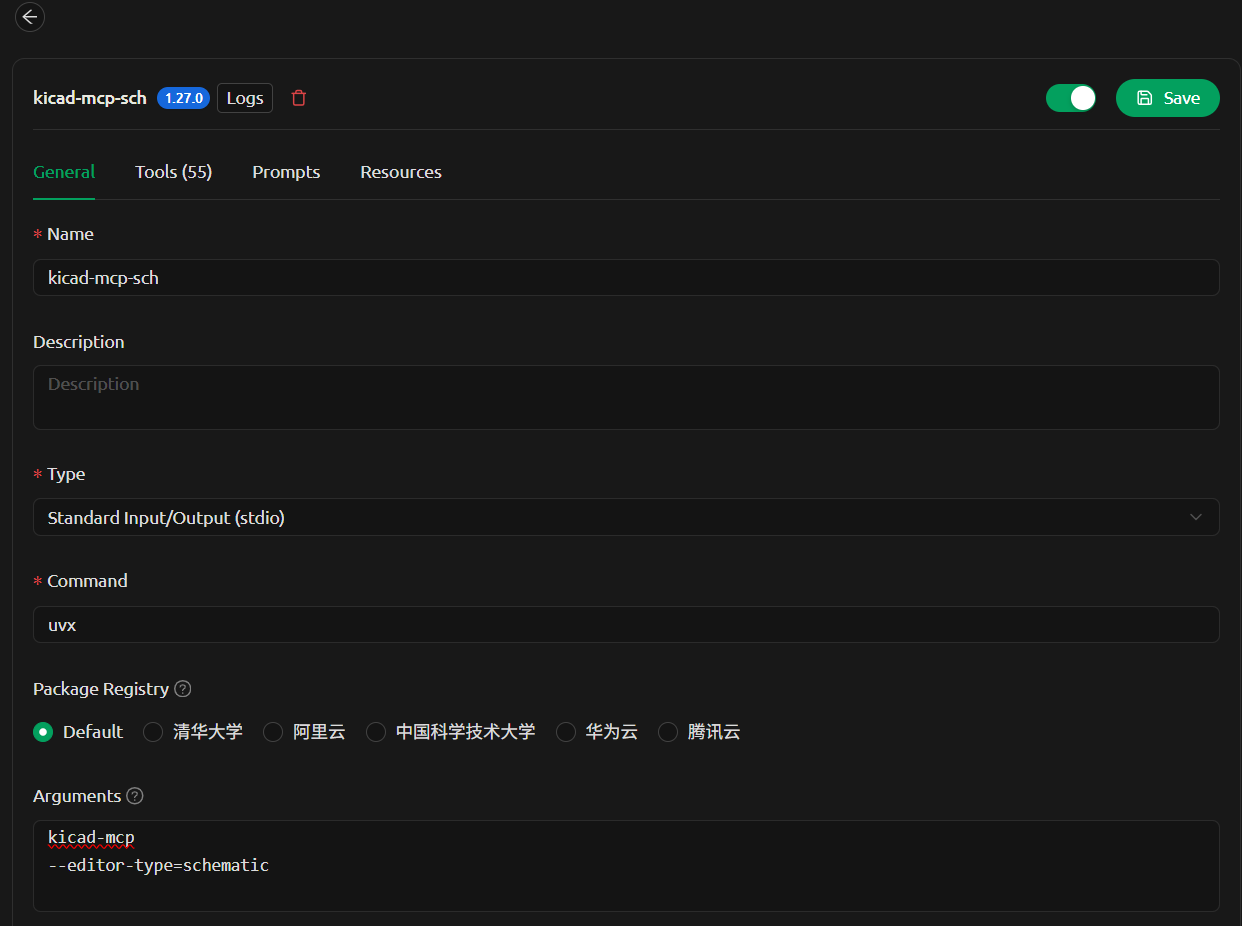
Options
--editor-type supports:
schematicpcbsymbolfootprint
Development
1. Clone the repository
git clone <your-repo-url>
cd kicad-mcp
2. Configure MCP client (local development)
Example configuration in VSCode:
{
  "servers": {
    "kicad-pcb-mcp": {
      "type": "stdio",
      "command": "uv",
      "args": [
        "--directory",
        "C:/code/kicad-mcp",
        "run",
        "kicad-mcp",
        "--editor-type",
        "pcb"
      ]
    },
    "kicad-schematic-mcp": {
      "type": "stdio",
      "command": "uv",
      "args": [
        "--directory",
        "C:/code/kicad-mcp",
        "run",
        "kicad-mcp",
        "--editor-type",
        "schematic"
      ]
    }
  }
}
3. Run locally
Install dependencies and run:
uv sync
uv run kicad-mcp --editor-type schematic
4. Iterate
Modify the code and restart your MCP client to see changes.
Notes
- Requires
uv: https://github.com/astral-sh/uv - Python 3.11+
- Ensure KiCad is running with IPC enabled
Installing Huaqiu KiCad
This server has no published package — it is built from source. Open the repository and follow its README.
▸ github.com/huaqiu-electronics/kicad-mcpFAQ
Is Huaqiu KiCad MCP free?
Yes, Huaqiu KiCad MCP is free — one-click install via Unyly at no cost.
Does Huaqiu KiCad need an API key?
No, Huaqiu KiCad runs without API keys or environment variables.
Is Huaqiu KiCad hosted or self-hosted?
Self-hosted: the server runs locally on your machine via the install command above.
How do I install Huaqiu KiCad in Claude Desktop, Claude Code or Cursor?
Open Huaqiu KiCad on unyly.org, pick your client tab (Claude Desktop, Claude Code, Cursor) and press Install — the config is generated automatically, no JSON editing.
Related MCPs
GitHub
PRs, issues, code search, CI status
 by GitHub
Filesystem
Secure file operations with configurable access controls.
Memory
Knowledge graph-based persistent memory system.
Template MCP Server
A CLI tool to create a new Model Context Protocol server project with TypeScript support, dual transport options, and an extensible structure
 by mcpdotdirect
Compare Huaqiu KiCad with
Not sure what to pick?
Find your stack in 60 seconds
Author?
Embed badge for your README
Browse similar
All development MCPs