
I Want My MTG
FreeNot checkedQuery Magic: The Gathering cards, sets, and prices and manage a personal MTG collection.

About
Query Magic: The Gathering cards, sets, and prices and manage a personal MTG collection.
README
npm version License: MIT smithery badge
An MCP server for I Want My MTG. Exposes IWMM's API as tools so Claude Desktop, Claude Code, Cursor, and other MCP clients can search Magic: The Gathering cards/sets and manage a user's collection conversationally.
Published on npm, the MCP Registry, and Smithery. Coverage expands to match the API; see docs/TOOLS.md for the full, always-current tool list.
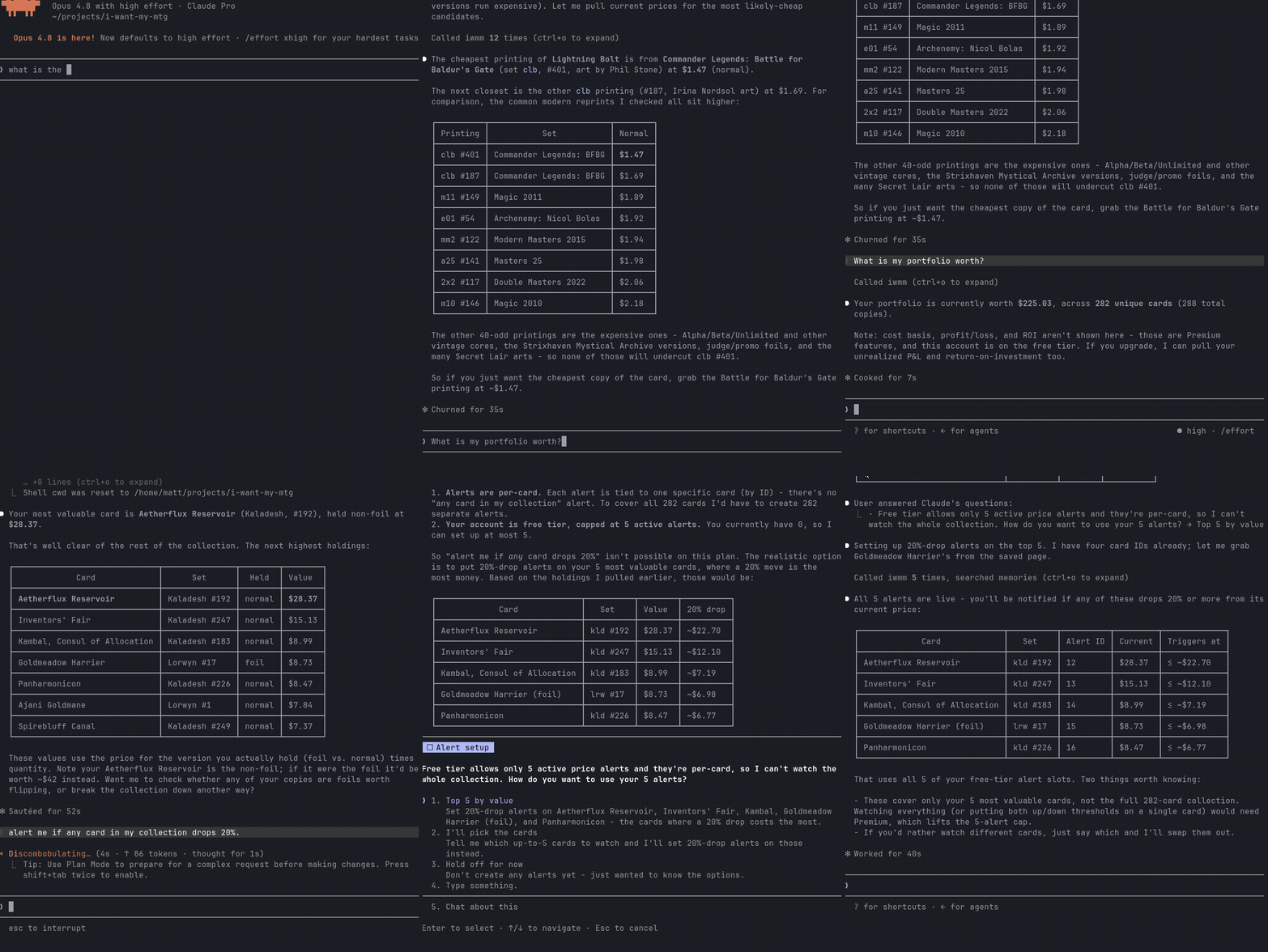
What you can do
- Anonymous (no key): search cards, look up a card by set+number, get current prices and 30-day price history, get a card's buylist (sell-to-vendor) offers, list sets and their cards, list sealed products.
- Authenticated (with an IWMM API key): manage your inventory and transactions; build and manage decks (create, import from a decklist, edit cards, add the cards you're missing to your buy-list); view portfolio summaries, history, performance, cash flow, realized gains, and breakdowns (including by color, with per-slice drill-down); manage price alerts and notifications.
- Sell tools (with a key): see your collection's market sell value (best buylist offer per card, grouped by vendor), manage a buy-list (want-list), and get a cash-vs-store-credit recommendation for selling toward your buy list.
See the project roadmap for what's next.
Install
Requires Node 20+.
npx iwantmymtg-mcp
Or install globally if you prefer:
npm install -g iwantmymtg-mcp
iwantmymtg-mcp
Claude Desktop
Add to claude_desktop_config.json (macOS: ~/Library/Application Support/Claude/claude_desktop_config.json; Windows: %APPDATA%\Claude\claude_desktop_config.json):
{
  "mcpServers": {
    "iwmm": {
      "command": "npx",
      "args": ["-y", "iwantmymtg-mcp"],
      "env": {
        "IWMM_API_KEY": "iwm_live_..."
      }
    }
  }
}
IWMM_API_KEY is optional - read-only tools work without it. Create a key at https://iwantmymtg.net/user/api-keys.
Claude Code
Add to .mcp.json in your project (or ~/.claude/.mcp.json globally):
{
  "mcpServers": {
    "iwmm": {
      "command": "npx",
      "args": ["-y", "iwantmymtg-mcp"],
      "env": { "IWMM_API_KEY": "iwm_live_..." }
    }
  }
}
Cursor
Add to ~/.cursor/mcp.json (global) or .cursor/mcp.json in your project:
{
  "mcpServers": {
    "iwmm": {
      "command": "npx",
      "args": ["-y", "iwantmymtg-mcp"],
      "env": { "IWMM_API_KEY": "iwm_live_..." }
    }
  }
}
After saving, restart Cursor and confirm iwmm appears under Settings -> Features -> MCP Servers.
Example prompts
- "Search for Lightning Bolt printings and show me the cheapest one."
- "What's the price history of Bloodbraid Elf from Modern Horizons 3?"
- "Add 4 copies of Lightning Bolt LEA to my inventory."
- "What sealed products are available for MH3?"
- "What's my collection worth to sell right now, and which vendor pays most?"
- "Add these cards to my buy list, then tell me whether cash or store credit is the better deal."
See examples/ for walkthroughs of common flows, and docs/TOOLS.md for the full tool reference.
Configuration
| Env var | Default | Purpose |
|---|---|---|
IWMM_API_KEY |
(unset) | Personal API key. Required only for authenticated tools. |
IWMM_BASE_URL |
https://iwantmymtg.net |
Override for self-hosted or local-dev IWMM instances. |
Local development
npm install
npm run build
node dist/index.js
Or with tsx for live reload:
npm install
npx tsx src/index.ts
License
This project is licensed under the MIT License — see the LICENSE file for details.
Install I Want My MTG in Claude Desktop, Claude Code & Cursor
unyly install i-want-my-mtgInstalls into Claude Desktop, Claude Code, Cursor & VS Code — handles npx, uvx and build-from-source repos for you.
First time? Get the CLI: curl -fsSL https://unyly.org/install | sh
Or configure manually
Run in your terminal:
claude mcp add i-want-my-mtg -- npx -y iwantmymtg-mcpStep-by-step: how to install I Want My MTG
FAQ
Is I Want My MTG MCP free?
Yes, I Want My MTG MCP is free — one-click install via Unyly at no cost.
Does I Want My MTG need an API key?
No, I Want My MTG runs without API keys or environment variables.
Is I Want My MTG hosted or self-hosted?
Self-hosted: the server runs locally on your machine via the install command above.
How do I install I Want My MTG in Claude Desktop, Claude Code or Cursor?
Open I Want My MTG on unyly.org, pick your client tab (Claude Desktop, Claude Code, Cursor) and press Install — the config is generated automatically, no JSON editing.
Related MCPs
GitHub
PRs, issues, code search, CI status
 by GitHub
Filesystem
Secure file operations with configurable access controls.
Memory
Knowledge graph-based persistent memory system.
Template MCP Server
A CLI tool to create a new Model Context Protocol server project with TypeScript support, dual transport options, and an extensible structure
 by mcpdotdirect
Compare I Want My MTG with
Not sure what to pick?
Find your stack in 60 seconds
Author?
Embed badge for your README
Browse similar
All development MCPs