
Icontext
FreeNot checkedEncrypted AI context vault: give Claude Code, Codex, and Cursor persistent memory from Gmail + LinkedIn

About
Encrypted AI context vault: give Claude Code, Codex, and Cursor persistent memory from Gmail + LinkedIn
README
CI License: MIT Python 3.11+ GitHub stars
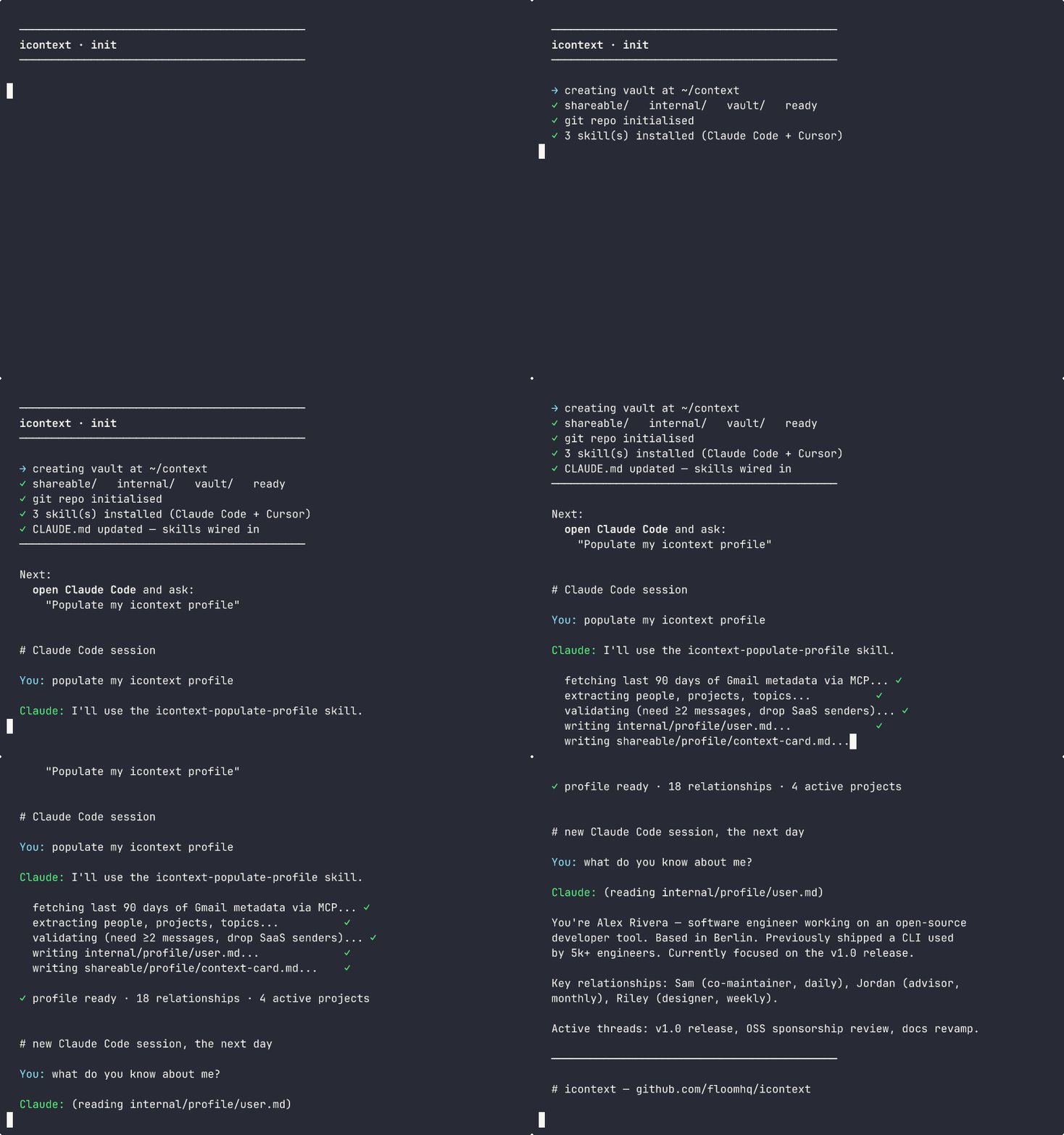
Your AI agents now share a brain.
icontext is a folder + a set of skills. Your AI tools (Claude Code, Cursor, Codex) read from it before answering, and write to it as they learn about you. Local. Encrypted. No API keys.
Quickstart
curl -fsSL https://raw.githubusercontent.com/floomhq/icontext/main/get.sh | bash
icontext init
Open Claude Code and say: "Populate my icontext profile."
That's it. Your AI now has persistent memory.
How it works
icontext is intentionally minimal infrastructure. Three pieces:
This diagram shows the default profile-building flow: agents try local sources in order, synthesize context inside the current AI session, and write plain Markdown into the shared vault. Claude Code, Cursor, Codex, and OpenCode then read the same three-tier context folder without needing a hosted icontext service.
flowchart TD
  Gmail["Gmail (MCP)"] -. fallback .-> LinkedIn["LinkedIn (browser/PDF)"]
  LinkedIn -. fallback .-> SelfDescribe["User self-describe"]
  Gmail --> Evidence["Selected evidence"]
  LinkedIn --> Evidence
  SelfDescribe --> Evidence
  Evidence --> Session["Local LLM session<br/>no external API needed"]

  Session --> Shareable["shareable/<br/>context-card.md"]
  Session --> Internal["internal/<br/>profile markdown"]
  Session --> Vault["vault/<br/>git-crypt encrypted"]

  Shareable --> Claude["Claude Code"]
  Internal --> Claude
  Vault --> Claude
  Shareable --> Cursor["Cursor"]
  Internal --> Cursor
  Vault --> Cursor
  Shareable --> Codex["Codex"]
  Internal --> Codex
  Vault --> Codex
  Shareable --> OpenCode["OpenCode"]
  Internal --> OpenCode
  Vault --> OpenCode
1. The vault — a structured folder
Plain Markdown files in a tiered folder structure:
~/context/
  internal/profile/
    user.md            # full synthesized profile (identity, relationships, topics, projects, communication, pending)
    relationships.md   # key contacts table
    projects.md        # active projects
  shareable/profile/
    context-card.md    # 200-word shareable summary, safe to send to collaborators
  vault/               # git-crypt encrypted (legal docs, credentials, anything truly private)
Every file is plain Markdown. Open it in a text editor, in Obsidian, or pipe it to any tool. No proprietary format.
2. Skills — instructions your AI agent follows
icontext init installs four skills:
- icontext-populate-profile — builds the profile from real data sources
- icontext-refresh-profile — updates a stale profile
- icontext-share-card — regenerates the shareable summary
- icontext-write-fact — routes durable facts to the right vault location
Skills are Markdown files installed at:
~/.claude/skills/icontext-*/SKILL.md(Claude Code)~/.cursor/rules/icontext-*.mdc(Cursor; upgraded installs may also retain legacyfbrain-*.mdcrules)
When you ask Claude Code "populate my icontext profile", it discovers the skill via its description, reads the instructions, and executes them.
3. The synthesis pipeline
The populate skill instructs the agent to follow a deterministic 4-stage flow:
Stage A — Source cascade (try in order):
- Gmail MCP if available (read headers only — never message bodies)
- LinkedIn via browser automation, or a saved-to-PDF profile
- User describes themselves in chat (4 questions)
Stage B — Entity extraction: The agent extracts structured data from the source: people (with evidence_messages count), projects (with evidence_subjects), topics. Filters out 1-shot SaaS welcome emails, notification senders, and self-addresses.
Stage C — Local validation:
- Drop entities below evidence threshold (≥2 messages for relationships, ≥2 subjects for projects)
- Dedupe by email/handle
- Sort by evidence weight, keep top 15-20
Stage D — Markdown rendering:
Write four files (user.md, relationships.md, projects.md, context-card.md) using a fixed template. Roles and context columns are required (cite subject evidence, never blank). No HTML comment delimiters or fragile parsing.
This is the same architecture as the optional headless icontext sync (which uses Gemini 2.5 Flash Lite directly), just executed by the user's AI agent instead.
Cross-tool: every agent reads the same folder
| Tool | How it reads | How it writes |
|---|---|---|
| Claude Code | CLAUDE.md snippet + skill files | Skill file invocation |
| Cursor | .cursor/rules/icontext-*.mdc |
Same skill instructions, Cursor-flavored |
| Codex | reads vault directly (plain MD) | optional — icontext sync |
| OpenCode | reads vault directly (plain MD) | optional — icontext sync |
Any tool that can read Markdown can read the vault. Any tool that can follow Markdown instructions can populate it.
Privacy and security
- No external API calls by default. Synthesis happens inside your AI agent's session. No icontext server, no telemetry, no profile leaves your machine.
- Credentials in OS keychain. Gmail App Passwords (only used for the optional headless
sync) are stored viakeyring— macOS Keychain, Linux Secret Service. Never in plaintext JSON. - Vault tier encryption.
vault/is git-crypt encrypted at rest.internal/andshareable/are plaintext (designed to be portable and readable in Obsidian). - Pre-commit secret scanning.
gitleaksruns on every commit if you push the vault to git.
Full threat model in SECURITY.md.
What you get
~/context/
  shareable/        public-safe summaries
    profile/
      context-card.md   sendable to collaborators
  internal/         private working context
    profile/
      user.md           full profile
      relationships.md  key contacts
      projects.md       active projects
  vault/            git-crypt encrypted secrets
Then your agents share the same context layer:
Claude Code   →  skills + CLAUDE.md
Cursor        →  rules
Codex / OpenCode  →  optional MCP server (legacy)
GitHub        →  gitleaks + tier CI
Privacy
Synthesis runs inside your AI agent's session, not on a server. Default install requires no API keys. Email metadata never leaves your laptop.
icontext stores:
- Your synthesized profile in
~/context/internal/profile/. Plaintext on disk. Use FileVault. - Your vault secrets in
~/context/vault/. Encrypted withgit-crypt.
icontext does not run a server. No data is ever sent to any icontext-controlled endpoint.
Full threat model: see SECURITY.md.
Headless / no-agent setup (optional)
If you don't have Claude Code or Cursor and want a fully automated pipeline, the original Gemini-based sync is still available:
pip install fbrain[sync]
icontext connect gmail
icontext connect linkedin --pdf ~/Downloads/Profile.pdf
icontext sync
This requires GEMINI_API_KEY and runs the same 3-stage synthesis as the agent skill, but headlessly. Use it for CI, scripts, or non-agent environments.
Features
| Layer | What icontext does |
|---|---|
| Skills | Markdown instructions your agent follows to populate and refresh your profile. |
| Encryption | vault/** is protected with git-crypt in Git and on GitHub. |
| Secret scanning | gitleaks runs locally and in GitHub Actions. |
| Tier enforcement | deterministic classifier blocks sensitive files in lower-trust folders. |
| Retrieval | local SQLite FTS index, rebuilt by hook, no API key required. |
| MCP (optional) | search_vault, read_vault_file, append_log, rebuild_index. |
| Verification | doctor.py --deep checks hooks, encryption, index, MCP, agents, gitleaks, and CI. |
| Headless sync | optional Gemini-based fallback for CI / no-agent setups. |
Tiers
A vault split into three top-level folders:
| Folder | Meaning | Encryption |
|---|---|---|
shareable/ |
Could be published without harm | Plaintext |
internal/ |
Personal/business but not catastrophic if leaked | Plaintext |
vault/ |
Must never leak | git-crypt encrypted |
The classifier enforces content matches folder. Secrets are never allowed anywhere without git-crypt.
Install
curl -fsSL https://raw.githubusercontent.com/floomhq/icontext/main/get.sh | bash
icontext init
Or manually:
git clone https://github.com/floomhq/icontext ~/icontext
pip install -e ~/icontext
icontext init
icontext init creates the vault, installs skills into ~/.claude/skills/ and ~/.cursor/rules/, and adds a CLAUDE.md snippet so your agent loads the profile at session start.
Skill management
icontext skills list      # show installed skills and where they live
icontext skills update    # pull latest skill versions from the icontext repo
Prove it works
icontext doctor
The doctor command validates your install without starting background services or adding hosted dependencies.
Uninstall
bash ~/icontext/uninstall.sh /path/to/vault
Uninstall removes icontext-managed hooks, .icontext/, the GitHub Actions workflow, and the install manifest. It leaves your shareable/, internal/, and vault/ content in place.
Requirements
git- Python 3.11+
Optional:
gitleaksfor secret scanning (brew install gitleaks)git-cryptfor vault encryption (brew install git-crypt)git-lfsfor binary assets (brew install git-lfs)GEMINI_API_KEYonly if you want the headlessicontext syncfallback
Multi-device sync
Same vault, every machine. icontext uses git on a private repo as the sync layer — no extra service, no daemon talking to a vendor.
Setup (3 steps)
On your primary machine, push the vault to a private repo:
cd ~/context
gh repo create <user>/context --private --source=. --push
icontext autosync start          # commits + pushes every 60s
On every other machine, clone and start autosync:
gh repo clone <user>/context ~/context
icontext autosync start
That's it. Edits made on machine A appear on machine B within ~60s of the next prompt (the user-prompt-submit hook also pulls in the background whenever you start a Claude Code prompt).
Commands
| Command | What it does |
|---|---|
icontext push |
Commit local changes and push to origin |
icontext pull |
Rebase against origin (autostashes in-flight changes) |
icontext autosync start |
Install + start the 60s background agent |
icontext autosync stop |
Stop and remove the agent |
icontext autosync status |
Show running state and last sync time |
Conflict handling
icontext pull runs git pull --rebase --autostash. Last writer wins. If two machines edit the same lines of the same file in the same minute, the rebase surfaces the conflict and prints the file paths — resolve manually with normal git tooling.
In practice, conflicts are rare: profile files are append-mostly, and the 60s push window is shorter than typical edit cycles.
Implementation
- macOS:
launchdagent at~/Library/LaunchAgents/dev.fbrain.autosync.plist. Logs at~/Library/Logs/fbrain.log. - Linux:
systemd --usertimer at~/.config/systemd/user/fbrain-autosync.timer. Logs viajournalctl --user -u fbrain-autosync.service.
How icontext compares
Common question: "isn't this just like X?"
| What it is | How icontext is different | |
|---|---|---|
| mem0 / Letta / Zep | Memory libraries for developers building agents | icontext is for end users; you don't write code to use it |
| OpenMemory | Local CLI + MCP for AI memory | OpenMemory's memory is reactive (built from chat history). icontext is proactive (built from your real data: Gmail, LinkedIn) |
| Obsidian | Knowledge base for humans | Obsidian is for humans writing notes; icontext is for AI agents writing context. Same folder works for both — open ~/context in Obsidian for the human view. |
| Pieces.app | OS-level capture for developers | Pieces captures what you do; icontext synthesizes who you are. Different layer. |
| Claude Code's CLAUDE.md | Per-project AI instructions | CLAUDE.md is per-project. icontext is your identity — the same context every project uses. |
| Cursor Rules / .cursorrules | Cursor-specific instructions | icontext works across Claude Code, Cursor, Codex, OpenCode via MCP and shared file conventions. Tool-agnostic. |
The wedge: icontext is the only tool that proactively builds your professional identity from sources you already own (Gmail, LinkedIn) and exposes it to every AI tool you use.
Status
Production-ready. Run icontext doctor to verify your install.
Social preview image at
assets/og-image.png— upload via Settings → Social preview
Built with icontext
Share your setup: tag #icontext on Twitter/X
Installing Icontext
This server has no published package — it is built from source. Open the repository and follow its README.
▸ github.com/floomhq/icontextFAQ
Is Icontext MCP free?
Yes, Icontext MCP is free — one-click install via Unyly at no cost.
Does Icontext need an API key?
No, Icontext runs without API keys or environment variables.
Is Icontext hosted or self-hosted?
Self-hosted: the server runs locally on your machine via the install command above.
How do I install Icontext in Claude Desktop, Claude Code or Cursor?
Open Icontext on unyly.org, pick your client tab (Claude Desktop, Claude Code, Cursor) and press Install — the config is generated automatically, no JSON editing.
Related MCPs
Gmail
Read, send and search emails from Claude
 by Google
Slack
Send, search and summarize Slack messages
 by Slack
Runbear
No-code MCP client for team chat platforms, such as Slack, Microsoft Teams, and Discord.
Discord Server
A community discord server dedicated to MCP by [Frank Fiegel](https://github.com/punkpeye)
Compare Icontext with
Not sure what to pick?
Find your stack in 60 seconds
Author?
Embed badge for your README
Browse similar
All communication MCPs