
Kerebrom
FreeNot checkedLocal-first persistent memory for AI agents. One Go binary installs MCP, lifecycle hooks, and shared SQLite/FTS5 memory for Claude, Codex, Cursor, and more.

About
Local-first persistent memory for AI agents. One Go binary installs MCP, lifecycle hooks, and shared SQLite/FTS5 memory for Claude, Codex, Cursor, and more.
README
Español · Install for AI agents · Release v2.1.9 · Repository history
Local-first persistent memory for AI agents. Install once, then Claude, Codex, Cursor, Gemini CLI, OpenCode, Windsurf, VS Code, and any MCP-capable client can share one durable memory layer.
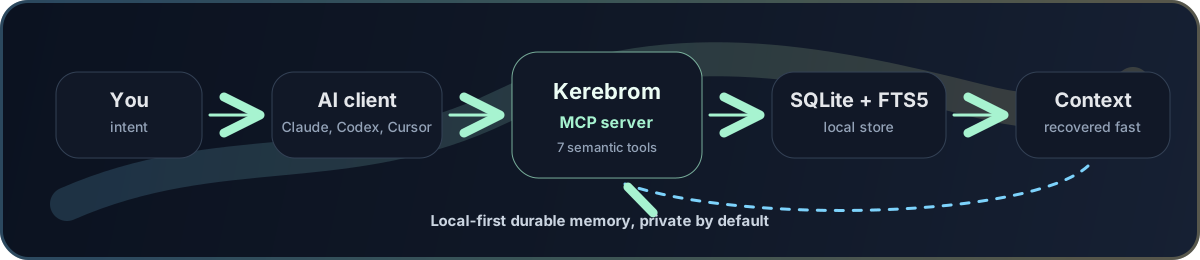
Kerebrom is a private memory engine for people who work with more than one AI assistant. It runs as one Go binary, stores memory locally in SQLite + FTS5, exposes a semantic MCP server, and installs the strongest available memory lifecycle for each supported client.
It is designed to feel automatic: agents consult prior context, remember durable decisions, summarize substantial work, and recover project context without the user repeating "use memory" in every chat.
Why It Exists
AI clients usually remember in separate silos. Claude Code, Claude Desktop Chat, Cowork, Codex, Cursor, and CLI agents may all know different pieces of the same project. Kerebrom gives them one local source of truth:
| Problem | Kerebrom behavior |
|---|---|
| Context disappears between chats | context activates on every user message and retrieves prior project observations before the agent answers. |
| Agents save noisy transcripts | remember stores distilled observations, not raw conversation dumps. |
| Claude/Codex know different things | All configured clients read and write the same local SQLite store. |
| Setup is fragile | setup auto detects installed clients and writes their native config surfaces. |
| Old or contradictory facts resurface | valid_at, context_governor, and the trust ledger make recency, conflict handling, and memory provenance explicit. |
| Cloud memory is risky | Local stdio MCP and local hooks are the default; remote MCP is opt-in only. |
Install
Kerebrom currently installs from source. You need Git and Go 1.26 or newer; use the newest Go 1.26 patch available. The installer tells you clearly if Go is missing or too old. In interactive mode, if Homebrew is available, it asks before installing or upgrading Go; if you decline, installation stops because Kerebrom cannot build without Go.
For a human-friendly install:
git clone https://github.com/ulianbass/kerebrom.git
cd kerebrom/versions/v2
./scripts/install-user.sh
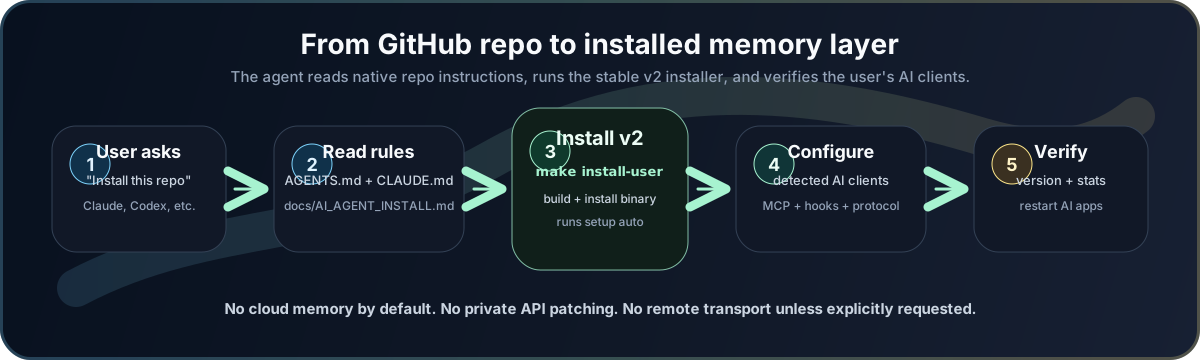
The script builds the binary, installs it to ~/local/bin/kerebrom, links it from ~/.local/bin/kerebrom, asks which AI clients to configure when run interactively, runs setup, prints the installed version and stats, then verifies the install with doctor --deep.
It does not use network transports, import memory, delete memory, or make system-level dependency changes without user consent. The only dependency it can offer to install automatically is Go through Homebrew when the user explicitly accepts.
For a non-interactive install:
./scripts/install-user.sh --yes --agent auto
For automation that already has make:
make install-user
The Make target delegates to the same installer, so Go checks, dependency consent rules, version/stats output, and Doctor verification stay consistent.
All three paths install the binary and run:
kerebrom setup auto
setup auto configures only clients that already have local config on the machine. If no known client is detected, it falls back to Claude Desktop so a first-time user still gets a working MCP entry.
To force a specific target:
./scripts/install-user.sh --agent claude-desktop
./scripts/install-user.sh --agent codex
./scripts/install-user.sh --all
After install, fully restart any open AI client so it reloads the MCP server and native instruction files.
What success looks like:
Installed version:
v2.1.x (commit=..., build_date=...)

Kerebrom doctor: PASS
Kerebrom doctor: WARN can also be usable when the warning is for an optional client that is not installed. There should be no FAIL lines.
Ask An AI Agent To Install It
Kerebrom includes repo-native instructions for AI installers:
| Agent surface | File it should read |
|---|---|
| Codex / OpenAI-style coding agents | AGENTS.md |
| Claude Code / Claude-aware agents | CLAUDE.md |
| Any agent or human installer | docs/AI_AGENT_INSTALL.md |
You can paste this into Claude, Codex, or another coding agent after pointing it at the repo:
Please install this repository for me as an end-user product.
Read AGENTS.md or CLAUDE.md first, then follow docs/AI_AGENT_INSTALL.md.
Use the current stable line in versions/v2, run the plug-and-play install path, verify the binary, and tell me which AI clients were configured.
Do not enable remote/HTTP memory unless I explicitly ask for it.
What Gets Configured
| Client | Setup behavior |
|---|---|
| Claude Code | MCP entry, lifecycle hooks, auto-approved everyday tools, hook scripts, and suppressible hook payloads; protocol is delivered by the MCP server and hook payloads, not by occupying user preferences. |
| Claude Desktop Chat | Local MCP server entry. Account memory is cloud-backed, so Kerebrom does not patch private Claude APIs or browser databases. |
| Claude Cowork | Local MCP plus a native memory/CLAUDE.md authority seed when the desktop app has local Cowork account storage. |
| Codex | MCP server in config, auto-approval for everyday memory tools, and lifecycle hooks with human status messages plus quiet-mode hints; protocol is delivered by the MCP server and hook payloads instead of the user instructions textbox. |
| Cursor | MCP entry plus Kerebrom memory rule. |
| Gemini CLI | MCP entry, system prompt, environment flag for system instructions. |
| OpenCode | MCP entry plus Kerebrom memory protocol file. |
| Windsurf | MCP config plus global rules. |
| VS Code | MCP entry and prompt instructions where supported. |
The Memory Cycle
Kerebrom v2 exposes seven semantic tools. The first six are everyday agent tools; projects is administrative.
| Moment | Tool | Purpose |
|---|---|---|
| Every user message | context |
Open/resume a session, save the prompt only when appropriate, and retrieve useful prior observations before the agent answers. |
| Need a specific topic | recall |
Search memory by natural-language query. |
| Durable fact appears | remember |
Save an interpreted observation using What / Why / Where / Learned. |
| Work is ending, compacting, or explicitly closed | summary |
Persist goals, decisions, changes, risks, files, and next steps. |
| Inspect chronology | timeline |
Review recent sessions and observations. |
| User says memory is wrong | forget |
Invalidate an obsolete observation. |
| Project names need consolidation | projects |
Move variants into the canonical project and persist aliases so fragments do not reappear. |
The user should not have to say "use Kerebrom" or "save this" for every turn. Activation happens every user message; durable saving still happens only when the message contains something worth preserving.
Observations are ordered by valid_at, the semantic timestamp for when a memory was last asserted, corrected, or revalidated. Administrative maintenance such as project consolidation does not make old facts look new, and corrections saved with the same topic_key update the canonical memory instead of leaving contradictory facts at equal priority.
Every context response also includes context_governor: a compact decision contract that tells the agent to think, search, analyze, then answer; prefer query matches over generic recency; and call timeline when returned memories conflict. Every observation has a local trust-ledger trail of create, update, reassert, import, and soft-delete events so Kerebrom can audit why a memory is considered current.
Local-First Security Model
Kerebrom is private by default:
- Runtime data lives in
~/.kerebrom/. - The memory database is local SQLite + FTS5.
- There is no telemetry, cloud database, hosted account, or background daemon.
kerebrom updatecontacts GitHub Releases only when the user runs it.kerebrom mcp-httpandkerebrom serveare local transports by default; non-loopback exposure requires explicit authentication or an explicit unsafe override.- Claude Chat account memory is not modified through private APIs. If the user wants a native Claude Chat memory hint, use the copy-paste prompt in docs/AI_AGENT_INSTALL.md.
Commands
kerebrom version
kerebrom update --check
kerebrom update
kerebrom doctor --deep
kerebrom doctor status
kerebrom doctor heal
kerebrom setup auto
kerebrom setup all
kerebrom stats
kerebrom context --project my-project "what matters here?"
kerebrom search "release decision"
kerebrom projects aliases
kerebrom projects consolidate --target proyecto-falage --sources falage
kerebrom tui
kerebrom export --output memory-export.json
kerebrom sync --status
Advanced local HTTP MCP transport:
KEREBROM_REMOTE_TOKEN="change-me" kerebrom mcp-http --addr 127.0.0.1:7437 --path /mcp
Advanced local HTTP API:
KEREBROM_REMOTE_TOKEN="change-me" kerebrom serve --addr 127.0.0.1:7438
Product Lines
| Line | Status | Purpose |
|---|---|---|
v2 |
current | Semantic seven-tool surface, self-update, stronger Claude Desktop/Cowork behavior. |
v1 |
maintained | Prior mem_* tool surface; critical fixes only. |
history/legacy-main-2026-04-10 |
tag | Pre-reset legacy history. |
history/go-rewrite-2026-04-10 |
tag | Previous Go rewrite experiment. |
Each line lives under versions/vN/ so future releases can evolve without rewriting history. See docs/BRANCHES.md.
Build And Test
cd versions/v2
make test
make build
./bin/kerebrom version
Architecture
versions/v2/
  cmd/kerebrom/             CLI entrypoint
  internal/cli/             commands, hooks, TUI
  internal/contextgov/      context governance contract
  internal/setup/           local AI-client setup and v1 cleanup
  internal/store/sqlite/    SQLite + FTS5 memory store
  internal/transport/mcp/   MCP server with semantic tools
  internal/transport/http/  local HTTP API
  internal/sync/            compressed sync chunks
  internal/updater/         self-update via GitHub Releases
  docs/                     specs, ADRs, migration, release checklist
Canonical docs:
License
Source-available proprietary software. See LICENSE.
Installing Kerebrom
This server has no published package — it is built from source. Open the repository and follow its README.
▸ github.com/ulianbass/kerebromFAQ
Is Kerebrom MCP free?
Yes, Kerebrom MCP is free — one-click install via Unyly at no cost.
Does Kerebrom need an API key?
No, Kerebrom runs without API keys or environment variables.
Is Kerebrom hosted or self-hosted?
Self-hosted: the server runs locally on your machine via the install command above.
How do I install Kerebrom in Claude Desktop, Claude Code or Cursor?
Open Kerebrom on unyly.org, pick your client tab (Claude Desktop, Claude Code, Cursor) and press Install — the config is generated automatically, no JSON editing.
Related MCPs
wenb1n-dev/SmartDB_MCP
A universal database MCP server supporting simultaneous connections to multiple databases. It provides tools for database operations, health analysis, SQL optim
 by wenb1n-dev
Postgres Server
This server enables interaction with PostgreSQL databases through the Model Context Protocol, optimized for the AWS Bedrock AgentCore Runtime. It provides tools
 by madhurprash
Postgres
Query your database in natural language
 by Anthropic
PostgreSQL
Read-only database access with schema inspection.
by modelcontextprotocolCompare Kerebrom with
Not sure what to pick?
Find your stack in 60 seconds
Author?
Embed badge for your README
Browse similar
All data MCPs