
Keyshot
БесплатноНе проверенPrototype MCP server: control KeyShot Studio from Claude Code (scene, cameras, materials from a CMF sheet, renders)

Описание
Prototype MCP server: control KeyShot Studio from Claude Code (scene, cameras, materials from a CMF sheet, renders)
README
English | 简体中文 | 日本語 | 한국어 | Deutsch
Control an open KeyShot Studio 2026 window from Claude Code with the Model Context Protocol (MCP).
License: MIT Status: prototype Tests Release PyPI
Status: prototype. The tools work and have tests, but the project depends on the scripting API of KeyShot, which can change. Tell us what you use and what fails: open an issue or a discussion.
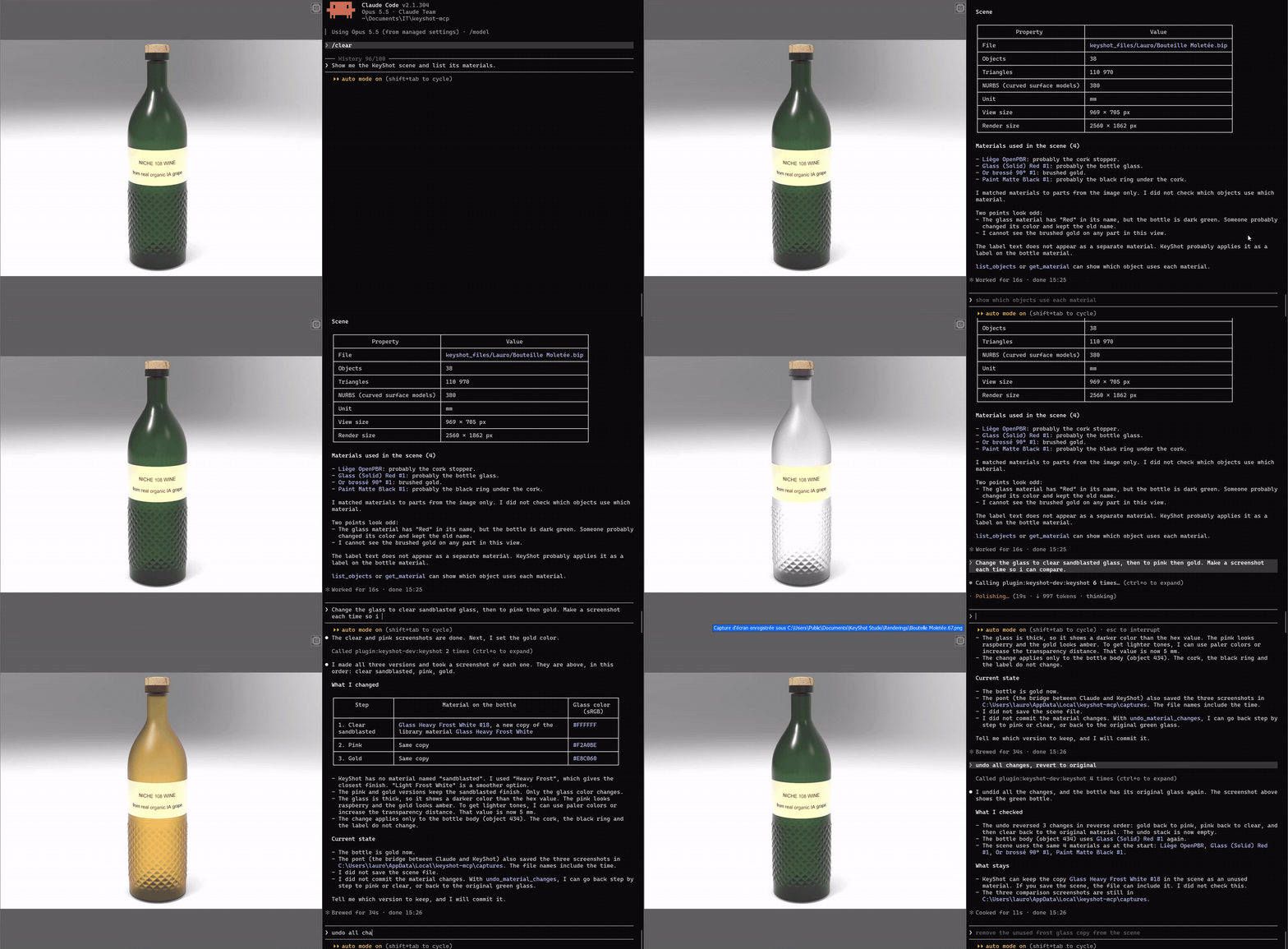
The demo plays 3 times faster than real time.
Claude Code ⇄ MCP server keyshotmcp (Python 3.12, stdio)
            ⇄ TCP 127.0.0.1:1998, 4-byte length + JSON, token
            ⇄ MCP start.py (in KeyShot, timer on the UI thread)
The bridge runs inside KeyShot. The server runs in Claude Code. They speak only on the local computer.
Requirements
| Item | Version |
|---|---|
| KeyShot Studio | 15.1 (2026) or later. Tested with 2026.2 Pro (15.1.2.7). |
| Python | 3.12 or later, Windows |
mcp |
1.30.0 |
| Claude Code | any recent version |
Install
From PyPI
From version 1.1.0, keyshot-mcp is a Python package. With uv:
uvx keyshot-mcp install-addin
claude mcp add keyshot -- uvx keyshot-mcp
install-addin copies the two bridge scripts into %PUBLIC%\Documents\KeyShot Studio\Scripts (or the folder of --dir). Then restart KeyShot.
As a Claude Code plugin
From version 1.1.0, this repository is also a Claude Code marketplace. The plugin keyshot starts the server with uvx, so uv must be installed.
/plugin marketplace add lfoletti/keyshot-mcp
/plugin install keyshot@keyshot-mcp
Then run /keyshot-install-addin once, and restart KeyShot.
From the release zip or the repository
Each release has keyshot-mcp-<version>-windows.zip, with libs/ already filled. Unzip it, then go to step 3. Without the zip, start at step 1.
- Clone the repository:
git clone https://github.com/lfoletti/keyshot-mcp.git - Install
mcpin thelibsfolder.run.pyloads it from there.py -3.12 -m pip install --target libs mcp==1.30.0 - Copy
addin\Scripts\MCP start.pyandMCP stop.pytoC:\Users\Public\Documents\KeyShot Studio\Scripts\. - Restart KeyShot. KeyShot reads the Scripts folder only when it starts.
- Add the server to Claude Code:
claude mcp add keyshot -- py -3.12 -I -S C:\path\to\keyshot-mcp\run.py - Make sure the imports are correct:
The output showspy -3.12 -I -S run.py --checkkeyshot : imports okand 33 tools.
Use
- In KeyShot, open Window > Scripting Console > Scripts.
- Select
MCP start, then click Run. The console showsPont KeyShot actif sur 127.0.0.1:1998. - In Claude Code, type
/mcp. Make sure thatkeyshotis connected. - Ask Claude, for example:
- "Show me the scene and list the materials."
- "Apply brushed aluminium to the cap, then make a 1920 × 1080 render."
To stop the bridge, run the script MCP stop, or close KeyShot.
To update the bridge, copy the new file, then use the tool reload_bridge.
Tools
| Group | Tools |
|---|---|
| Scene | keyshot_status, get_scene_info, get_scene_tree, list_objects, set_visibility, screenshot, save_scene |
| Cameras and environment | list_cameras, set_camera, fit_camera, list_environments, set_environment, set_realtime |
| Materials | list_materials, get_material, list_library_materials, assign_material, set_material_parameter, rename_material, undo_material_changes, commit_material_changes, save_material_to_library |
| Material graph | add_material_node, connect_material_nodes, disconnect_material_input, remove_material_node |
| Render | render_image, render_status, wait_for_render, view_image |
| Bridge | lux_functions, reload_bridge, execute_python (off by default) |
Two MCP prompts give Claude the method:
| Prompt | Use |
|---|---|
keyshot_strategy |
How to work in KeyShot without damage to the scene. |
keyshot_materiaux |
How to make materials from a CMF sheet (color, material, finish) or a description: physical values, colors, node recipes. |
Colors: [r, g, b] is linear (0-1). #RRGGBB is sRGB: the bridge changes it to linear.
Settings
Optional file: %LOCALAPPDATA%\keyshot-mcp\pont-config.json.
{"execute_python": false, "dossier_sorties": "C:\\path\\to\\outputs"}
| Setting | Effect |
|---|---|
execute_python |
true enables the tool execute_python. The default is false. |
dossier_sorties |
Folder for screenshots, renders and scene backups. |
dossiers_textures |
List of more folders where the bridge can read texture images. KeyShot's texture library and dossier_sorties are always allowed. |
KEYSHOT_MCP_PORT |
Environment variable. Bridge port. The default is 1998. |
KEYSHOT_MCP_TIMEOUT |
Environment variable. Server timeout in seconds. The default is 60. |
KEYSHOT_MCP_EXECUTE_PYTHON |
Environment variable. 1 enables execute_python. |
The bridge writes pont-actif.json (port, token, KeyShot PID) and pont.log in the same folder.
Safety
- The bridge listens only on 127.0.0.1. Each request must have the token from
pont-actif.json. execute_pythonis off. Only a local setting can enable it.- The tools edit a material graph only on copies that the bridge made.
set_cameradoes not discard a camera view that is not saved.save_scenekeeps a copy of the old.bipfile.
Tests
The tests use a fake lux module. KeyShot is not necessary.
cd tests
py -3.13 test_pont.py
py -3.13 test_serveur_mcp.py
py -3.13 test_cli.py
py -3.13 test_publication.py
py -3.13 test_plugin.py
py -3.13 test_dev_version.py
test_pont.py has 87 tests for the bridge. test_serveur_mcp.py has 9 end-to-end tests. test_cli.py tests the command keyshot-mcp. test_publication.py and test_plugin.py check the PyPI, MCP registry and plugin files, and that this README follows the code. test_dev_version.py tests the TestPyPI version tool. The essai_*.py files need an open KeyShot.
test_serveur_mcp.py starts the server with the Python that runs the test. If the packages in libs are for a different Python version, set KEYSHOT_MCP_PYTHON to the applicable python.exe.
Contribute
Read CONTRIBUTING.md and CODE_OF_CONDUCT.md.
Status
keyshot-mcp is a working prototype. It is tested with KeyShot Studio 2026.2 Pro on Windows.
- The bridge uses the KeyShot scripting API (
lux). A new KeyShot version can change this API. - KeyShot can add its own integration with Claude in a future version. This project can then stop.
- Feedback has priority over new features. Use the issue templates Bug and Feedback.
Disclaimer
keyshot-mcp is an independent project. It is not affiliated with Luxion or KeyShot, and so far Luxion does not endorse or sponsor it. KeyShot is a trademark of Luxion.
License
MIT
Установка Keyshot
У этого сервера нет опубликованного пакета — он собирается из исходников. Открой репозиторий и следуй инструкции в README.
▸ github.com/lfoletti/keyshot-mcpFAQ
Keyshot MCP бесплатный?
Да, Keyshot MCP бесплатный — установка в пару кликов через Unyly без оплаты.
Нужен ли API-ключ для Keyshot?
Нет, Keyshot работает без API-ключей и переменных окружения.
Keyshot — hosted или self-hosted?
Self-hosted: сервер запускается локально на твоей машине командой из раздела установки.
Как установить Keyshot в Claude Desktop, Claude Code или Cursor?
Открой Keyshot на unyly.org, выбери вкладку своего клиента (Claude Desktop, Claude Code, Cursor) и нажми Install — конфиг сгенерируется автоматически, без правки JSON.
Похожие MCP
GitHub
PRs, issues, code search, CI status
 автор: GitHub
Filesystem
Secure file operations with configurable access controls.
Memory
Knowledge graph-based persistent memory system.

Unyly Deploy
Deploy sites and MCP servers to Unyly straight from your AI agent
 автор: Unyly
Amap Maps Mcp Server
MCP server for using the AMap Maps API
 автор: duxiaohui
PayMCP
Lightweight payments layer for MCP servers: turn tools into paid endpoints with a two-line decorator. [PyPI](https://pypi.org/project/paymcp/) · [npm](https://w
 автор: blustAI
Server For Power BI
Enables exploring Microsoft Fabric / Power BI workspaces and semantic models, and executing ad-hoc DAX queries.
 автор: Mitsubishi-Fuso
Gpt Image 2 Mcp
RunAPI GPT Image 2 MCP server for image generation: create tasks, poll results, and check pricing across 1 model from Claude Code, Codex, Cursor, and VS Code.
 автор: runapi-ai
Template MCP Server
A CLI tool to create a new Model Context Protocol server project with TypeScript support, dual transport options, and an extensible structure
 автор: mcpdotdirect
Supabase
Database, auth and storage
 автор: Supabase
Compare Keyshot with
Не уверен что выбрать?
Найди свой стек за 60 секунд
Автор?
Embed-бейдж для README
Похожее
Все в категории development