
Krimto
FreeNot checkedOpen-source team memory layer for AI coding agents. Markdown-in-git, user/team/org hierarchy, MCP. Apache-2.0.

About
Open-source team memory layer for AI coding agents. Markdown-in-git, user/team/org hierarchy, MCP. Apache-2.0.
README
Open-source memory for AI coding agents you own in git — governed by a real user→team→org hierarchy, not a vendor database. Solo to team. Apache-2.0.
Your agent's memory, as markdown in your own git — synced across every editor and machine. Tell your agent "remember X" in any editor and it saves a durable, attributable fact; ask later — in a new chat, a different editor, or on another machine — and it recalls the right answer. One command, no account, no vendor database: your memory follows you.
You own it: every fact is a plain markdown file in a git repo you control — readable, reviewable in a
PR, and yours. When a teammate joins, that same memory becomes a shared team brain governed by a real
user → team → org hierarchy (the most specific scope wins at recall) — the one primitive no other
memory tool ships. Solo is free; the governance is what you grow into.
See it
One npx command sets it up; then your agent saves a fact in Claude Code and recalls it in Cursor —
no account, no database:
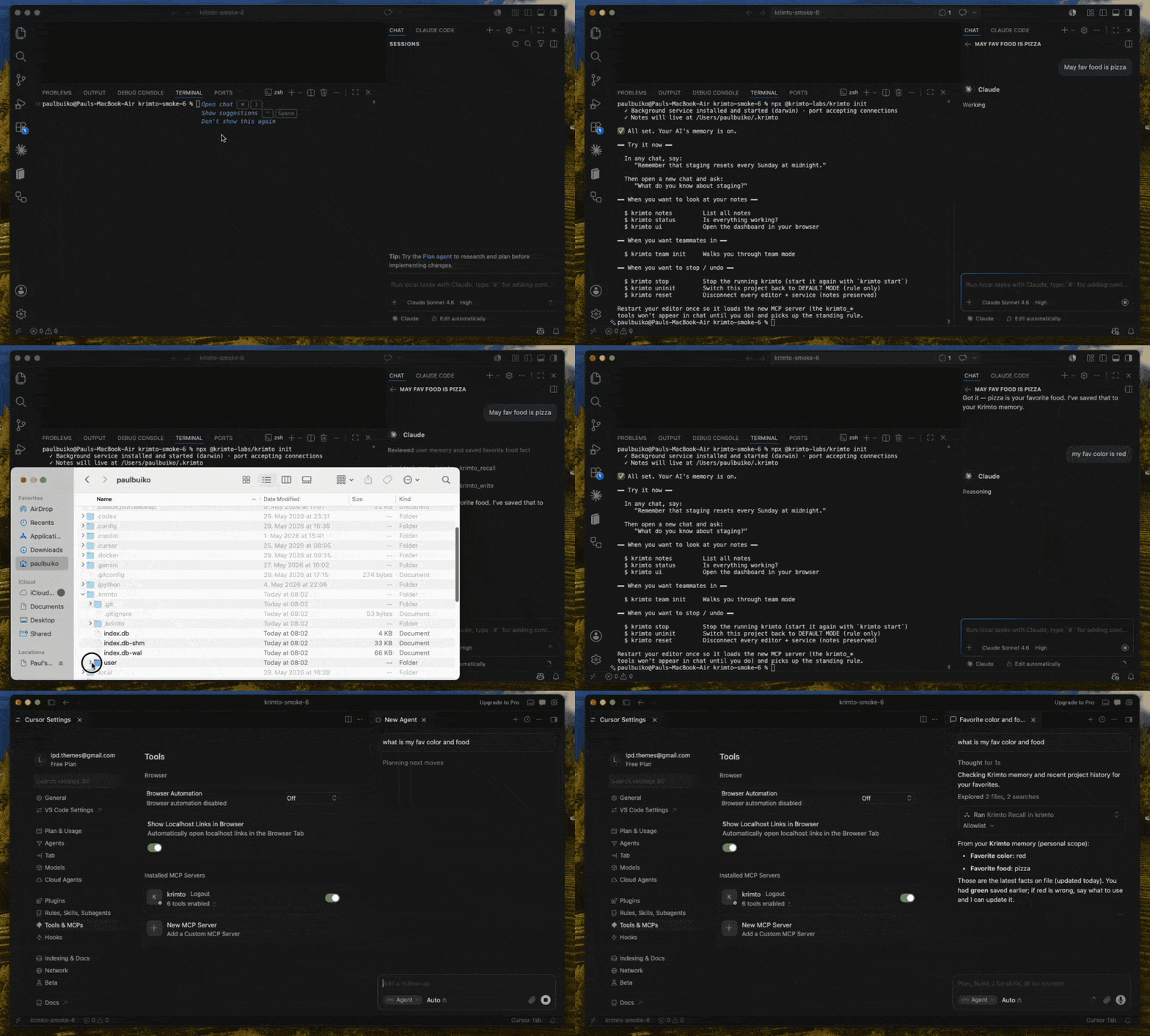
Three short demos — solo (remember in Claude Code, recall in Cursor), cross-machine (write,
git push, recall on another laptop), and team (a teammate's fact reaches you; your personal notes
stay yours).
Because every memory is just a file in your git, you can read it yourself — no API, no dashboard needed:
$ cat ~/.krimto/user/[email protected]/favorite-color.md
---
id: fct_01KT3BDSYY1KK80SG3S7KBEV58
scope: user/[email protected]
title: Favorite color
author: [email protected]
created: 2026-06-02T05:03:14Z
updated: 2026-06-02T05:03:14Z
tags:
  - personal
source: claude-code
---

User's favorite color is red.

$ git -C ~/.krimto log --oneline -1
8bc5b86 krimto: write batch — 1 fact
That's the whole bet: your agent's memory is plain markdown in a git repo you own — not rows in someone else's database.
Why Krimto
- You own it, in your git. Every fact is a markdown file in a git repo you control —
git logthe audit trail, edit it in any editor, review it in a pull request. No vendor database, no lock-in. - Governed
user → team → orghierarchy. Knowledge is scoped to a person, a team, or the whole company, and the most specific scope wins at recall — a server-enforced primitive no other memory tool ships for free. - Follows you everywhere — cross-vendor, Apache-2.0. One MCP server syncs the same memory across Claude Code, Cursor, Codex, Gemini CLI and more — every editor and machine. Fully open source, with no managed-service restriction.
Try it in 2 minutes (solo, no account)
npx @krimto-labs/krimto init
The setup wizard detects your editor, wires it up, and turns on automatic memory. Then, in any chat:
"Remember that our staging DB resets every Sunday."
Open a new chat and ask:
"What do you know about staging?" → it remembers.
See your notes with krimto notes (terminal) or krimto ui (browser dashboard). Your data lives in
~/.krimto — the same folder no matter which project you're working in.
Connect your agent
krimto init wires supported editors for you. What auto-connects vs. needs one copy-paste step:
| Editor | Setup |
|---|---|
| Cursor | auto-connects |
| Claude Code | auto-connects |
| Codex | manual snippet |
| Gemini CLI | manual snippet |
To connect any MCP client manually, point it at Krimto over stdio:
claude mcp add krimto -- npx -y @krimto-labs/krimto
…or the config-file form (Cursor, Codex, Gemini CLI, etc. use the same shape):
{ "mcpServers": { "krimto": { "command": "npx", "args": ["-y", "@krimto-labs/krimto"] } } }
By default an agent uses Krimto only when you ask. Running krimto init once in your project drops a
standing rule so it uses Krimto on its own.
Install as a Claude Code plugin
Prefer Claude Code's plugin system? Add Krimto's marketplace and install it directly:
/plugin marketplace add krimto-labs/krimto
/plugin install krimto@krimto
This bundles the MCP server together with Krimto's skills, the /krimto-status command, and the
memory hooks — no separate krimto init needed.
How it works
Three layers, one source of truth:
- Storage — facts are markdown files in a git repository (the source of truth; git is the audit log).
- Index — a SQLite + sqlite-vec hybrid index (keyword + vector) for fast retrieval, with scope precedence applied at ranking time.
- Access — an API server enforces who can read and write each scope (
user/team/org).
Team mode
When you're ready to share memory with teammates:
npx @krimto-labs/krimto team init
This walks you through an admin email, your org/team name, an optional shared git remote, and teammate invites — then prints a join command for each teammate:
krimto join --server <url> --key <key>
Teammates can connect to one shared server, or each run their own Krimto synced over a shared git
remote. Personal and team notes live together and sync as a unit. Step back to solo any time with
krimto team disband (your notes are preserved).
Self-host
Krimto runs anywhere Node 20+ runs.
# HTTP server + browser dashboard at http://localhost:8080
npx @krimto-labs/krimto serve

# or Docker
docker run -d -p 8080:8080 -v ~/.krimto:/data ghcr.io/krimto-labs/krimto:latest
Run npx @krimto-labs/krimto --help for the full command surface.
Roadmap
v0.2 (current) ships the memory core, teams, the web dashboard, and the cross-vendor MCP server. Next: OAuth sign-in and a pull-request approval flow (v0.3), then a hosted Krimto Cloud (v1.0). See ROADMAP.md.
Contributing & license
Contributions welcome — see CONTRIBUTING.md and our Code of Conduct. Security reports: SECURITY.md.
Licensed under Apache-2.0. The same code is self-hostable by a solo developer or an enterprise — no tier walls.
Install Krimto in Claude Desktop, Claude Code & Cursor
unyly install krimtoInstalls into Claude Desktop, Claude Code, Cursor & VS Code — handles npx, uvx and build-from-source repos for you.
First time? Get the CLI: curl -fsSL https://unyly.org/install | sh
Or configure manually
Run in your terminal:
claude mcp add krimto -- npx -y @krimto-labs/krimtoFAQ
Is Krimto MCP free?
Yes, Krimto MCP is free — one-click install via Unyly at no cost.
Does Krimto need an API key?
No, Krimto runs without API keys or environment variables.
Is Krimto hosted or self-hosted?
Self-hosted: the server runs locally on your machine via the install command above.
How do I install Krimto in Claude Desktop, Claude Code or Cursor?
Open Krimto on unyly.org, pick your client tab (Claude Desktop, Claude Code, Cursor) and press Install — the config is generated automatically, no JSON editing.
Related MCPs
GitHub
PRs, issues, code search, CI status
 by GitHub
Filesystem
Secure file operations with configurable access controls.
Memory
Knowledge graph-based persistent memory system.
Template MCP Server
A CLI tool to create a new Model Context Protocol server project with TypeScript support, dual transport options, and an extensible structure
 by mcpdotdirect
Compare Krimto with
Not sure what to pick?
Find your stack in 60 seconds
Author?
Embed badge for your README
Browse similar
All development MCPs