
Kynoptic
FreeNot checkedA local-first activity awareness layer for Windows. Records app/system/input activity to a local SQLite database — query it via CLI, a local dashboard, or MCP.

About
A local-first activity awareness layer for Windows. Records app/system/input activity to a local SQLite database — query it via CLI, a local dashboard, or MCP. Keyboard is stored as per-minute counts, never key contents. Apache-2.0.
README
English | 简体中文
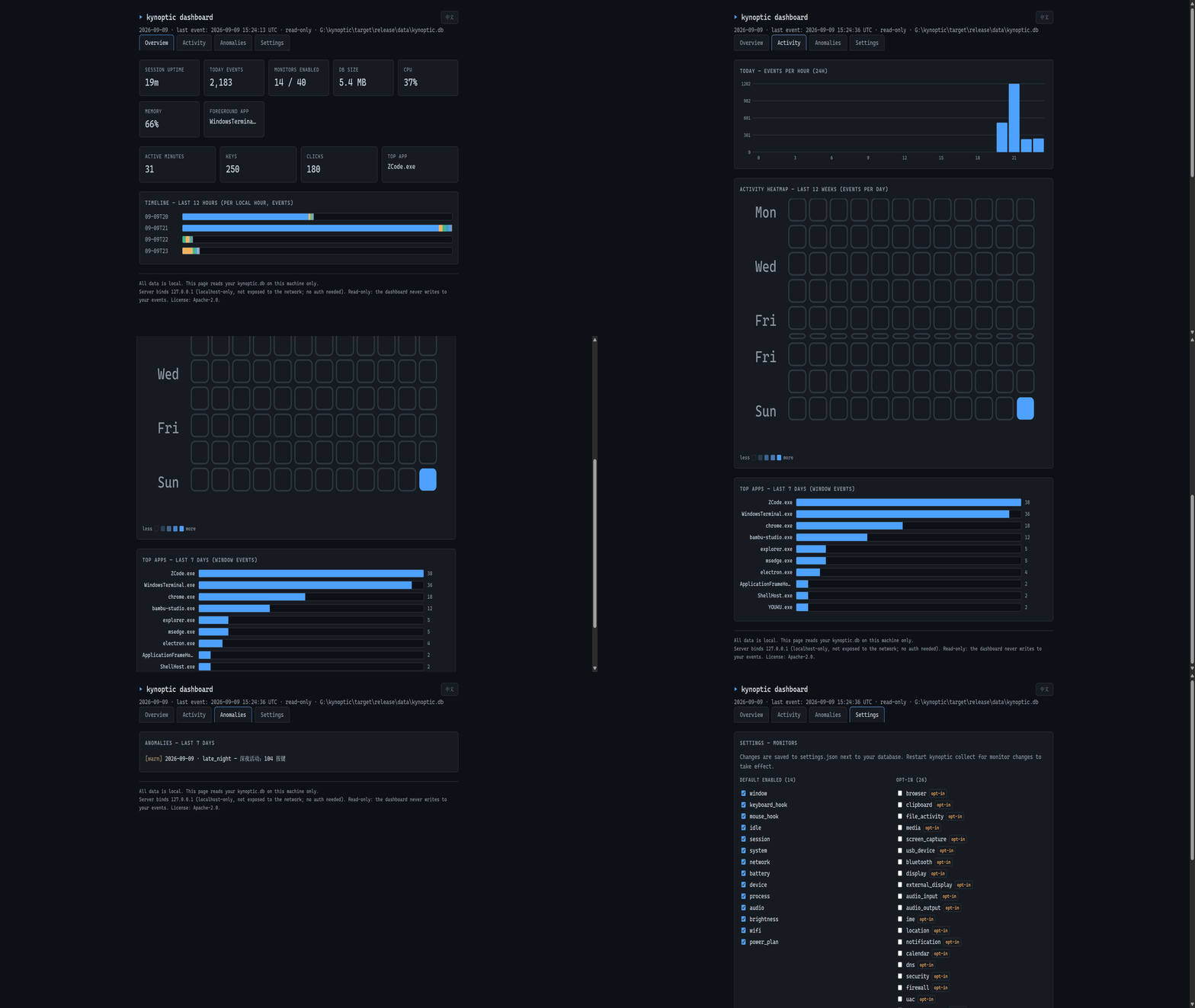
A local-first activity awareness layer for Windows. Kynoptic records which applications you use, when your machine is busy, what changes on your system — and lets you (or your AI assistant) ask questions about it later. Everything stays on your machine.
It answers the questions you actually have after the fact: "What was that tool I used last Tuesday?", "Why was my laptop hot at 2pm?", "How much time did I actually spend in the editor this week?" — through a CLI, a local dashboard, or MCP.



- Website: https://kynoptic.com
- Status: v0.3.1, in active development. API surface may still change.
Computer activity ≠ human activity
A machine being busy is not the same as a person being present. Kynoptic keeps the two apart instead of blending them into one "activity" number: input events flagged by Windows as injected (LLKHF_INJECTED — sent by scripts, macros, or AI agents) are filtered out of the human metric and counted separately, so an automation script hammering the keyboard never inflates your "time at the computer".
The dashboard is built on three metrics:
- Human presence — minutes with real (non-injected) keyboard/mouse/scroll input (scrolling counts as presence: active reading is human).
- Automation — minutes where the only input was injected (scripts, agents).
- Foreground dwell — minutes an application held the foreground window, regardless of input.
Comparing them answers the question raw activity logs can't: was someone there? The overview card does exactly that arithmetic:
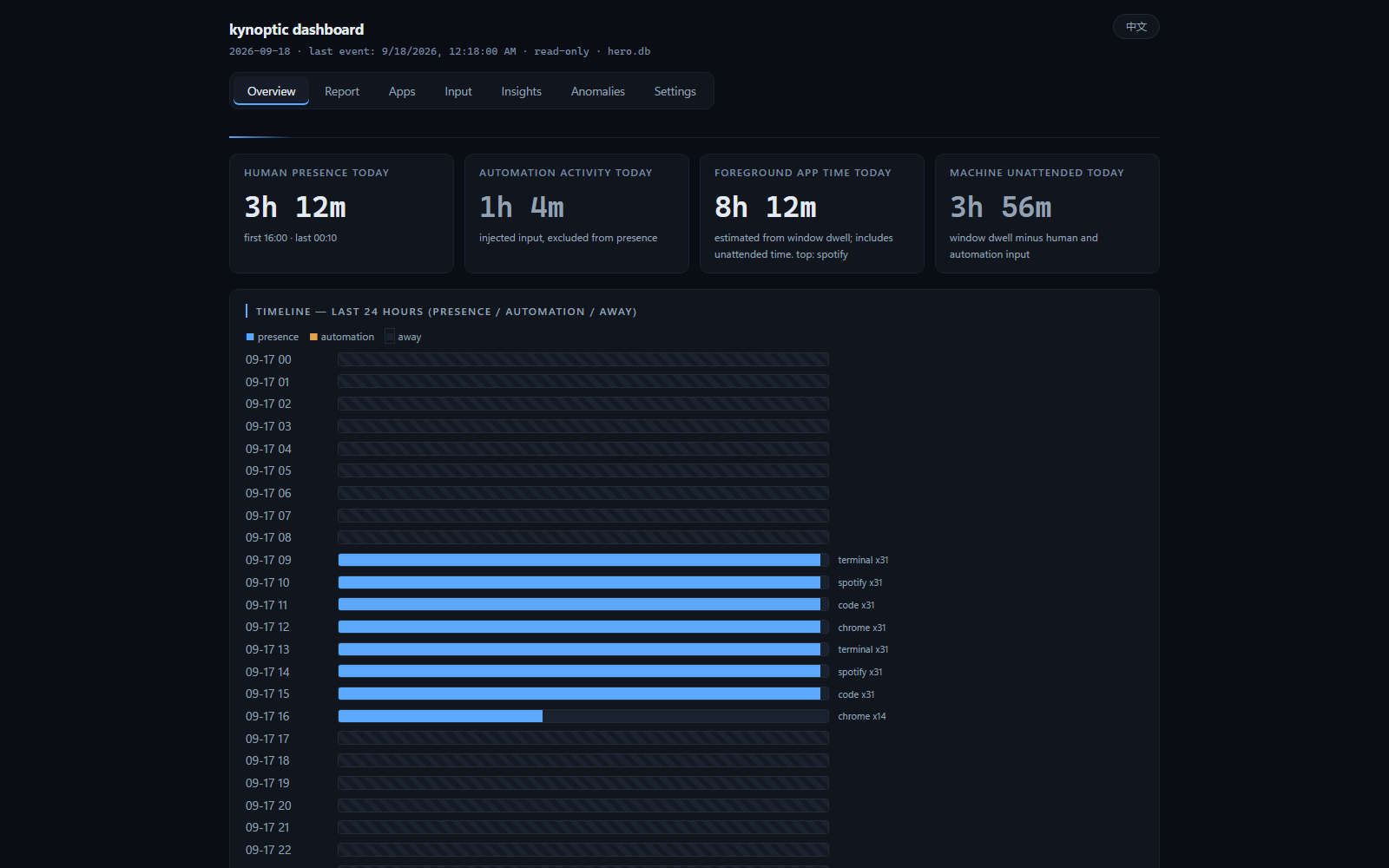
Example from a real day: foreground dwell 20h 1m, human presence 10h 14m, automation-injected activity 8m → unattended foreground = 20h 1m − (10h 14m + 8m) = 9h 39m — hours the machine looked busy while no human was interacting with it (builds, sync jobs, idle-logged-in apps). Raw activity counters would have reported all of it as "usage"; Kynoptic shows you which part was a person.
How it works
- 40 monitors cover the system: foreground window and app switches, keyboard/mouse activity counts, idle time, battery, network interfaces, devices, processes, audio, brightness, Wi-Fi and more. 14 are enabled by default (pure Win32 APIs, zero subprocesses); 26 more (browser tabs, clipboard, Bluetooth, and others) ship in the binary and are opt-in.
- Raw events are stored untouched in SQLite on your machine. Aggregate tables (per-minute/per-day buckets) exist only as derived read caches for fast queries; the raw layer is never truncated, re-keyed, or cleaned up automatically.
- Query locally: a CLI for ad-hoc questions, and an MCP server so a local AI assistant can ask for your day's summary, timeline, or anomalies without any data leaving the machine.
Quick start
Option 1 — Installer (recommended, under 1 minute, no toolchain):
SmartScreen note: the build is not code-signed, so Windows will show "Windows protected your PC" on first run. Click More info -> Run anyway (the binary is safe to inspect — sources and per-release SHA256 checksums are on the release page, and everything is reproducible from source with
cargo build --release). It runs entirely on your machine and makes no network calls except the daily update check.
Download Kynoptic-Setup.exe
from the latest release, run it, and launch Kynoptic from the Start menu.
Collection starts automatically. Open the dashboard from the tray icon
menu ("open dashboard"); it binds to http://127.0.0.1:8422 by default.
The automatic fallback (8422–8432, then the 18422/28422 segments, with the
actual port recorded in data\dashboard-port.txt) applies only when the
dashboard is opened via the tray app; the standalone
kynoptic dashboard CLI command exits with an error if the configured
port is already taken (use --port to pick another one).
Option 2 — Build from source:
Requirements: Windows 10/11 and a Rust toolchain (stable, MSVC target).
git clone https://github.com/ardss/kynoptic
cd kynoptic
cargo build --release -p kynoptic

# collect (foreground, writes to <exe-dir>\data\kynoptic.db by default)
target\release\kynoptic.exe collect             # foreground collection; tray is the normal entry

# query what was recorded
target\release\kynoptic.exe query --from today
target\release\kynoptic.exe stats --days 7
target\release\kynoptic.exe dashboard          # local-only web panel (127.0.0.1)
Use it from your AI assistant (MCP)
Kynoptic ships an MCP server (stdio JSON-RPC) with six tools:
get_current_status, get_summary, get_timeline, get_top_apps,
get_anomalies, wait_for. Point your MCP client at it:
The MCP server is the
mcpsubcommand of the installedkynopticexecutable — no separatekynoptic-mcp.exeis shipped. If a tool you run reports a missingkynoptic-mcpbinary, it is invoking the wrong entry point.
{
  "mcpServers": {
    "kynoptic": { "command": "kynoptic", "args": ["mcp"] }
  }
}
To point the MCP server at a specific database, set the KYNOPTIC_DB
environment variable (the MCP config env field works well):
{
  "mcpServers": {
    "kynoptic": {
      "command": "kynoptic",
      "args": ["mcp"],
      "env": { "KYNOPTIC_DB": "D:/data/kynoptic.db" }
    }
  }
}
Both --db <PATH> and the KYNOPTIC_DB environment variable work — mcp --db is passed to the server internally via KYNOPTIC_DB:
{
  "mcpServers": {
    "kynoptic": { "command": "kynoptic", "args": ["mcp", "--db", "D:/data/kynoptic.db"] }
  }
}
Your assistant can then answer questions like "what was I doing when the CPU spiked yesterday?" or "which app did I use most last Tuesday?" without the data ever leaving your disk.
Threat model: any local program that can spawn processes (or is granted MCP
access by your assistant) can read your activity database with the same
rights as this MCP server — treat MCP access like plain file read access to
KYNOPTIC_DB. The server opens the database read-only and never sends data
off-machine, but it cannot protect the file from other local processes.
Writing settings from scripts (curl / automation)
The dashboard write endpoint POST /api/settings sits behind three defenses
(cross-site blocking, same-machine proof, and a session token). A plain script
POST gets a 403 (csrf_blocked or session_token_invalid). That is by design
— the dashboard listens on the loopback interface only, and writes must prove
they come from the local dashboard itself. To write settings from a script,
send all four headers:
PORT=8422   # match the dashboard port (default 8422, dashboard_port in settings.json)
# 1) The session token is injected only into the dashboard's HTML page; grab it first:
TOKEN=$(curl -s http://127.0.0.1:$PORT/ | sed -n 's/.*KYN_CSRF_TOKEN = "\([^"]*\)".*/\1/p')
# 2) Then POST with all four headers:
curl -s -X POST http://127.0.0.1:$PORT/api/settings \
  -H "Origin: http://127.0.0.1:$PORT" \
  -H "X-Kynoptic: 1" \
  -H "X-Kynoptic-Token: $TOKEN" \
  -H "X-Kynoptic-Access-Token: <access token>" \
  -H "Content-Type: application/json" \
  -d '{"daily_goal_minutes": 480}'
What each header does:
| Header | Purpose |
|---|---|
Origin |
Must be the dashboard's own (loopback) address; blocks cross-site forms |
X-Kynoptic: 1 |
Custom header a plain cross-site form cannot send; blocks cross-site fetches |
X-Kynoptic-Token |
Session token, taken from the KYN_CSRF_TOKEN constant in the GET / HTML |
X-Kynoptic-Access-Token |
Access token; only needed if you created data/dashboard-token.txt (its content is the token) |
Read-only endpoints (GET /api/*) do not need the first three; they only need
the access token when one is enabled.
Troubleshooting
- Double-clicking the tray icon does nothing: an instance is already
running, so the new one exits immediately. The program directory's
duplicate-start.logand the data directory'stray.logsay why. Single-instance is per user, machine-wide — it does not distinguish data directories, so two deployments with different data directories also replace each other, and the later start will not run. - A "protection is not active" notification appears: the watchdog
scheduled task that restarts Kynoptic has been disabled or deleted.
Re-enable the
Kynoptic Watchdog <fingerprint>task in Windows Task Scheduler (the name ends with an 8-character fingerprint of the install directory, e.g.Kynoptic Watchdog 46516965), or reinstall Kynoptic.
Performance
Measured on a Ryzen 5 5600X / Windows 11, reproducible from the benchmark harness in this repo (full methodology and raw numbers in BENCHMARKS.md):
| Metric | Measured |
|---|---|
| Idle CPU (whole collector, default monitors) | 0.41% of one core (p95 1.56%) |
| Resident memory (steady state) | ~16.5 MB |
| Startup to first sample | ~238 ms (median) |
| Storage cost | 336 bytes/event in raw mode; the default minute-granularity input mode is ~2.3x smaller |
| Query p95 on a 1M-event database | < 50 ms for all tools (anomalies ~30 ms, via aggregate caches) |
| Large legacy database open (1M rows, backfill pending) | ~8 ms (backfill runs chunked in background) |
Storage budget over time. Raw events are kept forever by default:
there is no automatic cleanup path (DEFAULT_RETENTION_DAYS = 0, and
kynoptic db cleanup only deletes events with an explicit --yes and
N ≥ 30). At a measured low-intensity workload of ~750 events/hour the
database (main + WAL) grows ≈ 3.8 MB/hour — ≈ 92 MB/day, ≈ 33 GB/year.
Plan disk space accordingly, or use kynoptic db cleanup N --yes
periodically (it also prunes the derived aggregates for the deleted
dates).
Privacy
- Recorded data never leaves your machine by default. There is no account, no telemetry, no analytics, and no network calls except a once-daily version check. That check is one GET of GitHub's entire Releases list — on the order of ~100 KB today, and it grows with the number of releases and assets (the API can also paginate) — not a lightweight single-field lookup. A version the check finds is shown in the tray menu and is never auto-installed.
- Fully offline deployments: the version check is the only outbound call
and it honors the standard proxy environment variables. Point
HTTPS_PROXYat an unreachable proxy to stop the check with no outbound traffic at all (anhttps://URL only consultsHTTPS_PROXY/https_proxy, notHTTP_PROXY). The tray runs the check in the background and fails silently, so a dead proxy just means no "update available" prompt ever appears. Runningkynoptic update --checkby hand is not silent: it exits non-zero and prints the failed URL — that is the expected "no network" signal, not a fault. - Keyboard and mouse are stored as per-minute counts only — never key
contents, key order, or timing. The dashboard keyboard heatmap uses
per-key frequency counts (how many times each key was pressed), which are
aggregate statistics, not content. Per-key frequency is on by default
(local data completeness first) and can be disabled explicitly in settings
as an opt-out. Export writes
window_titleverbatim by default; pass--redactto strip URL query strings from titles. Privacy hardening is always available as a switch, but never at the cost of silently dropping local data — if you share exports outside the machine, you own the risk. - Aggregates are derived caches; the raw event log is append-only.
- Deleting anything is opt-in and off by default; schema migrations archive tables by renaming instead of dropping.
The trade-off is deliberate: Kynoptic is useful precisely because the data is complete, and it is trustworthy precisely because it is local.
Repository layout
| Crate | Purpose |
|---|---|
crates/core |
Collectors, event pipeline, SQLite storage, queries |
crates/cli |
kynoptic / kynoptic-ctl CLI |
crates/dash |
Dashboard service and pages (shared by CLI and tray) |
crates/mcp |
MCP server (stdio) |
crates/tray |
Tray shell (pure Win32, hosts the collector and dashboard) |
Monitor registry (single source of truth for what is enabled by default):
crates/core/src/registry.rs. Extended app-internal docs: APP.md,
design notes: CODE_NOTES.md.
License
Apache-2.0. See LICENSE.
Installing Kynoptic
This server has no published package — it is built from source. Open the repository and follow its README.
▸ github.com/ardss/kynopticFAQ
Is Kynoptic MCP free?
Yes, Kynoptic MCP is free — one-click install via Unyly at no cost.
Does Kynoptic need an API key?
No, Kynoptic runs without API keys or environment variables.
Is Kynoptic hosted or self-hosted?
Self-hosted: the server runs locally on your machine via the install command above.
How do I install Kynoptic in Claude Desktop, Claude Code or Cursor?
Open Kynoptic on unyly.org, pick your client tab (Claude Desktop, Claude Code, Cursor) and press Install — the config is generated automatically, no JSON editing.
Related MCPs
Postgres
Query your database in natural language
 by Anthropic
wenb1n-dev/SmartDB_MCP
Connect to multiple databases at once (MySQL, PostgreSQL, SQL Server, MariaDB, Dameng, Oracle) for operations, health analysis and SQL optimization.
 by wenb1n-dev
Postgres Server
This server enables interaction with PostgreSQL databases through the Model Context Protocol, optimized for the AWS Bedrock AgentCore Runtime. It provides tools
 by madhurprash
PostgreSQL
Read-only database access with schema inspection.
by modelcontextprotocolRedis
Interact with Redis key-value stores.
by modelcontextprotocolSQLite
Database interaction and business intelligence capabilities.
by modelcontextprotocolmxcp
Open-source framework for building enterprise-grade MCP servers using just YAML, SQL, and Python, with built-in auth, monitoring, ETL and policy enforcement.
 by raw-labs
julien040/anyquery
Query apps with SQL from a single local-first binary; also connects to PostgreSQL, MySQL and SQLite-compatible databases.
 by julien040
drakonkat/wizzy-mcp-tmdb
Search and retrieve movie, TV show and person information from The Movie Database (TMDB) API.
 by drakonkat
longevity-genie/opengenes-mcp
Query the OpenGenes database for aging and longevity research.
 by longevity-genie
Compare Kynoptic with
Not sure what to pick?
Find your stack in 60 seconds
Author?
Embed badge for your README
Browse similar
All data MCPs