
LabOps Agent Server
FreeNot checkedMCP server that enables clinical lab staff to predict reagent stockouts, check inventory, create orders, and update inventory canvases directly from Slack.

About
MCP server that enables clinical lab staff to predict reagent stockouts, check inventory, create orders, and update inventory canvases directly from Slack.
README
Slack Agent for Good — Slack Agent Builder Challenge 2026 (Salesforce/Devpost)
Predict. Alert. Act. All from Slack.
LabOps Agent is a Slack-native AI agent that predicts reagent stockouts in clinical laboratories before they happen, based on historical demand patterns by test type — and enables lab staff to act directly from Slack without switching to external LIMS systems.
The Problem
Clinical laboratories run on reagents. When a critical reagent runs out mid-operation, testing stops. Current solutions (Quartzy, Scispot) only send passive threshold alerts after stock is already low. No product today predicts stockouts based on test-type demand patterns.
Example: TSH demand spikes every autumn in Argentina (Mar–May, 2.5x ratio). A lab with 680 units, at a projected demand of ~147 units/day, runs out in ~6 days — inside the 7-day reorder window. Without prediction, they find out when the analyzer throws an error.
What LabOps Agent Does
- Predicts stockouts using Prophet, calibrated with patterns derived from anonymized demand analysis in Argentine clinical labs
- Alerts lab staff in
#labops-alertswith interactive Block Kit messages — before the stockout happens - Acts — staff orders reagents, assigns tasks, and updates inventory without leaving Slack
Why LabOps Agent is Different
No existing product (Quartzy, Scispot, Benchling) combines:
- Prediction by test type — TSH spikes in autumn (Mar–May), Hemograma is stable; each reagent gets its own Prophet model
- Native Slack agent — not a webhook or Zapier bridge; Bolt Python with Socket Mode, interactive Block Kit buttons, and modals
- Domain expertise — built by someone with 4 years of B2B KAM experience in clinical diagnostics (Argentina), not a generic inventory template
Technologies Used
| Technology | How It's Used | Platform |
|---|---|---|
| MCP Server | Exposes 4 lab tools: get_inventory, get_forecast, create_order, update_canvas |
Anthropic/Slack |
| Claude Tool-Use Agent | LLM selects and invokes MCP tools via agent_router.py on every @mention |
Anthropic |
| Slack Channel History API | Queries #labops-alerts message history for past reagent incidents (works with the bot token) | Slack |
| Claude API Summarization | Generates natural language summaries of reagent alert history | Anthropic |
Design decision note:
search.messages(Slack Search API) was evaluated but replaced byconversations_replies(Channel History API) for thread history retrieval.search.messagesrequires a workspace user token (xoxp-) which is not available in standard bot-token deployments; the bot token returns empty results. Thread-scoped history viaconversations_repliesprovides the relevant alert context without requiring a user token.
MCP Server
LabOps Agent exposes a real MCP Server using the official Anthropic MCP Python SDK:
# Run MCP Server (stdio transport)
cd backend
python mcp_server.py
Tools available:
get_inventory— Query current reagent stockget_forecast— Prophet demand forecastcreate_order— Create reagent orderupdate_canvas— Update inventory Canvas
Architecture
┌─────────────────────────────────────────────────────┐
│                  SLACK WORKSPACE                     │
│   #labops-alerts  │  Canvas Inventario  │  App Home  │
└──────────────────┬──────────────────────────────────┘
                   │ Bolt Python (Socket Mode)
┌──────────────────▼──────────────────────────────────┐
│                FASTAPI BACKEND                       │
│  ┌─────────────────┐   ┌──────────────────────────┐ │
│  │   MCP SERVER    │   │   PREDICTION ENGINE      │ │
│  │ get_inventory   │   │   Prophet + seasonality  │ │
│  │ get_forecast    │   │   params from 414K B2B   │ │
│  │ create_order    │   │   CV MAPE 8-11% (synth)  │ │
│  │ update_canvas   │   └──────────────────────────┘ │
│  └─────────────────┘                                 │
└─────────────────────────────────┬───────────────────┘
                                  │
┌─────────────────────────────────▼───────────────────┐
│                    SUPABASE                          │
│  inventory │ demand_history │ orders │ alerts_log    │
└─────────────────────────────────────────────────────┘
                                  │
┌─────────────────────────────────▼───────────────────┐
│                  CLAUDE API                          │
│  Natural language explanations of predictions        │
└─────────────────────────────────────────────────────┘
Demo Flow (3 minutes)
0:00–0:45 — Agent detects TSH will run out in ~6 days (demand forecast exceeds stock)
0:45–1:30 — Alert fires in #labops-alerts with Block Kit buttons:
- 📊 Ver proyección
- 🛒 Ordenar reactivo
- 👤 Asignar al equipo
1:30–2:15 — User clicks "Ordenar reactivo" → modal opens → one click confirms → Canvas auto-updates
2:15–3:00 — Agent explains WHY TSH is at risk (seasonal demand pattern) → Claude API summarizes past incidents
Try it Live
Demo video (≤3 min): Watch on YouTube — full demo with voiceover narration. Live deploy:
https://labops-agent.onrender.com(Render persistent host — Socket Mode + FastAPI co-hosted) Sandbox workspace:https://labopsespacio.slack.com(invite-only sandbox).
Reproduce the live deploy (judge-reachable, chart renders)
Slack fetches forecast-chart images from its own servers, so the backend must be reachable over public HTTPS. Socket Mode also needs a persistent host, so this deploys to Render/Railway/Fly — not Vercel serverless (see Deployment).
- Join the Slack Developer Program and create a Developer Sandbox workspace.
- Create a new app from slack-manifest.json, install it, and copy the Bot + App tokens.
- Deploy with the included render.yaml blueprint (one persistent web service hosts both the chart endpoint and the Socket Mode websocket).
- After the first deploy, set
BACKEND_URL=https://labops-agent.onrender.com(or your service URL) and redeploy so the forecast chart renders in Slack.
Local + tunnel (for recording the demo on your machine):
docker-compose up --build                 # backend + slack client + DB
cloudflared tunnel --url http://localhost:8000   # public HTTPS for the chart
# set BACKEND_URL=https://<random>.trycloudflare.com in .env, restart slack_client
Without a public BACKEND_URL, the forecast still shows as native Block Kit
fields — the chart image is simply omitted, never broken.
Setup Instructions
Prerequisites
- Python 3.11+
- Supabase account
- Slack Developer Sandbox (via Slack Developer Program)
- Anthropic API key
1. Clone and install
git clone https://github.com/Marianooss/labops-agent
cd labops-agent
pip install -r requirements.txt
2. Configure environment
cp .env.example .env
# Fill in your keys:
# SUPABASE_URL, SUPABASE_KEY
# SLACK_BOT_TOKEN, SLACK_APP_TOKEN, SLACK_SIGNING_SECRET
# SLACK_USER_TOKEN (optional — only for Slack Search API, not used in current implementation)
# ANTHROPIC_API_KEY
# LABOPS_ALERTS_CHANNEL=#labops-alerts
3. Set up Supabase
# Run in Supabase SQL Editor:
# 1. data/create_tables.sql
# 2. data/seed_data.sql
4. Create Slack App (from manifest)
- Go to api.slack.com/apps → Create New App
- Select From an app manifest
- Choose your Developer Sandbox workspace
- Paste the contents of slack-manifest.json
- Click Create
- Go to OAuth & Permissions → Install to Workspace
- Copy the Bot User OAuth Token and App-Level Token into your
.env
Manifest includes all required scopes: chat:write, channels:read, channels:history, groups:read, groups:history, im:write, users:read, app_mentions:read, canvases:read, canvases:write.
5. One-Click Docker Setup (recommended for judges)
# Clone and start everything (PostgreSQL + backend + slack client + auto-seed)
git clone https://github.com/Marianooss/labops-agent
cd labops-agent
docker-compose up --build

# Wait ~30s for DB init, then test:
curl "http://localhost:8000/alert/trigger?reagent_name=TSH"
This runs the full stack locally without needing a cloud Supabase account:
db— PostgreSQL with auto-created schema and seed databackend— FastAPI on http://localhost:8000slack_client— Bolt Python Socket Mode (waits gracefully if Slack tokens are missing)
To enable Slack integration, copy
.env.exampleto.envand fill inSLACK_BOT_TOKEN,SLACK_APP_TOKEN, andSLACK_SIGNING_SECRETbefore runningdocker-compose up.
6. Local Setup without Docker (one-script)
# Single command — starts backend + Slack client + seeds DB
python scripts/start_local.py
Or manually in separate terminals:
# Terminal 1: FastAPI backend
cd backend && uvicorn main:app --reload --port 8000

# Terminal 2: Slack agent
cd backend && python slack_client.py
Note: Backend commands must be run from the
backend/directory because modules use relative imports.
Deployment (Render / Railway / Fly)
Why not Vercel? The agent uses Slack Socket Mode, which holds a persistent
websocket. Vercel serverless functions are short-lived and cannot keep that
connection open. (If you must use Vercel, you would have to switch to HTTP Events
mode and expose /slack/events — a different integration path this repo does not
use.) Instead, deploy to a persistent host.
The included render.yaml provisions one web service that hosts both:
- the FastAPI HTTP app (serves the public
/chart/forecast/{reagent}PNG that Slack image blocks fetch — needs public HTTPS), and - the Socket Mode websocket, started in a background thread via
RUN_SOCKET_MODE=1(see backend/main.py startup).
Render → New → Blueprint → select this repo → fill the secret env vars
→ after first deploy, set `BACKEND_URL=https://labops-agent.onrender.com` → redeploy
Railway and Fly.io work identically with the same Dockerfile
(it honors the host-injected $PORT).
Project Structure
labops-agent/
├── backend/
│   ├── main.py           # FastAPI entry point
│   ├── mcp_server.py     # MCP tools (4 lab tools)
│   ├── prediction.py     # Prophet demand forecasting
│   ├── slack_client.py   # Bolt Python + event handlers
│   ├── database.py       # Dual backend: Supabase or PostgreSQL
│   ├── claude_client.py  # Claude API wrapper
│   └── blocks_loader.py  # Block Kit / Canvas template loader
├── blocks/
│   ├── alert.json        # Stockout alert Block Kit template
│   ├── modal_order.json  # Order reagent modal template
│   └── canvas.json       # Inventory canvas template
├── data/
│   ├── create_tables.sql # Database schema
│   └── seed_data.sql     # Demo data (DEMO badge)
├── docs/
│   ├── architecture.md   # Technical architecture
│   ├── impact.md         # Impact metrics
│   └── demo_script.md    # 3-minute demo script
├── scripts/
│   ├── init_db.py        # Auto-seed PostgreSQL on Docker startup
│   ├── start_local.py    # One-script local startup (backend + slack + seed)
│   ├── holdout_backtest.py   # Monthly hold-out backtest (illustrative)
│   └── cross_validation.py   # Rolling-origin CV (headline accuracy metric)
├── notebooks/
│   ├── cv_metrics.json       # Rolling-origin CV results (real, reproducible)
│   ├── holdout_metrics.json  # Monthly hold-out results (caveated)
│   └── prophet_metrics.json  # Consolidated metrics summary
├── tests/
│   ├── test_mcp.py       # MCP tool unit tests
│   ├── test_prediction.py # Prophet engine tests
│   └── test_integration.py # Bolt handler integration tests
├── models/               # Prophet serialized models (.pkl)
├── render.yaml           # Render Blueprint (persistent host + Socket Mode)
├── docker-compose.yml    # One-click local stack
├── Dockerfile            # Backend container
├── LICENSE               # MIT License
├── AGENTS.md             # Development operating system
├── BIBLE.md              # Immutable declarations
└── CLAUDE.md             # Claude Code instructions
UiPath Components Used
None — this project uses Slack platform APIs (Channel History API, Canvas API) for messaging and surfaces, Anthropic MCP Server for tool exposure, and Claude API for natural language generation.
Demo Screenshots
Extracted from the final demo video (YouTube).
Block Kit Alert
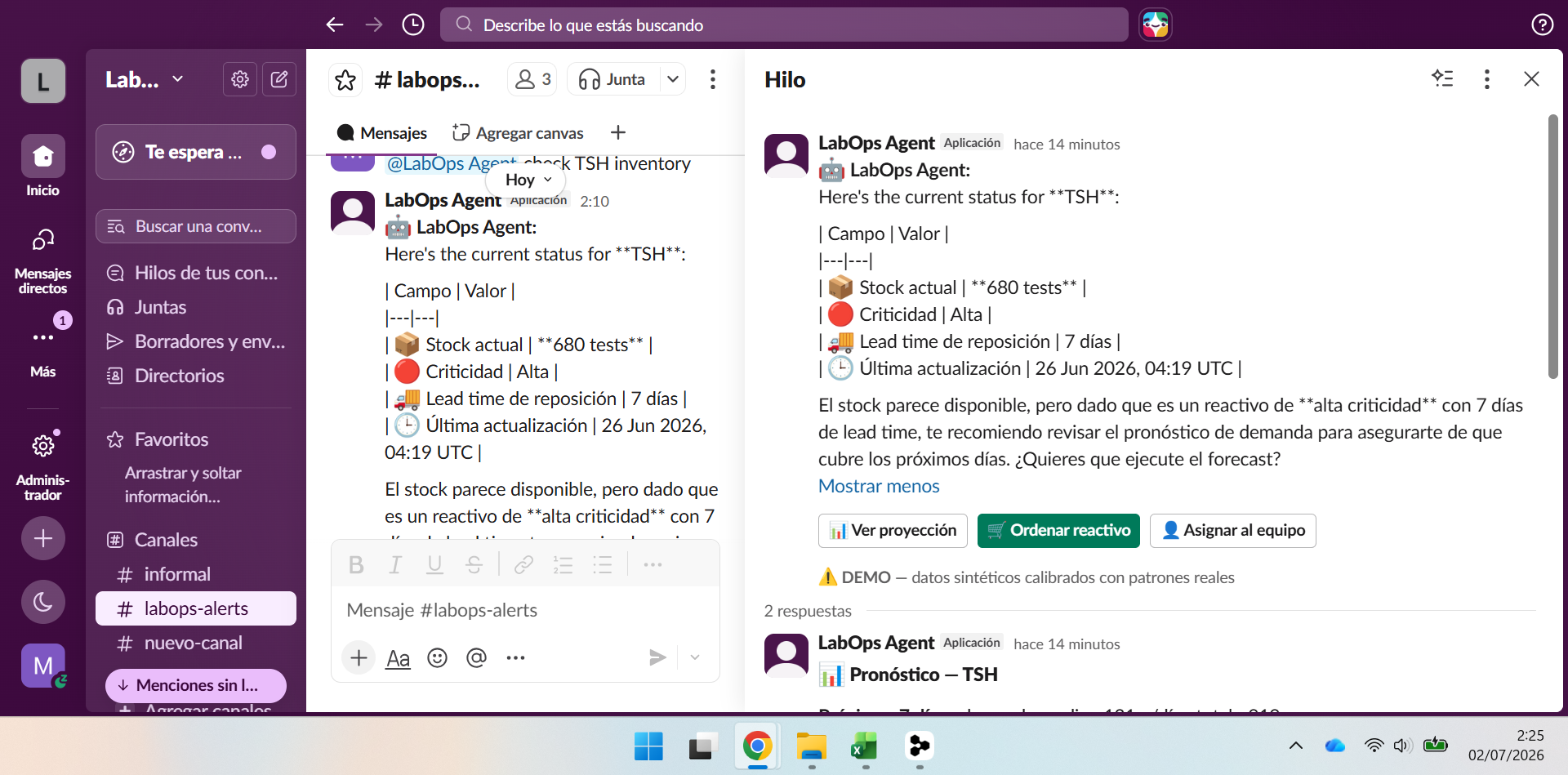 Real-time Block Kit alert fired when Prophet predicts a stockout within the reorder lead time window.
Order Modal
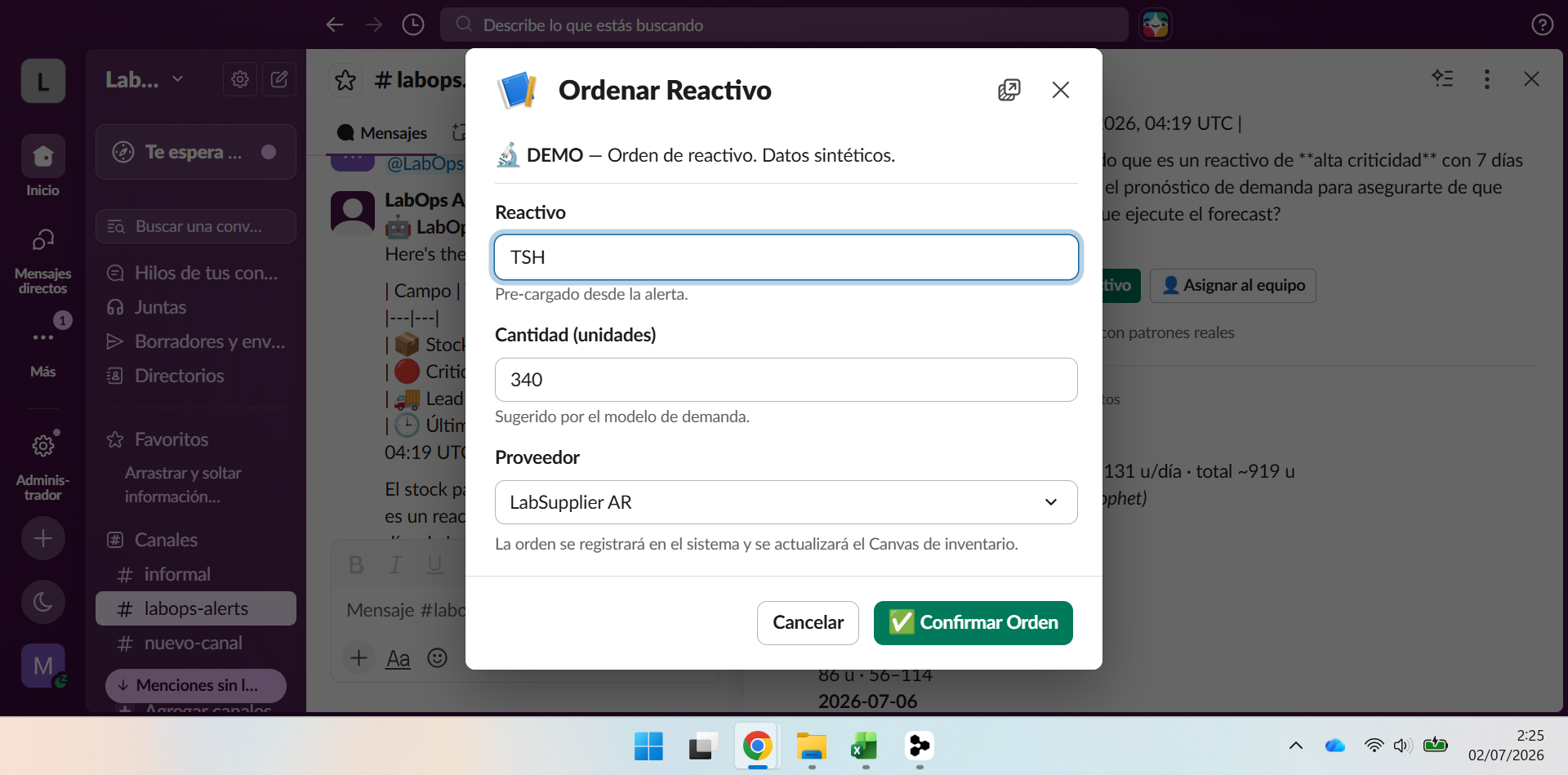 Pre-filled order modal with model-suggested quantity and supplier dropdown — one click creates the order in Supabase.
Demand Forecast Chart
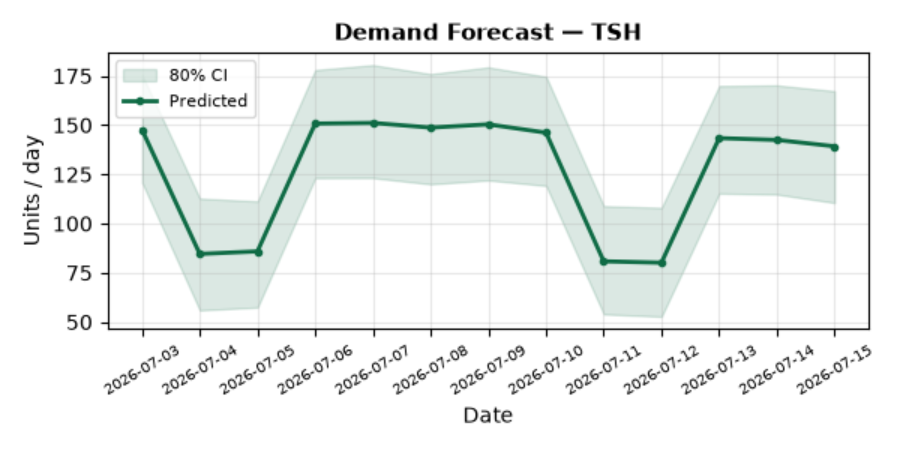 Prophet-generated forecast chart with 80% confidence interval, rendered live and embedded in the Slack thread.
Canvas Update
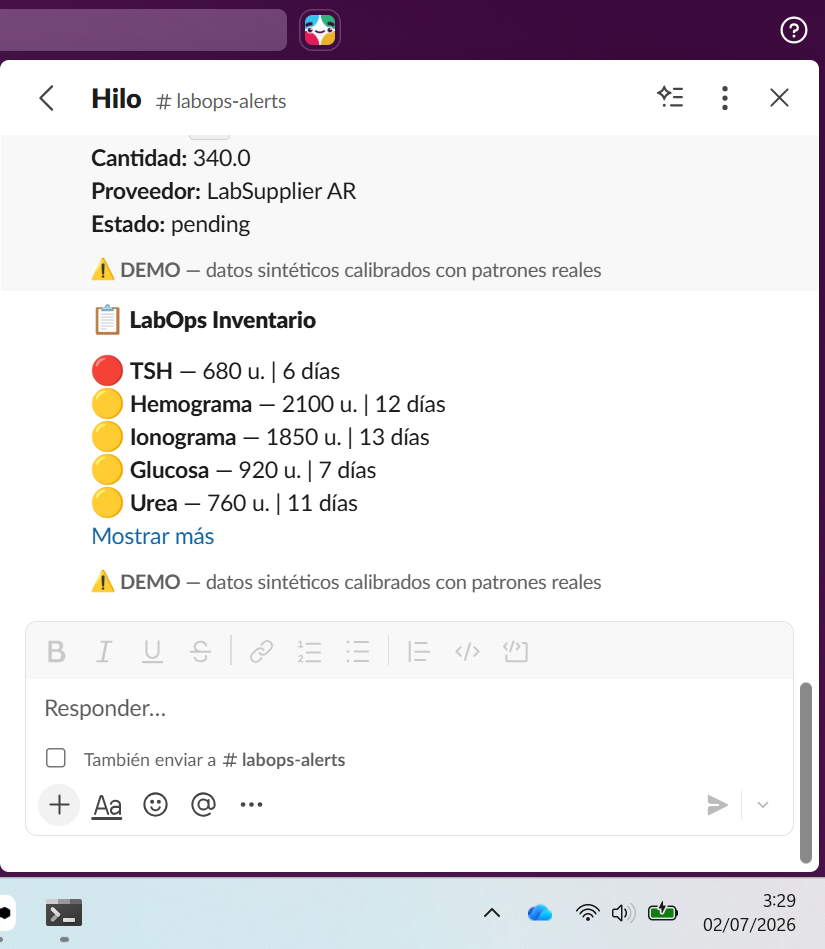 Inventory Canvas updates in real time after an order is confirmed.
Verified numbers from live deploy:
- TSH demand: ~144 u/día (hábil), ~79 u/día (fin de semana) — Prophet forecast, output real
/alert/trigger, out-of-peak (Jul-Sep) - Stockout projection: 6 días con 680 u stock (projected_stockout_date: 2026-07-08)
- Forecast chart: renders from
https://labops-agent.onrender.com/chart/forecast/TSH - Canvas: persists via
lab_configtable in Supabase
Data & Privacy
All data in this project is synthetic and clearly labeled with DEMO badges. No real patient data, no PHI. The prediction model's seasonal parameters (peak months, peak/trough ratios per test type) were derived from analysis of 414,289 real B2B demand records (Labmedicina, 2025-2026, anonymized — raw data not included, see data/DATASET_PROVENANCE.md); Prophet trains on a synthetic daily series encoding those parameters. Reported CV metrics (MAPE ~8-11%) are a synthetic-benchmark validation of the pipeline, not a real-consumption accuracy claim — see docs/architecture.md.
License
MIT License — see LICENSE
Builder
Mariano Adrian Oss · DevelopOss · Buenos Aires, Argentina
B2B KAM in clinical diagnostics (4 years) + AI Builder. This project applies real insider knowledge of clinical laboratory operations to a problem that existing software hasn't solved: uninterrupted diagnostic access for vulnerable patients inside the tools labs already use daily.
LabOps Agent · Slack Agent Builder Challenge 2026 · Track: Slack Agent for Good
Installing LabOps Agent Server
This server has no published package — it is built from source. Open the repository and follow its README.
▸ github.com/Marianooss/Labops-AgentFAQ
Is LabOps Agent Server MCP free?
Yes, LabOps Agent Server MCP is free — one-click install via Unyly at no cost.
Does LabOps Agent Server need an API key?
No, LabOps Agent Server runs without API keys or environment variables.
Is LabOps Agent Server hosted or self-hosted?
A hosted option is available: Unyly runs the server in the cloud, no local setup required.
How do I install LabOps Agent Server in Claude Desktop, Claude Code or Cursor?
Open LabOps Agent Server on unyly.org, pick your client tab (Claude Desktop, Claude Code, Cursor) and press Install — the config is generated automatically, no JSON editing.
Related MCPs
Gmail
Read, send and search emails from Claude
 by Google
Slack
Send, search and summarize Slack messages
 by Slack
Runbear
No-code MCP client for team chat platforms, such as Slack, Microsoft Teams, and Discord.
Discord Server
A community discord server dedicated to MCP by [Frank Fiegel](https://github.com/punkpeye)
Compare LabOps Agent Server with
Not sure what to pick?
Find your stack in 60 seconds
Author?
Embed badge for your README
Browse similar
All communication MCPs