
Lazy Brain
FreeNot checkedCodex Desktop capability router for choosing local Skills, Plugins, MCP servers, agents, and commands—with safe @Visualize decision views.

About
Codex Desktop capability router for choosing local Skills, Plugins, MCP servers, agents, and commands—with safe @Visualize decision views.
README
Ask naturally in Codex Desktop. LazyBrain searches your local Skills, Plugins, MCP servers, agents, and commands, then recommends what to use, why, and—when useful—turns the choice into an interactive
@Visualizedecision explorer.
npm version Node.js >=18 License: AGPL-3.0 No runtime deps
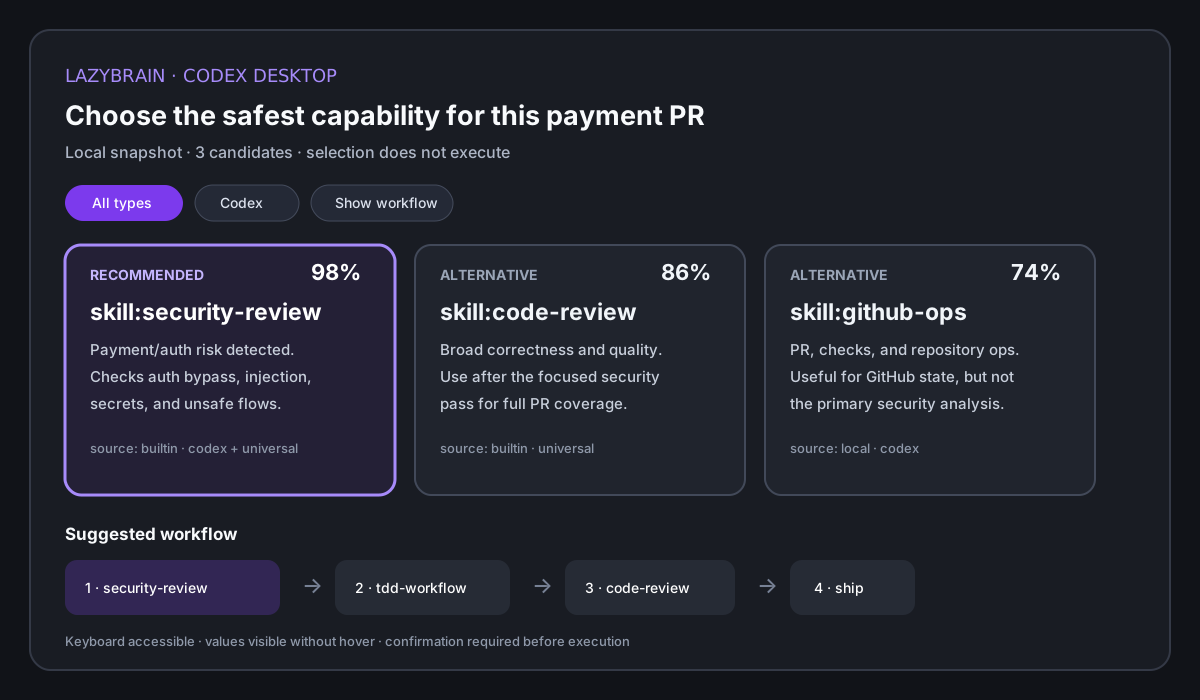
LazyBrain is a Codex Desktop-first, local capability index and deterministic router. It inventories local Skills, Plugins, MCP server metadata, agents, slash commands, rules, and workflow templates, then turns a plain-language task—even a vague one—into an explainable choice, comparison, clarification, or execution order.
It is built for developers who already have powerful agent tools installed and do not want to remember every exact command.
npm install -g lazybrain
lb quickstart
lb ask "review this payment PR safely"
Why LazyBrain
| Problem | LazyBrain gives you |
|---|---|
| Too many skills, commands, and rules to remember | One natural-language entrypoint |
| Agents picking random tools or generic workflows | Deterministic local routing |
| A vague prompt that could match several tools | One recommendation, tradeoffs, or a clarification question |
| Repeated release, security, migration, and review workflows | Reusable combos and orchestration plans |
| Hook suggestions that interrupt too often | Quiet suggestions only when confidence is high |
| Concern about scanned files leaving the machine | Local graph, local cache, no telemetry |
What It Does
| Surface | Status | Use it for |
|---|---|---|
| Codex Desktop plugin + bundled Skill | Ready for local checkout | Ask in the conversation, search local capabilities, compare choices, and use @Visualize when available |
lb CLI |
Support surface | Initialize the local graph, inspect decisions, and debug the desktop backend |
| Claude Code hook | Ready | Automatic high-confidence suggestions inside a project |
lazybrain-mcp |
Ready | Deterministic routing from MCP-capable agent clients |
| Local graph/cache | Ready | Fast matching from local capability metadata |
| Hosted dashboard | Not included | No cloud UI or team sync in this beta |
| Automatic task execution | Not included | LazyBrain recommends and plans; your agent executes |
Current version: 2.1.0.
Install
Requires Node.js 18 or newer.
npm install -g lazybrain
lb quickstart
lb ready
npm install only installs the CLI. It does not scan your home directory. lb quickstart is the explicit first-run command that scans local capability metadata and builds ~/.lazybrain/graph.json.
Beta channel:
npm install -g lazybrain@beta
GitHub release tarball after v2.1.0 is published:
npm install -g https://github.com/papperrollinggery/lazy-brain/releases/download/v2.1.0/lazybrain-2.1.0.tgz
Source checkout:
git clone https://github.com/papperrollinggery/lazy-brain.git
cd lazy-brain
npm ci
npm run build
npm link
lb quickstart
lb ready
Full install, cleanup, MCP, and smoke-test instructions: docs/INSTALL.md.
Codex Desktop quick start
The source checkout contains the Codex plugin, Skill, MCP declaration, and local marketplace entry:
npm ci
npm run build
npm link
codex plugin marketplace add .
codex plugin add lazybrain@lazybrain-local
Start a new task in Codex Desktop and ask which installed capability best fits your goal. LazyBrain calls its read-only recommendation tool. For an interactive comparison, explicitly select @Visualize in the composer before sending the task. When the result contains desktopVisualization.shouldRender: true and @Visualize is exposed in that task, the Skill passes its exact visualization prompt to it. If the preview is unavailable or was not selected, the task receives an accessible Markdown table and a ready-to-reuse visualization prompt. See Codex Desktop integration.
Quick Demo
Find the right capability:
lb "review this PR for security issues"
Turn a vague prompt into a structured decision for Codex, Claude Code, or another client:
lb ask "help me ship this safely" --json
Inspect the exact Codex Desktop visualization contract:
lb desktop "review this payment PR safely" --json
lb desktop "review this payment PR safely" --visualize-prompt
The decision contract is fail-closed: low-confidence prompts return clarify instead of silently choosing a tool.
Example output:
/security-review 98%
Scan code for OWASP Top 10, auth bypass, injection, and credential exposure.

Also consider:
- /code-review
- /gitnexus-pr-review
Turn a risky task into an ordered plan:
lb orchestrate "deploy payment feature"
Pick a reusable workflow:
lb combo "deploy new feature to production"
Install quiet Claude Code suggestions for the current project:
lb hook install
lb hook status
After the hook is installed, you can keep typing normal prompts in Claude Code. LazyBrain only adds a suggestion when the match is confident.
Commands
| Command | Purpose |
|---|---|
lb "task" |
Find the best matching capability |
lb ask "task" |
Choose, compare, or clarify; add --json for agents and visualizations |
lb desktop "task" |
Return the Codex Desktop @Visualize decision payload, accessible fallback, or exact visualization prompt |
lb use <name> [task] |
Explicitly record that you chose a recommendation |
lb combo "task" |
Return a reusable workflow template |
lb orchestrate "task" |
Build a multi-skill execution plan |
lb scan |
Scan local capability files |
lb compile |
Rebuild the local capability graph; no LLM or embedding call |
lb quickstart |
Scan and compile in one first-run command |
lb stats |
Show recent usage and patterns |
lb discover |
Find high-value unused local capabilities |
lb config show |
Print local config with secrets redacted |
lb ready / lb ready --json |
Check graph and hook readiness |
lb hook plan |
Show the hook change that would be made |
lb hook install |
Install the project Claude Code hook |
lb hook uninstall |
Remove the project hook |
lazybrain-mcp |
Start the stdio MCP server |
MCP
Add LazyBrain to an MCP-capable client:
{
  "mcpServers": {
    "lazybrain": {
      "command": "lazybrain-mcp",
      "args": []
    }
  }
}
Source checkout variant:
{
  "mcpServers": {
    "lazybrain": {
      "command": "node",
      "args": ["/absolute/path/to/lazy-brain/dist/bin/mcp.js"]
    }
  }
}
Current MCP tools:
| Tool | Purpose |
|---|---|
lazybrain_find |
Find matching capabilities for a task |
lazybrain_recommend |
Return a backward-compatible decision plus desktopVisualization, alternatives, reasons, and optional sequence |
lazybrain_orchestrate |
Build an orchestration plan |
lazybrain_catalog |
Summarize the indexed capability library by type |
lazybrain_stats |
Read recent local usage stats |
lazybrain_scan |
Scan local capability sources |
Smoke test:
printf '{"jsonrpc":"2.0","id":1,"method":"tools/list"}\n' | lazybrain-mcp
Codex Desktop and Claude Code
Codex Desktop is the primary product surface; Claude Code remains a supported compatibility surface:
- Codex Desktop: packaged plugin manifest, bundled
$lazybrain-findSkill, read-only MCP recommendation tools, and a versioned interactive-decision payload for the installed@Visualizeplugin. - The decision explorer keeps scores, reasons, source, platform, alternatives, and workflow visible; candidate selection never executes a capability.
@Visualizeis an OpenAI preview and must be selected in the composer for the task; availability may depend on account/workspace rollout. LazyBrain falls back when it is not exposed.- Claude Code: quiet
UserPromptSubmithook plus the same deterministic core, CLI, and MCP server, without claiming Desktop visualization rendering.
Local Codex plugin development from this checkout:
npm ci
npm run build
npm link
codex plugin marketplace add .
codex plugin add lazybrain@lazybrain-local
This changes personal Codex configuration, so run it only when you want to install the local development plugin. Start a new Codex task after installation. The project does not auto-install plugins or edit Codex configuration.
What LazyBrain Indexes
lb quickstart, lb scan, and lb compile read local capability metadata from common agent-tool locations:
- Claude Code skills and commands
- Codex and universal
.agentsskills - installed Codex/Claude plugin manifests and bundled skills, agents, commands, and MCP declarations
- Codex
config.toml, Claude.mcp.json/configuration MCP server names (credential values are never copied into the graph) - project
.claude/commands .skillshub.codex/skills.agents/skills- Cursor, Windsurf, Cline, and OpenCode rule files
- local
SKILL.md-style capability files
Empty machines still work because LazyBrain includes built-in capabilities for common development workflows.
Reliability
LazyBrain's hot path is deterministic:
- no runtime LLM call for normal matching
- no embedding dependency for normal matching
- no runtime dependencies in the published package
- low-confidence decisions ask one clarifying question instead of guessing
- MCP tools declare read-only/open-world/destructive safety annotations
- low-confidence hook suggestions stay silent
- golden-set tests cover 76 labeled routing cases plus negative cases
- precision gate requires at least 88% top-match precision
- latency gate requires average
find()time under 200ms
Verification commands:
npm run lint
npm test
npm run build
npm run audit:public
npm pack --dry-run --json
Privacy
LazyBrain is local-first. It scans local capability metadata and writes local cache/history files under ~/.lazybrain. It does not upload scanned files, does not require a cloud account, and does not send telemetry.
Details: docs/PRIVACY.md.
Best Fit
Use LazyBrain when you have:
- many local agent skills, slash commands, rules, prompts, or plugins
- multiple MCP servers and no reliable memory of which one fits a task
- repeated workflows such as release, security review, migration, incident response, or PR review
- an MCP-capable agent client that needs deterministic tool selection
- a preference for local routing over runtime model calls
Wait if you need:
- fully automatic task execution
- hosted team dashboards
- cross-machine sync
- managed cloud analytics
Docs
- Install
- Use cases
- Product direction and architecture
- Codex Desktop and @Visualize
- Privacy
- Release checklist
FAQ
Is LazyBrain another Skill or MCP installer?
No. Native marketplaces and registries already handle installation. LazyBrain indexes what is available locally and helps the agent choose the right capability at execution time.
Does LazyBrain send my prompts or local tool metadata to an LLM?
Normal matching is deterministic and local. LazyBrain reads capability metadata and stores its graph/history under ~/.lazybrain; it does not require an API key or telemetry service.
Can it execute the recommended workflow automatically?
No. Recommendations and orchestration plans are advisory. Codex, Claude Code, or the user decides whether to invoke a capability, especially when it may write, publish, install, or change external systems.
Why not embeddings or an LLM router?
The default path favors auditable triggers, examples, local history, and high confidence thresholds. It stays fast, offline, debuggable, and easy to improve with a golden test case.
Does LazyBrain itself render the interactive interface?
LazyBrain produces a bounded local decision snapshot and exact visualization prompt. Capability metadata is treated as untrusted display data. In Codex Desktop, the installed OpenAI @Visualize plugin renders the interactive explorer when that preview is available. LazyBrain never substitutes invented data or treats a card selection as permission to execute a tool.
Contributing
The smallest useful PR is one trigger phrase plus one golden-set case:
- Add the trigger/example in
src/knowledge/builtin.ts. - Add a labeled query in
test/golden/find.test.ts. - Run
npm test.
Useful contribution areas: trigger phrases, combo templates, orchestration rules, scanner coverage, and benchmark cases.
License
AGPL-3.0.
Installing Lazy Brain
This server has no published package — it is built from source. Open the repository and follow its README.
▸ github.com/papperrollinggery/lazy-brainFAQ
Is Lazy Brain MCP free?
Yes, Lazy Brain MCP is free — one-click install via Unyly at no cost.
Does Lazy Brain need an API key?
No, Lazy Brain runs without API keys or environment variables.
Is Lazy Brain hosted or self-hosted?
Self-hosted: the server runs locally on your machine via the install command above.
How do I install Lazy Brain in Claude Desktop, Claude Code or Cursor?
Open Lazy Brain on unyly.org, pick your client tab (Claude Desktop, Claude Code, Cursor) and press Install — the config is generated automatically, no JSON editing.
Related MCPs
GitHub
PRs, issues, code search, CI status
 by GitHub
Filesystem
Secure file operations with configurable access controls.
Memory
Knowledge graph-based persistent memory system.
Template MCP Server
A CLI tool to create a new Model Context Protocol server project with TypeScript support, dual transport options, and an extensible structure
 by mcpdotdirect
Compare Lazy Brain with
Not sure what to pick?
Find your stack in 60 seconds
Author?
Embed badge for your README
Browse similar
All development MCPs