
Lenovmail
FreeNot checkedSelf-hosted mail frontend: syncs IMAP and Microsoft Graph accounts into Postgres, served over a web GUI, REST API, and MCP for AI agents.

About
Self-hosted mail frontend: syncs IMAP and Microsoft Graph accounts into Postgres, served over a web GUI, REST API, and MCP for AI agents.
README
Self-hosted mail infrastructure for many mailboxes at once — IMAP and Microsoft Graph behind a single database, a browser client, a REST API, and an MCP server that lets AI agents read and send mail under limits you can audit.


Product page: satuapps.com/lenovmail
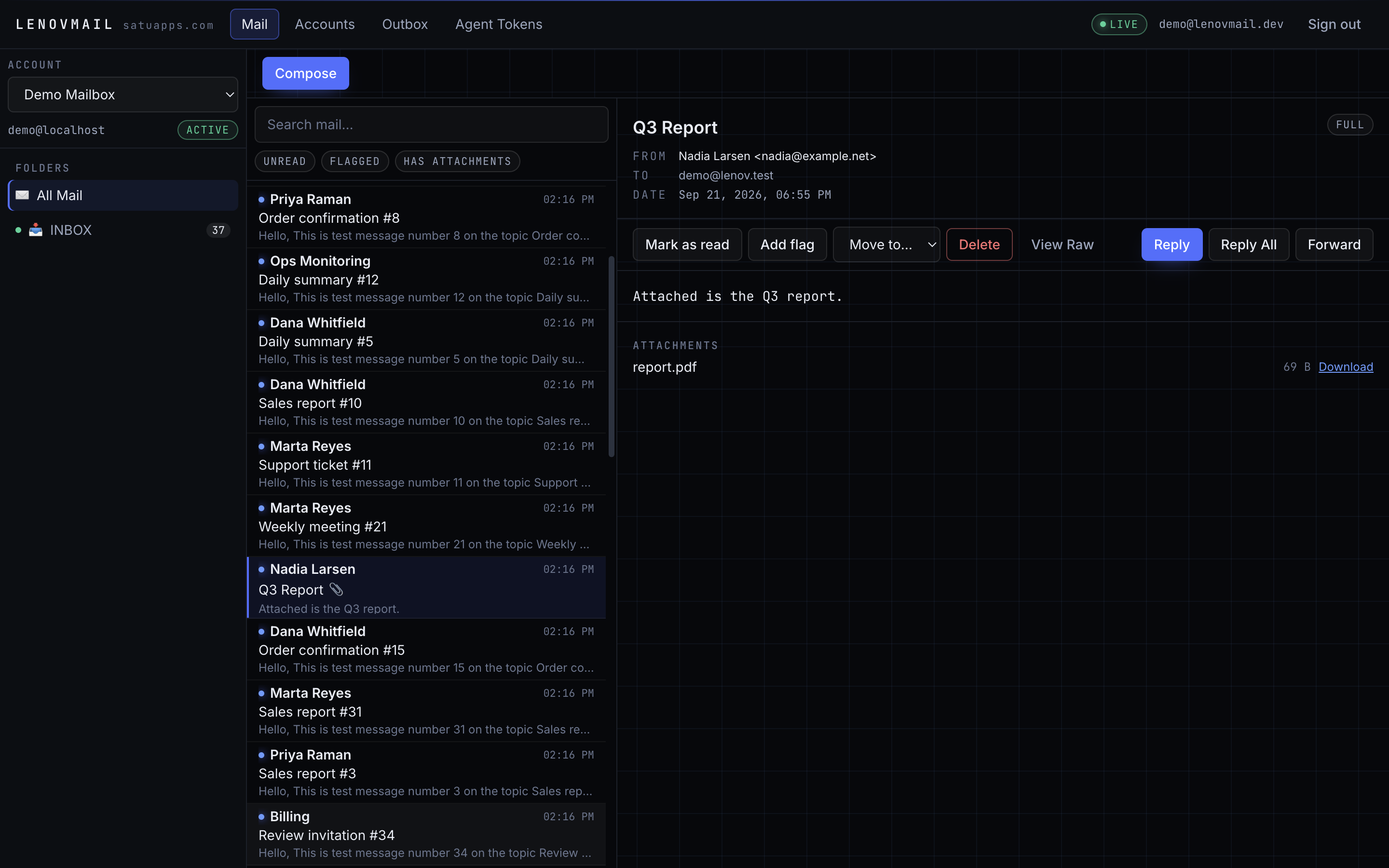
What it does
Lenovmail keeps a normalized copy of your mailboxes in PostgreSQL. IMAP accounts sync
incrementally (UIDVALIDITY, CONDSTORE when the server offers it, IDLE for the inbox);
Microsoft 365 accounts sync through Graph delta links. Messages are parsed once, stored with
their MIME blob on disk, threaded by References/In-Reply-To, and indexed for full-text
search. Everything the GUI can do is also reachable over REST, and a scoped subset is exposed
to AI agents over MCP.
It is built for the case where mail is an input to automation: several accounts, one API, and an agent that must not be able to quietly send a thousand emails.
Why it is different
| Agent-native, not agent-bolted-on | Scoped tokens, per-account restrictions, hourly send limits, mandatory human approval, and an audit row for every call — REST and MCP alike. |
| Two providers, one schema | IMAP and Graph accounts produce the same messages/folders/threads rows, so downstream code never branches on provider. |
| Configuration discovery that actually resolves | Bundled overrides → autoconfig.<domain> → .well-known → ISPDB → MX → SRV (RFC 6186) → hostname probing, with negative results cached. |
| Self-healing account state | A janitor re-checks rejected credentials, restores the ones that recover, and retires the ones that stay dead instead of retrying them forever. |
| No message loss on parallel sends | Outbox rows are claimed with FOR UPDATE SKIP LOCKED; two workers cannot deliver the same message twice. |
Quickstart
git clone https://github.com/satuapps/lenovmail.git
cd lenovmail
cp .env.example .env
python -c "import os,base64;print(base64.b64encode(os.urandom(32)).decode())"   # -> LENOVMAIL_SECRET_KEY

docker compose up -d --build
docker compose exec api uv run lenovmail bootstrap-admin --email [email protected]
Open http://localhost:8080, sign in with the printed password, and add an account. API documentation is served at http://localhost:8080/api/docs.
No mailbox to test with? Start the bundled fake server and seed it:
docker compose -f docker-compose.test.yml up -d
uv run python scripts/seed_greenmail.py
Full walkthrough: docs/quickstart.md.
Architecture
flowchart LR
    Browser[Browser GUI] -->|session cookie| API
    Agent[AI agent] -->|Bearer token| API

    subgraph Lenovmail
        API[FastAPI: REST + MCP + static GUI]
        Worker[arq worker]
    end

    subgraph Stores
        PG[(PostgreSQL)]
        RD[(Redis)]
    end

    API --> PG
    API <-->|jobs, events| RD
    Worker --> PG
    Worker <--> RD
    Worker -->|IMAP / SMTP| Mailserver[(Mail providers)]
    Worker -->|Microsoft Graph| Graph[(Microsoft 365)]
The API process serves the REST API, the built React client, and the MCP endpoint. The worker process runs sync cycles, body backfill, IMAP IDLE watchers, outbox delivery, and the janitor. Redis carries the job queue and the SSE fan-out; PostgreSQL holds everything else.
Details: docs/architecture.md.
Agents and MCP
{
  "mcpServers": {
    "lenovmail": {
      "type": "http",
      "url": "http://localhost:8080/api/mcp",
      "headers": { "Authorization": "Bearer lnv_..." }
    }
  }
}
Tools: list_accounts, list_folders, search_messages, get_message, get_thread,
set_message_flags, move_message, delete_message, send_message, list_outbox,
get_attachment.
A token carries scopes (mail.read, mail.write, mail.send, mail.delete, mail.manage),
an optional account allowlist, an hourly send budget, and an approval flag. With approval on,
send_message stops at pending_approval and waits for a human in the Outbox view. Every call
lands in agent_audit.
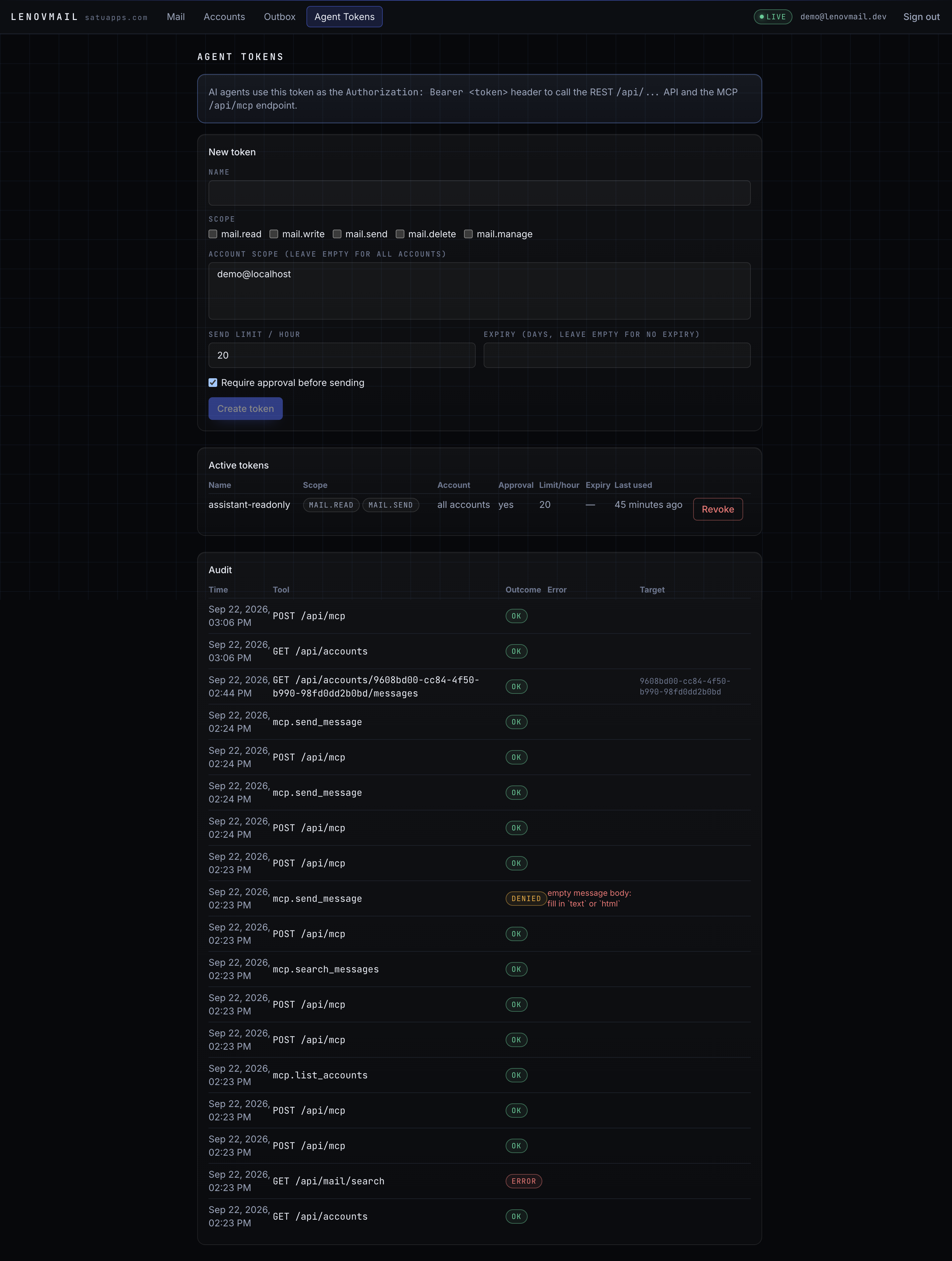
Sends queued by an agent wait in the Outbox until a human approves them:
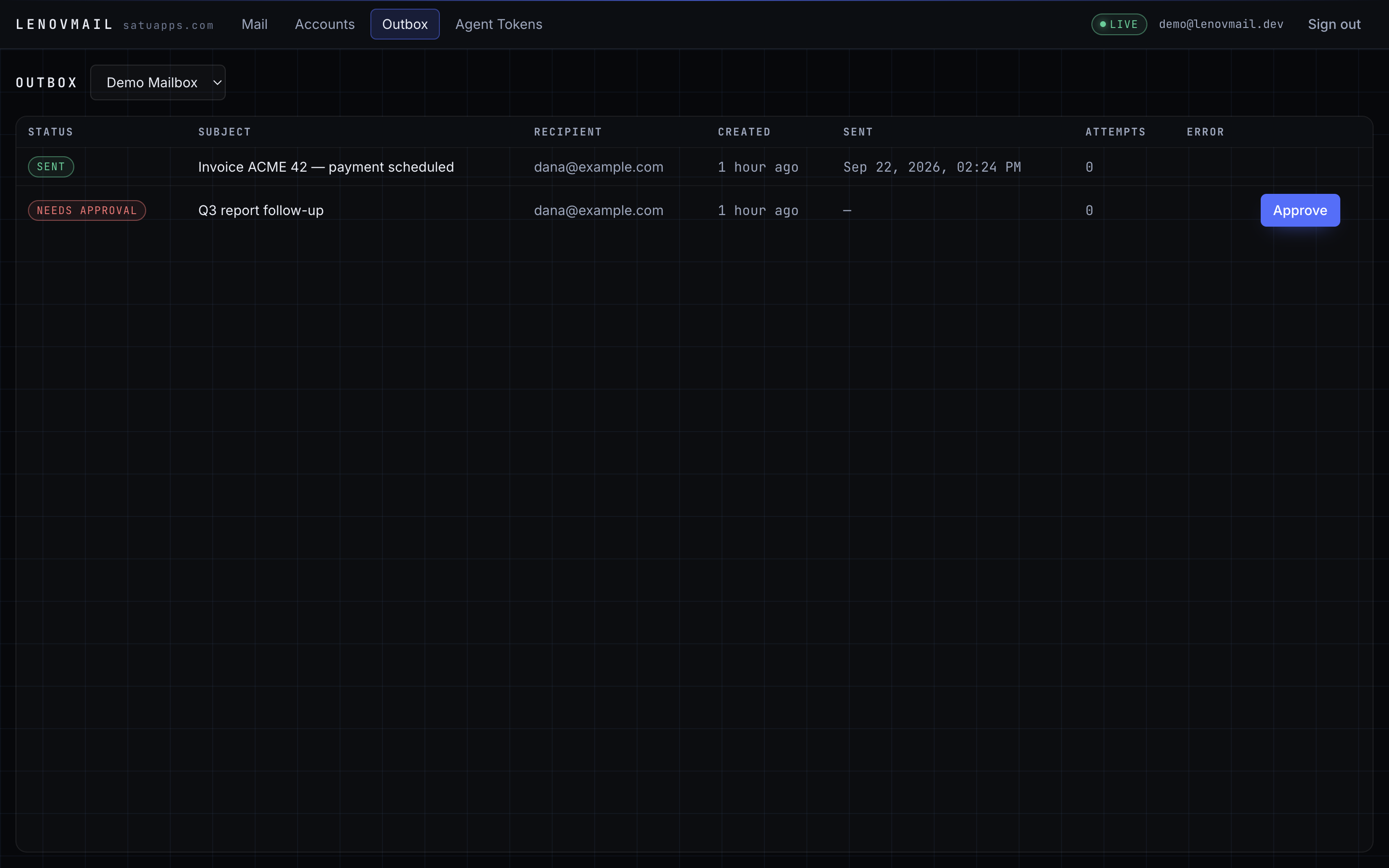
Running the agent on another machine takes one allowlist entry and a token: docs/agents.md.
Maintenance built in
Credentials die quietly: an app password gets revoked, a tenant pulls an OAuth grant, an account
is closed. The janitor (janitor_sweep, hourly) re-checks every account the sync path marked
auth_error:
stateDiagram-v2
    active --> auth_error: provider rejects login
    auth_error --> active: credentials work again
    auth_error --> disabled: grace period expired (default)
    auth_error --> deleted: grace period expired, action=delete
Transient failures never count — a timeout or a 5xx leaves the account exactly where it was.
Expired and revoked agent tokens are deleted after their retention window, and agent_audit is
trimmed to its own. Run it by hand with uv run lenovmail janitor.
Details: docs/operations.md.
CLI
| Command | Purpose |
|---|---|
lenovmail bootstrap-admin --email ... |
Create or update the admin user; prints a generated password once |
lenovmail discover user@domain |
Run the discovery chain and print the resolved settings |
lenovmail sync --email user@domain |
One sync cycle in the foreground, no worker needed |
lenovmail agent-token --email ... --scopes mail.read,mail.send |
Issue an agent token (shown once) |
lenovmail show-account user@domain |
Folders, message counts, last sync cycles |
lenovmail janitor [--action disable|delete] |
Run one maintenance sweep now |
lenovmail serve [--port 8080] |
Run the API and GUI |
Documentation
| Page | Contents |
|---|---|
| Quickstart | Clone to first synced inbox, including a local test mailbox |
| Architecture | Processes, schema, sync cycles, delivery path |
| Configuration | Every LENOVMAIL_* variable, defaults, and when to change it |
| Operations | Jobs and cron, janitor lifecycle, health checks, troubleshooting |
| Agents | Tokens, scopes, approval flow, MCP tool reference |
| REST API | Endpoint reference, pagination, error shape |
| Deployment | TLS, scaling, volumes, Microsoft app registration |
Development
uv sync
docker compose up -d db redis
uv run alembic upgrade head
uv run uvicorn lenovmail.api.app:app --reload --port 8080
uv run arq lenovmail.workers.main.WorkerSettings     # second terminal
npm --prefix web run dev                             # GUI with a proxy to :8080
Checks that CI runs: uv run ruff check src tests, uv run mypy, uv run pytest -q,
npm --prefix web run typecheck, npm --prefix web run build. Database-backed tests skip
themselves when PostgreSQL is not reachable; the IMAP end-to-end suite needs
docker compose -f docker-compose.test.yml up -d.
See CONTRIBUTING.md.
Security
Stored IMAP/SMTP passwords and Microsoft token caches are encrypted with AES-256-GCM using a
per-field AAD derived from the account id; rotating LENOVMAIL_SECRET_KEY makes existing
credentials undecryptable. Browser sessions live in Redis so they can be revoked; agent tokens
are stored as sha256 hashes and displayed once. Incoming HTML is sanitized server-side (nh3) and
again in the client (DOMPurify). LENOVMAIL_ALLOWED_HOSTS gates the Host header for the API
and the MCP mount alike.
Reporting a vulnerability: SECURITY.md.
License
MIT — see LICENSE.
Built and maintained by satuapps.
Install Lenovmail in Claude Desktop, Claude Code & Cursor
unyly install lenovmailInstalls into Claude Desktop, Claude Code, Cursor & VS Code — handles npx, uvx and build-from-source repos for you.
First time? Get the CLI: curl -fsSL https://unyly.org/install | sh
Or configure manually
Run in your terminal:
claude mcp add lenovmail -- uvx --from git+https://github.com/satuapps/lenovmail lenovmailStep-by-step: how to install Lenovmail
FAQ
Is Lenovmail MCP free?
Yes, Lenovmail MCP is free — one-click install via Unyly at no cost.
Does Lenovmail need an API key?
No, Lenovmail runs without API keys or environment variables.
Is Lenovmail hosted or self-hosted?
Self-hosted: the server runs locally on your machine via the install command above.
How do I install Lenovmail in Claude Desktop, Claude Code or Cursor?
Open Lenovmail on unyly.org, pick your client tab (Claude Desktop, Claude Code, Cursor) and press Install — the config is generated automatically, no JSON editing.
Related MCPs
Gmail
Read, send and search emails from Claude
 by Google
Slack
Send, search and summarize Slack messages
 by Slack
Runbear
No-code MCP client for team chat platforms, such as Slack, Microsoft Teams, and Discord.
Discord Server
A community discord server dedicated to MCP by [Frank Fiegel](https://github.com/punkpeye)
Klavis AI
Open Source MCP Infra. Hosted MCP servers and MCP clients on Slack and Discord.
Work90210/APIFold
Turn any REST API into a hosted MCP server. 18 free public servers (GitHub, Stripe, Slack, OpenAI, Notion, and more) — no setup required, bring your own API key
 by Work90210
arikusi/deepseek-mcp-server
MCP server for DeepSeek AI with chat, reasoning, multi-turn sessions, function calling, thinking mode, and cost tracking.
 by arikusi
hashgraph-online/hashnet-mcp-js
MCP server for the Registry Broker. Discover, register, and chat with AI agents on the Hashgraph network.
 by hashgraph-online
profullstack/mcp-server
A comprehensive MCP server aggregating 20+ tools including SEO optimization, document conversion, domain lookup, email validation, QR generation, weather data,
 by profullstack
WayStation-ai/mcp
Seamlessly and securely connect Claude Desktop and other MCP hosts to your favorite apps (Notion, Slack, Monday, Airtable, etc.). Takes less than 90 secs.
 by waystation-ai
Compare Lenovmail with
Not sure what to pick?
Find your stack in 60 seconds
Author?
Embed badge for your README
Browse similar
All communication MCPs