
LinkedIn Zero
FreeNot checked32 MCP tools for job search, resume analysis, matching, alerts, and exports using public LinkedIn endpoints, with optional read-only browser intelligence.

About
32 MCP tools for job search, resume analysis, matching, alerts, and exports using public LinkedIn endpoints, with optional read-only browser intelligence.
README
██╗     ██╗███╗   ██╗██╗  ██╗███████╗██████╗ ██╗███╗   ██╗
██║     ██║████╗  ██║██║ ██╔╝██╔════╝██╔══██╗██║████╗  ██║
██║     ██║██╔██╗ ██║█████╔╝ █████╗  ██║  ██║██║██╔██╗ ██║
███████╗██║██║ ╚████║██║  ██╗███████╗██████╔╝██║██║ ╚████║
             MCP ZERO - public-first LinkedIn intelligence
LinkedIn MCP Zero
A public-first MCP server for LinkedIn jobs, resumes, matching, alerts, exports, and opt-in read-only browser intelligence.
No Docker required · Claude Desktop ready · Claude Code ready · Low-RAM friendly · PyPI published
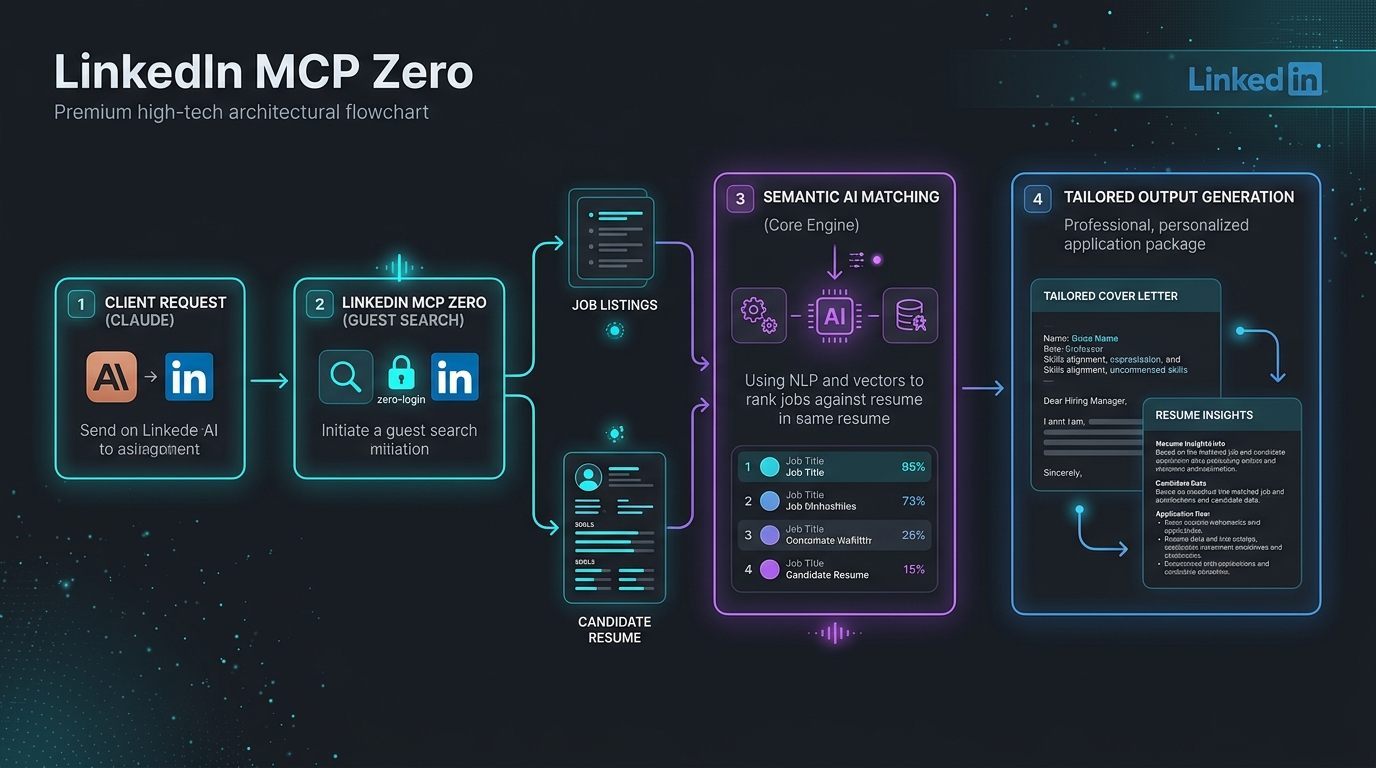
🎨 System Flow
🔌 Works With
- ✅ Claude Desktop (Fully verified)
- ✅ Claude Code (Fully verified)
- ✅ Cursor (Fully verified)
- ✅ VS Code + Copilot (Fully verified)
- ✅ Cline / Roo Code (Fully verified)
- ✅ Any standard Stdio/HTTP MCP client
📊 Feature Comparison
Compare LinkedIn MCP Zero against the next most popular alternatives:
| Feature | stickerdaniel (2.3k★) | Other MCP Servers | LinkedIn MCP Zero (10/10) |
|---|---|---|---|
| Zero-Login Public Tools | ❌ None | ⚠️ 0-2 tools | ✅ 30+ Public Tools |
| Semantic AI Resume Matching | ❌ None | ❌ None | ✅ Yes (TF-IDF & LLM-guided) |
| Local DOCX/PDF Parsing | ❌ None | ❌ None | ✅ Yes (Docling & PyMuPDF) |
| Iterative Progress Reporting | ❌ None | ❌ None | ✅ Yes (MCP Context.report_progress) |
| Wired OpenTelemetry Traces | ❌ None | ❌ None | ✅ Yes (Batch OTel Tracing) |
| Enterprise OAuth 2.1 Security | ❌ None | ❌ None | ✅ Yes (Remote Introspection Middleware) |
| One-Click Diagnostic CLI | ❌ None | ❌ None | ✅ Yes (--doctor verification) |
| Interactive CLI setup | ❌ None | ❌ None | ✅ Yes (Automated Configurator) |
| Zero-Configuration Setup | ❌ None | ⚠️ Complex docker | ✅ Yes (Pure Python / uvx direct) |
Install In One Command
| Client | Command |
|---|---|
| Claude Desktop | uvx --refresh-package linkedin-mcp-zero linkedin-mcp-zero --install-client claude-desktop |
| Claude Code | uvx --refresh-package linkedin-mcp-zero linkedin-mcp-zero --install-client claude-code |
| Cursor | uvx linkedin-mcp-zero --install-client cursor |
| VS Code | uvx linkedin-mcp-zero --install-client vscode |
| Any stdio client | uvx linkedin-mcp-zero |
uvx linkedin-mcp-zero --doctor
Verify after install:
uvx --refresh-package linkedin-mcp-zero linkedin-mcp-zero --verify-client claude-desktop
Browser mode:
uvx --refresh-package linkedin-mcp-zero linkedin-mcp-zero --install-client claude-desktop --with-extra browser
Tool Inventory
Default Tools: 30 Working
These work without LinkedIn login or browser setup.
| # | Tool | Feature | Risk |
|---|---|---|---|
| 1 | search_jobs |
Search public LinkedIn jobs | Public no-login |
| 2 | search_jobs_multi |
Multi-board search; LinkedIn fallback by default | Public no-login |
| 3 | get_job_details |
Full public job details | Public no-login |
| 4 | get_company_jobs |
Public jobs for a company | Public no-login |
| 5 | get_company_profile |
Company signals inferred from public jobs | Public no-login |
| 6 | search_companies |
Company discovery from public job data | Public no-login |
| 7 | get_job_salary |
Salary extraction from job detail pages | Public no-login |
| 8 | get_job_trends |
Role/location hiring trends | Public no-login |
| 9 | get_industry_insights |
Market signals for an industry | Public no-login |
| 10 | search_jobs_advanced |
Job search with filters | Public no-login |
| 11 | analyze_resume |
Local PDF/DOCX/text resume parsing | Local |
| 12 | get_resume_insights |
Local skill gaps and suggestions | Local |
| 13 | match_jobs_to_resume |
Rank public jobs against a resume | Local/public |
| 14 | compare_jobs |
Compare selected jobs | Local/public |
| 15 | export_jobs |
Export jobs to CSV/JSON/XLSX | Local |
| 16 | save_job_alert |
Save a recurring search | Local |
| 17 | get_saved_alerts |
List saved searches | Local |
| 18 | check_saved_alerts |
Run alerts and find new matches | Local/public |
| 19 | get_engine_status |
Runtime, engine, token, cache status | Local |
| 20 | get_help |
Tool documentation | Local |
| 21 | get_usage_stats |
Local response-size/token estimates | Local |
| 22 | get_tool_usage_summary |
Aggregate local usage by tool | Local |
| 23 | reset_usage_stats |
Clear local usage metrics | Local |
| 24 | smart_match_jobs |
AI-powered job matching using client LLM | Local/public |
| 25 | generate_cover_letter |
Tailored cover letter using client LLM | Local/public |
| 26 | analyze_salary_offer |
AI-powered salary analysis using client LLM | Local/public |
| 27 | personalized_job_hunt |
Interactive job search preferences | Local/public |
| 28 | confirm_export |
Export jobs with user confirmation | Local |
| 29 | get_resume_insights_advanced |
Advanced AI-powered resume insights | Local |
| 30 | deep_industry_analysis |
Full industry analysis with progress updates | Local/public |
Browser Tools: +11
Enable with --with-extra browser or --enable-browser. These are read-only,
but they use your logged-in browser session.
| # | Tool | Feature |
|---|---|---|
| 31 | get_my_profile |
Read your profile |
| 32 | get_person_profile |
Read a public/person profile page |
| 33 | search_people |
People search through browser |
| 34 | get_my_connections |
Read your connection list |
| 35 | get_inbox |
Recent conversations list |
| 36 | get_conversation |
Read a conversation thread |
| 37 | get_feed |
Read home feed posts |
| 38 | get_notifications |
Read notifications |
| 39 | get_sidebar_profiles |
Suggested/sidebar profiles |
| 40 | get_company_employees |
Company people page |
| 41 | check_session |
Check CDP/login readiness |
Gated Private-Risk Tool: +1
| # | Tool | Feature |
|---|---|---|
| 42 | get_profile_voyager |
Voyager/private API placeholder, disabled by default |
Default mode exposes 30 usable tools: 29 core local/public tools plus
search_jobs_multi, which falls back to LinkedIn-only results unless the
multi extra is installed. Browser tools appear only with --enable-browser or
--with-extra browser in an installed client config. Voyager/private API mode is
hidden unless explicitly enabled.
Tool counts:
| Mode | Exposed Tools | Notes |
|---|---|---|
| Default | 30 | Safe local/public tools; no LinkedIn login required |
| Browser enabled | 41 | Adds 11 read-only browser tools; needs Chrome/CDP login |
| Browser + Voyager | 42 | Adds gated private-API placeholder |
Safety Model
| Mode | Label | Account Risk |
|---|---|---|
| Local resume/alerts/exports | local_zero_account_risk |
None |
| Public no-login job data | public_no_login_read_only |
No LinkedIn login required |
| Browser tools | browser_readonly_account_risk |
Opt-in account risk |
| Voyager/private API | disabled_private_api_risk |
Disabled by default |
No tool posts, likes, connects, follows, applies, or sends messages.
Browser Mode
Install browser dependencies into the isolated uvx runtime:
uvx linkedin-mcp-zero --install-client claude-desktop --with-extra browser
Start Chrome with remote debugging and log in manually:
google-chrome --remote-debugging-port=9222
Then call check_session from your MCP client.
Global Playwright installs do not count for uvx; use --with-extra browser.
Token Usage Tracking
Claude Desktop has no built-in per-MCP token counter. This server provides a privacy-safe tracker instead:
- Estimated tokens:
ceil(response_chars / 4), always on. - Exact-style counts: optional Anthropic
/v1/messages/count_tokens. - Full tool responses are not stored in the metrics database.
- Exact-style counting sends the counted response text to Anthropic only when
ANTHROPIC_API_KEYandLINKEDIN_MCP_EXACT_TOKEN_COUNT=trueare both set.
Enable exact-style counting:
ANTHROPIC_API_KEY=sk-ant-... LINKEDIN_MCP_EXACT_TOKEN_COUNT=true uvx linkedin-mcp-zero
Use a different token-count model if needed:
LINKEDIN_MCP_TOKEN_COUNT_MODEL=claude-sonnet-4-5
Usage tools:
get_usage_stats
get_tool_usage_summary
reset_usage_stats
Avoid terminal transcript logging as a token strategy; it can expose private profile, inbox, resume, or job data.
Client Config
Print without editing files:
uvx linkedin-mcp-zero --print-config --client claude-desktop
uvx linkedin-mcp-zero --print-config --client vscode
Claude Desktop and Cursor use:
{
  "mcpServers": {
    "linkedin-zero": {
      "command": "/absolute/path/to/uvx",
      "args": ["linkedin-mcp-zero"]
    }
  }
}
VS Code uses:
{
  "servers": {
    "linkedin-zero": {
      "command": "/absolute/path/to/uvx",
      "args": ["linkedin-mcp-zero"]
    }
  }
}
Doctor
uvx linkedin-mcp-zero --doctor
uvx linkedin-mcp-zero --doctor --json
Checks OS, Python, RAM, disk, Chrome, CDP URL, display state, optional extras, and recommended mode.
Development
uv sync --extra dev
uv run --extra dev ruff check .
uv run --extra dev pytest
uv build
Publish only the new version files:
UV_PUBLISH_TOKEN=... uv publish dist/linkedin_mcp_zero-0.3.2*
Install LinkedIn Zero in Claude Desktop, Claude Code & Cursor
unyly install linkedin-mcp-zeroInstalls into Claude Desktop, Claude Code, Cursor & VS Code — handles npx, uvx and build-from-source repos for you.
First time? Get the CLI: curl -fsSL https://unyly.org/install | sh
Or configure manually
Run in your terminal:
claude mcp add linkedin-mcp-zero -- uvx linkedin-mcp-zeroFAQ
Is LinkedIn Zero MCP free?
Yes, LinkedIn Zero MCP is free — one-click install via Unyly at no cost.
Does LinkedIn Zero need an API key?
No, LinkedIn Zero runs without API keys or environment variables.
Is LinkedIn Zero hosted or self-hosted?
Self-hosted: the server runs locally on your machine via the install command above.
How do I install LinkedIn Zero in Claude Desktop, Claude Code or Cursor?
Open LinkedIn Zero on unyly.org, pick your client tab (Claude Desktop, Claude Code, Cursor) and press Install — the config is generated automatically, no JSON editing.
Related MCPs
Playwright
Browser automation, scraping, screenshots
 by Microsoft
Puppeteer
Browser automation and web scraping.
 by modelcontextprotocol
opentabs-dev/opentabs
Plugin-based MCP server + Chrome extension that gives AI agents access to web applications through the user's authenticated browser session. 100+ plugins with a
 by opentabs-dev
robhunter/agentdeals
1,500+ developer infrastructure deals, free tiers, and startup programs across 54 categories. Search deals, compare vendors, plan stacks, and track pricing chan
 by robhunter
Compare LinkedIn Zero with
Not sure what to pick?
Find your stack in 60 seconds
Author?
Embed badge for your README
Browse similar
All browse MCPs