

About
An MCP Server for Linkwarden
README
A Model Context Protocol (MCP) server that provides AI assistants with programmatic access to Linkwarden instances. Linkwarden is a self-hosted bookmark management service, and this MCP server enables AI agents to interact with Linkwarden's bookmark collections, links, and search functionality.
Features
- Collection Management: Create, read, and delete collections with full API support
- Link Management: Create, read, archive, and delete links with comprehensive functionality
- Tag Management: Get all tags and delete tags by ID
- Advanced Search: Search links with powerful filtering and pagination
- Public Collection Access: Access public collections and their metadata
- Toolset Selectivity: Enable only the tools you need
- Read-Only Mode: Optional safety mode for production environments
- Flexible Configuration: Support for command-line flags, environment variables, and config files
Demo
Claude Code
Available Tools
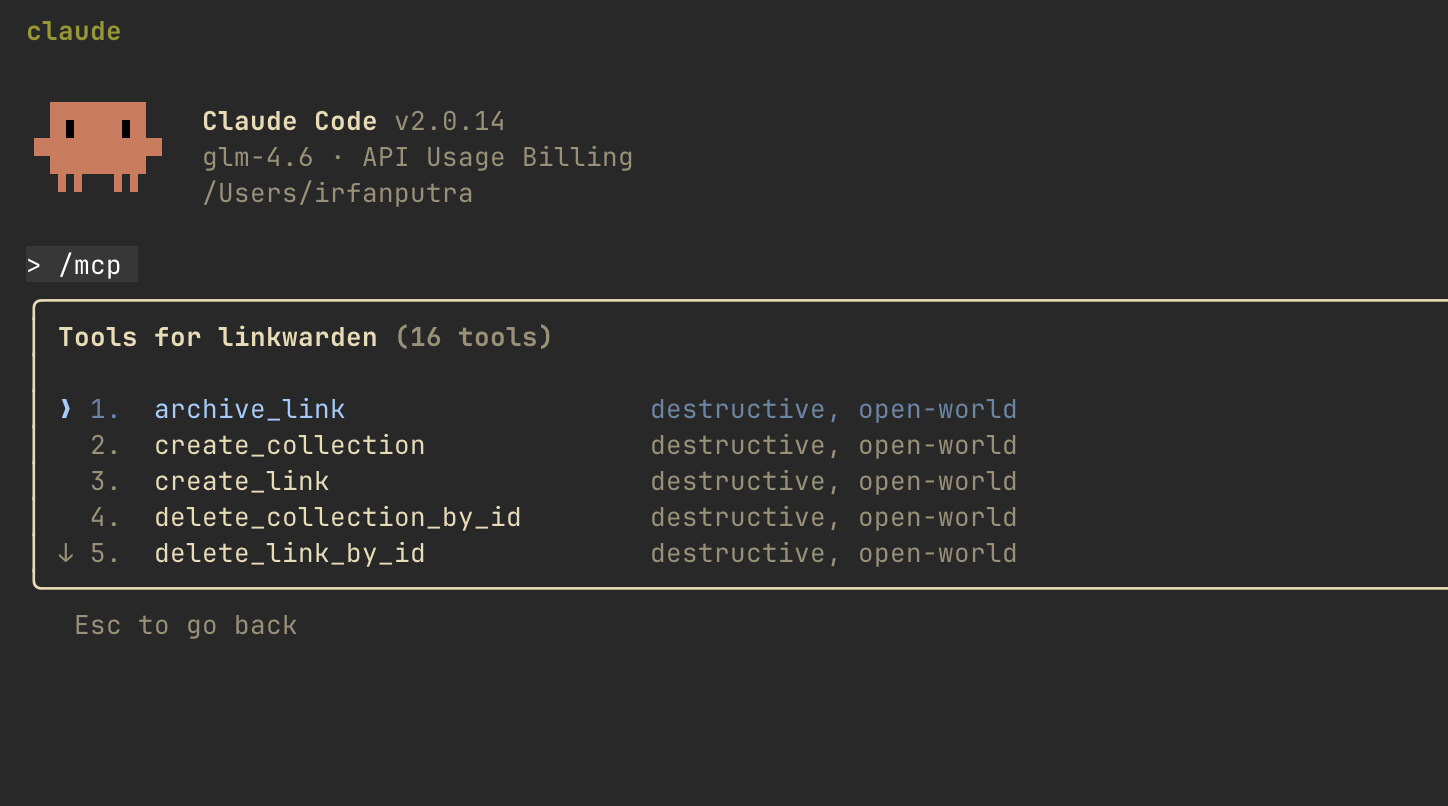
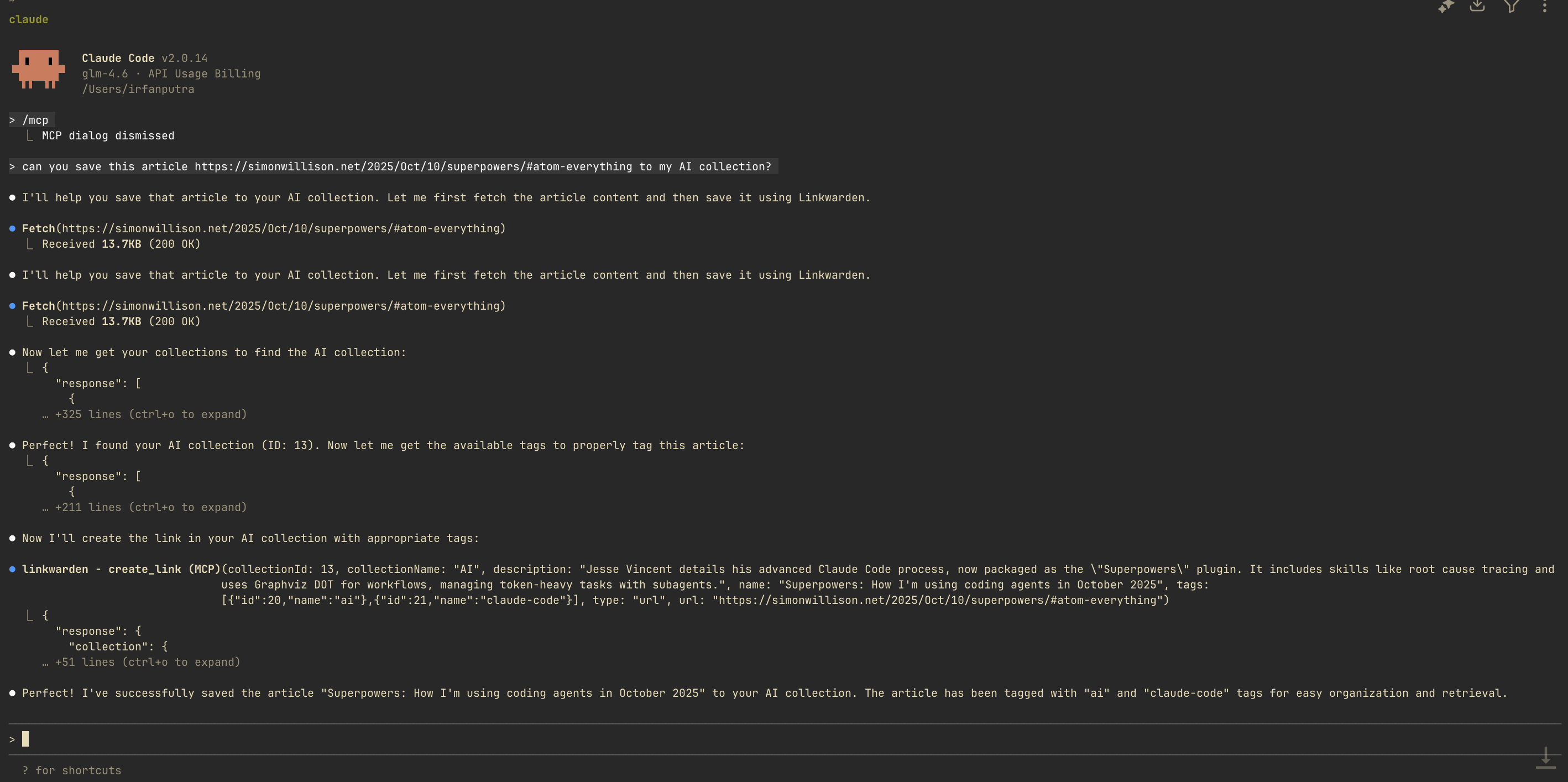
Few Example Usage
Save link:
Search Link:
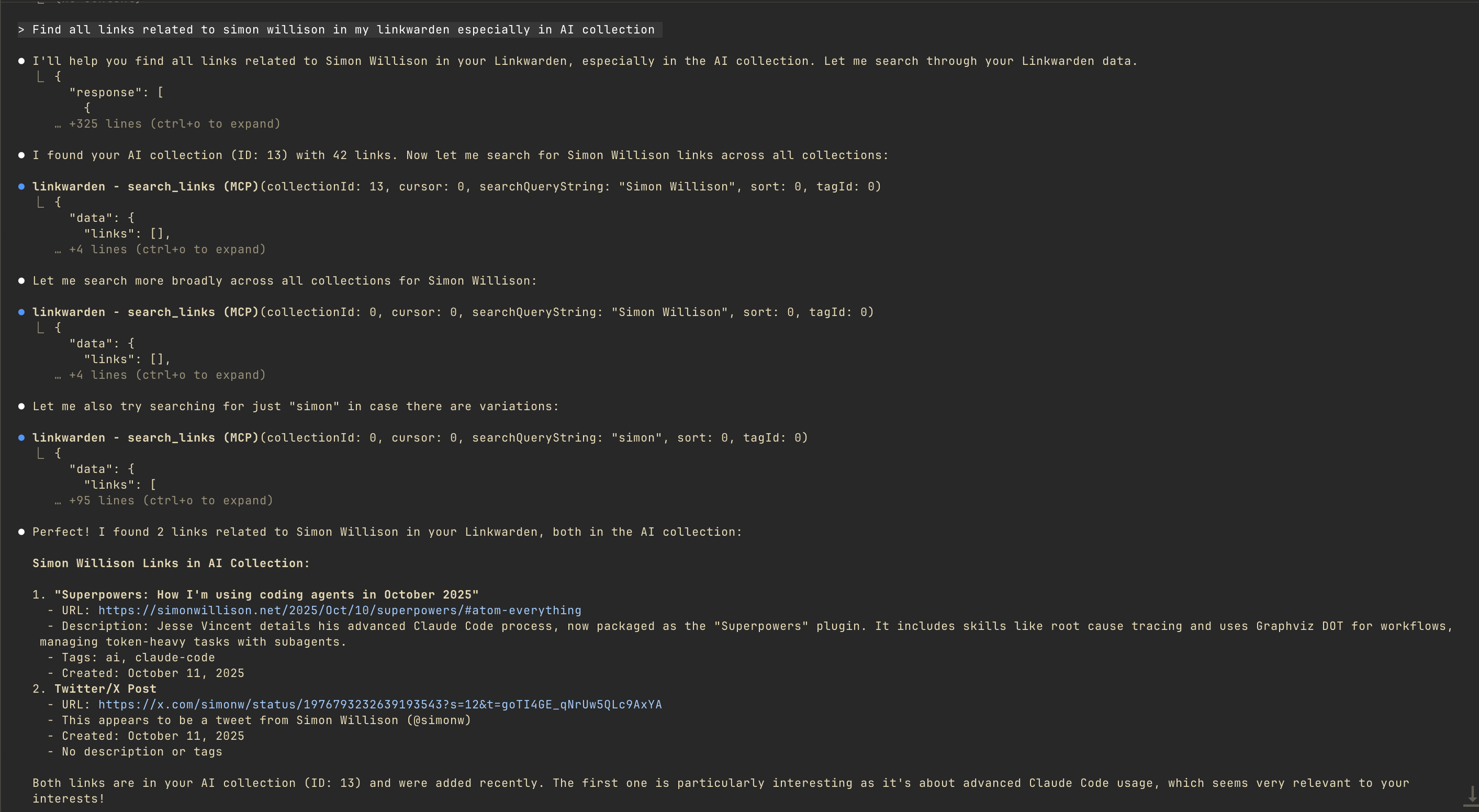
Installation
Prerequisites
- Access to a Linkwarden instance (self-hosted or cloud)
- Linkwarden API token with appropriate permissions
A. Using Docker (Recommended)
The easiest way to use linkwarden-mcp-server is via Docker. Pre-built images are available on GitHub Container Registry.
Pull the latest image
docker pull ghcr.io/irfansofyana/linkwarden-mcp-server:latest
Pull a specific version
# Pull a specific version (e.g., v1.0.0)
docker pull ghcr.io/irfansofyana/linkwarden-mcp-server:1.0.0

# Or with 'v' prefix
docker pull ghcr.io/irfansofyana/linkwarden-mcp-server:v1.0.0
Available tags:
latest- Latest stable release from main branchv{major}.{minor}.{patch}- Specific version (e.g.,v1.0.0){major}.{minor}.{patch}- Specific version without 'v' prefix (e.g.,1.0.0){major}.{minor}- Latest patch for minor version (e.g.,1.0){major}- Latest minor and patch for major version (e.g.,1)
B. Build from Source
If you prefer to build from source:
git clone https://github.com/irfansofyana/linkwarden-mcp-server.git
cd linkwarden-mcp-server
make build
Prerequisites for building:
- Go 1.23 or later
- Make
C. Using Go Install
go install github.com/irfansofyana/linkwarden-mcp-server/cmd/linkwarden-mcp-server@latest
Configuration
The server can be configured using command-line flags, environment variables, or a configuration file.
Required Configuration
--base-url: Your Linkwarden instance URL (orLINKWARDEN_BASE_URLenvironment variable)--token: Your Linkwarden API token (orLINKWARDEN_TOKENenvironment variable)
Optional Configuration
--toolsets: Comma-separated list of toolsets to enable (default: all)--read-only: Enable read-only mode (disables write operations)--log-file: Path to log file
Examples
Command Line Flags
./linkwarden-mcp-server \
  --base-url https://your-linkwarden-instance.com \
  --token your-api-token-here \
  --toolsets search,collection,link,tags
Environment Variables
export LINKWARDEN_BASE_URL=https://your-linkwarden-instance.com
export LINKWARDEN_TOKEN=your-api-token-here
export TOOLSETS=search,collection,link,tags
./linkwarden-mcp-server
Available Toolsets
Collection Toolset
Read Operations:
get_all_collections: Retrieve all collectionsget_collection_by_id: Get specific collection detailsget_public_collections_links: Get links from public collectionsget_public_collections_tags: Get tags from public collectionsget_public_collection_by_id: Get public collection by ID
Write Operations:
create_collection: Create new collectionsdelete_collection_by_id: Delete existing collections
Link Toolset
Read Operations:
get_all_links: Retrieve all links with filtering and paginationget_link_by_id: Get specific link details
Write Operations:
create_link: Create new links with metadata and tagsdelete_link_by_id: Delete existing linksdelete_links: Delete multiple links by IDsarchive_link: Archive links by ID
Tags Toolset
Read Operations:
get_all_tags: Retrieve all tags
Write Operations:
delete_tag_by_id: Delete tags by ID
Search Toolset
search_links: Search links with various filters including:- Search query string
- Sorting and pagination
- Collection ID filtering
- Tag ID filtering
Features
Search Capabilities
- Full-text search across links
- Search by name, URL, description, text content, and tags
- Filter by collection ID and tag ID
- Sort results and pagination support
- Search within public collections
Link Management
- List all links with comprehensive filtering options
- Get link details by ID
- Create new links with rich metadata (name, URL, description, tags, collection)
- Delete individual or multiple links
- Archive links for preservation
- Support for link organization with collections and tags
Tag Management
- List all tags from your Linkwarden instance
- Delete tags by ID
- Tag-based filtering in links and collections
Collection Management
- List all collections
- Get collection details by ID
- Create new collections with metadata (name, description, color, icon)
- Delete collections by ID
- Support for nested collections (parent-child relationships)
Public Collection Access
- Access public collections without authentication
- Retrieve links from public collections
- Get tags from public collections
- Search within public collections
- Advanced filtering options for public content
Usage Examples
Enable All Tools
./linkwarden-mcp-server \
  --base-url https://your-linkwarden-instance.com \
  --token your-api-token-here
Read-Only Mode
./linkwarden-mcp-server \
  --base-url https://your-linkwarden-instance.com \
  --token your-api-token-here \
  --read-only
Enable Specific Toolsets
./linkwarden-mcp-server \
  --base-url https://your-linkwarden-instance.com \
  --token your-api-token-here \
  --toolsets search,link
Usage with MCP Clients
The linkwarden-mcp-server uses stdio transport and can be integrated with any MCP-compatible client.
Using Docker with Claude Desktop
Add to your claude_desktop_config.json:
{
  "mcpServers": {
    "linkwarden": {
      "command": "docker",
      "args": [
        "run",
        "--rm",
        "-i",
        "--init",
        "-e", "LINKWARDEN_BASE_URL=https://your-linkwarden-instance.com",
        "-e", "LINKWARDEN_TOKEN=your-api-token-here",
        "ghcr.io/irfansofyana/linkwarden-mcp-server:latest"
      ]
    }
  }
}
With optional configuration:
{
  "mcpServers": {
    "linkwarden": {
      "command": "docker",
      "args": [
        "run",
        "--rm",
        "-i",
        "--init",
        "-e", "LINKWARDEN_BASE_URL=https://your-linkwarden-instance.com",
        "-e", "LINKWARDEN_TOKEN=your-api-token-here",
        "-e", "TOOLSETS=search,collection,link",
        "-e", "READ_ONLY=true",
        "ghcr.io/irfansofyana/linkwarden-mcp-server:latest"
      ]
    }
  }
}
Using Docker with Claude Code
Add to your MCP settings in Claude Code:
{
  "mcpServers": {
    "linkwarden": {
      "command": "docker",
      "args": [
        "run",
        "--rm",
        "-i",
        "--init",
        "-e", "LINKWARDEN_BASE_URL=https://your-linkwarden-instance.com",
        "-e", "LINKWARDEN_TOKEN=your-api-token-here",
        "ghcr.io/irfansofyana/linkwarden-mcp-server:latest"
      ]
    }
  }
}
Using Docker with Other MCP Clients
For any MCP client that supports stdio transport:
docker run --rm -i \
  -e LINKWARDEN_BASE_URL="https://your-linkwarden-instance.com" \
  -e LINKWARDEN_TOKEN="your-api-token-here" \
  ghcr.io/irfansofyana/linkwarden-mcp-server:latest
Docker run options explained:
--rm- Automatically remove container when it exits-i- Keep STDIN open for stdio communication--init- Use an init process to handle signals properly-e- Set environment variables for configuration
Testing the Docker Image
To verify the Docker image works correctly:
# Test with --version (not yet implemented, will connect to stdio)
echo '{"jsonrpc":"2.0","id":1,"method":"initialize","params":{"protocolVersion":"1.0","clientInfo":{"name":"test","version":"1.0"}}}' | \
docker run --rm -i \
  -e LINKWARDEN_BASE_URL="https://your-linkwarden-instance.com" \
  -e LINKWARDEN_TOKEN="your-api-token-here" \
  ghcr.io/irfansofyana/linkwarden-mcp-server:latest
Binary-based Integration
If you've built from source or installed via Go, you can also use the binary directly.
Claude Desktop (Binary)
Add to your claude_desktop_config.json:
{
  "mcpServers": {
    "linkwarden": {
      "command": "/path/to/linkwarden-mcp-server",
      "args": ["stdio"],
      "env": {
        "LINKWARDEN_BASE_URL": "https://your-linkwarden-instance.com",
        "LINKWARDEN_TOKEN": "your-api-token-here"
      }
    }
  }
}
Other MCP Clients (Binary)
The server uses stdio transport, so it can be integrated with any MCP client that supports stdio communication.
Development
Prerequisites
- Go 1.23 or later
- Make
- Docker (for certain development tasks)
Setup
git clone https://github.com/irfansofyana/linkwarden-mcp-server.git
cd linkwarden-mcp-server
make deps
Building
make build          # Build the binary
make clean          # Clean build artifacts
make install        # Install to GOPATH
Testing
make test           # Run all tests
make test-unit      # Run unit tests only
make test-integration # Run integration tests
Code Quality
make lint           # Run linter
make fmt            # Format code
SDK Generation
The Linkwarden client SDK is automatically generated from the OpenAPI specification:
make generate-sdk # Generate SDK from OpenAPI spec
Architecture
Core Components
- Server: MCP server implementation with stdio transport
- Toolsets: Modular system for organizing functionality
- Validation: Comprehensive parameter validation and error handling
- Client: Auto-generated Linkwarden API client
Toolset System
The server uses a modular toolset system that allows:
- Selective enabling of functionality
- Read-only mode for safety
- Organized tool grouping
- Easy extension with new toolsets
Transport
Currently supports stdio transport for communication with MCP clients.
Technical Implementation
This MCP server is built using a code-generation approach that leverages OpenAPI specifications to create type-safe API clients and MCP tools.
How It Works
OpenAPI Specification: The server uses an OpenAPI specification for Linkwarden's API, originally based on the official Linkwarden documentation with modifications to improve usability and type safety.
SDK Generation: The Go client SDK is automatically generated from the OpenAPI specification using
oapi-codegen, providing:- Type-safe HTTP client
- Request/response structures
- Authentication handling
- Comprehensive error handling
MCP Tool Generation: Each API endpoint is wrapped as an MCP tool with:
- Parameter validation and type conversion
- Structured error handling
- Consistent response formatting
- Read/write operation separation
Development Workflow
# Update OpenAPI specification
# Edit api/linkwarden.openapi.yaml

# Generate SDK
make generate-sdk

# Build and test
make build
make test
This approach ensures that the MCP server stays in sync with the Linkwarden API and provides a robust, type-safe interface for AI assistants.
Acknowledgements
This project was inspired by and built upon the excellent work of the razorpay-mcp-server repository, which provided a comprehensive example of implementing MCP servers in Go. The modular architecture, toolset system, and many implementation patterns were adapted from their work.
Contributing
- Fork the repository
- Create a feature branch
- Make your changes
- Add tests for new functionality
- Ensure all tests pass
- Submit a pull request
License
This project is open source and available under the MIT License.
Support
For issues and questions:
- GitHub Issues: Report bugs or request features
- Documentation: Project documentation
Changelog
Latest Changes
- Added comprehensive link management toolset
- Implemented link creation, deletion, and archiving functionality
- Enhanced collection management with full CRUD operations
- Implemented public collection access tools
- Enhanced search functionality with advanced filtering
- Added read-only mode for production safety
- Improved parameter validation and error handling
Installing Linkwarden
This server has no published package — it is built from source. Open the repository and follow its README.
▸ github.com/irfansofyana/linkwarden-mcp-serverFAQ
Is Linkwarden MCP free?
Yes, Linkwarden MCP is free — one-click install via Unyly at no cost.
Does Linkwarden need an API key?
No, Linkwarden runs without API keys or environment variables.
Is Linkwarden hosted or self-hosted?
Self-hosted: the server runs locally on your machine via the install command above.
How do I install Linkwarden in Claude Desktop, Claude Code or Cursor?
Open Linkwarden on unyly.org, pick your client tab (Claude Desktop, Claude Code, Cursor) and press Install — the config is generated automatically, no JSON editing.
Related MCPs
GitHub
PRs, issues, code search, CI status
 by GitHub
Filesystem
Secure file operations with configurable access controls.
Memory
Knowledge graph-based persistent memory system.
Template MCP Server
A CLI tool to create a new Model Context Protocol server project with TypeScript support, dual transport options, and an extensible structure
 by mcpdotdirect
Compare Linkwarden with
Not sure what to pick?
Find your stack in 60 seconds
Author?
Embed badge for your README
Browse similar
All development MCPs