loading…
en/
Browse all
Configuration (
Living Documentation
FreeLocal Markdown documentation hub with a built-in MCP server — coding agents create ADRs, draw diagrams and detect drift while you code.
About
Local Markdown documentation hub with a built-in MCP server — coding agents create ADRs, draw diagrams and detect drift while you code.
README
language: en
Living Documentation
Local Markdown documentation hub with a built-in MCP server , coding agents create ADRs, draw diagrams, and detect drift while you code.
Markdown on disk, no cloud, no database, no build step. Point it at a folder, open http://localhost:4321. Plug any MCP-aware AI agent into it (Claude Code, Claude Desktop, Cursor…) and your documentation maintains itself as your code evolves.





npx living-ai-documentation@latest                # interactive wizard (EN/FR)
npx living-ai-documentation@latest ./docs         # serve an existing folder
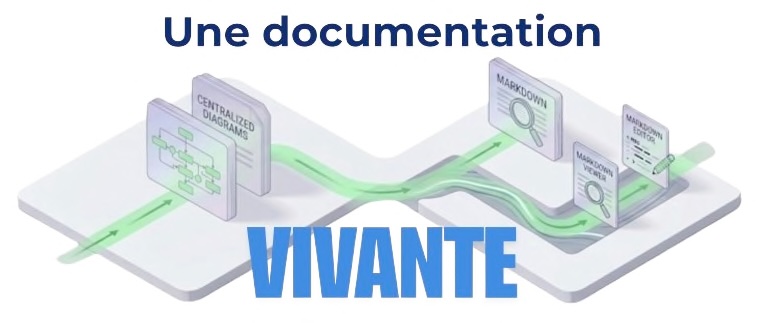
Two ways to use it
1. With an AI coding agent , the killer feature
Living Documentation ships an MCP server on POST /mcp. Any MCP-aware agent can read, create and audit your project's documentation autonomously.
| You say… | The agent triggers… | What happens |
|---|---|---|
| "feature done" / "feature terminée" | create-adr |
Searches existing ADRs, supersedes the obsolete one if any, writes a new ADR at To be validated, binds the source files via metadata. |
| "audit the ADRs" / "vérifie la fiabilité des ADR" | audit-adrs-drift |
Lists every ADR below 80% reliability and brings each back in sync , re-baseline or supersede after your confirmation. |
| "review this ADR" / "vérifie la pertinence de cet ADR" | review-adr-relevance |
Reviews a single ADR against the bound source files; refreshes hashes or proposes supersession. |
| "backfill ADRs from git" / "retrodocumente depuis git" | retrodocument-adrs-from-git |
Walks git history oldest-first and creates ADRs for the durable decisions that were never documented. |
| "give me the big picture" | generate-context-diagram |
Creates a C4 context diagram derived from the docs, never invented. |
All new ADRs land at To be validated. You promote them. The agent never promotes on your behalf.
2. Solo, no AI
A personal docs hub: ADRs, meeting notes, dev journals, feature plans, architecture sketches , all kept as Markdown on disk, git-friendly, zero vendor lock-in. Inline editor, snippets, image paste, file attachments, diagram editor, full-text search, PDF/HTML/Notion/Confluence export.
The two modes mix freely: jot notes solo all week, then let your agent record the ADR when the feature actually lands.
Quick start
# Interactive wizard , creates a starter doc folder (EN or FR), scaffolds
# AGENTS.md / CLAUDE.md / memory/MEMORY.md at the project root and symlinks
# them into <docs>/AI/ so AI agents can find them.
npx living-ai-documentation@latest

# Or serve an existing folder
npx living-ai-documentation@latest ./docs
npx living-ai-documentation@latest ./docs --port 4000 --open
Then open http://localhost:4321 (viewer) and http://localhost:4321/admin (config).
The folder argument must be a relative path (
./docs,../shared/docs…). Absolute paths and~are rejected so the generated.living-doc.jsonstays portable and can be committed.
Install
Requires Node.js 20.19 or newer (Vite 8 and Commander 14 no longer support Node.js 18).
npx living-ai-documentation@latest                 # zero-install
npm install -g living-ai-documentation      # global
Connect your AI agent
Claude Code
claude mcp add --transport http living-ai-documentation http://localhost:4321/mcp
Or manually in .claude/settings.json:
{
  "mcpServers": {
    "living-ai-documentation": {
      "type": "http",
      "url": "http://localhost:4321/mcp"
    }
  }
}
Claude Desktop
In ~/Library/Application Support/Claude/claude_desktop_config.json (macOS), then restart:
{
  "mcpServers": {
    "living-ai-documentation": {
      "type": "http",
      "url": "http://localhost:4321/mcp"
    }
  }
}
Cursor, Continue, any MCP client
Use the same HTTP endpoint: http://localhost:4321/mcp (Streamable HTTP transport, stateless).
The Living Documentation server must be running first (
npx living-ai-documentation@latest ./docs) before the agent connects.
Core concepts
- Markdown on disk , each document is a
.mdfile. Configuration lives in.living-doc.jsonnext to it. Both are git-friendly. - Filename pattern , default
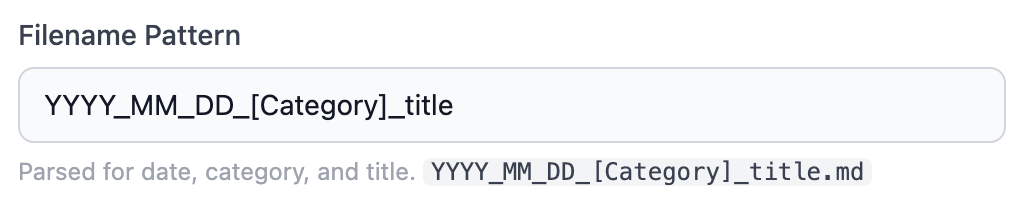
YYYY_MM_DD_HH_mm_[Category]_title.md. The pattern is configurable; date, category and title are parsed from it. Files that don't match still appear under General. - Folders → categories → docs in the sidebar. Folder names become the labels; numeric prefixes (
1_TUTORIAL,2_REFERENCE) control order without showing in the UI. - ADRs are the canonical decision record. The MCP server enforces a normalized frontmatter (
**date:**,**status:**,**description:**,**tags:**) and aTo be validatedinitial status that only a human can promote. sourceRootpoints to the project's code. The MCP source tools (list_source_files,read_source_file,search_source) and the metadata binding rely on it. Defaults to the parent of the docs folder.- Source-file metadata + reliability gauge , bind a doc to the source files it describes. Each binding stores a SHA-256. The gauge in the doc header (
🔴 → 🟡 → 🟢) reflectsunchanged / total. As soon as one bound file is modified or deleted, drift is visible. God files (package.json, lock files, manifests, barrels) are excluded by convention. - Diagrams are derived views , they cite the documents they're built from (
evidence). They cannot introduce concepts absent from the docs.
MCP reference
Tools (19)
| Group | Tool | Description |
|---|---|---|
| Onboarding | get_server_guide |
Returns the server guide: workflow, conventions, diagram rules. |
| Documents | list_documents |
Inventory: id, title, category, folder, linkHref. |
read_document |
Raw Markdown content of a document. | |
create_document |
Create a new .md file (filename from configured pattern, optional date override for retrodoc). |
|
update_document |
Overwrite an existing doc (drift correction, supersede). | |
| Diagrams | list_diagrams |
List saved diagrams. |
read_diagram |
Read nodes + edges of one diagram. | |
create_diagram |
Create / overwrite a diagram (server-side guardrails enforce C4 progression and edge labels). | |
| Source code (fallback) | list_source_files |
List files under sourceRoot (ignored: node_modules, dist, .git…). |
read_source_file |
Read a file under sourceRoot. |
|
search_source |
Grep-like text search under sourceRoot. |
|
| Metadata | list_metadata |
Source-file bindings of a doc. |
get_accuracy |
Per-entry status (unchanged / modified / missing) + weighted accuracy ∈ [0, 1]. |
|
add_metadata |
Bind a source file (path under sourceRoot), records SHA-256. Skips god files. |
|
remove_metadata |
Detach a binding (idempotent , for renames/deletes). | |
refresh_metadata |
Re-hash every binding (re-baseline after an update). | |
| ADR audit | list_adrs_below_accuracy |
Up to 10 ADRs whose accuracy < 80%, sorted most-degraded first. Excludes SuperSeeded and non-ADRs. |
review_adr_relevance |
Factual report on one ADR + drifted files to re-read. Returns a state to drive the LLM decision tree. |
|
| Retrodocumentation | retrodocument_adrs_from_git |
Up to 200 git commits (oldest first) classified candidate / trivial / merge, with god-file flags. Used to backfill missing ADRs. |
Prompts (10)
| Group | Prompt | When |
|---|---|---|
| ADR lifecycle | create-adr |
A feature has just been implemented or modified. Records the decision, supersedes a prior ADR if any. |
audit-adrs-drift |
Batch audit: bring every drifting ADR back to a clear state (re-baseline or user-confirmed supersession). | |
review-adr-relevance |
Single ADR review against its bound source files. | |
retrodocument-adrs-from-git |
Backfill ADRs from git history when the project lacks them. | |
| Diagrams | generate-context-diagram |
DEFAULT. C4 context diagram, gated server-side. |
generate-container-diagram |
Explicit-only. C4 container diagram of one system. | |
generate-uml-diagram |
Explicit-only. UML class/sequence/state/activity/use-case. | |
generate-screen-guide |
Explicit-only. Annotated screenshot with post-it callouts. | |
update-diagram-from-docs |
Re-read source documents to update existing diagrams. | |
flow, erd |
Linear flow / entity-relationship diagrams. |
A GET http://localhost:4321/mcp returns the live tool + prompt schemas for inspection.
Authoring features
- Inline editor , edit any doc in the browser, saves to disk instantly.
- Snippets panel (
🧩 Snippets) , pre-built Markdown constructs at the cursor: collapsible blocks, links (in-doc, cross-doc, anchor), lists, code blocks, blockquotes, separators, images. Plus a table editor (dynamic grid → aligned Markdown table) and a tree editor (indentation → ASCII tree with├──/└──). Selecting an existing snippet detects its type and pre-fills the form for editing. - Image paste , paste from clipboard while editing, auto-uploaded to
<docs>/images/, inserted as Markdown. - File attachments , drag, drop, paste or pick any non-image file (PDF, archive, office doc). Uploaded under
<docs>/files/, inserted as a paperclip pill. Blocked extensions and size limits configurable in Admin. - Full-text search , instant filename filter + server-side content search; for each file lists every occurrence, highlights and jumps to them.
metadata://<filename>search prefix , reverse-lookup: which documents reference this attachment?- Annotations , persistent highlight markers per document (yellow / pink / green / blue).
- Anchor navigation ,
[label](#heading-slug)scrolls correctly after async render; IDs auto-generated. - Dark mode , follows system preference, manually toggleable. Syntax highlighting always dark.
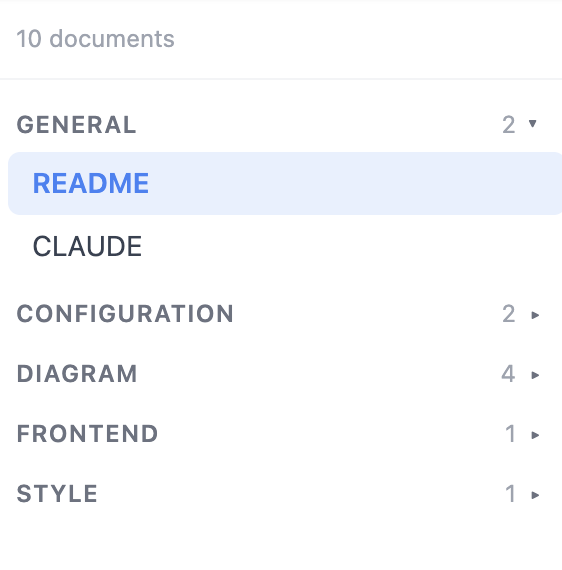
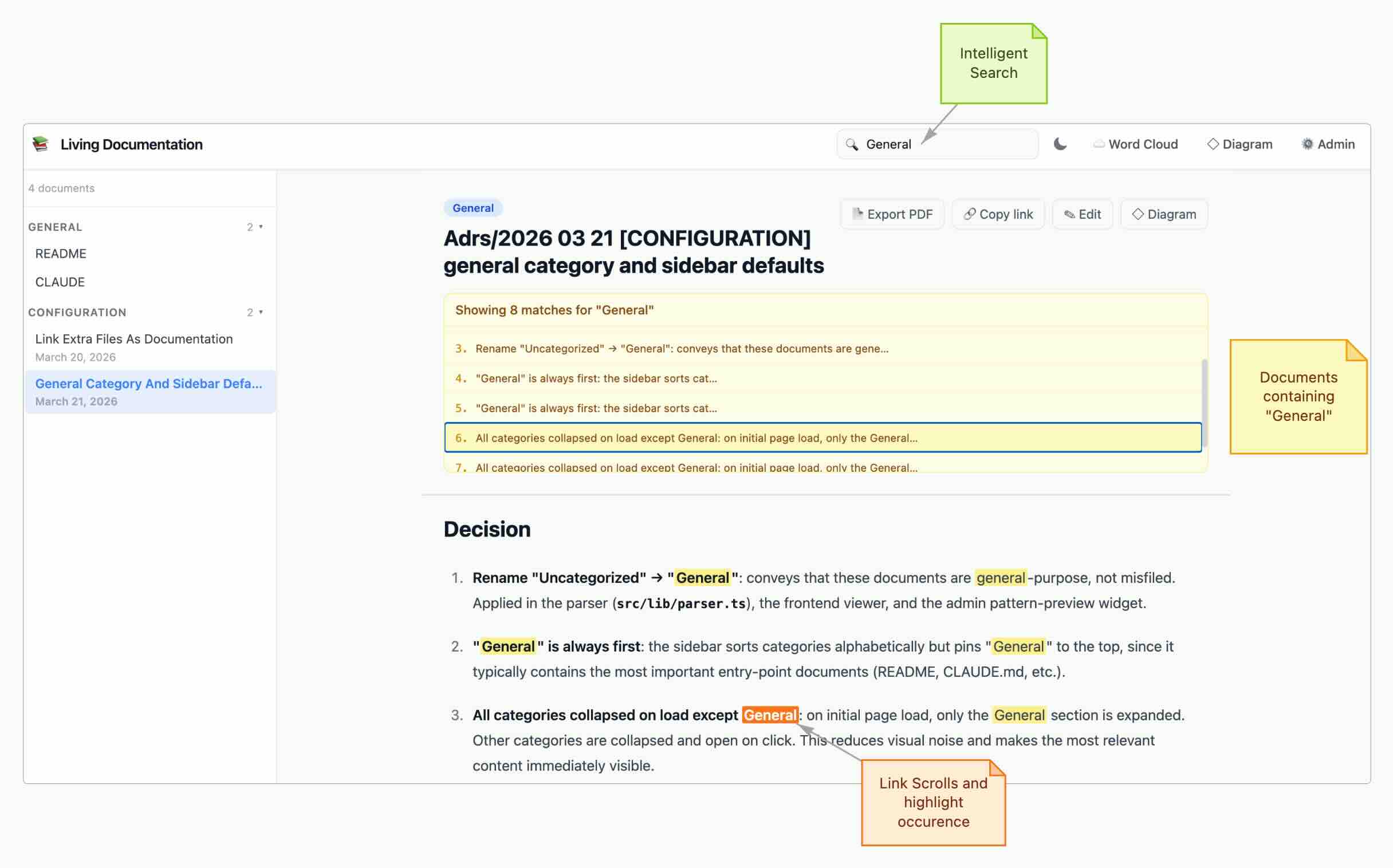
Diagram editor
Built-in canvas diagram editor (vis-network), accessible at /diagram?id=....
- C4 progression enforced , context first (default), container/component only on explicit request. UML on explicit request.
- Architectural
kindvs visualrenderAs, separate the concept (software_system,database,queue,api,cloud_service…) from the shape (box,ellipse,database,actor,post-it…). The MCP picks sensible defaults for eachkind. - Evidence provenance , every architectural node/edge can cite the document and section that justifies it. The editor surfaces missing-evidence warnings.
- Custom shape libraries at
/shape-editor, define your own shapes (SVG icons, ports, default colors) and reuse them across diagrams. - Ports for anchored edges, alignment guides, undo/redo, snap-to-grid, paste images, PNG export, deep-link to a diagram by id.
File organization
docs/
├── 2024_01_15_09_30_[DevOps]_deploy.md          → category: DevOps
├── 1_tutorial/                                   → folder: Tutorial (prefix hidden in UI)
│   └── 2024_03_01_10_00_[Onboarding]_setup.md   → folder: Tutorial / category: Onboarding
├── adrs/
│   └── 2024_04_01_10_15_[Architecture]_event_sourcing.md
└── 2_reference/
    └── api.md                                    → folder: Reference / category: General
- The
[Category]tag is parsed from the filename regardless of the folder. - Files without a
[Category]fall under General. General is always rendered first. - Folders are sorted alphabetically , prefix with
1_,2_… to force an order; the prefix is hidden in the UI but visible on hover. - Subdirectory nesting is supported recursively.
Configuration (.living-doc.json)
Created automatically in your docs folder on first run. Edit in the Admin panel or by hand.
{
  "filenamePattern": "YYYY_MM_DD_HH_mm_[Category]_title",
  "title": "Living Documentation",
  "theme": "system",
  "port": 4321,
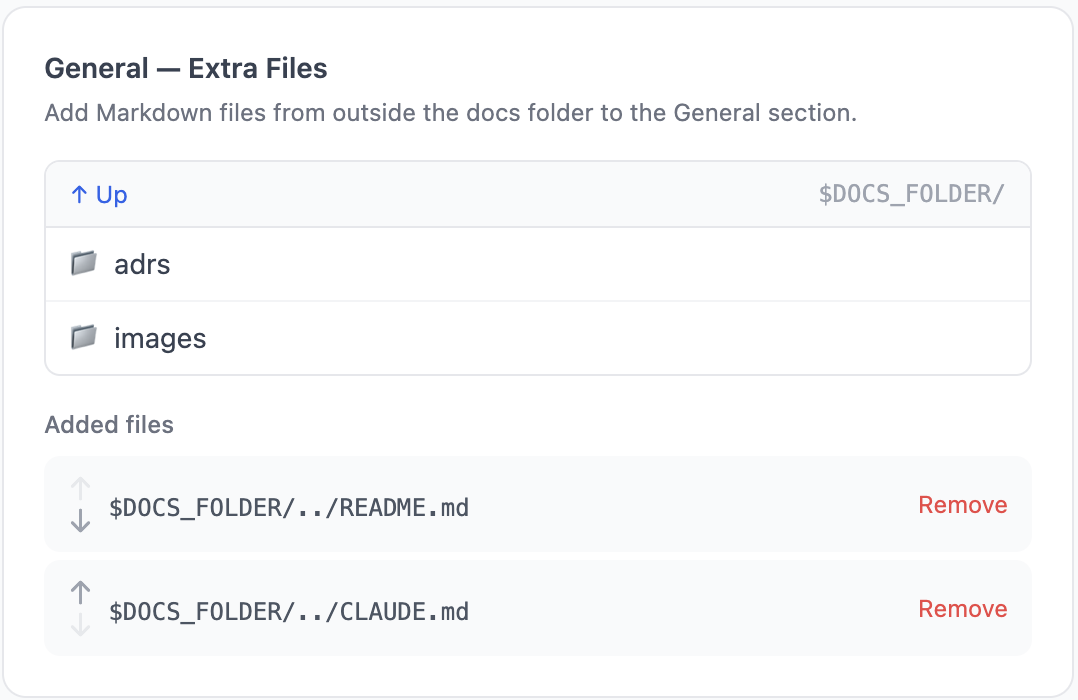
  "extraFiles": ["../README.md", "../CLAUDE.md"],
  "sourceRoot": "../src",
  "blockedFileExtensions": [".exe", ".bin"]
}
| Field | Role |
|---|---|
filenamePattern |
Filename convention used to parse date / category / title. [Category] token mandatory, exactly once. |
extraFiles |
Ordered Markdown files outside the docs folder (e.g. README.md, CLAUDE.md). Shown in General first. |
sourceRoot |
Where your code lives (relative to docs folder). Defaults to ... Used by MCP source + metadata tools. |
blockedFileExtensions |
File-attachment safety list, editable from Admin. |
All paths are relative POSIX so .living-doc.json stays portable. Legacy absolute paths are silently migrated on first read.
Export
| Format | Endpoint | Notes |
|---|---|---|
| PDF (per doc) | POST /api/export/html |
Browser print dialog from the rendered HTML. |
| HTML , Notion mode | POST /api/export/html |
Single HTML bundle suitable for Notion import. |
| HTML , Confluence mode | POST /api/export/html |
Zipped HTML bundle suitable for Confluence import. |
| Markdown bundle | POST /api/export/markdown |
Zip of every document with normalized links. |
UI surfaces
| URL | Page |
|---|---|
/ |
Viewer , sidebar, document rendering, inline edit, snippets, search, attachments. |
/admin |
Config , title, theme, filename pattern, extra files, source root, file safety list. |
/diagram?id= |
Diagram editor (vis-network) with C4 conventions, ports, alignment guides, undo/redo. |
/shape-editor |
Custom shape library editor , SVG icons, default colors, ports. |
/context |
AI context page , instructions, rules, memory, MCP explorer (try tools live in-browser). |
REST API
Full HTTP API (click to expand)
| Method | Endpoint | Description |
|---|---|---|
GET |
/api/documents |
List documents with metadata (includes extra files). |
GET |
/api/documents/:id |
Document content + rendered HTML. |
POST |
/api/documents |
Create from { title, category, folder?, content?, date? }. |
PUT |
/api/documents/:id |
Save content to disk. |
DELETE |
/api/documents/:id |
Delete a document. |
GET |
/api/documents/search?q= |
Full-text search. |
GET |
/api/config |
Read config. |
PUT |
/api/config |
Update config (title, theme, filenamePattern, extraFiles, sourceRoot, blockedFileExtensions, …). |
GET |
/api/browse?path= |
List directories and .md files at a path. |
POST |
/api/browse/mkdir |
Create a folder under the docs root. |
POST |
/api/images/upload |
Upload a base64 image → <docs>/images/. |
POST |
/api/files/upload |
Upload a base64 attachment → <docs>/files/. |
GET |
/api/files |
List every attachment (chronological). |
PUT |
/api/files/:filename |
Replace an attachment. |
DELETE |
/api/files/:filename |
Delete an attachment. |
GET |
/api/metadata/:docId |
Reliability report for one doc. |
POST |
/api/metadata/:docId |
Add or replace a binding. |
DELETE |
/api/metadata/:docId |
Remove a binding. |
POST |
/api/metadata/:docId/refresh |
Re-baseline hashes. |
GET |
/api/browse-source?path= |
Navigate the source tree rooted at sourceRoot. |
GET |
/api/diagrams |
List saved diagrams. |
GET |
/api/diagrams/:id |
Read a single diagram (nodes + edges). |
PUT |
/api/diagrams/:id |
Create or update a diagram. |
DELETE |
/api/diagrams/:id |
Delete a diagram. |
GET |
/api/shape-libraries |
List custom shape libraries. |
PUT |
/api/shape-libraries/:id |
Save a shape library. |
GET |
/api/annotations[/:docId] |
List annotations (all docs / one doc). |
POST |
/api/annotations/:docId |
Add an annotation. |
DELETE |
/api/annotations/:docId/:id |
Delete one annotation. |
POST |
/api/export/html |
HTML export , Notion / Confluence modes. |
POST |
/api/export/markdown |
Markdown bundle export. |
GET |
/api/wordcloud?path=&ext= |
Recursively concatenate matching source files as raw text. |
POST |
/mcp |
Model Context Protocol endpoint (Streamable HTTP). |
GET |
/mcp |
Live tool + prompt schema summary. |
Build & test
git clone https://github.com/craftskillz/living-documentation.git
cd living-documentation
npm install
npm run setup-hooks                      # one-time: enable .githooks/ as core.hooksPath
npm run dev -- ./documentation          # Vite (UI on :5174, HMR) + Express backend (:4321)
npm run build                            # tsc (server) + vite build (UI → dist/frontend-svelte)
npm run test:e2e                         # Playwright end-to-end (~3 s, ~30 MCP specs)
npm run test:coverage                    # c8 V8-native coverage
In dev, open the UI on http://localhost:5174 (Vite serves the Svelte app with HMR and proxies /api, /mcp, /images, /files to the Express backend on :4321).
End-to-end tests use Playwright. Each test spawns a real CLI child process against a fresh fixture on a random port , no leaking state, runs in parallel. Server-side coverage via c8 (V8 native, ~72% baseline overall, 83% on src/routes and src/lib).
Test the published package locally
No need to publish a version. The CLI starts a single Express server that serves the pre-built Svelte UI and the API/MCP on one port , Vite (:5174) is dev-only and does not exist for end users.
# Run the exact production artifact, then open http://localhost:4321
npm run build
node dist/bin/cli.js ./documentation

# Most faithful: build the tarball npm would publish (respects "files"), then run it
npm pack                                 # → living-ai-documentation-<version>.tgz
npx ./living-ai-documentation-*.tgz ./documentation

npm pack --dry-run                       # inspect exactly which files would be published
In production there is no
:5174. The MCP endpoint clients connect to ishttp://localhost:4321/mcp(Express, default port).
Contributing
This repository ships with a pre-commit hook (under .githooks/) that enforces the bilingual README contract: if you touch README.md you must also touch README.fr.md, and vice-versa. Run npm run setup-hooks once after cloning to activate it. The same check runs in CI on every PR (see .github/workflows/readme-sync.yml), so the rule is enforced even if a contributor forgets the local setup.
License
AGPL-3.0 , © Youssef MEDAGHRI-ALAOUI.
Install Living Documentation in Claude Desktop, Claude Code & Cursor
Run in your terminal:
claude mcp add living-documentation -- npx -y living-documentationFAQ
Is Living Documentation MCP free?
Yes, Living Documentation MCP is free — one-click install via Unyly at no cost.
Does Living Documentation need an API key?
No, Living Documentation runs without API keys or environment variables.
Is Living Documentation hosted or self-hosted?
Self-hosted: the server runs locally on your machine via the install command above.
How do I install Living Documentation in Claude Desktop, Claude Code or Cursor?
Open Living Documentation on unyly.org, pick your client tab (Claude Desktop, Claude Code, Cursor) and press Install — the config is generated automatically, no JSON editing.


