
Local CRM
FreeNot checkedA local-first CRM that exposes customer and project management tools via the Model Context Protocol (MCP), including an analytics server. It integrates seamless

About
A local-first CRM that exposes customer and project management tools via the Model Context Protocol (MCP), including an analytics server. It integrates seamlessly with Claude Code or a custom LlamaIndex ReAct agent.
README
A local-first CRM built on the Model Context Protocol (MCP) — customer & project management exposed as MCP tools, driven by either a custom LlamaIndex ReAct agent or directly from Claude Code.





📸 Screenshots
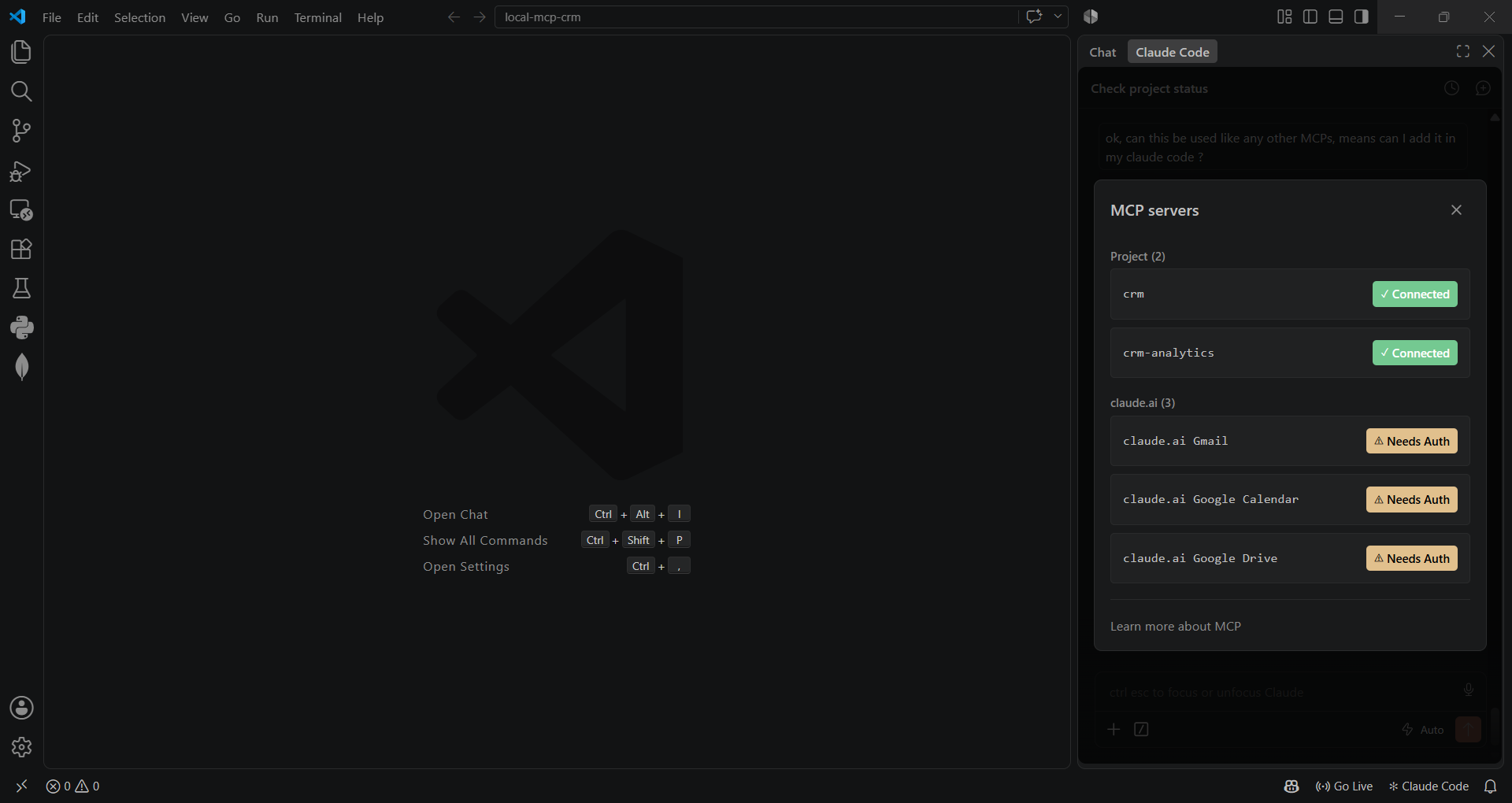
Both servers connected inside Claude Code (VS Code extension):
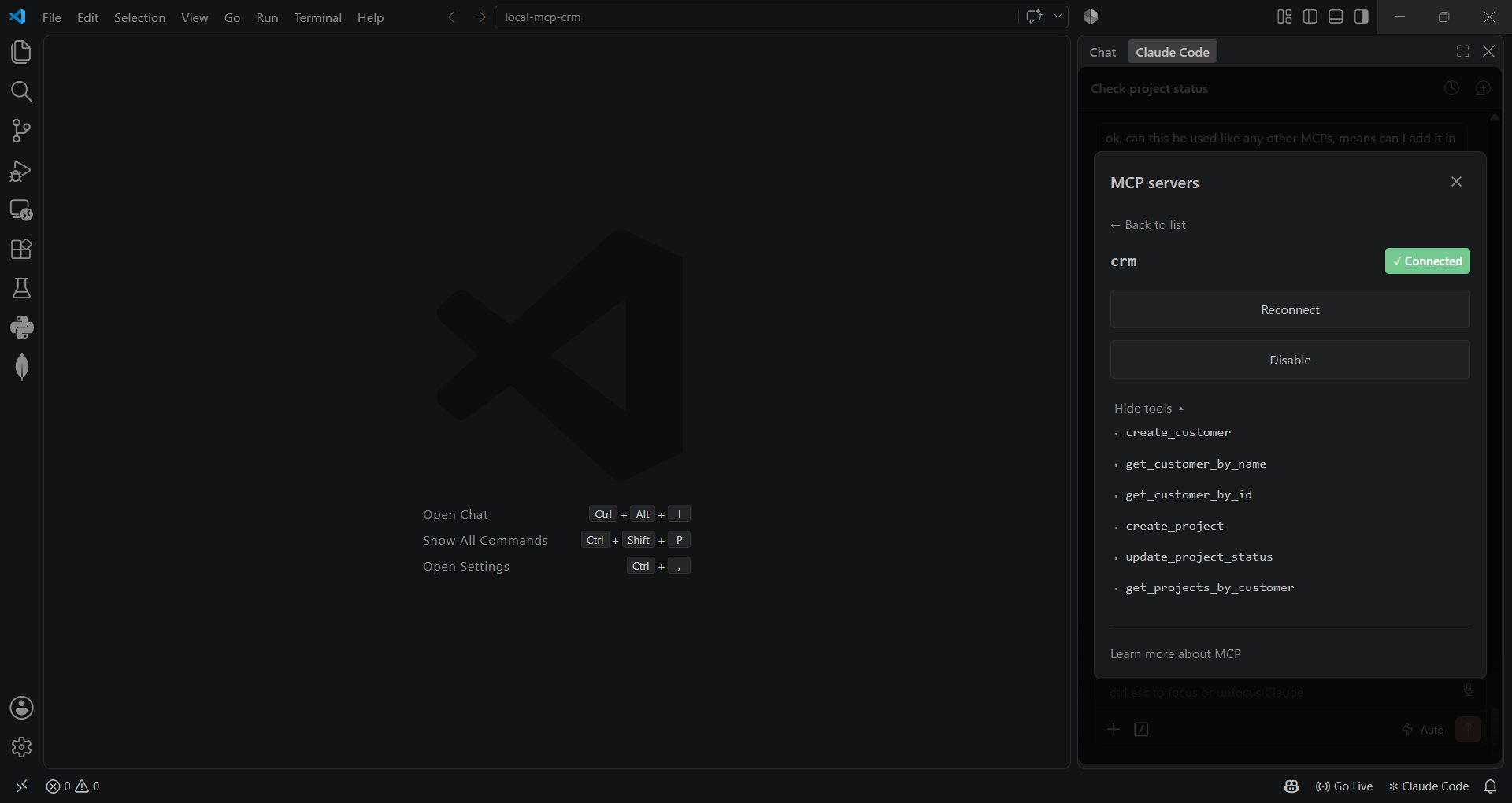
CRM server tools:
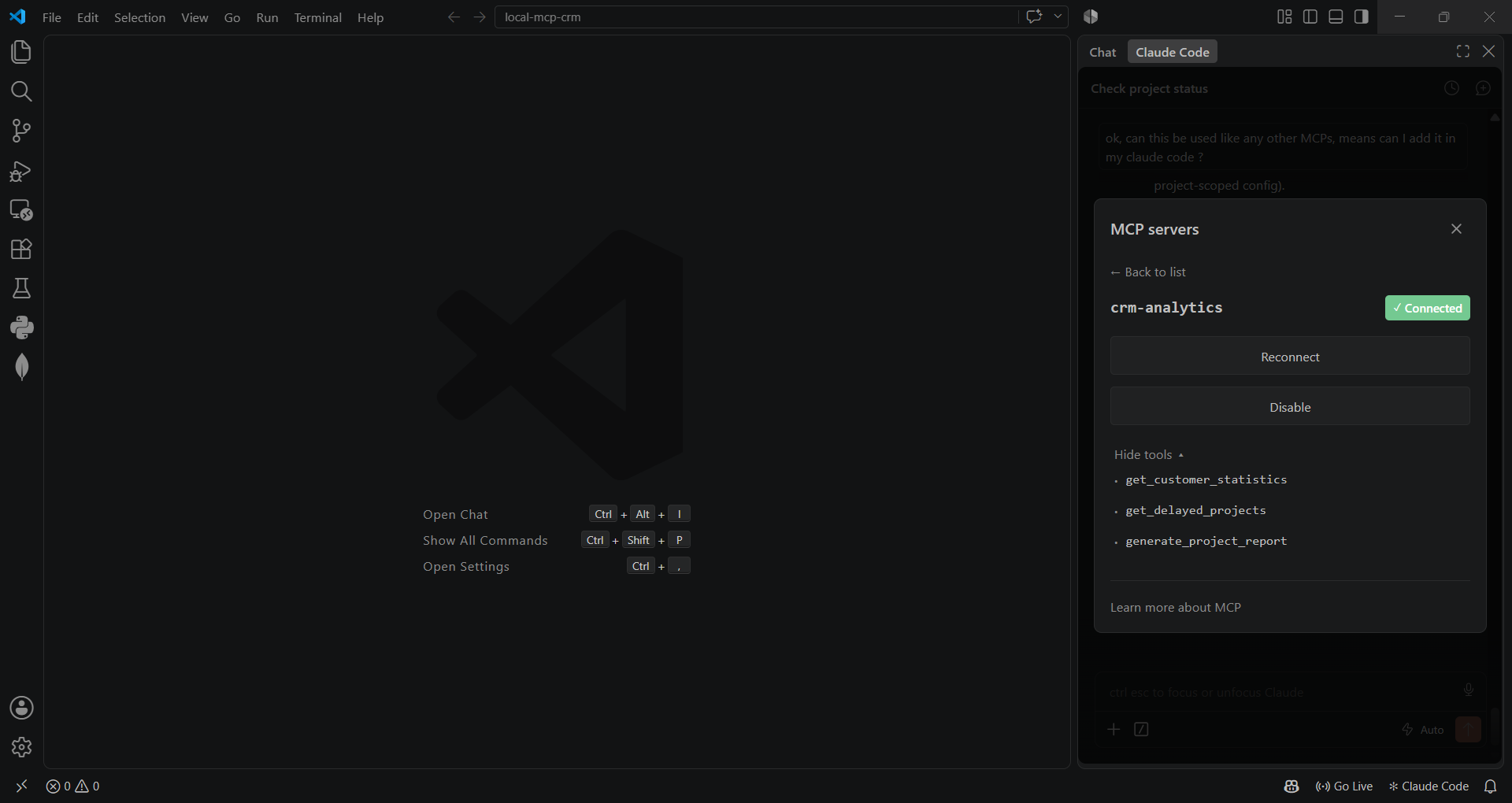
Analytics server tools:
📖 Table of Contents
- Screenshots
- Why this project
- Architecture
- Features
- Tech Stack
- MCP Tools Reference
- Getting Started
- Project Structure
- Roadmap
🎯 Why this project
This is a small, deliberately layered CRM that doubles as a hands-on demonstration of the
Model Context Protocol — the emerging standard for connecting LLMs to tools and data.
It ships two independent MCP servers (crm and crm-analytics), each exposing a clean
set of tools over stdio, and two different clients talking to them:
- A custom agent (
client/) — a LlamaIndexReActAgentwired to a free OpenRouter model, with its own MCP client, tool-schema translation, and a simple multi-turn "collect missing fields" workflow. - Claude Code itself — via
.mcp.json, the same servers plug straight into Claude Code (or any other MCP-compatible client) with zero extra glue code.
The point isn't the CRM domain (customers/projects are intentionally simple) — it's the architecture underneath: a clean repository → service → MCP tool → server pipeline that keeps business logic, data access, and protocol plumbing separate and independently testable.
🏗️ Architecture
flowchart LR
    subgraph Clients
        A["Custom ReAct Agent\n(client/chat.py)"]
        B["Claude Code /\nany MCP client"]
    end

    subgraph Servers["MCP Servers (stdio)"]
        C["CRM Server\nservers/crm_server"]
        D["Analytics Server\nservers/analytics_server"]
    end

    subgraph Domain["Domain Layer"]
        E["Services\n(validation & business rules)"]
        F["Repositories\n(data access)"]
    end

    G[("SQLite\ncrm.db")]

    A -- MCP --> C
    A -- MCP --> D
    B -- MCP --> C
    B -- MCP --> D
    C --> E
    D --> E
    E --> F
    F --> G
Each layer has one job:
- Repositories — raw SQL against SQLite, nothing else.
- Services — validation and business rules (e.g. "can't create a project for a customer that doesn't exist").
- MCP tools — translate service calls into the
{success, data/error, message}shape every tool returns. - Servers — register those tools on a
FastMCPinstance and speak stdio.
✨ Features
- ✅ Customer CRUD — create, look up by name or ID
- ✅ Project lifecycle — create, update status (
Active/Delayed/Completed), list by customer - ✅ Analytics — aggregate stats, delayed-project tracking, per-customer reports
- ✅ Two independent MCP servers, each with a focused tool surface
- ✅ Works as a drop-in MCP integration for Claude Code — no adapter code needed
- ✅ Standalone chat agent with tool-calling via LlamaIndex
ReActAgent - ✅ Layered architecture (repository / service / tool / server) — each piece testable in isolation
🛠️ Tech Stack
| Layer | Technology |
|---|---|
| Protocol | Model Context Protocol (mcp Python SDK, FastMCP) |
| Agent / LLM orchestration | LlamaIndex ReActAgent |
| LLM | OpenRouter (free-tier model) / LM Studio (local, optional) |
| Database | SQLite |
| Language | Python 3.13 |
🔧 MCP Tools Reference
crm server
| Tool | Description |
|---|---|
create_customer |
Create a customer (name, email, company) |
get_customer_by_name |
Look up a customer by name |
get_customer_by_id |
Look up a customer by ID |
create_project |
Create a project under a customer |
update_project_status |
Update a project's status |
get_projects_by_customer |
List all projects for a customer |
crm-analytics server
| Tool | Description |
|---|---|
get_customer_statistics |
Aggregate counts — total customers, total projects, delayed projects |
get_delayed_projects |
List every project currently marked Delayed |
generate_project_report |
Full project report for a single customer |
🚀 Getting Started
Prerequisites
- Python 3.13+
- An OpenRouter API key (free tier works) — only needed for the standalone chat agent, not for using the servers from Claude Code
1. Clone & set up a virtual environment
git clone <your-repo-url>
cd local-mcp-crm

python -m venv .venv
# Windows
.venv\Scripts\activate
# macOS / Linux
source .venv/bin/activate

pip install -r requirements.txt
2. Configure environment variables
cp .env.example .env
# then fill in OPENROUTER_API_KEY (and LM Studio settings, if you use them)
3. Initialize the database
python -m database.schema
4. Run it
Option A — standalone chat agent:
python -m client.chat
Option B — plug into Claude Code:
cp .mcp.json.example .mcp.json
# replace <ABSOLUTE_PATH_TO_PROJECT> with this project's absolute path
# (on macOS/Linux, point "command" at .venv/bin/python instead of .venv/Scripts/python.exe)
Reload Claude Code / run /mcp — you should see crm and crm-analytics connected, as
in the screenshots above.
📂 Project Structure
local-mcp-crm/
├── servers/
│   ├── crm_server/          # MCP server: customers & projects
│   └── analytics_server/    # MCP server: aggregate analytics
├── services/                # Business rules & validation
├── repositories/            # SQLite data access
├── database/                # Schema + connection helper
├── client/                  # Standalone LlamaIndex ReAct agent
├── models/                  # (reserved for typed domain models)
├── tests/                   # Manual verification scripts
├── .env.example
├── .mcp.json.example
└── requirements.txt
🗺️ Roadmap
- Convert the manual scripts in
tests/into a realpytestsuite - Pydantic-based input validation at the MCP tool boundary
- Package
crm_serverandanalytics_serverinto a single MCP server with resource-based tool grouping - CI (lint + tests) on push
Built as a hands-on exploration of the Model Context Protocol.
Installing Local CRM
This server has no published package — it is built from source. Open the repository and follow its README.
▸ github.com/bhairavaa/local-mcp-crmFAQ
Is Local CRM MCP free?
Yes, Local CRM MCP is free — one-click install via Unyly at no cost.
Does Local CRM need an API key?
No, Local CRM runs without API keys or environment variables.
Is Local CRM hosted or self-hosted?
Self-hosted: the server runs locally on your machine via the install command above.
How do I install Local CRM in Claude Desktop, Claude Code or Cursor?
Open Local CRM on unyly.org, pick your client tab (Claude Desktop, Claude Code, Cursor) and press Install — the config is generated automatically, no JSON editing.
Related MCPs
GitHub
PRs, issues, code search, CI status
 by GitHub
Filesystem
Secure file operations with configurable access controls.
Memory
Knowledge graph-based persistent memory system.
Template MCP Server
A CLI tool to create a new Model Context Protocol server project with TypeScript support, dual transport options, and an extensible structure
 by mcpdotdirect
Compare Local CRM with
Not sure what to pick?
Find your stack in 60 seconds
Author?
Embed badge for your README
Browse similar
All development MCPs