
Localhost Dev Server Manager
FreeNot checkedIdentifies, inspects, and terminates local development servers by port or PID.

About
Identifies, inspects, and terminates local development servers by port or PID.
README

localhost-mcp
localhost-mcp MCP server CI npm version License: MIT
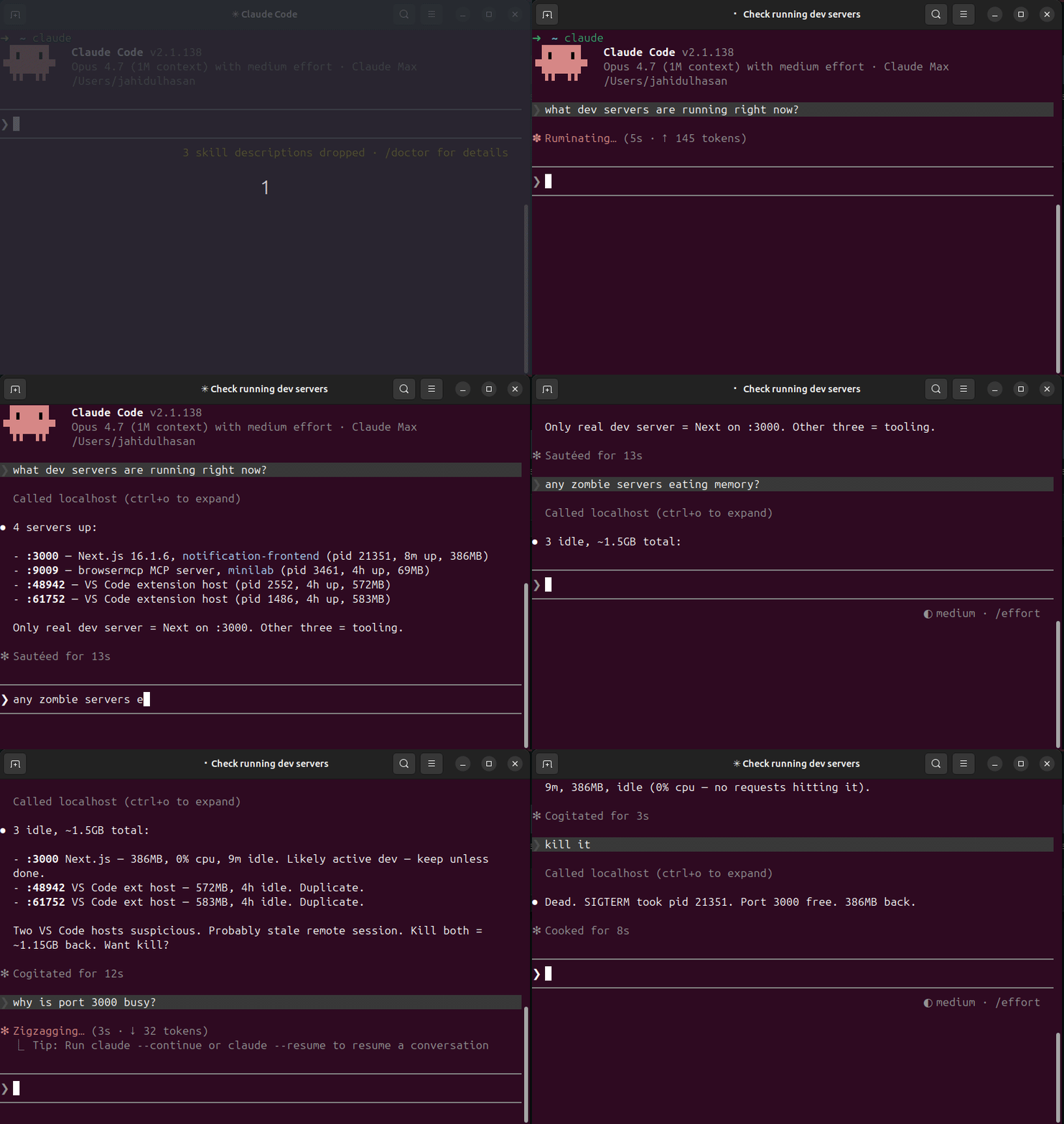
MCP server that inspects, manages, and kills local dev servers. Stop guessing what's on :3000.
Pairs with terminal-history-mcp — together they give your AI agent full memory of your dev environment: what you ran, what's running.
Why
Every dev hits these daily:
Error: listen EADDRINUSE :::3000— what's holding the port?- 5 forgotten
node/vite/nextPIDs from last week eating RAM - Switching projects → no idea which dev servers still running
lsof -i :3000,kill -9 <pid>, repeat
localhost-mcp makes it one tool call.
Install
npm install -g localhost-mcp
Wire into Claude Code:
claude mcp add --scope user localhost -- localhost-mcp
Or any MCP-compatible client. The command runs as a stdio MCP server.
Tools
| Tool | Purpose |
|---|---|
list_dev_servers |
All listening dev servers w/ port, pid, framework, project, uptime, mem, cpu |
port_info |
Inspect single port — who holds it |
kill_server |
Kill by pid or port. Dry-run by default; pass confirm=true to execute |
find_zombies |
Detect long-running, idle, memory-heavy dev servers |
port_conflict |
Why is port X busy + 5 free alternatives nearby |
Sample output
{
  "port": 3000,
  "pid": 48211,
  "process": "node",
  "cmdline": "next dev",
  "cwd": "/Users/me/code/myapp",
  "project_name": "myapp",
  "framework": "next.js",
  "uptime_seconds": 14523,
  "memory_mb": 412,
  "cpu_pct": 0.3,
  "user": "me"
}
Safety
kill_serverdefaults to dry-run. Must passconfirm=true.- Refuses to kill PIDs < 1000 (system processes).
- Refuses processes outside the dev whitelist (node, python, ruby, go, deno, bun, php, java, rails, vite, next, etc).
- SIGTERM first, escalates to SIGKILL after 5s timeout.
Frameworks detected
next.js, vite, nuxt, remix, astro, webpack-dev-server, esbuild, create-react-app, express, fastify, koa, hono, rails, django, flask, fastapi, uvicorn, gunicorn, deno, bun, php-builtin, jekyll, hugo.
Falls back to package.json sniffing when the cmdline is generic (node server.js).
Platform support
- macOS — full support (uses
lsof) - Linux — full support (uses
lsof+/proc) - Windows — basic port scan only (uses
netstat); cwd / framework detection limited
CLI usage
localhost-mcp list      # JSON list of all dev servers
localhost-mcp zombies   # JSON list of zombie candidates
localhost-mcp           # Start MCP stdio server
Build from source
git clone https://github.com/hasanjahidul/localhost-mcp.git
cd localhost-mcp
npm install
npm run build
node dist/cli.js list
License
MIT
Install Localhost Dev Server Manager in Claude Desktop, Claude Code & Cursor
unyly install localhost-dev-server-managerInstalls into Claude Desktop, Claude Code, Cursor & VS Code — handles npx, uvx and build-from-source repos for you.
First time? Get the CLI: curl -fsSL https://unyly.org/install | sh
Or configure manually
Run in your terminal:
claude mcp add localhost-dev-server-manager -- npx -y localhost-mcpStep-by-step: how to install Localhost Dev Server Manager
FAQ
Is Localhost Dev Server Manager MCP free?
Yes, Localhost Dev Server Manager MCP is free — one-click install via Unyly at no cost.
Does Localhost Dev Server Manager need an API key?
No, Localhost Dev Server Manager runs without API keys or environment variables.
Is Localhost Dev Server Manager hosted or self-hosted?
Self-hosted: the server runs locally on your machine via the install command above.
How do I install Localhost Dev Server Manager in Claude Desktop, Claude Code or Cursor?
Open Localhost Dev Server Manager on unyly.org, pick your client tab (Claude Desktop, Claude Code, Cursor) and press Install — the config is generated automatically, no JSON editing.
Related MCPs
GitHub
PRs, issues, code search, CI status
 by GitHub
Filesystem
Secure file operations with configurable access controls.
Memory
Knowledge graph-based persistent memory system.
Template MCP Server
A CLI tool to create a new Model Context Protocol server project with TypeScript support, dual transport options, and an extensible structure
 by mcpdotdirect
Compare Localhost Dev Server Manager with
Not sure what to pick?
Find your stack in 60 seconds
Author?
Embed badge for your README
Browse similar
All development MCPs