
Longbrain
FreeNot checkedLocal-first shared memory for AI agents: persistent AI memory across Claude Code, Codex, Hermes Desktop, and any MCP client. Automatic record, recall, consolida

About
Local-first shared memory for AI agents: persistent AI memory across Claude Code, Codex, Hermes Desktop, and any MCP client. Automatic record, recall, consolidation, forgetting, and backup. Self-hosted on Qdrant + LlamaIndex; one-command install.
README
Shared long-term memory for Claude Code, Codex, Hermes Desktop, and any MCP-compatible AI agent. Longbrain is a self-hosted, Docker-packaged memory system that lets multiple agents share the same project-aware context. Each user runs an independent stack, so data stays local and fully private.
Website · User guide · Latest release
By default it needs no API key, no Ollama, and no Python packages to
install — the host-side scripts and hooks run on the stock system
python3, stdlib only.
Two full adapters ship today: Hermes Desktop and Claude Code. Both
access the same memory store, so what you teach one agent, the other
recalls. Codex ships with official lifecycle hooks for automatic recall,
turn recording, and session-start consolidation catch-up; its older notify
adapter remains as a write fallback. Any MCP client can connect manually — see the
support tiers. Adding a new agent only
means writing a new adapter — the system's architecture doesn't change.
Why it exists
- Real long-term memory, not a stopgap. A plain chat forgets everything
when the window closes; a hand-maintained
CLAUDE.mdneeds you to curate it forever. Longbrain records, distills, recalls and drops outdated information automatically. - Shared across agents. Teach something in one tool, the others already know it — no re-explaining every time you switch.
- Cost per turn stays roughly flat. Only what's relevant to the current
question is recalled, and the injection is size-capped — unlike a
CLAUDE.mdthat loads in full, every turn, and only grows. - Doesn't have to cost extra money. Runs on a subscription you already pay for (Claude Code) or a local model (Ollama) — a paid API key is never required.
- Visible and correctable, fully private. The
/uipage shows everything the system remembers as an interactive graph — fix or delete entries instead of guessing what the AI thinks it knows. Everything stays on your machine, with nightly backups.
Memory Atlas
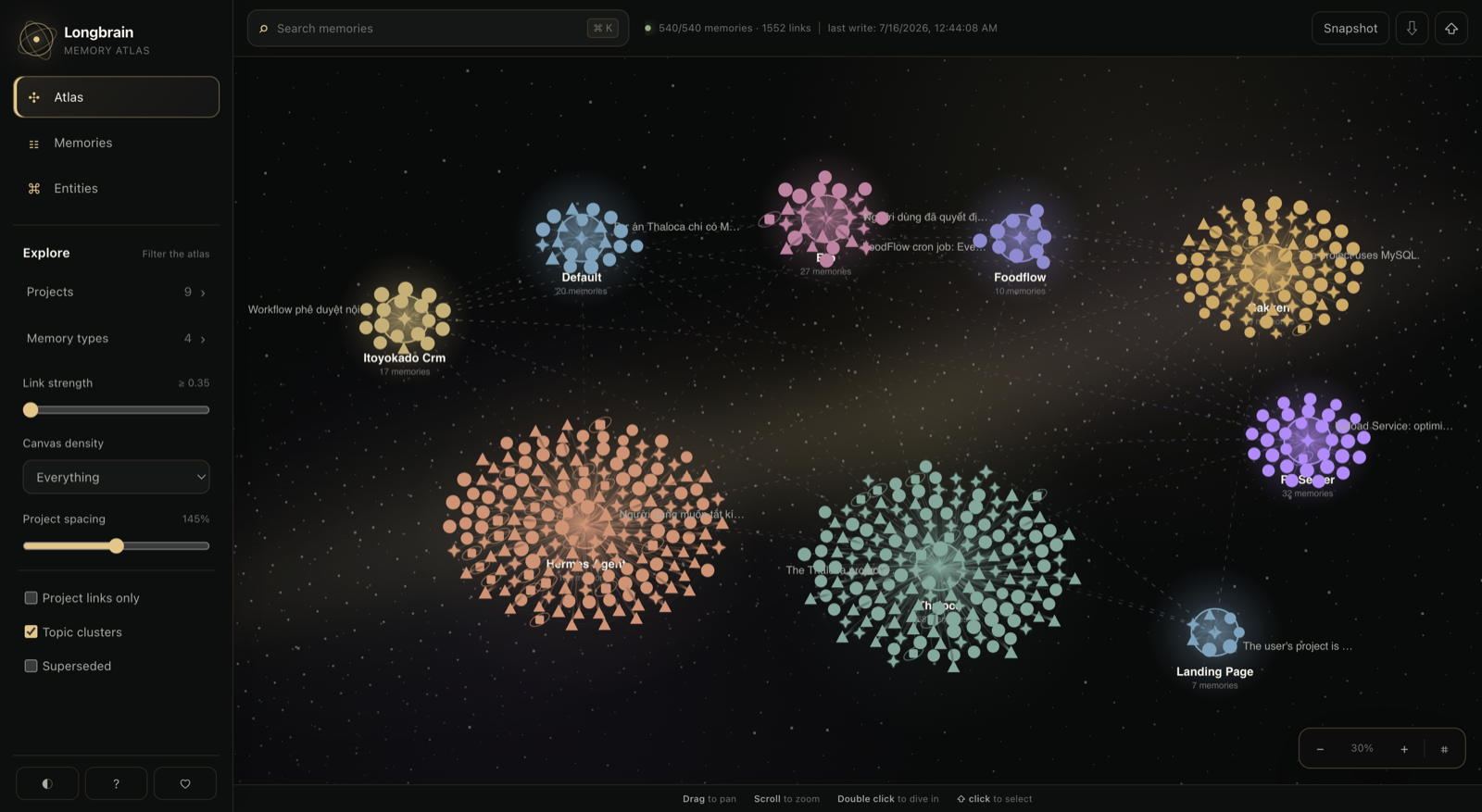
Each project is a movable, color-coded galaxy. Memories form stable rings around their project hub, while filters, adjustable spacing and wide-range zoom keep large collections readable.
Verified by evals, not claims
- 187 tests (pytest, run in-container) — idempotency, dedup/supersede, recall filtering, hook payload parsing, adapter config patching.
- Recall regression eval: 12/13 expected hits, 0 violations (no
irrelevant memory leaked into the context), 11,460 chars injected across
the whole eval set. The tracked miss is a genuine two-hop graph query;
results are gated against a committed baseline (
scripts/recall_eval.py). - Hybrid BM25 measured on a real 450-chunk corpus: exact-token hit@top-2 went 1/12 (dense-only) → 11/12; prompts without identifier-like tokens return byte-identical results.
Known limitations (read before installing)
- Docker required — 1–2 background containers running permanently.
- macOS-first: launchd jobs (backup, docs watcher) and the agent wiring are built and tested on macOS. The service itself is plain Docker, but Linux agent wiring is untested.
- Personal, single-machine by design — no sync, no multi-user, no realtime multi-device (see docs/ARCHITECTURE.md).
- Codex lifecycle gap: Codex has no
SessionEndhook, so consolidation catches up on the nextSessionStartinstead of firing when a chat closes. - Distillation quality depends on the configured LLM — a weak local
model extracts facts less reliably;
LLM_PROVIDER=nonedelegates distillation to the agent's own model via MCP. - Status: stable — one-command install, eval-guarded recall quality, and a full test suite; scope stays personal, single-machine, macOS-first (the limitations above).
Architecture at a glance
flowchart TB
    subgraph Agents["User's machine — chat agents"]
        HD["Hermes Desktop<br/>hooks/*.py"]
        CC["Claude Code<br/>hooks/claude/*.py"]
        CX["Codex<br/>SessionStart · UserPromptSubmit · Stop hooks"]
    end

    HD -- "POST /memory/append<br/>POST /memory/recall<br/>MCP /mcp" --> SVC
    CC -- "POST /memory/append<br/>POST /memory/recall<br/>MCP /mcp" --> SVC
    CX -- "POST /memory/append<br/>POST /memory/recall<br/>MCP /mcp" --> SVC

    subgraph SVC["llamaindex-service — FastAPI (host :8800 → container :8000)"]
        REST["REST API"]
        MCP["MCP Streamable HTTP (/mcp)"]
        ENGINE["Memory Engine<br/>L1 Working · L2 Episodic · L3 Semantic · L4 Knowledge"]
        REST --> ENGINE
        MCP --> ENGINE
    end

    ENGINE -- "HTTP :6333" --> QD[("Qdrant<br/>longbrain_chat_history · longbrain_memories<br/>longbrain_documents · longbrain_meta")]
    QD -.-> VOL[("volume: qdrant_data")]
    ENGINE -.-> DVOL[("volume: longbrain_data<br/>/data — original document files")]

    OLLAMA["ollama (optional profile)"] -. "--profile ollama" .-> SVC
- L1 Working memory — current session's recent turns
- L2 Episodic memory — every conversation turn, searchable semantically
- L3 Semantic memory — facts/preferences/decisions/tasks distilled by consolidation, with automatic dedup/supersede
- L4 Knowledge base — document RAG (each project's
docs/folder is auto-ingested)
The whole lifecycle runs automatically: record → recall → consolidate → controlled forgetting → nightly backup. Before every turn, a hook injects only the relevant, size-capped slice of memory — nothing relevant, nothing injected.
Install
- Install Docker Desktop.
- Install Hermes Desktop and/or Claude Code — whichever agents you use.
- Run from the directory where you want Longbrain to live:
curl -fsSL https://raw.githubusercontent.com/ngocthanh06/longbrain/main/install.sh | bash
The bootstrap clones Longbrain into ./longbrain (override with
LONGBRAIN_INSTALL_DIR), or updates that checkout when re-run from the
same directory, then runs ./setup.sh. To update later, re-run the command
from the same place — or git pull && ./setup.sh inside the checkout. To
inspect everything first, clone the repository manually and run ./setup.sh
from its directory.
No manual steps remain. The script creates .env, builds & starts the
containers, wires every installed agent (hooks + MCP), and installs the
nightly backup and the docs/ ingest watcher. Idempotent — safe to re-run.
Restart open agent sessions to pick the hooks up.
Verify after a few chats:
curl localhost:8800/health # last_written_at must advance after every turn
Then open http://localhost:8800/ui to watch your memory graph grow.
Documentation
| Document | What's in it |
|---|---|
| docs/USER_GUIDE.md | Daily use: how memory works, the /ui browser, fixing/forgetting memories, the docs/ folder, backup, export/import |
| docs/API.md | REST + MCP reference: every endpoint and tool with sample requests/responses |
| docs/ARCHITECTURE.md | How it works inside: data flows, Qdrant schema, multi-agent provenance, source layout |
| docs/OPERATIONS.md | Setup internals, provider config (.env), health checks, backup restore, troubleshooting |
| docs/ROADMAP.md | Completed milestones, what's next, deliberate non-goals |
| adapters/README.md | Writing an adapter for a new agent: the 4-lifecycle-moment contract |
| CONTRIBUTING.md | Dev setup, tests, what PRs are welcome |
Repository layout
longbrain/
├── setup.sh                 # one-command install (Docker + automatic agent wiring)
├── docker-compose.yml       # qdrant + llamaindex (+ optional ollama profile)
├── docs/                    # user guide, API reference, architecture, operations, roadmap
├── hooks/                   # agent adapters (Hermes Desktop + hooks/claude/ for Claude Code)
├── scripts/                 # setup, backup, ingest watcher, transfer, evals
├── adapters/                # adapter contract docs + minimal example
└── llamaindex-service/      # the memory service (FastAPI + LlamaIndex + MCP) + tests
License
MIT — see LICENSE.
Installing Longbrain
This server has no published package — it is built from source. Open the repository and follow its README.
▸ github.com/ngocthanh06/longbrainFAQ
Is Longbrain MCP free?
Yes, Longbrain MCP is free — one-click install via Unyly at no cost.
Does Longbrain need an API key?
No, Longbrain runs without API keys or environment variables.
Is Longbrain hosted or self-hosted?
Self-hosted: the server runs locally on your machine via the install command above.
How do I install Longbrain in Claude Desktop, Claude Code or Cursor?
Open Longbrain on unyly.org, pick your client tab (Claude Desktop, Claude Code, Cursor) and press Install — the config is generated automatically, no JSON editing.
Related MCPs
GitHub
PRs, issues, code search, CI status
 by GitHub
Filesystem
Secure file operations with configurable access controls.
Memory
Knowledge graph-based persistent memory system.
Template MCP Server
A CLI tool to create a new Model Context Protocol server project with TypeScript support, dual transport options, and an extensible structure
 by mcpdotdirect
Compare Longbrain with
Not sure what to pick?
Find your stack in 60 seconds
Author?
Embed badge for your README
Browse similar
All development MCPs