
Ltspice
FreeNot checkedAn MCP server that enables LLMs to read and modify LTspice schematics, run simulations, parse results, and generate plots, all through natural language.

About
An MCP server that enables LLMs to read and modify LTspice schematics, run simulations, parse results, and generate plots, all through natural language.
README
I wanted to learn about MCP, slash commands and claude.md files. Are DSLs a thing of the past? I created the following with Claude:
An MCP (Model Context Protocol) server that gives an LLM direct, tool-based access to LTspice circuit simulations — read schematics, set component values, run simulations, parse results, and generate plots, all from a Claude conversation.
What it does
- Read & modify schematics — parse
.ascfiles, inspect components and parameters, patch values - Run simulations — invoke LTspice headlessly via Wine (
-bbatch mode), get back log and output files - Analyze results — parse
.raw/.op.rawbinary output: waveforms, node voltages, device currents - Generate plots — auto-generated matplotlib scripts saved next to the schematic as a reproducible record
MCP Tools
| Tool | Description |
|---|---|
list_schematics |
Discover .asc files and associated outputs in a directory |
read_schematic |
Parse components, params, includes, directives from .asc |
read_parameters |
Read .param values from a .inc or .asc file |
write_parameters |
Write/overwrite .param values in a .inc file |
run_simulation |
Run LTspice via Wine (-b batch), return log + output file list |
read_waveforms |
Parse transient/AC .raw output — returns waveforms |
read_op_point |
Parse DC operating point .op.raw — returns node voltages/currents |
modify_component |
Patch SYMATTR Value of a named component directly in .asc |
write_schematic |
Generate a new .asc schematic from a component/netlist description |
/analyze-circuit slash command
The flagship workflow. Run it from Claude Code on any .asc schematic:
/analyze-circuit examples/rc_filter/mystery_circuit.asc
/analyze-circuit /absolute/path/to/my_filter.asc
/analyze-circuit          ← lists available schematics and prompts
It will:
- Run the simulation via
run_simulation - Read the DC operating point — transistor bias, operating region
- Discover all waveforms (names, ranges, simulation type)
- Detect high-frequency signals and switch to full-resolution rendering automatically
- Write and execute a
<stem>_analysis.pyplot script next to the schematic - Display the plot inline and provide a written circuit explanation
Example Analysis Output: AM Modulator (mystery_circuit.asc)
A collector-modulated AM transmitter built around a single 2N3904 NPN BJT.
; Sources
V1  30 V DC                        ; supply
V2  SINE(0 30m 600k)               ; RF carrier — 30 mV, 600 kHz
V3  SINE(0 3.5 1k)                 ; audio modulating signal — 3.5 V, 1 kHz

; Bias network
R1  56k    ; base voltage divider (top)
R2  15k    ; base voltage divider (bottom)
R3  10k    ; collector load
R4  4.7k   ; emitter resistor — V3 (audio) connects at its bottom terminal

; Signal coupling
C1  100n   ; AC-couples carrier (V2) into base
C2  100n   ; emitter bypass (shorts R4 at RF frequencies)
C3  470p   ; output coupling cap — collector → V(n002) load output

Q1  2N3904 ; common-emitter RF amplifier
R5  1k     ; output load
How it works: V3 (audio, 3.5 V) sits in series with R4 between the emitter and ground. As the audio signal swings, it shifts the effective emitter voltage at 1 kHz, varying Vbe and hence gm. Since the RF carrier is simultaneously being amplified at the base, its gain varies at the audio rate — producing AM modulation. C3 AC-couples the collector output to the load.
DC bias (Q1 in active region):
| Parameter | Value |
|---|---|
| Vcc | 30.0 V |
| Vc (collector) | 18.0 V |
| Vbe | 0.66 V |
| Vce | 12.4 V |
| Ic | 1.20 mA |
| β | 334 |
/analyze-circuit output:
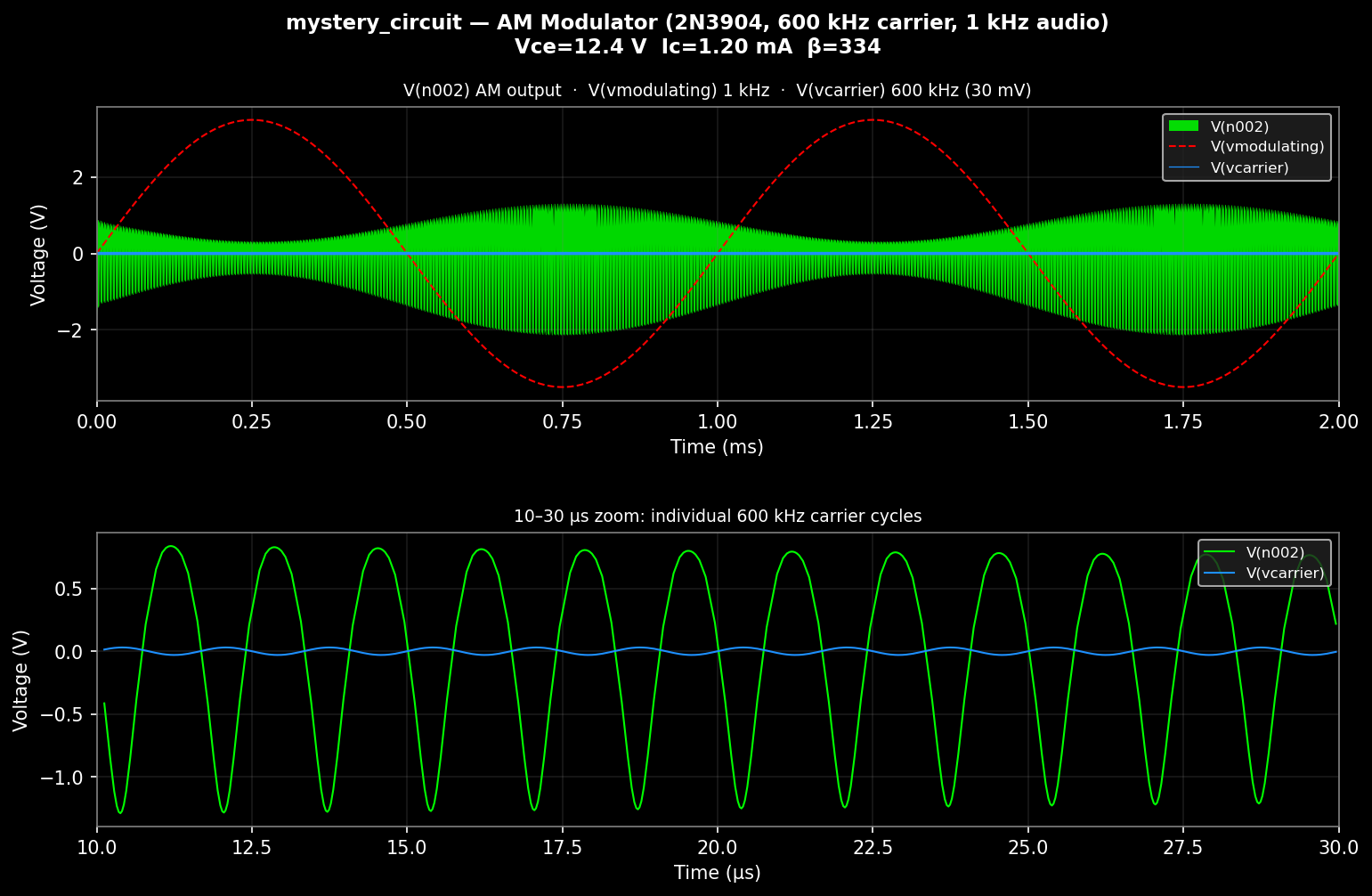
The top panel uses LTspice-style min/max-per-pixel rendering to produce the AM "football" shape at full 2 ms resolution — the green filled band is the 600 kHz carrier, its amplitude envelope tracing the 1 kHz audio signal (red dashed). The bottom panel zooms to 10–30 µs to show individual carrier cycles.
Setup
# Install in editable mode
pip install -e .

# LTspice runs via Wine — set path if different from default:
export LTSPICE_EXE="/home/user/.wine/drive_c/Program Files/LTC/LTspiceXVII/XVIIx64.exe"
MCP config (~/.config/claude/claude_desktop_config.json)
{
  "mcpServers": {
    "ltspice": {
      "command": "ltspice-mcp"
    }
  }
}
Or without installing the package:
{
  "mcpServers": {
    "ltspice": {
      "command": "python",
      "args": ["-m", "ltspice_mcp.server"],
      "cwd": "/path/to/ltspice-mcp/src"
    }
  }
}
Workflow example: RC filter optimization
list_schematics(directory="examples/rc_filter/")
read_schematic(path="rc_filter.asc")           # inspect components
read_parameters(path="params.inc")             # current R=1k, C=100n → fc≈1.6kHz
write_parameters(path="params.inc", parameters={"R": 2200, "C": 47e-9})
run_simulation(schematic_path="rc_filter.asc")
read_waveforms(raw_path="rc_filter.raw", signals=["V(out)"])
# adjust values, repeat
Project structure
src/ltspice_mcp/
  server.py           — MCP server, all tool definitions
  raw_parser.py       — .raw file parser (binary UTF-16-LE and ASCII)
  runner.py           — Wine subprocess runner (two-step: netlist → sim)
  schematic_writer.py — .asc generator (auto-layout + wire routing)
examples/
  rc_filter/
    rc_filter.asc                   — RC low-pass filter demo
    mystery_circuit.asc             — AM modulator (this example)
    mystery_circuit_analysis.py     — auto-generated plot script
    mystery_circuit_analysis.png    — analysis output
.claude/commands/
  analyze-circuit.md  — /analyze-circuit slash command definition
Requirements
- Python 3.10+
- Wine with LTspice XVII installed
matplotlib,numpy(for generated plot scripts)- MCP-compatible client (Claude Desktop or Claude Code)
Install Ltspice in Claude Desktop, Claude Code & Cursor
unyly install ltspice-mcpInstalls into Claude Desktop, Claude Code, Cursor & VS Code — handles npx, uvx and build-from-source repos for you.
First time? Get the CLI: curl -fsSL https://unyly.org/install | sh
Or configure manually
Run in your terminal:
claude mcp add ltspice-mcp -- uvx ltspice-mcpFAQ
Is Ltspice MCP free?
Yes, Ltspice MCP is free — one-click install via Unyly at no cost.
Does Ltspice need an API key?
No, Ltspice runs without API keys or environment variables.
Is Ltspice hosted or self-hosted?
Self-hosted: the server runs locally on your machine via the install command above.
How do I install Ltspice in Claude Desktop, Claude Code or Cursor?
Open Ltspice on unyly.org, pick your client tab (Claude Desktop, Claude Code, Cursor) and press Install — the config is generated automatically, no JSON editing.
Related MCPs
GitHub
PRs, issues, code search, CI status
 by GitHub
Filesystem
Secure file operations with configurable access controls.
Memory
Knowledge graph-based persistent memory system.
Template MCP Server
A CLI tool to create a new Model Context Protocol server project with TypeScript support, dual transport options, and an extensible structure
 by mcpdotdirect
Compare Ltspice with
Not sure what to pick?
Find your stack in 60 seconds
Author?
Embed badge for your README
Browse similar
All development MCPs