
MaxMSP Server
БесплатноНе проверенEnables LLMs to directly understand and generate Max patches via the Model Context Protocol.

Описание
Enables LLMs to directly understand and generate Max patches via the Model Context Protocol.
README
Note: An extended version by ersatzben and BenCello can be found at: https://github.com/ersatzben/maxmsp-mcp
MaxMSP-MCP Server
This project uses the Model Context Protocol (MCP) to let LLMs directly understand and generate Max patches.
Understand: LLM Explaining a Max Patch
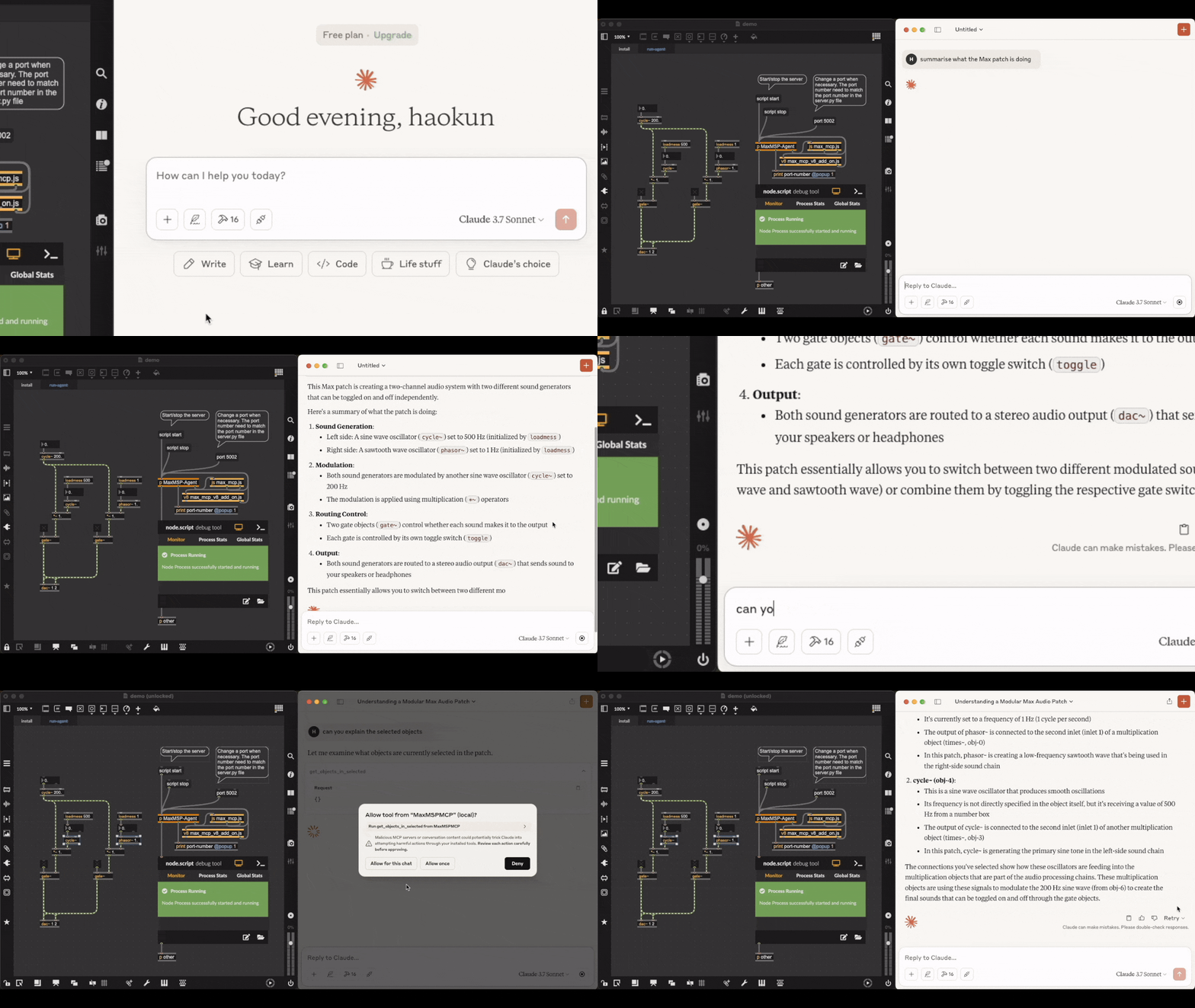 Video link. Acknowledgement: the patch being explained is downloaded from here. Text comments in the original file are deleted.
Generate: LLM Making an FM Synth
 Check out the full video where you can listen to the synthesised sounds.
The LLM agent has access to the official documentation of each object, as well as objects in the current patch and subpatch windows, which helps in retrieving and explaining objects, debugging, and verifying their own actions.
Installation
Prerequisites
- Python 3.8 or newer
- uv package manager
- Max 9 or newer (because some of the scripts require the Javascript V8 engine), we have not tested it on Max 8 or earlier versions of Max yet.
Installing the MCP server
- Install uv:
# On macOS and Linux:
curl -LsSf https://astral.sh/uv/install.sh | sh
# On Windows:
powershell -ExecutionPolicy ByPass -c "irm https://astral.sh/uv/install.ps1 | iex"
- Clone this repository and open its directory:
git clone https://github.com/tiianhk/MaxMSP-MCP-Server.git
cd MaxMSP-MCP-Server
- Start a new environment and install python dependencies:
uv venv
source .venv/bin/activate
uv pip install -r requirements.txt
- Connect the MCP server to a MCP client (which hosts LLMs):
# Claude:
python install.py --client claude
# or Cursor:
python install.py --client cursor
To use other clients (check the list), you need to download, mannually add the configuration file path to here, and connect by running python install.py --client {your_client_name}.
Installing to a Max patch
Use or copy from MaxMSP_Agent/demo.maxpat. In the first tab, click the script npm version message to verify that npm is installed. Then click script npm install to install the required dependencies. Switch to the second tab to access the agent. Click script start to initiate communication with Python. Once connected, you can interact with the LLM interface to have it explain, modify, or create Max objects within the patch.
Disclaimer
This is a third party implementation and not made by Cycling '74.
Установка MaxMSP Server
У этого сервера нет опубликованного пакета — он собирается из исходников. Открой репозиторий и следуй инструкции в README.
▸ github.com/tiianhk/MaxMSP-MCP-ServerFAQ
MaxMSP Server MCP бесплатный?
Да, MaxMSP Server MCP бесплатный — установка в пару кликов через Unyly без оплаты.
Нужен ли API-ключ для MaxMSP Server?
Нет, MaxMSP Server работает без API-ключей и переменных окружения.
MaxMSP Server — hosted или self-hosted?
Self-hosted: сервер запускается локально на твоей машине командой из раздела установки.
Как установить MaxMSP Server в Claude Desktop, Claude Code или Cursor?
Открой MaxMSP Server на unyly.org, выбери вкладку своего клиента (Claude Desktop, Claude Code, Cursor) и нажми Install — конфиг сгенерируется автоматически, без правки JSON.
Похожие MCP
GitHub
PRs, issues, code search, CI status
 автор: GitHub
Filesystem
Secure file operations with configurable access controls.
Memory
Knowledge graph-based persistent memory system.

Unyly Deploy
Deploy sites and MCP servers to Unyly straight from your AI agent
 автор: Unyly
Amap Maps Mcp Server
MCP server for using the AMap Maps API
 автор: duxiaohui
PayMCP
Lightweight payments layer for MCP servers: turn tools into paid endpoints with a two-line decorator. [PyPI](https://pypi.org/project/paymcp/) · [npm](https://w
 автор: blustAI
Server For Power BI
Enables exploring Microsoft Fabric / Power BI workspaces and semantic models, and executing ad-hoc DAX queries.
 автор: Mitsubishi-Fuso
Template MCP Server
A CLI tool to create a new Model Context Protocol server project with TypeScript support, dual transport options, and an extensible structure
 автор: mcpdotdirect
Supabase
Database, auth and storage
 автор: Supabase
Everything
Reference / test server with prompts, resources, and tools.
Compare MaxMSP Server with
Не уверен что выбрать?
Найди свой стек за 60 секунд
Автор?
Embed-бейдж для README
Похожее
Все в категории development