
Chaos Rig
FreeNot checkedA local MCP server that breaks on demand, allowing you to test your client against auth failures, disappearing tools, flaky responses, and token expiry from a w

About
A local MCP server that breaks on demand, allowing you to test your client against auth failures, disappearing tools, flaky responses, and token expiry from a web UI.
README

MCP Chaos Rig
A local MCP server that breaks on demand. Test your client against auth failures, disappearing tools, flaky responses, and token expiry, all from a web UI.



The problem
You're building an MCP client. You need to test OAuth flows, token refresh, tool discovery, error handling, and session lifecycle. Production servers don't fail on command. You need a server that does.
What Chaos Rig does
Run a local MCP server where you control everything:
- Break authentication: force 401s and 500s mid-session, expire tokens on demand, reject refresh tokens
- Break tools: disable tools to trigger
tools/changed, switch schema versions live - Break reliability: add random latency, make tool calls fail at configurable rates
- See everything: live request log shows inbound JSON-RPC calls and outbound SSE responses, with click-to-expand bodies
Test scenarios
| Scenario | How to test it |
|---|---|
| OAuth 2.1 consent flow | Use the interactive consent page: approve, decline, invalid code, tampered state |
| Fixed header auth | Switch to Headers mode, configure key-value pairs, verify client sends them |
| Missing/wrong headers | Send requests with missing or mismatched headers — 401 with details |
| Token rejection mid-session | Toggle "Reject OAuth" to 401 or 500 while client is connected |
| Token expiry and refresh | Set access token TTL to a short value, watch the client refresh |
| Reject refresh tokens | Toggle "Reject refresh tokens" to force re-authentication |
| Wrong client refreshing | Enable "Enforce refresh token ownership" — catches clients that lose credentials and re-register |
| Scope discovery conflict | Set different scopes in metadata vs WWW-Authenticate header, test which the client trusts |
| Tool disappearing | Disable a tool in the Tools tab. Clients receive tools/changed |
| Tool schema changing | Switch echo or add between v1 and v2 schemas |
| Flaky tool calls | Set failure rate 0-100%. Failed calls return isError: true |
| Slow responses | Enable slow mode with configurable latency range |
| PKCE code exchange | OAuth consent page offers "Wrong Code" and "Wrong State" options |
| Database-backed tools | CRUD operations on a real SQLite contact database |
Quick start
npx mcp-chaos-rig
Control panel at localhost:4100/ui, MCP endpoint at http://localhost:4100/mcp. Requires Node 20+.
If you prefer a global install:
npm install -g mcp-chaos-rig
mcp-chaos-rig
Or run from source:
git clone https://github.com/Typewise/mcp-chaos-rig.git
cd mcp-chaos-rig
npm install
npm run dev
Remote access
If your production environment needs to reach Chaos Rig, expose it via a tunnel (ngrok, Cloudflare Tunnel, etc.) and set BASE_URL so OAuth redirects resolve correctly:
BASE_URL=https://your-tunnel.example.dev npx mcp-chaos-rig
Auth state
All state is in-memory and resets on restart. Bearer starts with token test-token-123 (valid until changed). OAuth tokens expire per TTL. Refresh tokens track ownership per client when enabled. After restart, do one refresh with ownership off to re-seed, then turn it on.
Control panel tabs
Server
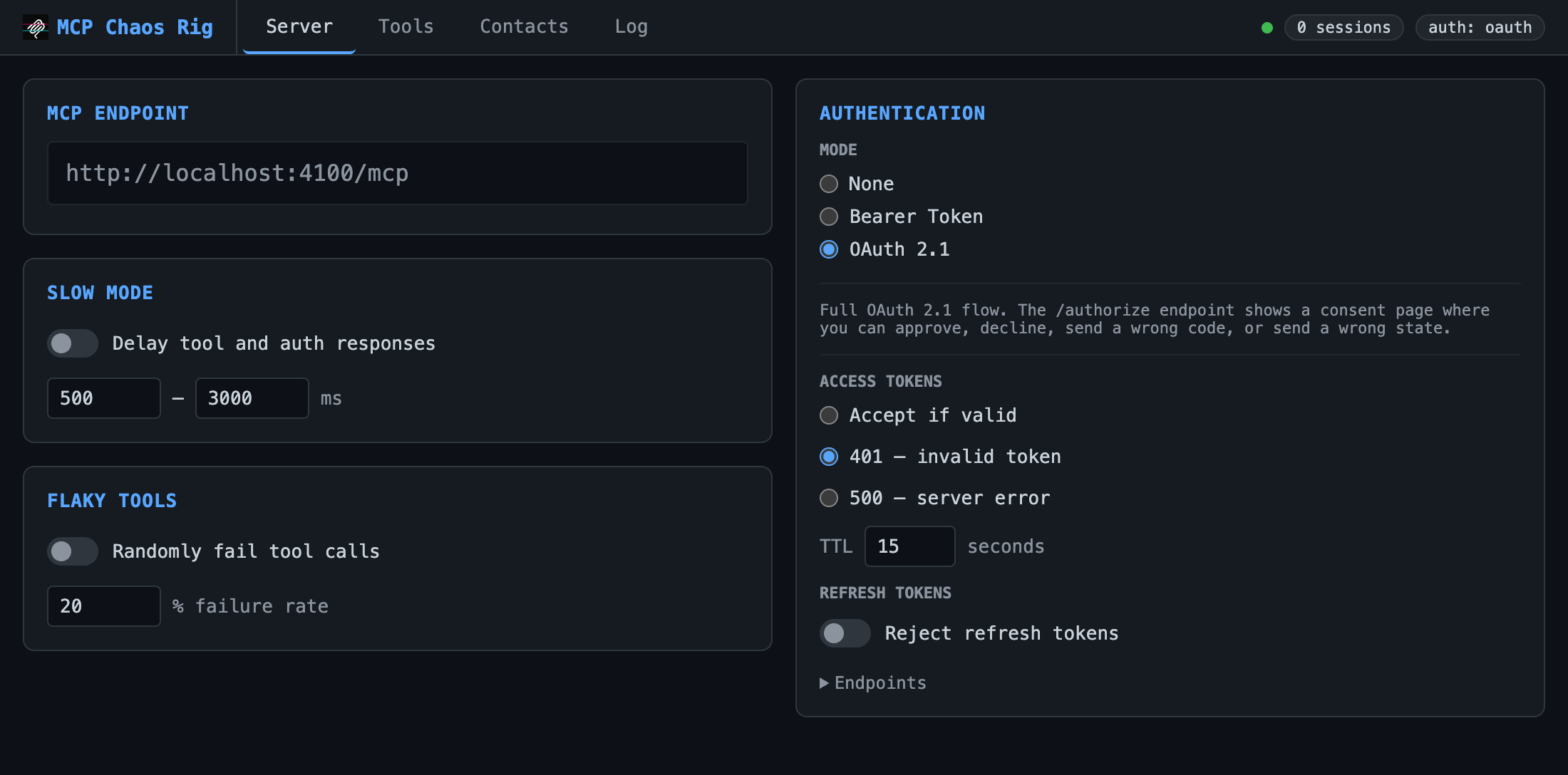
Configure auth mode, slow mode (random latency), and flaky tools (% failure rate).
| Auth mode | Behavior |
|---|---|
| None | All requests pass through |
| Bearer | Requires Authorization: Bearer test-token-123 |
| OAuth 2.1 | Full authorization flow with interactive consent page |
Bearer and OAuth modes support fault injection: force 401 or 500 responses to test error handling.
OAuth mode adds controls for access token TTL, refresh token rejection, and refresh token ownership enforcement. OAuth endpoints are listed in a collapsible section.
Tools
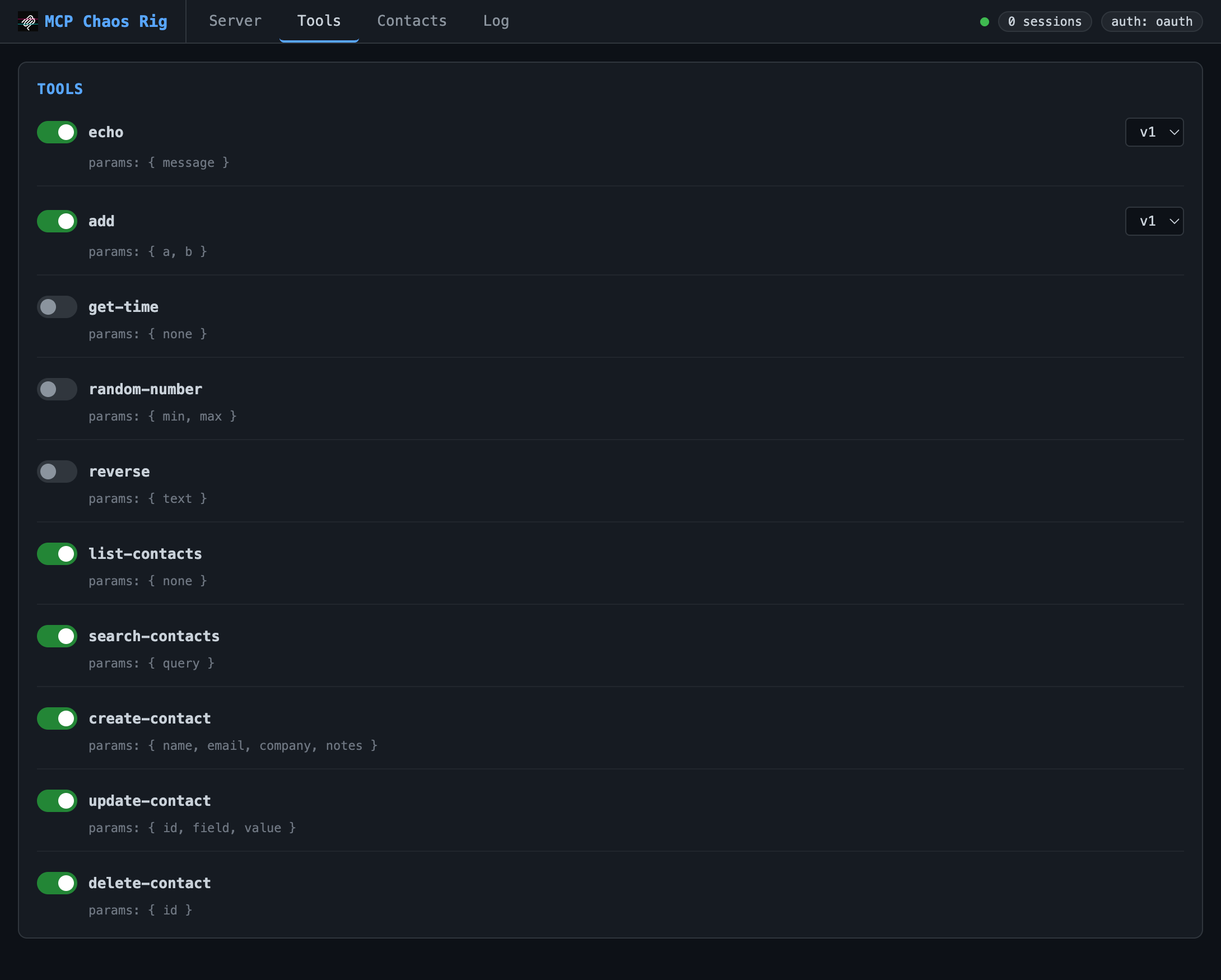
Toggle tools on/off. Disabling sends tools/changed to connected clients. Some tools (echo, add) support version switching.
Available tools:
echo: returns your message (v2 adds format options)add: sums two numbers (v2 accepts an array)get-time: current server time as ISO 8601random-number: random integer in a rangereverse: reverses a stringlist-contacts,search-contacts,create-contact,update-contact,delete-contact: SQLite CRUD
Contacts
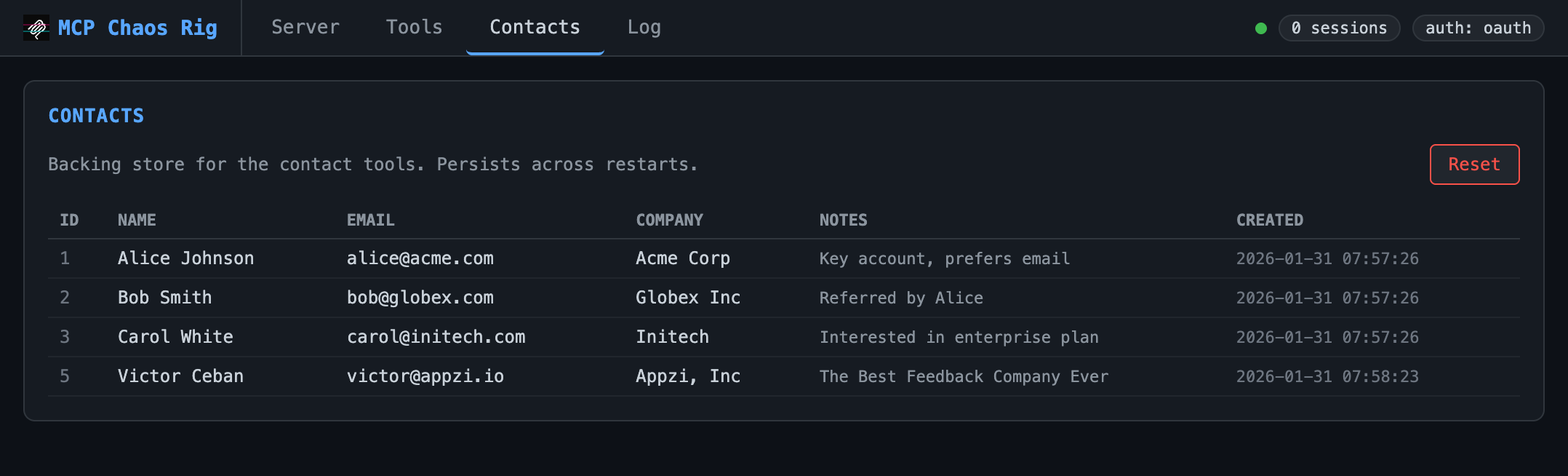
View and reset the SQLite database backing the contact tools. Starts with three seed records.
Log
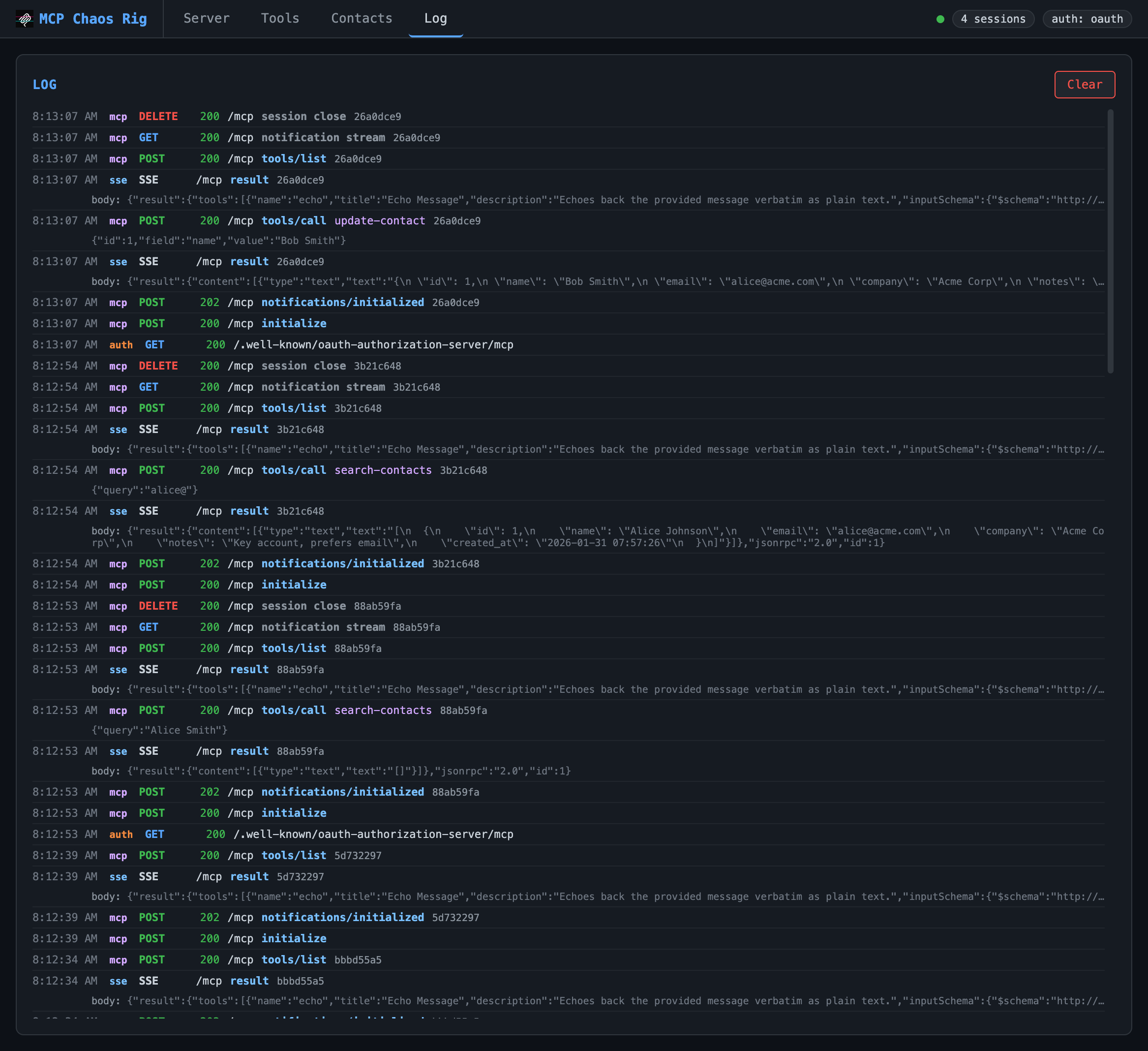
Live request log showing inbound requests and outbound SSE responses. Displays timestamp, source (mcp/auth/sse), method, status, JSON-RPC method, tool name, and arguments. Click any truncated body or args line to expand it. Keeps last 200 entries.
OAuth consent page
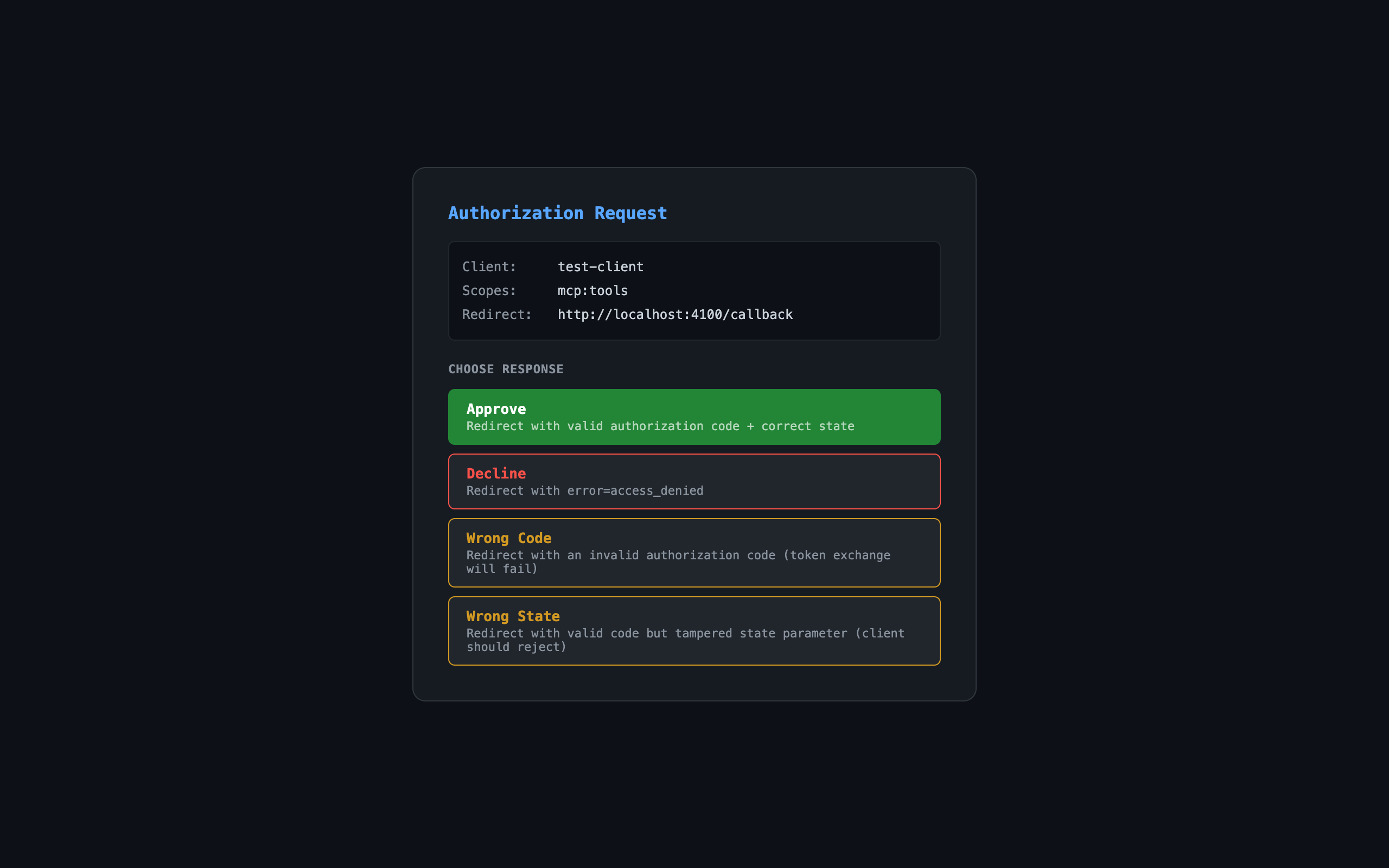
When auth mode is OAuth, the authorization endpoint shows an interactive consent page:
| Button | Result |
|---|---|
| Approve | Redirects with valid authorization code |
| Decline | Redirects with error=access_denied |
| Wrong Code | Redirects with invalid code (token exchange fails) |
| Wrong State | Redirects with tampered state parameter |
Links
Install Chaos Rig in Claude Desktop, Claude Code & Cursor
unyly install mcp-chaos-rigInstalls into Claude Desktop, Claude Code, Cursor & VS Code — handles npx, uvx and build-from-source repos for you.
First time? Get the CLI: curl -fsSL https://unyly.org/install | sh
Or configure manually
Run in your terminal:
claude mcp add mcp-chaos-rig -- npx -y mcp-chaos-rigFAQ
Is Chaos Rig MCP free?
Yes, Chaos Rig MCP is free — one-click install via Unyly at no cost.
Does Chaos Rig need an API key?
No, Chaos Rig runs without API keys or environment variables.
Is Chaos Rig hosted or self-hosted?
A hosted option is available: Unyly runs the server in the cloud, no local setup required.
How do I install Chaos Rig in Claude Desktop, Claude Code or Cursor?
Open Chaos Rig on unyly.org, pick your client tab (Claude Desktop, Claude Code, Cursor) and press Install — the config is generated automatically, no JSON editing.
Related MCPs
LibreOffice Tools
Enables AI agents to read, write, and edit Office documents via LibreOffice with token-efficient design. Supports multiple formats including DOCX, XLSX, PPTX, a
 by passerbyflutter
dannote/figma-use
Full Figma control: create shapes, text, components, set styles, auto-layout, variables, export. 80+ tools.
 by dannote
Logo.dev
Search and retrieve company logos by brand or domain. Customize size, format, and theme to match your design needs. Accelerate design, prototyping, and content
 by NOVA-3951
PIX4Dmatic
Enables GUI automation for controlling PIX4Dmatic on Windows through MCP. Supports launching, focusing, capturing screenshots, sending hotkeys, clicking UI elem
 by jangjo123
Compare Chaos Rig with
Not sure what to pick?
Find your stack in 60 seconds
Author?
Embed badge for your README
Browse similar
All design MCPs