
Context Server
FreeNot checkedA secure multi-tenant server that provides real-time context to LLMs via REST API, using JWT authentication and PostgreSQL row-level security for tenant isolati

About
A secure multi-tenant server that provides real-time context to LLMs via REST API, using JWT authentication and PostgreSQL row-level security for tenant isolation.
README
A secure, multi‑tenant server that provides context to LLMs using an MCP-inspired protocol. Features JWT authentication, row‑level security (RLS), and audit logging.
Table of Contents
- Overview
- Architecture
- Features
- Tech Stack
- Prerequisites
- Setup & Installation
- Running the Server
- API Endpoints
- Testing with LLM
- Security Considerations
- Audit Logs
- Troubleshooting
- Next Steps
Overview
This project demonstrates a secure context server that can be integrated with LLMs (like Ollama) to provide real‑time, tenant‑specific data. It mimics the Model Context Protocol (MCP) concept, where an LLM requests context from backend systems in a safe, auditable way.
Key aspects:
- Authentication: JWT tokens identify the tenant.
- Authorization: PostgreSQL RLS ensures tenants only see their own data.
- Audit: Every context request is logged.
- Simplicity: The server is API‑only; the LLM can call it via a tool.
Architecture
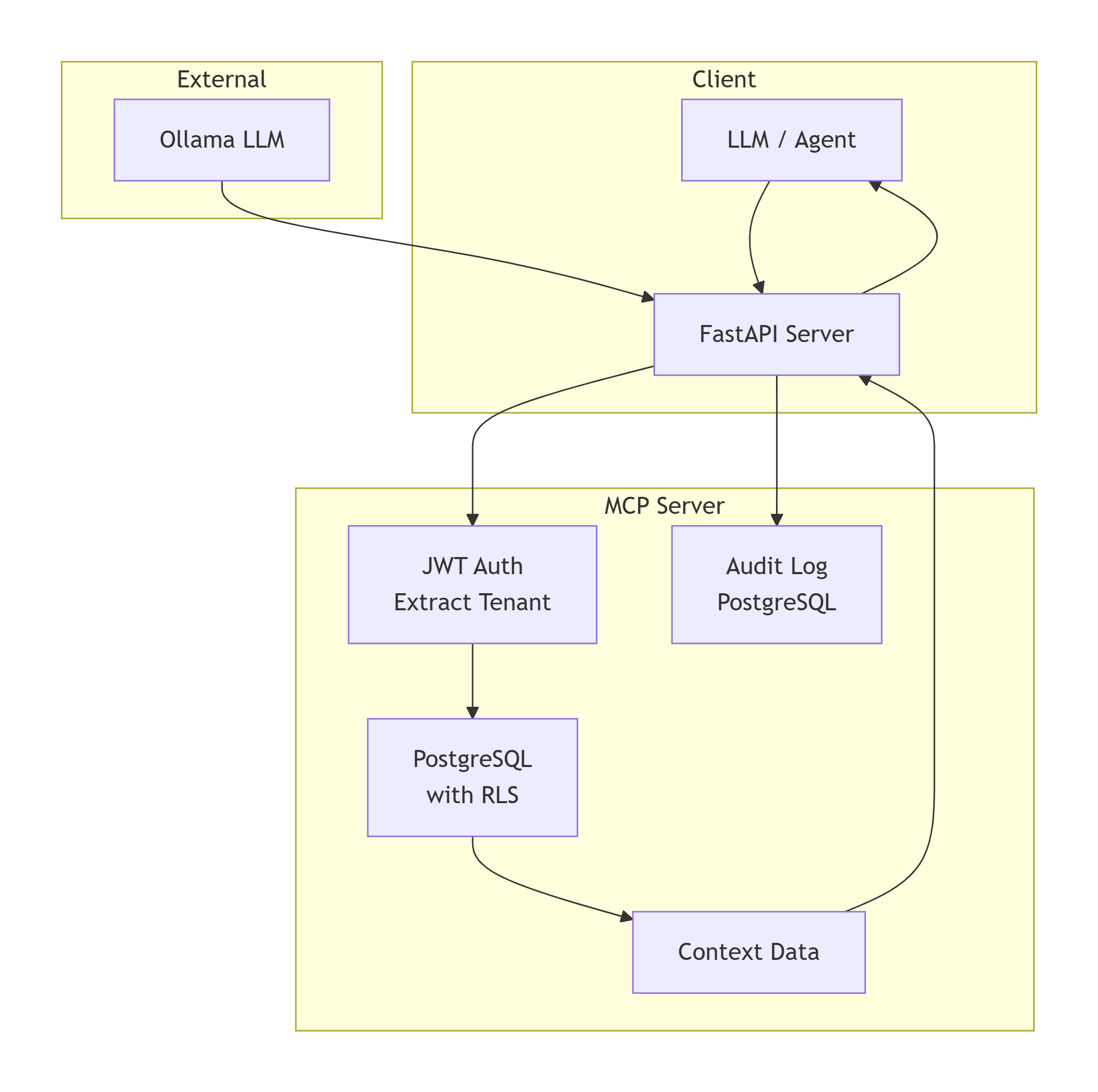
graph TD
    subgraph Client
        A[LLM / Agent] --> B[FastAPI Server]
    end

    subgraph MCP Server
        B --> C[JWT Auth<br/>Extract Tenant]
        C --> D[PostgreSQL<br/>with RLS]
        D --> E[Context Data]
        B --> F[Audit Log<br/>PostgreSQL]
    end

    subgraph External
        G[Ollama LLM] --> B
    end

    E --> B
    B --> A
To generate a PNG image, copy the Mermaid code into mermaid.live and export as PNG.
Features
- JWT Authentication: Tokens contain
tenant_idclaim. - Multi‑Tenant Data: Each tenant sees only their own orders and users.
- Row‑Level Security: PostgreSQL RLS enforces tenant isolation.
- Audit Logging: All context requests are logged with timestamp, tenant, and endpoint.
- Sample Data: Pre‑loaded synthetic customers and orders for tenants
tenant_aandtenant_b. - LLM Integration Example: Script shows how an LLM (via Ollama) can call the context server.
Tech Stack
| Component | Technology |
|---|---|
| Server | Python + FastAPI |
| Database | PostgreSQL with RLS |
| Authentication | JWT (PyJWT) |
| Audit | Custom PostgreSQL table |
| Container | Docker Compose |
Prerequisites
- Python 3.10+
- Docker and Docker Compose
- Ollama (optional, for testing LLM integration)
Setup & Installation
1. Clone the Repository
git clone https://github.com/your-username/mcp-context-server.git
cd mcp-context-server
2. Create Virtual Environment
python -m venv venv
source venv/bin/activate  # On Windows: venv\Scripts\activate
3. Install Dependencies
pip install -r requirements.txt
4. Start PostgreSQL
docker-compose up -d
5. Configure Environment
Copy .env.example to .env and edit if needed (defaults are fine for local).
6. Initialize Database
python scripts/init_db.py
This creates tables, enables RLS, inserts sample tenants and data.
7. Generate Test Tokens
python scripts/generate_token.py --tenant tenant_a
Copy the token output. You'll use it in API requests.
Running the Server
Start the FastAPI server:
uvicorn src.context_service:app --reload --port 8000
The API will be available at http://localhost:8000.
API Endpoints
GET /health
Health check.
GET /context/orders
Returns orders for the authenticated tenant.
Headers:
Authorization: Bearer <JWT>
Response (example):
[
  {"id": 1, "customer_name": "Alice", "total": 1200.0},
  {"id": 2, "customer_name": "Bob", "total": 850.0}
]
GET /context/customers
Returns customers for the authenticated tenant.
Audit Logs
All requests are logged in the audit_logs table. You can inspect them:
psql -h localhost -U postgres -d mcp_db -c "SELECT * FROM audit_logs ORDER BY timestamp DESC LIMIT 5;"
Testing with LLM
You can test how an LLM (like Ollama) can call this context server. Example script:
# example_llm_call.py
import requests
import json

JWT = "your_generated_token"
API_URL = "http://localhost:8000/context/orders"

response = requests.get(
    API_URL,
    headers={"Authorization": f"Bearer {JWT}"}
)
orders = response.json()
print("Orders:", orders)

# Now feed this context into an LLM (e.g., via Ollama)
context = f"Orders: {json.dumps(orders)}"
# Call Ollama with a prompt using the context...
You can extend this to a full agent that decides which endpoint to call based on the user's question.
Security Considerations
- JWT secret: Store securely, use a strong key.
- PostgreSQL RLS: Ensures even if a tenant obtains another tenant's JWT (unlikely with proper signing), they can't access other data.
- Audit: Logs all requests for compliance.
- TLS: In production, use HTTPS.
Audit Logs
All context requests are logged in the audit_logs table with:
timestamptenant_idendpointuser_id(optional, can be extended)
To view recent logs:
psql -h localhost -U postgres -d mcp_db -c "SELECT * FROM audit_logs ORDER BY timestamp DESC LIMIT 10;"
Troubleshooting
| Problem | Solution |
|---|---|
| Token invalid | Check the JWT secret in .env matches the one used in generation. |
| No data returned | Verify the tenant ID in the token exists in the tenants table. |
| RLS errors | Ensure you enabled RLS on tables and created policies correctly (the init script does this). |
| PostgreSQL connection refused | Check docker-compose ps; ensure container is running. |
Next Steps
- Add more context endpoints (e.g.,
GET /context/user/{id}). - Integrate with LangChain as a custom tool.
- Deploy to cloud with managed PostgreSQL.
- Add rate limiting and request throttling.
License
MIT
from github.com/dotteduniverse/Model-Context-Protocol-Server
Installing Context Server
This server has no published package — it is built from source. Open the repository and follow its README.
▸ github.com/dotteduniverse/Model-Context-Protocol-ServerFAQ
Is Context Server MCP free?
Yes, Context Server MCP is free — one-click install via Unyly at no cost.
Does Context Server need an API key?
No, Context Server runs without API keys or environment variables.
Is Context Server hosted or self-hosted?
A hosted option is available: Unyly runs the server in the cloud, no local setup required.
How do I install Context Server in Claude Desktop, Claude Code or Cursor?
Open Context Server on unyly.org, pick your client tab (Claude Desktop, Claude Code, Cursor) and press Install — the config is generated automatically, no JSON editing.
Related MCPs
GitHub
PRs, issues, code search, CI status
 by GitHub
Filesystem
Secure file operations with configurable access controls.
Memory
Knowledge graph-based persistent memory system.
Template MCP Server
A CLI tool to create a new Model Context Protocol server project with TypeScript support, dual transport options, and an extensible structure
 by mcpdotdirect
Compare Context Server with
Not sure what to pick?
Find your stack in 60 seconds
Author?
Embed badge for your README
Browse similar
All development MCPs