
Enterprise Tools Server
FreeNot checkedAn MCP-based enterprise tools server that exposes company knowledge search and employee database lookup as callable tools.

About
An MCP-based enterprise tools server that exposes company knowledge search and employee database lookup as callable tools.
README
An MCP-based enterprise tools server that exposes company knowledge search and employee database lookup as callable tools. The project demonstrates how an AI client such as Cursor, Claude Desktop, or a custom Python MCP client can discover tools, call them through the Model Context Protocol, and return structured results.
This project currently includes a document-search tool backed by an existing RAG API and a SQLite query tool for employee data.
Features
- MCP server built with
FastMCP search_documentstool for company knowledge lookup through a RAG APIquery_databasetool for SQLite employee database queries- Local stdio MCP client for testing tool discovery and execution
- Cursor MCP configuration example
- Environment-based configuration for the RAG API URL
- JSON-formatted database responses
- Small sample employee database for quick testing
Workflow
User / MCP Client
      |
      v
MCP Server
      |
      +--> search_documents --> RAG API --> Company Knowledge
      |
      +--> query_database ----> SQLite ----> Employee Records
      |
      v
Tool Response
Screenshots
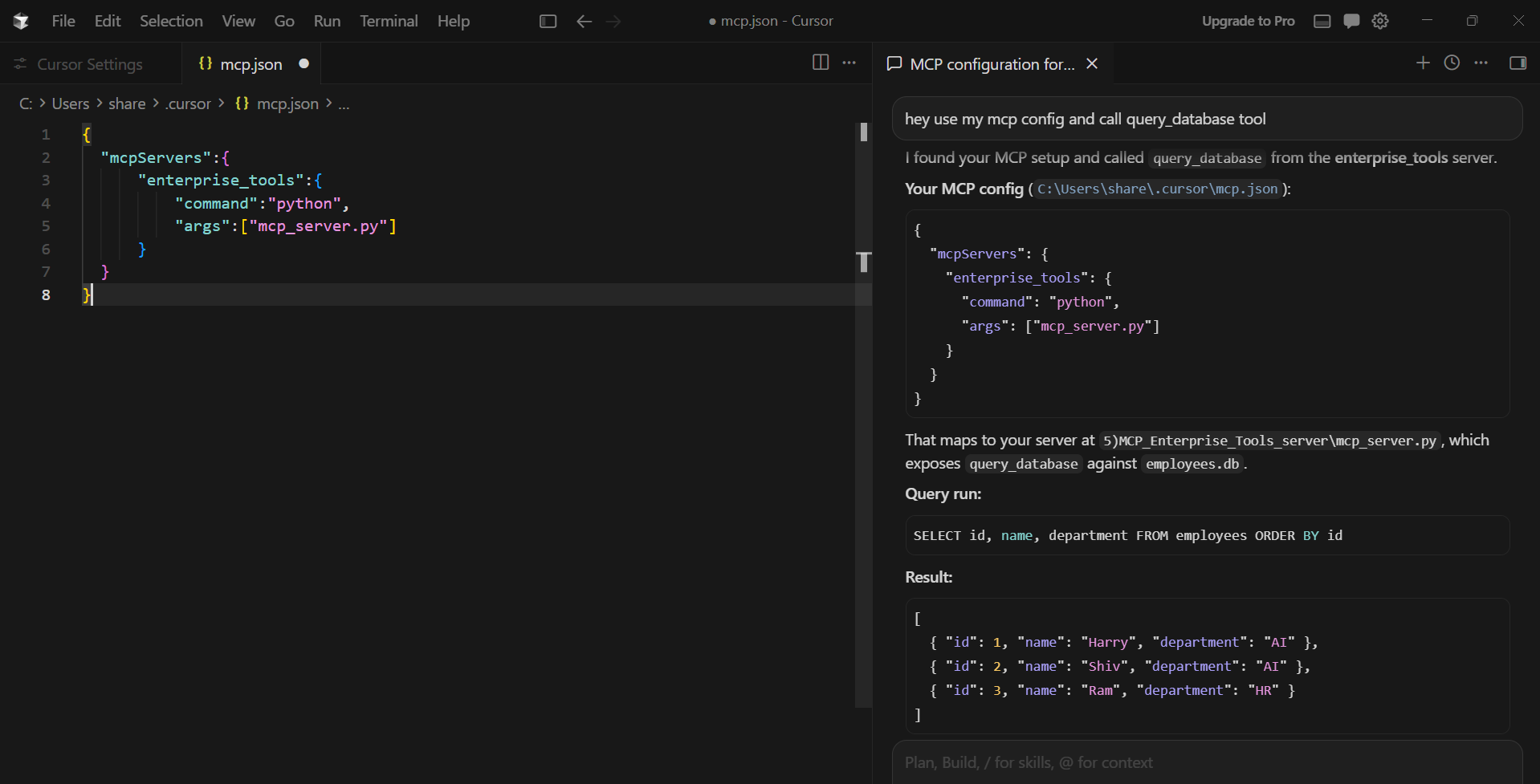
Cursor MCP Client Integration
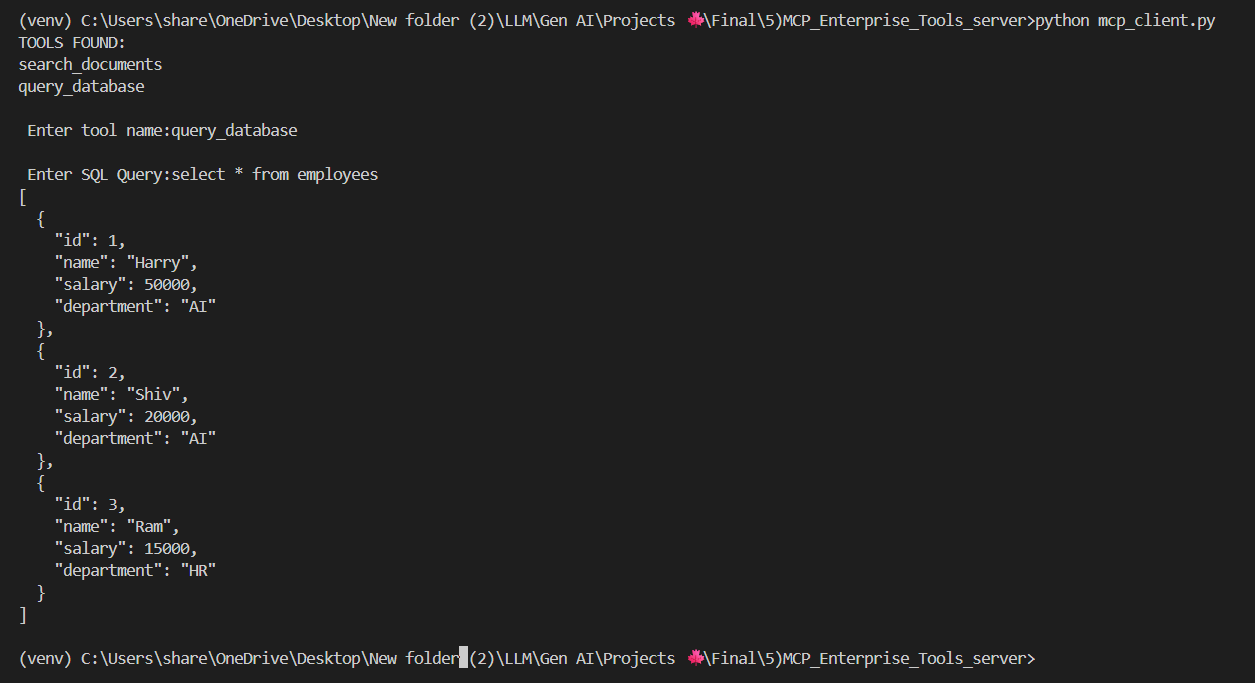
Database Query Tool
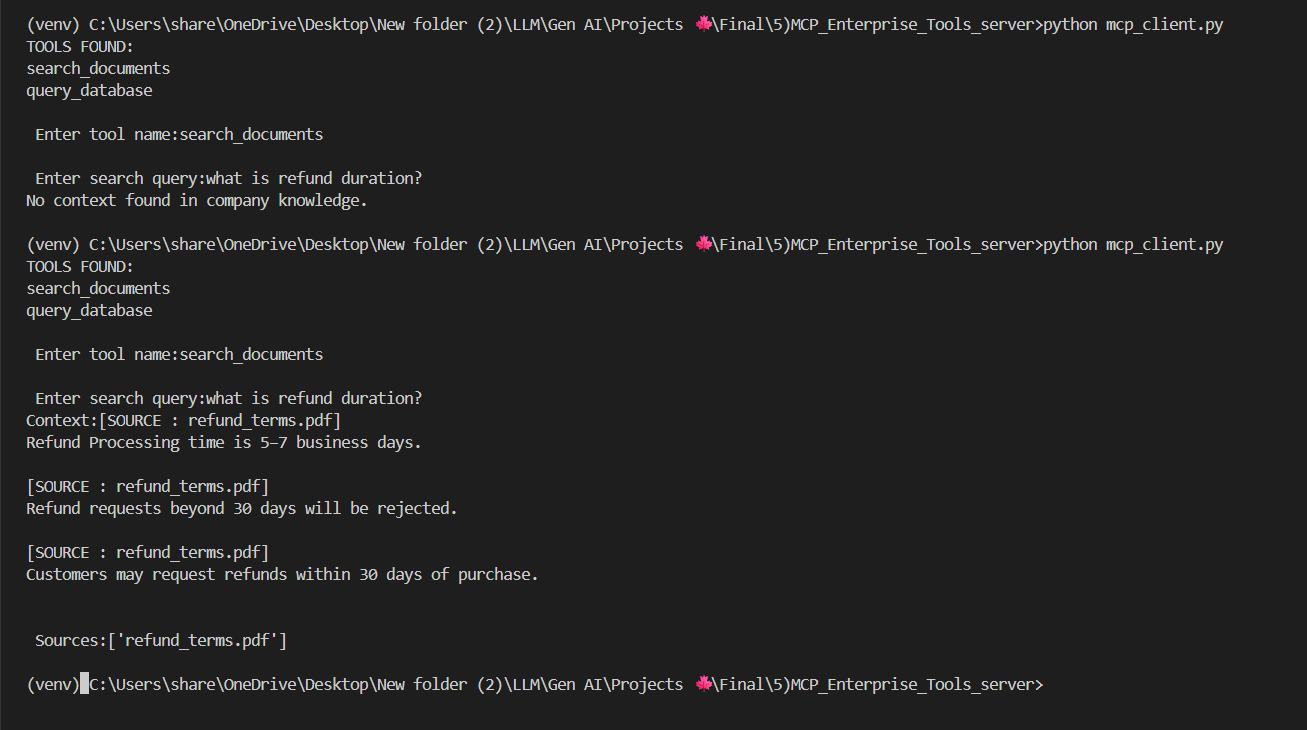
Company Document Search Tool
Project Structure
.
|-- db.py                 # Creates and seeds the sample employees SQLite database
|-- employees.db          # Local SQLite database generated for testing
|-- mcp_client.py         # CLI MCP client using stdio transport
|-- mcp_config.json       # MCP server configuration example
|-- mcp_server.py         # FastMCP server with enterprise tools
|-- requirements.txt      # Python dependencies
|-- README.md             # Project documentation
`-- Screenshots/          # Project screenshots
Tools
search_documents
Searches company documents by sending the user query to a RAG API.
Input:
{
  "query": "what is refund duration?"
}
Output:
Context: ...
Sources: ...
query_database
Runs a SQL query on the local SQLite employee database and returns rows as formatted JSON.
Input:
{
  "sql": "select * from employees"
}
Output:
[
  {
    "id": 1,
    "name": "Harry",
    "salary": 50000,
    "department": "AI"
  }
]
Setup
Clone the repository:
git clone https://github.com/Harry-GenAI/05-mcp-enterprise-tool-server.git
cd 05-mcp-enterprise-tool-server
Create and activate a virtual environment:
python -m venv venv
venv\Scripts\activate
Install dependencies:
pip install -r requirements.txt
Create a .env file:
RAG_URL=http://localhost:8000/rag
Create the sample database:
python db.py
Run MCP Client
Use the local CLI client to start the MCP server over stdio, list available tools, and call one of them:
python mcp_client.py
Example database query:
Enter tool name: query_database
Enter SQL Query: select * from employees
Example document search:
Enter tool name: search_documents
Enter search query: what is refund duration?
Cursor MCP Configuration
Add this configuration to your Cursor MCP settings:
{
  "mcpServers": {
    "enterprise_tools": {
      "command": "python",
      "args": ["mcp_server.py"]
    }
  }
}
After configuration, Cursor can discover and call:
search_documentsquery_database
Tech Stack
- Python
- Model Context Protocol
- FastMCP
- SQLite
- Requests
- python-dotenv
- Cursor MCP integration
Future Upgrades
- Add SQL safety validation for read-only database access
- Support more enterprise tools such as CRM, HR, tickets, and policy lookup
- Add FastAPI wrapper for HTTP-based testing
- Return richer structured responses from the RAG tool
- Add authentication for protected internal tools
- Add automated tests for MCP tool calls
Note
This project is for learning and demonstration. Keep .env, virtual environments, production databases, private documents, and secrets out of GitHub.
Installing Enterprise Tools Server
This server has no published package — it is built from source. Open the repository and follow its README.
▸ github.com/Harry-GenAI/Mcp-Enterprise-Tool-ServerFAQ
Is Enterprise Tools Server MCP free?
Yes, Enterprise Tools Server MCP is free — one-click install via Unyly at no cost.
Does Enterprise Tools Server need an API key?
No, Enterprise Tools Server runs without API keys or environment variables.
Is Enterprise Tools Server hosted or self-hosted?
Self-hosted: the server runs locally on your machine via the install command above.
How do I install Enterprise Tools Server in Claude Desktop, Claude Code or Cursor?
Open Enterprise Tools Server on unyly.org, pick your client tab (Claude Desktop, Claude Code, Cursor) and press Install — the config is generated automatically, no JSON editing.
Related MCPs
wenb1n-dev/SmartDB_MCP
A universal database MCP server supporting simultaneous connections to multiple databases. It provides tools for database operations, health analysis, SQL optim
 by wenb1n-dev
Postgres Server
This server enables interaction with PostgreSQL databases through the Model Context Protocol, optimized for the AWS Bedrock AgentCore Runtime. It provides tools
 by madhurprash
Postgres
Query your database in natural language
 by Anthropic
PostgreSQL
Read-only database access with schema inspection.
by modelcontextprotocolCompare Enterprise Tools Server with
Not sure what to pick?
Find your stack in 60 seconds
Author?
Embed badge for your README
Browse similar
All data MCPs