
Figma To Code
FreeNot checkedTransform Figma designs into pixel-perfect React + Tailwind components using the Model Context Protocol.

About
Transform Figma designs into pixel-perfect React + Tailwind components using the Model Context Protocol.
README

MCP Figma to Code
Transform Figma designs into pixel-perfect React + Tailwind components using the Model Context Protocol
License: MIT React TypeScript Tailwind CSS shadcn/ui Docker
Features • Quick Start • Documentation • Contributing
https://github.com/user-attachments/assets/823e50c7-fb4d-4ea2-a6da-b2a8413bf1a7
📸 Dashboard Interface
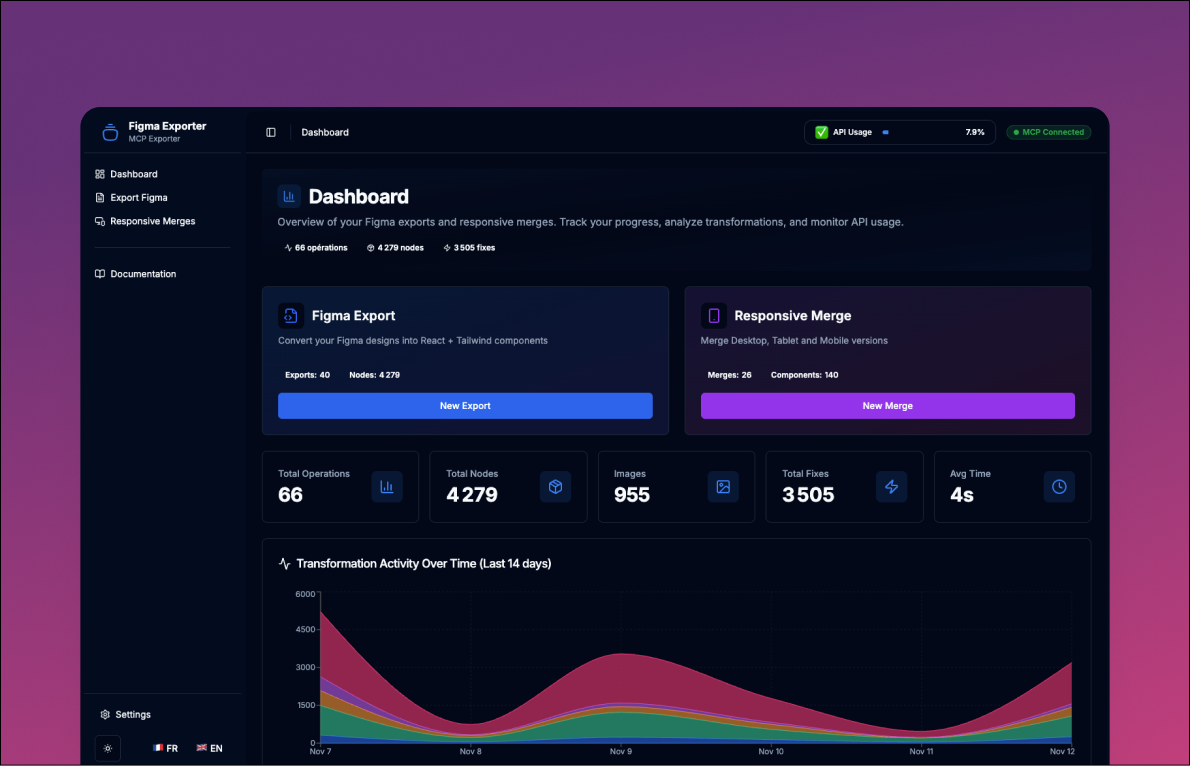 Modern dashboard built with shadcn/ui - featuring real-time analytics, test management, and MCP status monitoring
⚠️ Project Status
MVP in Active Development - This tool works great for most designs, but some edge cases are still being refined.
✅ What Works
- Complex Figma layouts with automatic chunking
- Gradients, shadows, blend modes, stroke alignment
- Design token extraction (colors, fonts, spacing)
- Visual validation with Puppeteer
- Interactive dashboard with shadcn/ui components
- Real-time MCP connection monitoring
🔧 Roadmap
- Component variants support
- Animation & interaction states
- Advanced component library mapping
- Better handling of deeply nested components
Contributions welcome! ⭐ Star the repo • 🐛 Report bugs • 💡 Suggest features • 🔨 Submit PRs
🌟 Features
🎯 Pixel-Perfect Conversion
- Visual Fidelity - Automated validation ensures code matches Figma design exactly
- Smart Chunking - Handles designs of any size by splitting into manageable pieces
- 11 AST Transforms - Specialized Babel transforms optimize generated code
- Advanced Graphics - Full support for gradients, shadows, blend modes, custom shapes
- Design Tokens - Automatic CSS variables for colors, spacing, typography
🚀 Dual Output Modes
| Mode | Files | Purpose |
|---|---|---|
| Fixed | Component-fixed.tsx/css |
Tailwind-based (requires safelist config) |
| Clean | Component-clean.tsx/css |
Pure CSS, zero dependencies, copy/paste ready |
Both versions generated automatically via CLI --clean flag or dashboard.
📊 Modern Dashboard (shadcn/ui)
New Architecture:
- Built with shadcn/ui + Radix UI primitives
- Dark/Light mode with system preference detection
- i18n support (EN/FR) with language switcher
- Sidebar navigation with collapsible menu
- Charts & Analytics - Timeline, KPIs, test statistics
Pages:
- Dashboard - KPIs, charts, recent activity
- Analyze - Launch new Figma analyses with real-time logs
- Export Figma - Grid/List view with pagination, sorting, filtering
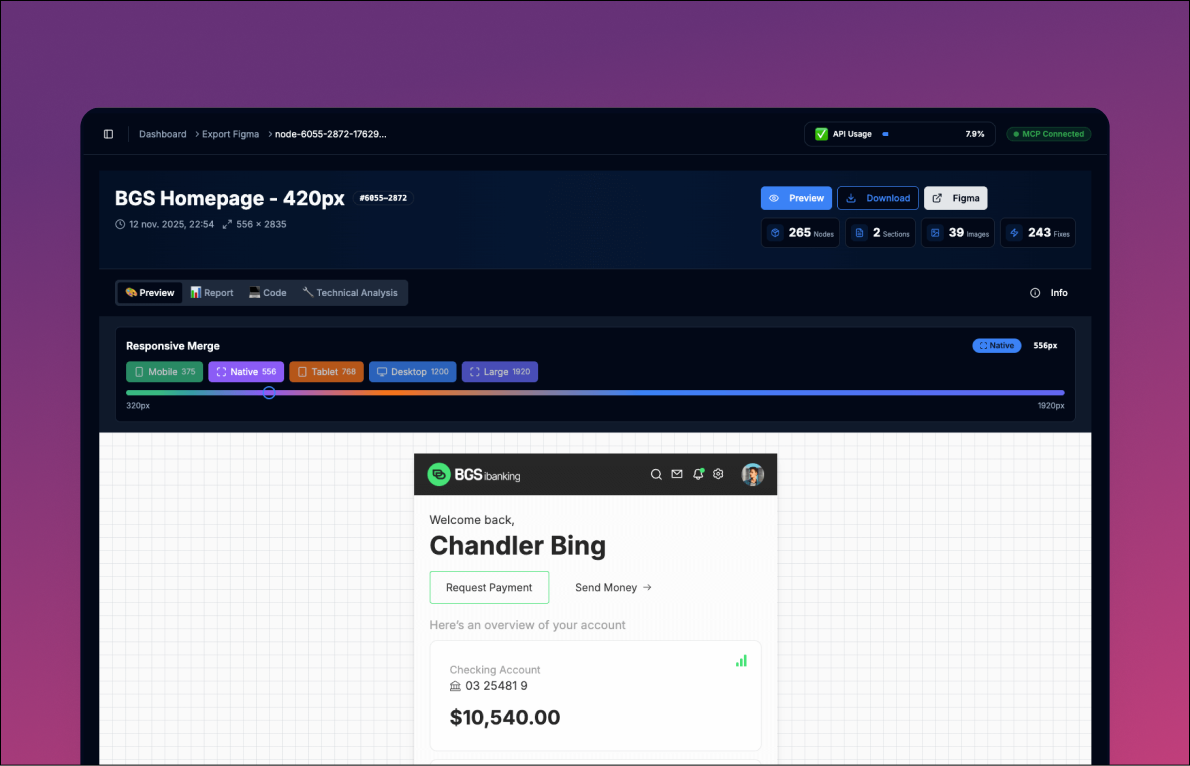
- Export Figma Detail - 4-tab interface (Preview, Code, Report, Technical)
Features:
- Responsive preview with slider (320px → 1920px)
- Syntax-highlighted code viewer
- Visual fidelity report (Figma vs Web)
- Real-time API usage tracking
- MCP connection status indicator
🔧 Developer Experience
- MCP Protocol - Direct Figma Desktop integration (no API keys)
- Docker Support - One-command setup with hot reload
- TypeScript - Full type safety across codebase
- Modular Architecture - Features organized by domain
📱 Responsive Merge (Multi-Screen Fusion)
Combine 3 Figma screens (Desktop, Tablet, Mobile) into a single responsive component:
- Intelligent Merging - Detects common components across breakpoints
- Pure CSS Media Queries - No framework dependencies, works everywhere
- Conflict Detection - Identifies and resolves className conflicts
- Modular Output - Generates
Page.tsx+Subcomponents/structure - Puck Integration - Visual editor-ready components
- Visual Reports - Side-by-side comparison across breakpoints
Process:
- Export 3 Figma screens (Desktop 1440px, Tablet 960px, Mobile 420px)
- Use dashboard to create a responsive merge
- Get a single responsive component with media queries
- Visual editor (Puck) for easy customization
For details: See Responsive Merge Guide
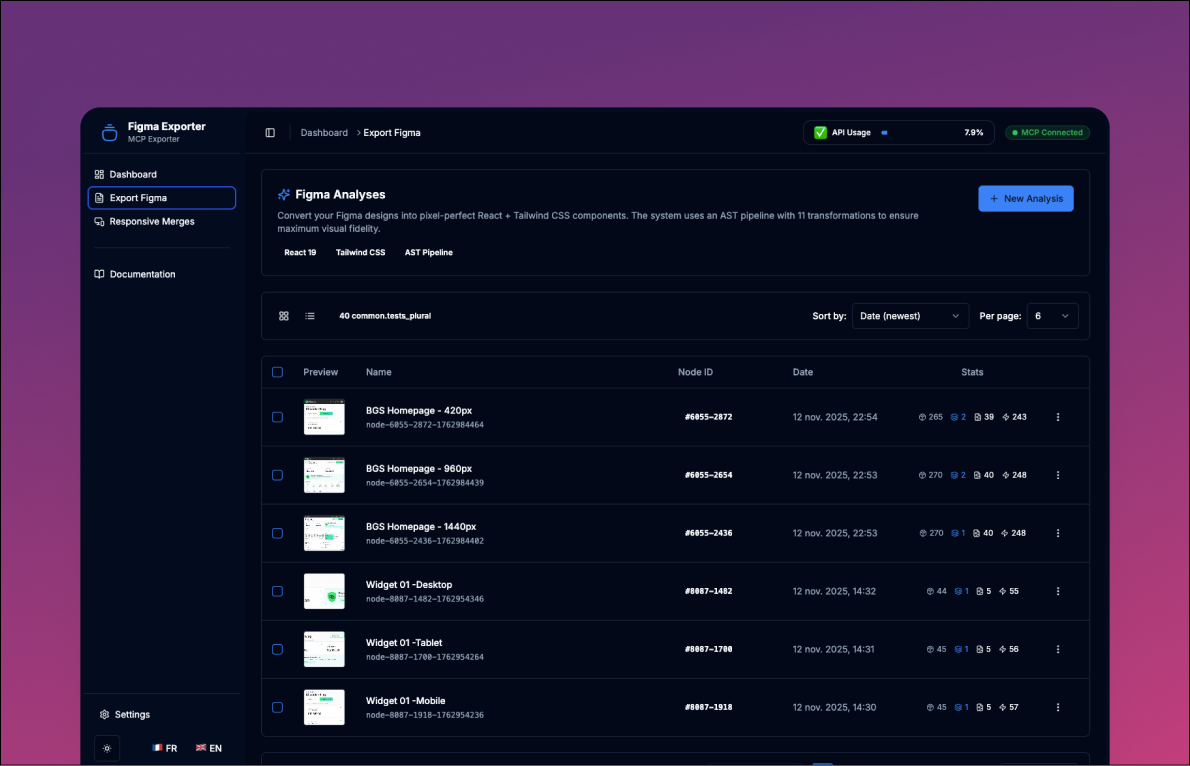 Simple Form With Visible Comamand Line
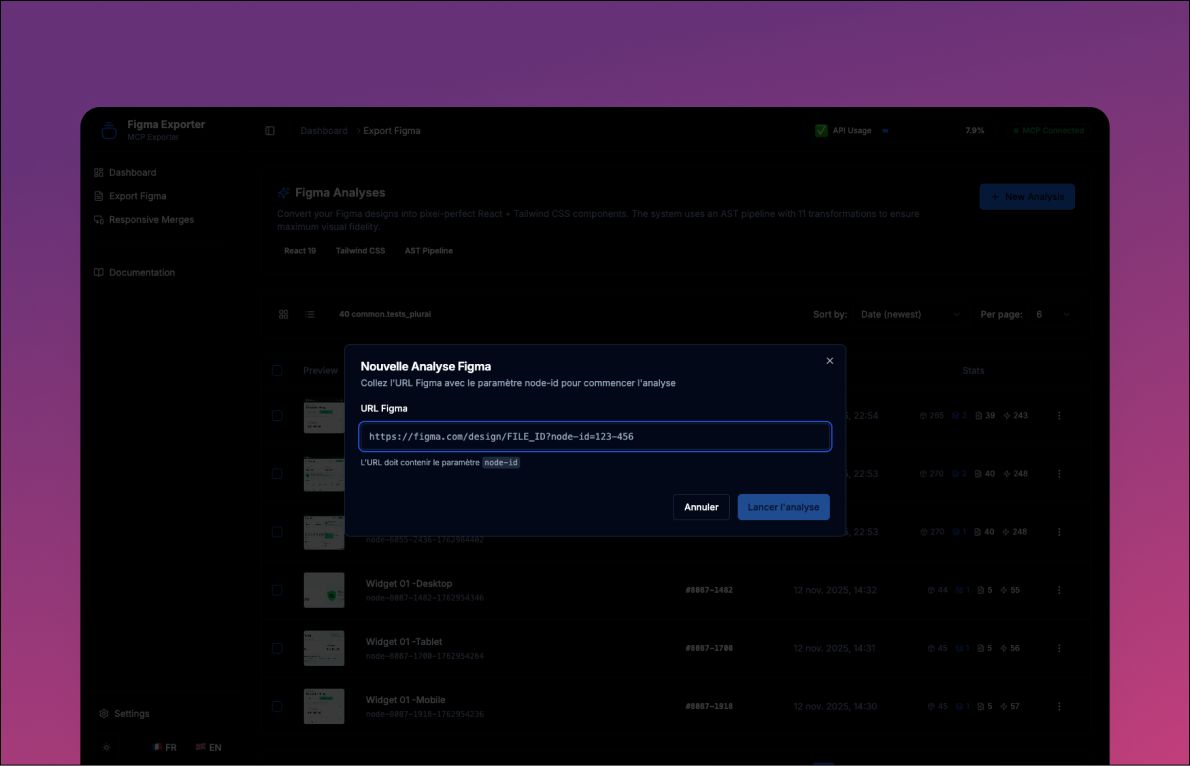 Grid list of all exported Code
 View list of all exported Code
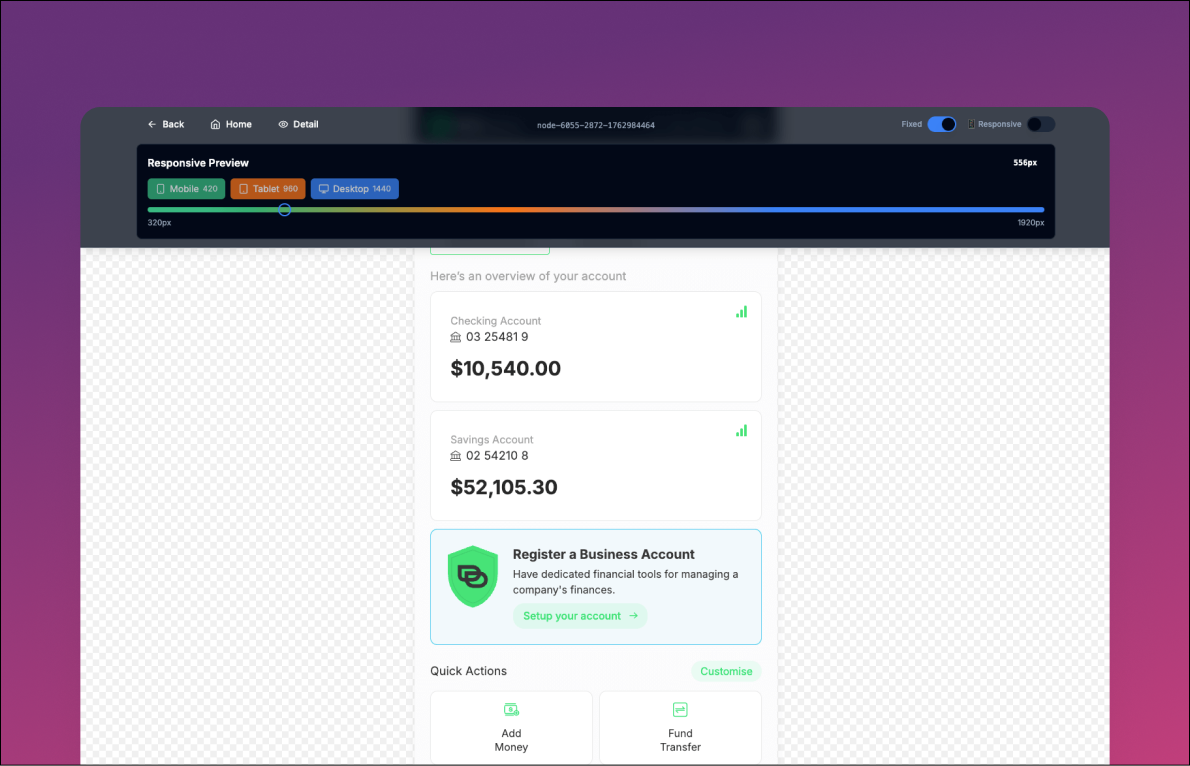 Detailled exported page with responsive merge preview
🚀 Quick Start
Prerequisites
| Tool | Version | Purpose |
|---|---|---|
| Docker + Docker Compose | Latest | Container runtime (recommended) |
| MCP Figma Desktop | Latest | Figma integration server (port 3845) |
| Node.js (optional) | 20+ | For local development |
Installation (Docker)
# 1. Clone repository
git clone https://github.com/vincegx/Figma-to-Code.git
cd Figma-to-Code

# 2. Start Docker (dependencies install automatically inside container)
docker-compose up --build

# 3. Open dashboard
# http://localhost:5173
That's it! 🎉 The dashboard is now running.
For Developers (Optional)
If you want IDE support (IntelliSense, linting):
# Install dependencies locally (optional - for IDE only)
npm install

# Note: Chromium is NOT downloaded (configured in .npmrc)
# The app MUST run in Docker for full functionality (MCP + Puppeteer)
Verify MCP Connection
# Check MCP server is accessible
curl http://localhost:3845/mcp

# Dashboard should show: 🟢 MCP Connected
Your First Analysis
- Ensure Figma Desktop is running
- Open dashboard at http://localhost:5173
- Navigate to Analyze page
- Paste your Figma URL:
https://www.figma.com/design/FILE_ID?node-id=X-Y - Click "Launch Export"
- Watch real-time logs in the modal
- View results in the Export Figma page
Reprocessing Exports (No MCP Calls)
Already have an export but need to regenerate files? Use the reprocess command:
# Find your export ID
ls src/generated/export_figma/
# Example: node-8132-3793-1763118767

# Reprocess with Tailwind version only
./cli/figma-reprocess node-8132-3793-1763118767

# Reprocess with both Tailwind + Clean versions
./cli/figma-reprocess node-8132-3793-1763118767 --clean
What it does:
- Re-runs AST transformations (Phase 2)
- Recaptures web screenshot (Phase 3)
- Regenerates reports and dist package (Phase 4)
- Uses existing
Component.tsx(no MCP calls = faster)
Use cases:
- Modified transform configuration and want to re-apply
- Need clean version but forgot
--cleanflag initially - Screenshot failed and want to retry
- Testing transform changes during development
📖 Documentation
Comprehensive guides available in the /docs folder:
| Guide | Description |
|---|---|
| Architecture | Detailed system architecture, tech stack, pipeline flow |
| Development | Developer guide, adding transforms, contributing |
| Transformations | Complete AST transform reference |
| Responsive Merge | Multi-screen fusion, responsive pipeline, Puck integration |
| Troubleshooting | Common issues and solutions |
| API Reference | REST API & SSE endpoints documentation |
| CLAUDE.md | AI assistant guidance (for Claude Code) |
Quick Links
Architecture:
Development:
Usage:
- CLI Commands
- Reprocessing Exports - Regenerate files without MCP calls
- API Endpoints
- Configuration
💡 How It Works
4-Phase Pipeline
Phase 1: EXTRACTION (MCP)
├─ Connect to Figma Desktop (port 3845)
├─ Extract metadata.xml (hierarchy)
├─ Extract parent-wrapper.tsx
├─ Extract chunks (1s delay between calls)
└─ Save design tokens, screenshot

Phase 2: PROCESSING (AST)
├─ Organize images (Figma names)
├─ Process each chunk:
│  ├─ Parse to AST
│  ├─ Apply 11 transforms (priority 10-100)
│  └─ Extract CSS
├─ Consolidate chunks → Component-fixed.tsx
├─ Merge CSS → Component-fixed.css
├─ Generate clean version → Component-clean.tsx/css
├─ Optimize CSS/TSX → Component-optimized.tsx/css (sync-optimizer.js)
└─ Split components → components/*.tsx/css (if --split-components)

Phase 3: VALIDATION (Visual)
├─ Launch Puppeteer
├─ Render at exact dimensions
└─ Capture web-render.png

Phase 4: OUTPUT (Reports)
├─ metadata.json (dashboard)
├─ analysis.md (technical)
└─ report.html (visual comparison)
Responsive Merge Pipeline
Multi-Screen Fusion - Combines 3 Figma exports into one responsive component:
Phase 1: DETECTION & VALIDATION
├─ Validate 3 exports have modular/ directory
├─ Detect common components across breakpoints
├─ Extract component order from Desktop metadata.xml
└─ Extract helper functions from Desktop

Phase 2: COMPONENT MERGING (Responsive AST)
├─ Parse Desktop, Tablet, Mobile TSX → AST
├─ Run 7 responsive transforms (priority 10-70):
│  ├─ Detect missing elements
│  ├─ Normalize className formatting
│  ├─ Detect className conflicts
│  ├─ Merge Desktop-first (base + overrides)
│  ├─ Add horizontal scroll
│  ├─ Reset conflicting properties
│  └─ Inject visibility classes
├─ Inject helper functions if needed
└─ Fix image paths (./img/ → ../img/)

Phase 3: CSS MERGING
├─ Desktop styles (baseline, no media query)
├─ Tablet overrides (@media max-width: 960px)
├─ Mobile overrides (@media max-width: 420px)
└─ Compile responsive classes to pure CSS

Phase 4: PAGE GENERATION
├─ Merge Page structure from 3 Component-clean.tsx
├─ Replace <div data-name> with <ComponentName />
├─ Generate Page.tsx + Page.css
├─ Generate Puck components (visual editor)
└─ Create visual report + technical analysis
Output: responsive-merger-{timestamp}/ with Page.tsx, Subcomponents/, puck/, and reports.
For details: See Responsive Merge Guide
Key Concepts
Adaptive Processing: Two modes automatically selected based on design complexity:
- Simple Mode - Direct processing for small, valid designs (4 MCP calls)
- Chunk Mode - Split processing for large/complex designs (5+N MCP calls)
Single-Pass AST: Transforms sorted by priority (10→100), all execute in one traversal for performance.
Dual Output:
-fixed uses Tailwind utilities, -clean uses pure CSS classes.
Visual Validation: Puppeteer captures web render at exact Figma dimensions for pixel-perfect comparison.
Responsive Merge (Multi-Screen):
Three key strategies power the responsive merge system:
- Desktop-First Approach - Desktop layout serves as baseline, Tablet/Mobile become progressive overrides via media queries
- Component Matching - Automatically detects common components across breakpoints by name (e.g., "Header" present in Desktop, Tablet, Mobile)
- Conflict Resolution - Uses
data-nameattributes and positional matching to identify corresponding elements, then merges classNames intelligently - Media Query Generation - Calculates CSS differences between breakpoints, generates optimized
@mediarules (Desktop → Tablet @960px → Mobile @420px) - Helper Injection - Extracts shared utilities (like
formatCurrency(), icon components) from Desktop and auto-injects where needed - Pure CSS Output - Compiles responsive classes (
max-md:w-80) to pure CSS, zero dependencies - Puck Integration - Visual editor for drag-and-drop customization post-merge
Example workflow:
Desktop (1440px) → Export with --split-components
Tablet (960px)   → Export with --split-components  } → Responsive Merge
Mobile (420px)   → Export with --split-components

Result: Page.tsx + Subcomponents/ with media queries
For more details: See Architecture Guide and Responsive Merge Guide
📦 Output Structure
Single-Screen Export
Each analysis creates a folder in src/generated/export_figma/:
node-{id}-{timestamp}/
├── Component-fixed.tsx          # Tailwind version
├── Component-fixed.css          # Consolidated CSS
├── Component-clean.tsx          # Pure CSS version (if --clean)
├── Component-clean.css          # Production CSS (if --clean)
├── chunks-fixed/                # Processed chunks
│   ├── Header.tsx
│   └── Header.css
├── img/                         # Organized images
├── metadata.json                # Dashboard metadata
├── analysis.md                  # Technical report
├── report.html                  # Visual comparison
├── figma-render.png             # Reference screenshot
└── web-render.png               # Validation screenshot
Responsive Merge (Multi-Screen)
Each responsive merge creates a folder in src/generated/responsive-screens/:
responsive-merger-{timestamp}/
├── Page.tsx                      # Main page component
├── Page.css                      # Consolidated CSS with media queries
├── Subcomponents/                # Modular responsive components
│   ├── Header.tsx                # Desktop-first with responsive classes
│   ├── Header.css                # Media queries: tablet/mobile
│   ├── Hero.tsx
│   ├── Hero.css
│   ├── Footer.tsx
│   └── Footer.css
├── img/                          # Images (from Desktop export)
│   ├── logo.png
│   └── hero-bg.jpg
├── puck/                         # Puck visual editor
│   ├── components/               # Puck-wrapped components
│   │   ├── Header.tsx
│   │   ├── Hero.tsx
│   │   └── Footer.tsx
│   ├── config.tsx                # Puck configuration
│   └── data.json                 # Initial Puck data
├── responsive-metadata.json      # Merge stats + transformation details
├── responsive-analysis.md        # Technical analysis report
└── responsive-report.html        # Visual comparison (Desktop/Tablet/Mobile)
Key files:
Page.tsx- Main page importing all subcomponentsSubcomponents/*.tsx- Modular components with responsive classNames*.css- Pure CSS with media queries (no Tailwind dependencies)puck/- Visual editor for drag-and-drop customization
🔧 Configuration
Environment Variables
# Puppeteer
PUPPETEER_EXECUTABLE_PATH=/usr/bin/chromium

# MCP Server (default values)
MCP_SERVER_HOST=host.docker.internal
MCP_SERVER_PORT=3845

# API Server
PORT=3000
Transform Configuration
Enable/disable transforms in scripts/config.js:
export const defaultConfig = {
  'font-detection': { enabled: true },
  'auto-layout': { enabled: true },
  'ast-cleaning': { enabled: true },
  // ... 8 more transforms
}
Docker Ports
# docker-compose.yml
ports:
  - "5173:5173"  # Dashboard + API
🐛 Troubleshooting
MCP Not Connected?
# 1. Verify Figma Desktop is running
# 2. Check MCP server
curl http://localhost:3845/mcp

# 3. Check from Docker
docker exec mcp-figma-v1 curl http://host.docker.internal:3845/mcp
Images Not Appearing?
# Re-organize images
docker exec mcp-figma-v1 node scripts/post-processing/organize-images.js \
  src/generated/export_figma/node-{id}
Need to Regenerate Files?
# Reprocess existing export (no MCP calls)
./cli/figma-reprocess node-{id}-{timestamp}

# With clean version
./cli/figma-reprocess node-{id}-{timestamp} --clean
Component Won't Load?
# Check for syntax errors
docker exec mcp-figma-v1 npm run lint

# Check browser console (F12)
For comprehensive troubleshooting: See Troubleshooting Guide
🤝 Contributing
We welcome contributions! Here's how to get started:
Quick Contribution Workflow
# 1. Fork & clone
git clone https://github.com/YOUR_USERNAME/Figma-to-Code.git

# 2. Create feature branch
git checkout -b feature/amazing-feature

# 3. Make changes & test
npm run lint
npm run build
docker-compose up --build

# 4. Test with real Figma designs
./cli/figma-analyze "https://www.figma.com/design/..."

# 5. Commit & push
git commit -m "feat: add amazing feature"
git push origin feature/amazing-feature

# 6. Open Pull Request
Contribution Areas
- 🐛 Bug Fixes - Fix edge cases, improve stability
- ✨ Features - Add new transforms, improve pipeline
- 📚 Documentation - Improve guides, add examples
- 🎨 UI/UX - Enhance dashboard components
- 🧪 Testing - Add tests, validate edge cases
For detailed guidelines: See Development Guide
📚 Resources
Project Links
External Documentation
- Model Context Protocol - MCP specification
- Figma MCP Server - Figma Desktop integration
- shadcn/ui - UI component library
- Babel AST - AST parsing docs
- Tailwind CSS - Utility classes reference
📄 License
This project is licensed under the MIT License - see LICENSE file for details.
MIT License - Copyright (c) 2025 MCP Figma to Code Contributors
🙏 Acknowledgments
- Anthropic - Model Context Protocol & Claude
- Figma - Design tool & MCP server implementation
- shadcn - Beautiful UI component library
- React Team - React 19
- Tailwind Labs - Tailwind CSS
- All Contributors - Thank you! 🎉
Installing Figma To Code
This server has no published package — it is built from source. Open the repository and follow its README.
▸ github.com/vincegx/Figma-to-Code_MCPFAQ
Is Figma To Code MCP free?
Yes, Figma To Code MCP is free — one-click install via Unyly at no cost.
Does Figma To Code need an API key?
No, Figma To Code runs without API keys or environment variables.
Is Figma To Code hosted or self-hosted?
Self-hosted: the server runs locally on your machine via the install command above.
How do I install Figma To Code in Claude Desktop, Claude Code or Cursor?
Open Figma To Code on unyly.org, pick your client tab (Claude Desktop, Claude Code, Cursor) and press Install — the config is generated automatically, no JSON editing.
Related MCPs
GitHub
PRs, issues, code search, CI status
 by GitHub
Filesystem
Secure file operations with configurable access controls.
Memory
Knowledge graph-based persistent memory system.

Unyly Deploy
Deploy sites and MCP servers to Unyly straight from your AI agent
 by Unyly
Amap Maps Mcp Server
MCP server for using the AMap Maps API
 by duxiaohui
PayMCP
Lightweight payments layer for MCP servers: turn tools into paid endpoints with a two-line decorator. [PyPI](https://pypi.org/project/paymcp/) · [npm](https://w
 by blustAI
Server For Power BI
Enables exploring Microsoft Fabric / Power BI workspaces and semantic models, and executing ad-hoc DAX queries.
 by Mitsubishi-Fuso
Template MCP Server
A CLI tool to create a new Model Context Protocol server project with TypeScript support, dual transport options, and an extensible structure
 by mcpdotdirect
Supabase
Database, auth and storage
 by Supabase
Everything
Reference / test server with prompts, resources, and tools.
Compare Figma To Code with
Not sure what to pick?
Find your stack in 60 seconds
Author?
Embed badge for your README
Browse similar
All development MCPs