
Local Prompt Server
FreeNot checkedAn MCP server that dynamically registers prompt templates from local files and serves them to clients with the assistant role.

About
An MCP server that dynamically registers prompt templates from local files and serves them to clients with the assistant role.
README
An MCP server that dynamically registers prompt templates from local files and serves them to clients with the assistant role (not user).
Features
- File-based prompts — Drop
.txt,.md,.yaml,.yml, or.jsonfiles intoprompts/and they are registered automatically on startup - Clean naming — Filenames like
grammer_correction_agent.mdbecome prompt names like"grammer correction agent" - Assistant role delivery — Prompts are served with
role: "assistant", so clients treat the content as system-level guidance, not user input - Stdio transport — Connects via standard input/output, compatible with any MCP host
Example
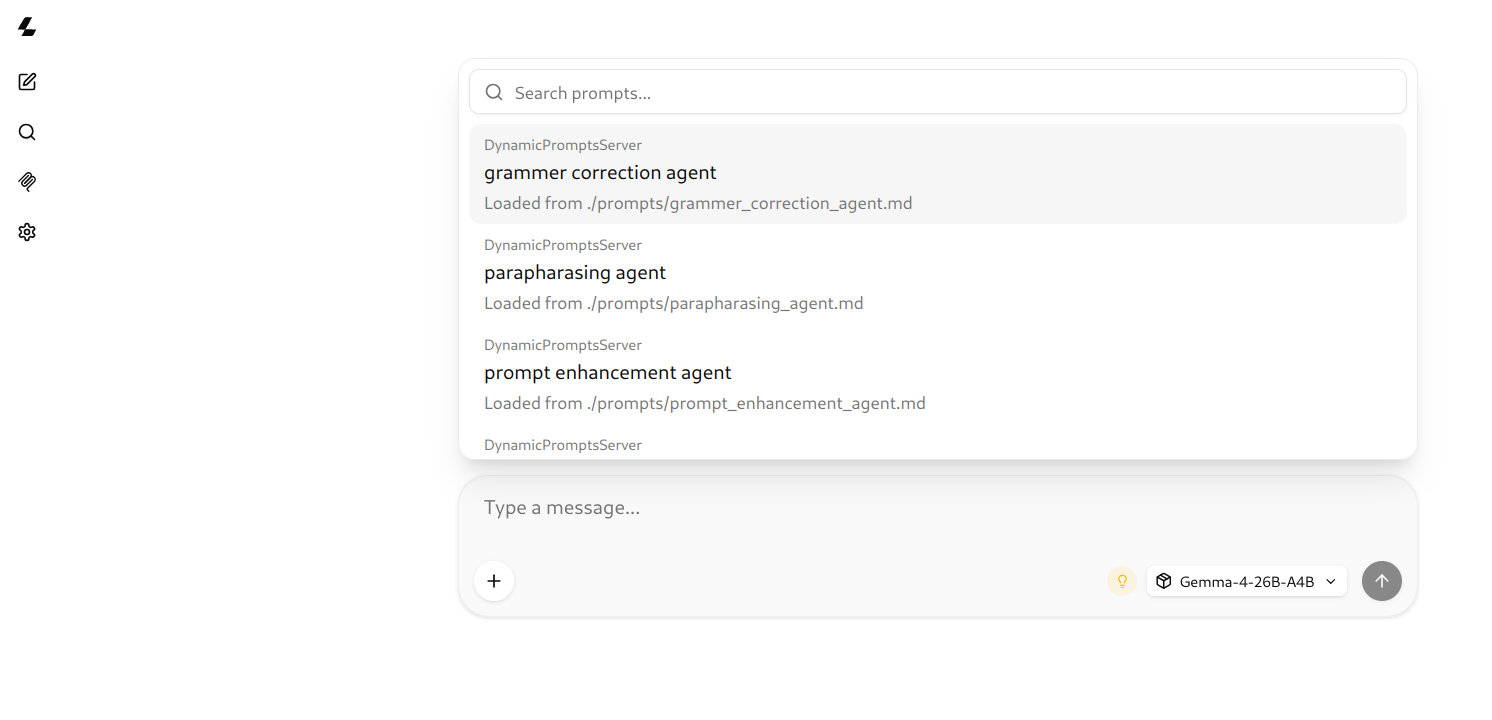
The screenshot shows the MCP Inspector listing all 4 prompts after the server starts.
Prerequisites
- Node.js 18+
- npm
Installation
git clone [email protected]:engrtipusultan/mcp-local-prompt-server.git
cd mcp-local-prompt-server
npm install
Included prompts
| File | Prompt name | Description |
|---|---|---|
grammer_correction_agent.md |
grammer correction agent | Fixes English grammar errors with minimal changes, preserving the user's original style |
parapharasing_agent.md |
parapharasing agent | Paraphrases text with configurable tone (professional, casual, etc.) and length adjustments |
prompt_enhancement_agent.md |
prompt enhancement agent | Refines user inputs into structured, actionable prompts |
summerization_agent.md |
summerization agent | Summarizes and structurally maps long texts with metadata, TL;DR, and hierarchical outlines |
Adding more prompts
Create a file in the prompts/ directory:
prompts/
├── code_review_agent.md
├── sql_optimizer.txt
└── writing_feedback.yaml
Supported extensions: .txt, .md, .yaml, .yml, .json. Hyphens and underscores in filenames are converted to spaces for the prompt name. No code changes needed — prompts are registered automatically on the next server start.
Usage
Run
npm run dev
or
npm start
Both run the server directly via tsx — no build step needed.
Testing with MCP Inspector
npx @modelcontextprotocol/inspector npm run dev
This opens a web UI where you can browse registered prompts and invoke them interactively.
How it works
On startup, the server scans the prompts/ directory for supported files. Each file is registered as an MCP prompt using mcpServer.registerPrompt(). When a client requests a prompt, the server reads the file content and returns it as an assistant-role message.
┌─────────────────────────────────────┐
│         MCP Host (client)           │
│            stdio transport          │
└────────────┬────────────────────────┘
             │ JSON-RPC
             ▼
┌─────────────────────────────────────┐
│  mcp-local-prompt-server            │
│                                     │
│  ┌────────────────────────────────┐ │
│  │  prompts/                      │ │
│  │  ├── grammer_correction.md     │ │
│  │  ├── summarization_agent.md    │ │
│  │  └── ...                       │ │
│  └────────────────────────────────┘ │
└─────────────────────────────────────┘
Scripts reference
| Script | Command | Description |
|---|---|---|
npm run dev |
tsx server.ts |
Run the server |
npm start |
tsx server.ts |
Run the server (alias) |
License
Apache 2.0
Installing Local Prompt Server
This server has no published package — it is built from source. Open the repository and follow its README.
▸ github.com/engrtipusultan/mcp-local-prompt-serverFAQ
Is Local Prompt Server MCP free?
Yes, Local Prompt Server MCP is free — one-click install via Unyly at no cost.
Does Local Prompt Server need an API key?
No, Local Prompt Server runs without API keys or environment variables.
Is Local Prompt Server hosted or self-hosted?
Self-hosted: the server runs locally on your machine via the install command above.
How do I install Local Prompt Server in Claude Desktop, Claude Code or Cursor?
Open Local Prompt Server on unyly.org, pick your client tab (Claude Desktop, Claude Code, Cursor) and press Install — the config is generated automatically, no JSON editing.
Related MCPs
GitHub
PRs, issues, code search, CI status
 by GitHub
Filesystem
Secure file operations with configurable access controls.
Memory
Knowledge graph-based persistent memory system.
Template MCP Server
A CLI tool to create a new Model Context Protocol server project with TypeScript support, dual transport options, and an extensible structure
 by mcpdotdirect
Compare Local Prompt Server with
Not sure what to pick?
Find your stack in 60 seconds
Author?
Embed badge for your README
Browse similar
All development MCPs