loading…
en/
Browse all
Outline
FreeNot checkedEnables Claude Code to search and retrieve documents from an Outline knowledge base.

About
Enables Claude Code to search and retrieve documents from an Outline knowledge base.
README
An MCP server that connects Claude Code to your Outline knowledge base, giving Claude tools to search and retrieve documents.
Tools
- outline_search — full-text search across your Outline workspace
- outline_get_document — fetch a document's full content by ID
Prerequisites
Node.js 18+
An Outline API key — go to Preferences → API & Access → New API key
Use the scope
documents:readto restrict the key to read-only document access: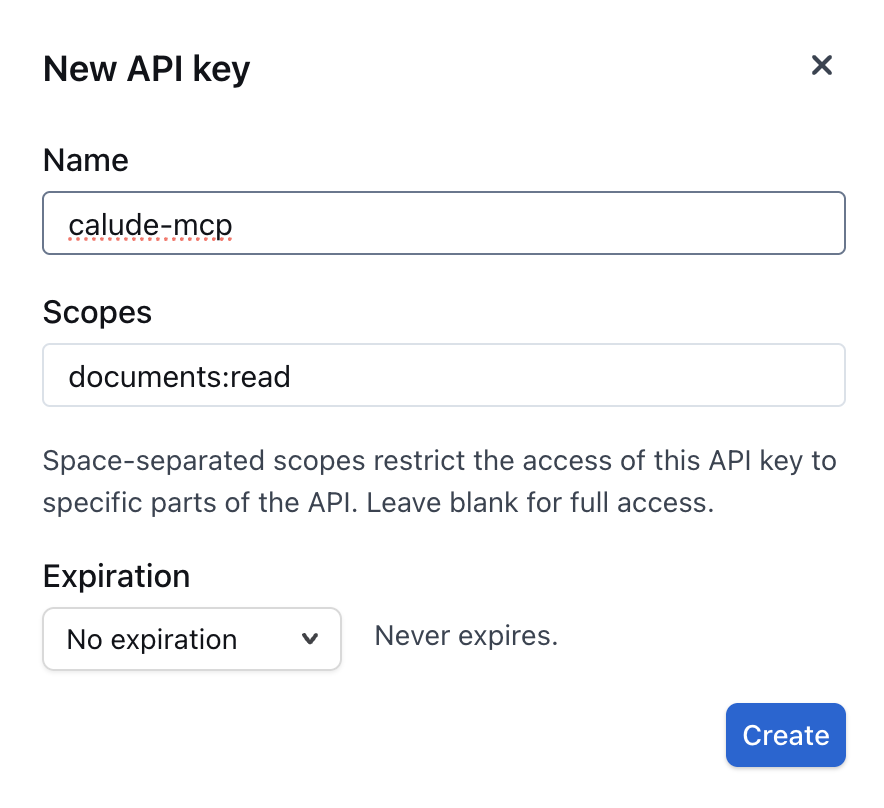
Setup
1. Clone and install
git clone https://github.com/YOUR_USERNAME/mcp-outline.git ~/.claude/mcp-outline
cd ~/.claude/mcp-outline
npm install
You can clone it anywhere;
~/.claude/mcp-outlineis just a tidy location that keeps it with your Claude config.
2. Register the MCP server globally
Run this once from your terminal to add the server to your user-level Claude Code config (available in every project):
claude mcp add -s user outline \
  npx tsx /Users/YOUR_USERNAME/.claude/mcp-outline/src/server.ts \
  --env OUTLINE_API_KEY=YOUR_OUTLINE_API_KEY \
  --env OUTLINE_BASE_URL=https://app.getoutline.com
Replace:
/Users/YOUR_USERNAME/.claude/mcp-outlinewith the actual absolute path where you cloned the repoYOUR_OUTLINE_API_KEYwith your Outline API key- Omit
--env OUTLINE_BASE_URL=...if you use the defaulthttps://app.getoutline.com
The -s user flag registers the server at the user scope, so it is available globally in every Claude Code session without needing per-project configuration.
3. Verify
claude mcp list
outline should appear in the list of active MCP servers.
Usage
Once configured, Claude Code can use the Outline tools automatically when you ask questions about your docs:
"Search our Outline for the onboarding guide"
"Get the Outline document with ID abc-123"
License
ISC
Install Outline in Claude Desktop, Claude Code & Cursor
Run in your terminal:
claude mcp add mcp-outline -- npx FAQ
Is Outline MCP free?
Yes, Outline MCP is free — one-click install via Unyly at no cost.
Does Outline need an API key?
No, Outline runs without API keys or environment variables.
Is Outline hosted or self-hosted?
A hosted option is available: Unyly runs the server in the cloud, no local setup required.
How do I install Outline in Claude Desktop, Claude Code or Cursor?
Open Outline on unyly.org, pick your client tab (Claude Desktop, Claude Code, Cursor) and press Install — the config is generated automatically, no JSON editing.
Related MCPs


Compare Outline with
Not sure what to pick?
Find your stack in 60 seconds
Author?
Embed badge for your README
Browse similar
All development MCPs