
Sentry
БесплатноНе проверенA Model Context Protocol server that enables retrieving and analyzing Sentry issues, including stacktraces and debugging information.

Описание
A Model Context Protocol server that enables retrieving and analyzing Sentry issues, including stacktraces and debugging information.
README
Add to Cursor Add to VS Code Add to Claude Add to ChatGPT Add to Codex Add to Gemini
mcp-sentry: A Sentry MCP server
Overview
A Model Context Protocol server for retrieving and analyzing issues from Sentry.io. This server provides tools to inspect error reports, stacktraces, and other debugging information from your Sentry account.
Tools
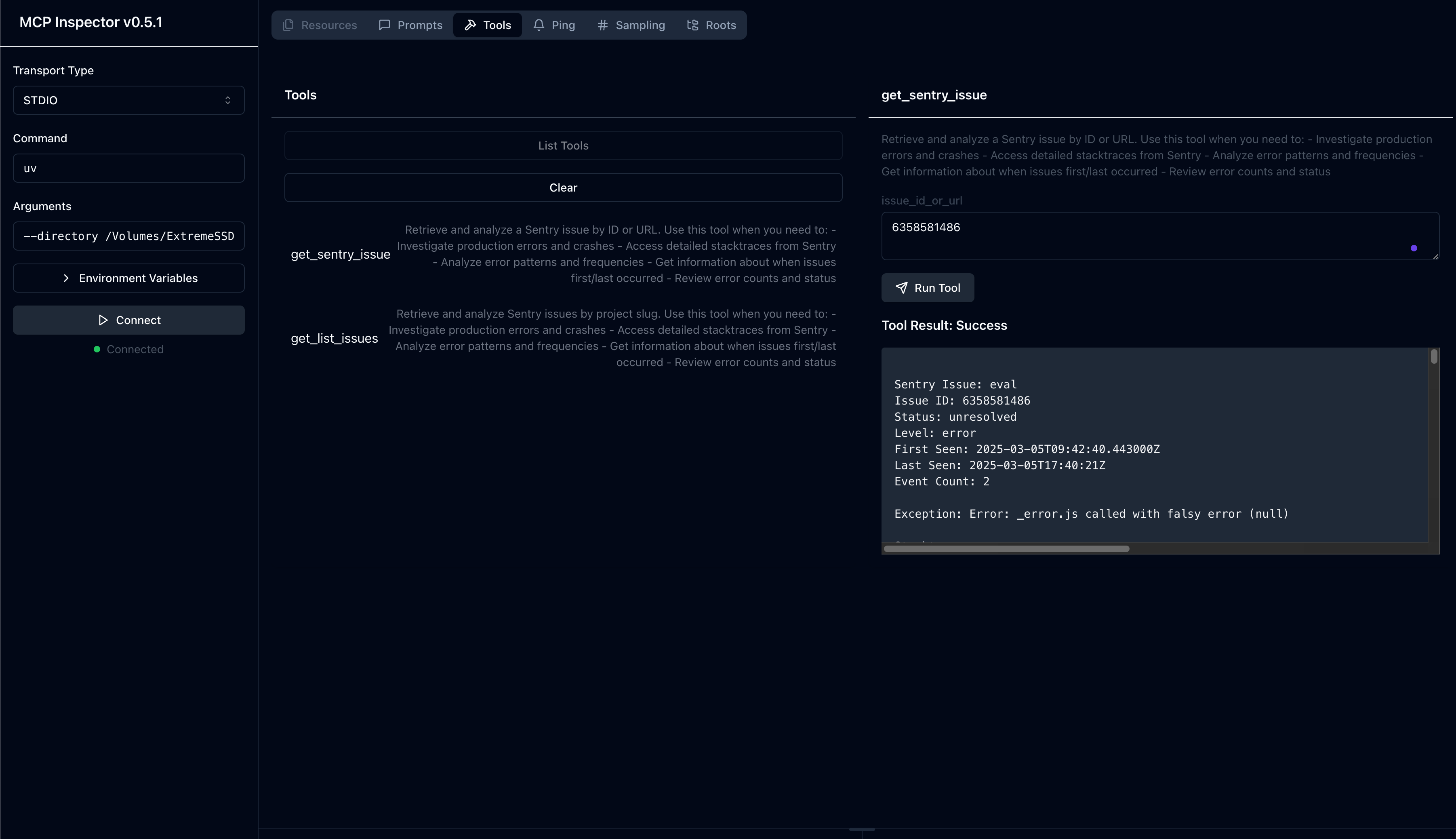
get_sentry_issue- Retrieve and analyze a Sentry issue by ID or URL
- Input:
issue_id_or_url(string): Sentry issue ID or URL to analyze
- Returns: Issue details including:
- Title
- Issue ID
- Status
- Level
- First seen timestamp
- Last seen timestamp
- Event count
- Full stacktrace
get_list_issues- Retrieve and analyze Sentry issues by project slug
- Input:
project_slug(string): Sentry project slug to analyzeorganization_slug(string): Sentry organization slug to analyze
- Returns: List of issues with details including:
- Title
- Issue ID
- Status
- Level
- First seen timestamp
- Last seen timestamp
- Event count
- Basic issue information
Prompts
sentry-issue- Retrieve issue details from Sentry
- Input:
issue_id_or_url(string): Sentry issue ID or URL
- Returns: Formatted issue details as conversation context
Installation
Installing via Smithery
To install mcp-sentry for Claude Desktop automatically via Smithery:
npx -y @smithery/cli install @qianniuspace/mcp-sentry --client claude
Using uv (recommended)
When using uv no specific installation is needed. We will use uvx to directly run mcp-sentry.
Using PIP
Alternatively you can install mcp-sentry via pip:
pip install mcp-sentry
or use uv
uv pip install -e .
After installation, you can run it as a script using:
python -m mcp_sentry
Configuration
Usage with Claude Desktop
Add this to your claude_desktop_config.json:
Using uvx
"mcpServers": {
  "sentry": {
    "command": "uvx",
    "args": ["mcp-sentry", "--auth-token", "YOUR_SENTRY_TOKEN","--project-slug" ,"YOUR_PROJECT_SLUG", "--organization-slug","YOUR_ORGANIZATION_SLUG"]
  }
}
Using docker
"mcpServers": {
  "sentry": {
    "command": "docker",
    "args": ["run", "-i", "--rm", "mcp/sentry", "--auth-token", "YOUR_SENTRY_TOKEN","--project-slug" ,"YOUR_PROJECT_SLUG", "--organization-slug","YOUR_ORGANIZATION_SLUG"]
  }
}
Using pip installation
"mcpServers": {
  "sentry": {
    "command": "python",
    "args": ["-m", "mcp_sentry", "--auth-token", "YOUR_SENTRY_TOKEN","--project-slug" ,"YOUR_PROJECT_SLUG", "--organization-slug","YOUR_ORGANIZATION_SLUG"]
  }
}
Usage with Zed
Add to your Zed settings.json:
Using uvx
For Example Curson
"context_servers": [
  "mcp-sentry": {
    "command": {
      "path": "uvx",
      "args": ["mcp-sentry", "--auth-token", "YOUR_SENTRY_TOKEN","--project-slug" ,"YOUR_PROJECT_SLUG", "--organization-slug","YOUR_ORGANIZATION_SLUG"]
    }
  }
],
Using pip installation
"context_servers": {
  "mcp-sentry": {
    "command": "python",
    "args": ["-m", "mcp_sentry", "--auth-token", "YOUR_SENTRY_TOKEN","--project-slug" ,"YOUR_PROJECT_SLUG", "--organization-slug","YOUR_ORGANIZATION_SLUG"]
  }
},
Using pip installation with custom path
"context_servers": {
  "sentry": {
      "command": "python",
      "args": [
        "-m",
        "mcp_sentry",
        "--auth-token",
        "YOUR_SENTRY_TOKEN",
        "--project-slug",
        "YOUR_PROJECT_SLUG",
        "--organization-slug",
        "YOUR_ORGANIZATION_SLUG"
      ],
      "env": {
        "PYTHONPATH": "path/to/mcp-sentry/src"
      }
    }
},
Debugging
You can use the MCP inspector to debug the server. For uvx installations:
npx @modelcontextprotocol/inspector uvx mcp-sentry --auth-token YOUR_SENTRY_TOKEN --project-slug YOUR_PROJECT_SLUG --organization-slug YOUR_ORGANIZATION_SLUG
Or if you've installed the package in a specific directory or are developing on it:
cd path/to/servers/src/sentry
npx @modelcontextprotocol/inspector uv run mcp-sentry --auth-token YOUR_SENTRY_TOKEN --project-slug YOUR_PROJECT_SLUG --organization-slug YOUR_ORGANIZATION_SLUG
or in term
npx @modelcontextprotocol/inspector uv --directory /Volumes/ExtremeSSD/MCP/mcp-sentry/src run mcp_sentry --auth-token YOUR_SENTRY_TOKEN
--project-slug YOUR_PROJECT_SLUG --organization-slug YOUR_ORGANIZATION_SLUG
Fork From
License
This MCP server is licensed under the MIT License. This means you are free to use, modify, and distribute the software, subject to the terms and conditions of the MIT License. For more details, please see the LICENSE file in the project repository.
Установить Sentry в Claude Desktop, Claude Code, Cursor
unyly install mcp-sentryСтавит в Claude Desktop, Claude Code, Cursor и VS Code — сам разбирается с npx, uvx и сборкой из исходников.
Впервые? Поставь CLI: curl -fsSL https://unyly.org/install | sh
Или настроить вручную
Выполни в терминале:
claude mcp add mcp-sentry -- uvx mcp-sentryПошаговые гайды: как установить Sentry
FAQ
Sentry MCP бесплатный?
Да, Sentry MCP бесплатный — установка в пару кликов через Unyly без оплаты.
Нужен ли API-ключ для Sentry?
Нет, Sentry работает без API-ключей и переменных окружения.
Sentry — hosted или self-hosted?
Доступен hosted-вариант: Unyly запускает сервер в облаке, локальная установка не обязательна.
Как установить Sentry в Claude Desktop, Claude Code или Cursor?
Открой Sentry на unyly.org, выбери вкладку своего клиента (Claude Desktop, Claude Code, Cursor) и нажми Install — конфиг сгенерируется автоматически, без правки JSON.
Похожие MCP
GitHub
PRs, issues, code search, CI status
 автор: GitHub
Filesystem
Secure file operations with configurable access controls.
Memory
Knowledge graph-based persistent memory system.

Unyly Deploy
Deploy sites and MCP servers to Unyly straight from your AI agent
 автор: Unyly
Amap Maps Mcp Server
MCP server for using the AMap Maps API
 автор: duxiaohui
PayMCP
Lightweight payments layer for MCP servers: turn tools into paid endpoints with a two-line decorator. [PyPI](https://pypi.org/project/paymcp/) · [npm](https://w
 автор: blustAI
Server For Power BI
Enables exploring Microsoft Fabric / Power BI workspaces and semantic models, and executing ad-hoc DAX queries.
 автор: Mitsubishi-Fuso
Gpt Image 2 Mcp
RunAPI GPT Image 2 MCP server for image generation: create tasks, poll results, and check pricing across 1 model from Claude Code, Codex, Cursor, and VS Code.
 автор: runapi-ai
Template MCP Server
A CLI tool to create a new Model Context Protocol server project with TypeScript support, dual transport options, and an extensible structure
 автор: mcpdotdirect
Supabase
Database, auth and storage
 автор: Supabase
Compare Sentry with
Не уверен что выбрать?
Найди свой стек за 60 секунд
Автор?
Embed-бейдж для README
Похожее
Все в категории development