
Server Agent Browser
FreeNot checkedMCP server that wraps agent-browser to let LLMs control a real browser, providing tools for navigation, interaction, reading page content, accessibility snapsho

About
MCP server that wraps agent-browser to let LLMs control a real browser, providing tools for navigation, interaction, reading page content, accessibility snapshots, screenshots, and session management.
README
Status: Testing — Functional but still being validated. Expect rough edges.
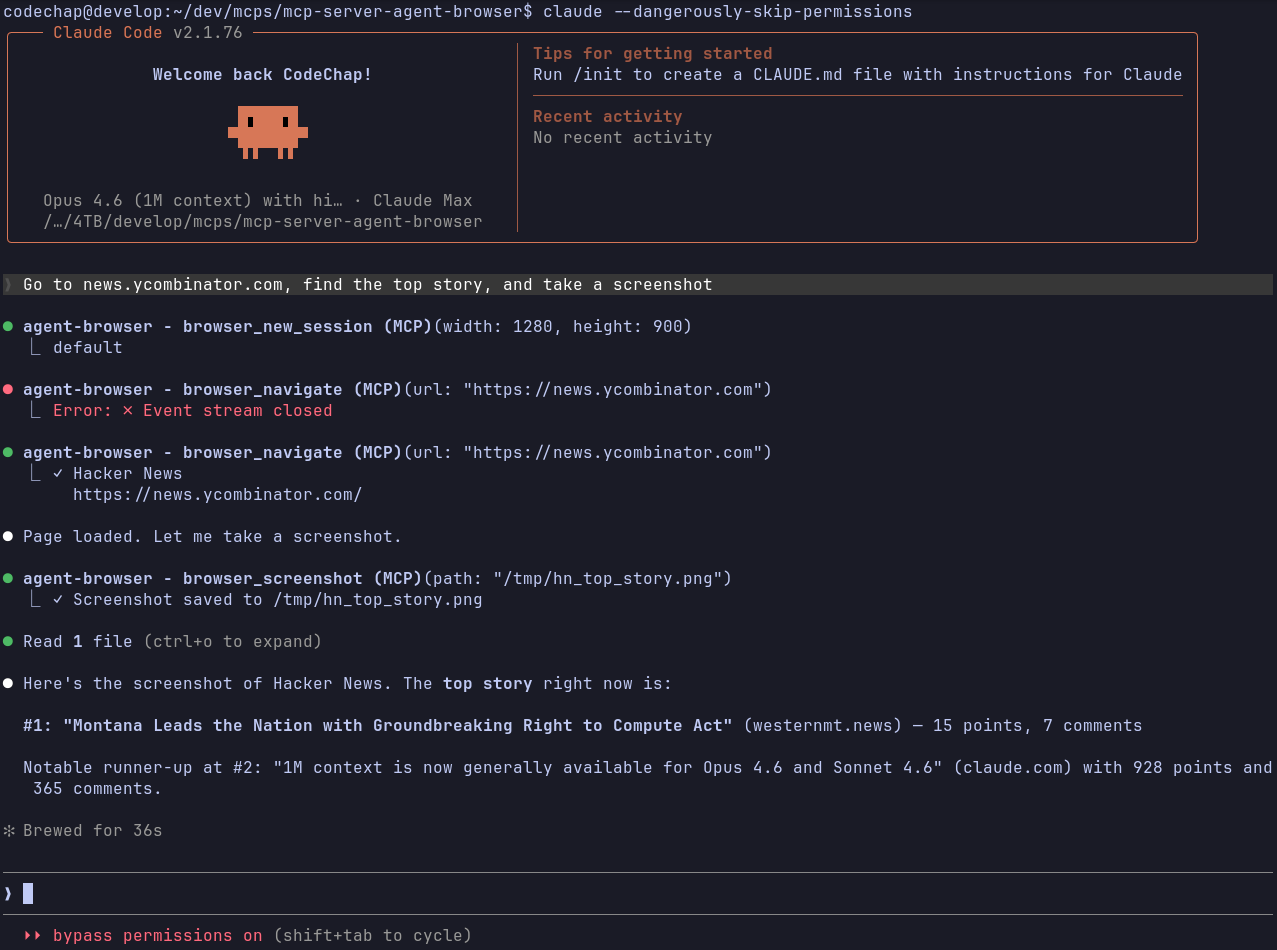
Let LLMs drive a real browser. This MCP server wraps agent-browser (by Vercel Labs) so any MCP-compatible client — Claude Desktop, Claude Code, or others — can navigate pages, fill forms, click buttons, take screenshots, and more.
Prerequisites
Install the agent-browser CLI:
cargo install agent-browser
agent-browser install
Build
cargo build --release
Binary: target/release/mcp-server-agent-browser
Configuration
Add to your MCP client config (example for Claude Desktop / Claude Code):
{
  "mcpServers": {
    "agent-browser": {
      "command": "/path/to/mcp-server-agent-browser"
    }
  }
}
The server communicates over stdio using JSON-RPC 2.0 — it works with any MCP client.
| Environment Variable | Description | Default |
|---|---|---|
AGENT_BROWSER_PATH |
Path to the agent-browser binary |
agent-browser (via $PATH) |
What it can do
The server exposes 35+ tools covering:
- Navigation — open URLs, go back/forward, reload
- Interaction — click, type, fill, press keys, hover, scroll, drag, select, check/uncheck, upload, download
- Reading — get page text, HTML, attributes, URL, title
- Accessibility —
browser_snapshotreturns an accessibility tree with@refidentifiers that can be used as selectors in subsequent calls - State — check if elements are visible, enabled, or checked
- Capture — screenshots (with optional annotation for vision models) and PDF export
- Sessions — create isolated browser sessions with independent cookies/storage/viewport
- Cookies — get, set, clear
- JavaScript — evaluate arbitrary JS in the page context
- DevTools — read console logs, inspect network requests, connect via CDP
Each tool is self-documented with parameter schemas — your MCP client will discover them automatically.
How it works
A typical AI-driven interaction follows this pattern:
browser_navigate— open a pagebrowser_snapshot— get the accessibility tree to understand the page structurebrowser_click/browser_fill— interact using@refselectors from the snapshotbrowser_screenshot— visually verify the result
The agent decides which tools to call and in what order. You just describe what you want done.
Sessions
All tools accept an optional session_id. Create isolated sessions with browser_new_session and pass the returned ID to subsequent calls. Each session has its own cookies, storage, and viewport. Without a session ID, commands use the default session.
Timeouts
Commands time out after 60 seconds by default. The browser_wait tool adjusts its timeout automatically based on the wait duration you specify.
Limitations
- Requires the Rust toolchain to build, and Node.js for the
agent-browserdaemon - Chromium only —
agent-browseruses Playwright under the hood - Headless by default — no visible browser window
- The 60-second default timeout may not be enough for slow pages or complex interactions
- No built-in authentication persistence — cookies reset between server restarts unless managed via the cookie tools
- File upload/download paths are validated but restricted from system directories
License
MIT
Installing Server Agent Browser
This server has no published package — it is built from source. Open the repository and follow its README.
▸ github.com/codeChap/mcp-server-agent-browserFAQ
Is Server Agent Browser MCP free?
Yes, Server Agent Browser MCP is free — one-click install via Unyly at no cost.
Does Server Agent Browser need an API key?
No, Server Agent Browser runs without API keys or environment variables.
Is Server Agent Browser hosted or self-hosted?
Self-hosted: the server runs locally on your machine via the install command above.
How do I install Server Agent Browser in Claude Desktop, Claude Code or Cursor?
Open Server Agent Browser on unyly.org, pick your client tab (Claude Desktop, Claude Code, Cursor) and press Install — the config is generated automatically, no JSON editing.
Related MCPs
Playwright
Browser automation, scraping, screenshots
 by Microsoft
Puppeteer
Browser automation and web scraping.
 by modelcontextprotocol
opentabs-dev/opentabs
Plugin-based MCP server + Chrome extension that gives AI agents access to web applications through the user's authenticated browser session. 100+ plugins with a
 by opentabs-dev
robhunter/agentdeals
1,500+ developer infrastructure deals, free tiers, and startup programs across 54 categories. Search deals, compare vendors, plan stacks, and track pricing chan
 by robhunter
Compare Server Agent Browser with
Not sure what to pick?
Find your stack in 60 seconds
Author?
Embed badge for your README
Browse similar
All browse MCPs