
Wormhole
БесплатноНе проверенOpen-source MCP servers that connect AI agents to tools like Asana and Vercel via natural language.

Описание
Open-source MCP servers that connect AI agents to tools like Asana and Vercel via natural language.
README
mcp-wormhole
Open-source MCP servers that connect AI agents to the tools you already use.
Website npm @mcp-wormhole/asana npm downloads @mcp-wormhole/asana npm @mcp-wormhole/vercel npm downloads @mcp-wormhole/vercel License: MIT MCP
Documentation · Blog · Contributing · GitHub
What is this?
mcp-wormhole is a monorepo of Model Context Protocol (MCP) servers — one package per integration. Each server wraps a third-party vendor API so AI clients (Cursor, Claude Desktop, VS Code Copilot, Windsurf, and 16 others) can read and act on your tools through natural language.
No new backends. No proprietary proxies. Just stdio MCP servers published to npm.
You → AI Client (Cursor, Claude, …) → MCP Server (npx) → Vendor API (Asana, Slack, …)
Owner: @Ayush7614
Table of contents
- Quick start
- Available servers
- Connect your client
- Repository structure
- Development
- Adding a new server
- Publishing to npm
- Guidelines
- License
Quick start
Use a published server (no clone required)
Add this to your MCP client config (Cursor: ~/.cursor/mcp.json, Claude Desktop: claude_desktop_config.json, VS Code: .vscode/mcp.json):
{
  "mcpServers": {
    "asana": {
      "command": "npx",
      "args": ["-y", "@mcp-wormhole/asana"],
      "env": {
        "ASANA_ACCESS_TOKEN": "your_token_here"
      }
    },
    "vercel": {
      "command": "npx",
      "args": ["-y", "@mcp-wormhole/vercel"],
      "env": {
        "VERCEL_TOKEN": "your_token_here"
      }
    },
    "google-calendar": {
      "command": "npx",
      "args": ["-y", "@mcp-wormhole/google-calendar"],
      "env": {
        "GOOGLE_CALENDAR_CREDENTIALS": "{\"client_id\":\"...\",\"client_secret\":\"...\",\"refresh_token\":\"...\"}"
      }
    },
    "linear": {
      "command": "npx",
      "args": ["-y", "@mcp-wormhole/linear"],
      "env": {
        "LINEAR_API_KEY": "lin_api_..."
      }
    },
    "cloudflare": {
      "command": "npx",
      "args": ["-y", "@mcp-wormhole/cloudflare"],
      "env": {
        "CLOUDFLARE_API_TOKEN": "your_token_here"
      }
    }
  }
}
For team-scoped Vercel projects, add "VERCEL_TEAM_ID": "team_…" to the vercel env block. Optional: "LINEAR_TEAM_ID" for a default Linear team; "CLOUDFLARE_ACCOUNT_ID" / "CLOUDFLARE_ZONE_ID" for Cloudflare defaults.
Restart your client, then ask: "List my open Asana tasks", "List my Vercel projects", "What's on my calendar today?", "What Linear issues are assigned to me?", or "List my Cloudflare zones".
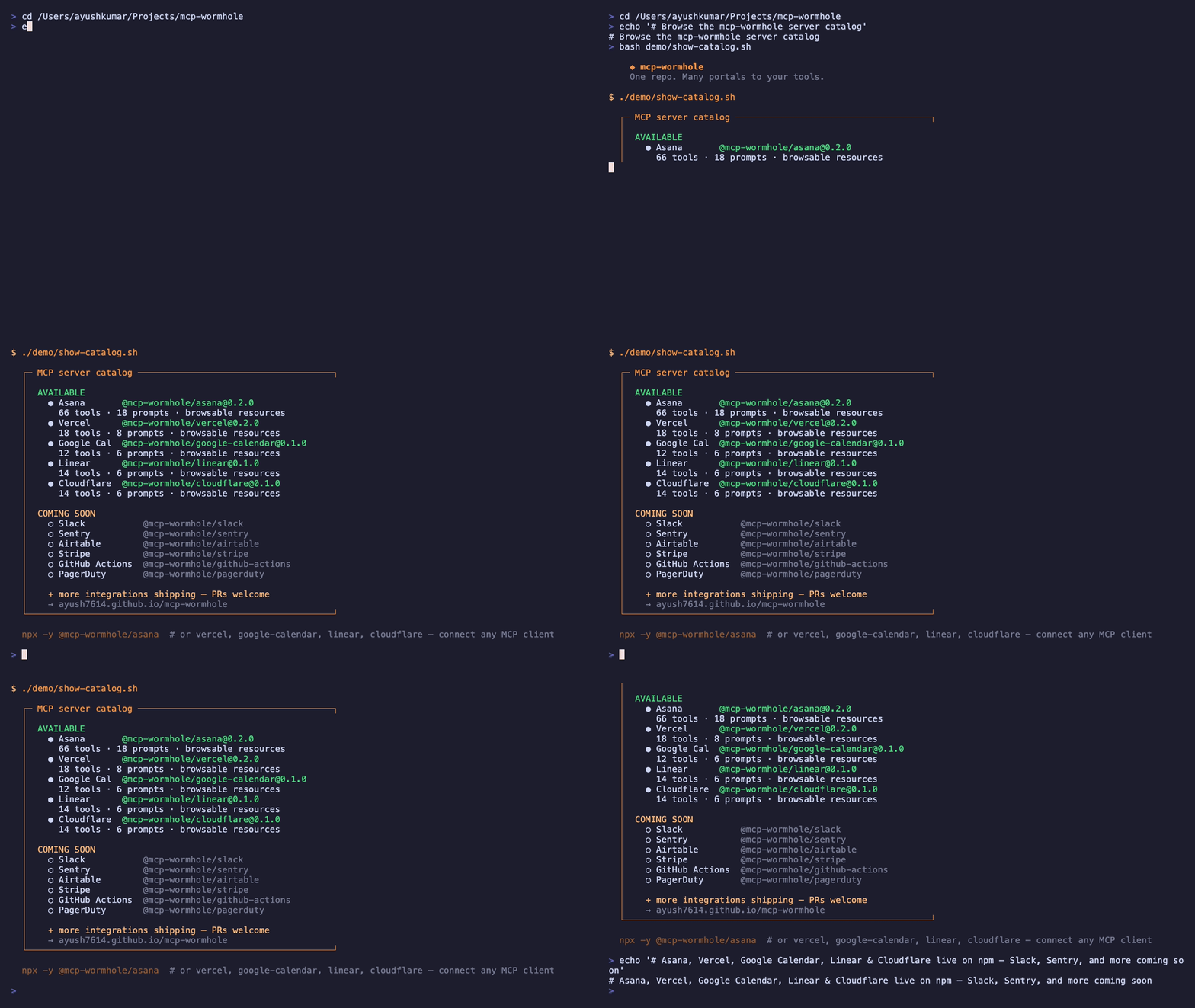
Published on npm: @mcp-wormhole/asana (0.2.0 · 66 tools) · @mcp-wormhole/vercel (0.2.0 · 18 tools) · @mcp-wormhole/google-calendar (0.1.0 · 12 tools) · @mcp-wormhole/linear (0.1.0 · 14 tools) · @mcp-wormhole/cloudflare (0.1.0 · 14 tools)
Get tokens: Asana developer console · Vercel account tokens · Google Calendar API auth · Linear API keys · Cloudflare API tokens
Server guides: Asana MCP · Vercel MCP · Google Calendar MCP · Linear MCP · Cloudflare MCP · All integrations
Clone for development
git clone https://github.com/Ayush7614/mcp-wormhole.git
cd mcp-wormhole
pnpm install
pnpm build
Available servers
Browse all: Asana · Vercel · Slack · Sentry · Google Calendar · Airtable · Stripe · Cloudflare · GitHub Actions · PagerDuty · Linear
| Server | npm package | Status | Auth | Tools |
|---|---|---|---|---|
| Asana | @mcp-wormhole/asana | Available | PAT | 66 tools · 18 prompts · resources |
| Vercel | @mcp-wormhole/vercel | Available | API token | 18 tools · 8 prompts · resources |
| Google Calendar | @mcp-wormhole/google-calendar | Available | OAuth2 | 12 tools · 6 prompts · resources |
| Linear | @mcp-wormhole/linear | Available | API key | 14 tools · 6 prompts · resources |
| Cloudflare | @mcp-wormhole/cloudflare | Available | API token | 14 tools · 6 prompts · resources |
| Slack | @mcp-wormhole/slack |
Planned | Bot token | — |
| Sentry | @mcp-wormhole/sentry |
Planned | Auth token | — |
| Airtable | @mcp-wormhole/airtable |
Planned | PAT | — |
| Stripe | @mcp-wormhole/stripe |
Planned | Secret key | — |
| GitHub Actions | @mcp-wormhole/github-actions |
Planned | PAT | — |
| PagerDuty | @mcp-wormhole/pagerduty |
Planned | API key | — |
Each server calls the vendor's existing API — we don't host new backends.
Connect your client
Step-by-step guides with copy-paste configs for 20 AI clients:
| Client | Asana | Vercel | Google Calendar |
|---|---|---|---|
| Cursor | Cursor + Asana | Cursor + Vercel | Cursor + Calendar |
| VS Code | VS Code + Asana | VS Code + Vercel | VS Code + Calendar |
| Claude Desktop | Claude + Asana | Claude + Vercel | Claude + Calendar |
| Claude Code | Claude Code + Asana | Claude Code + Vercel | Claude Code + Calendar |
| …and 16 more | All integrations | same page | same page |
Full server walkthroughs:
- Asana MCP server guide
- Vercel MCP server guide
- Google Calendar MCP server guide
- Linear MCP server guide
- Cloudflare MCP server guide
Repository structure
mcp-wormhole/
├── packages/
│   ├── asana/              # @mcp-wormhole/asana — live on npm
│   ├── vercel/             # @mcp-wormhole/vercel
│   ├── google-calendar/    # @mcp-wormhole/google-calendar
│   ├── linear/             # @mcp-wormhole/linear
│   ├── cloudflare/         # @mcp-wormhole/cloudflare
│   ├── _template/          # Copy this to start a new server
│   ├── slack/              # planned
│   └── …
├── site/                   # Docs site (Vite + React, GitHub Pages)
│   ├── src/data/           # Servers, integrations, guides, blog
│   └── public/demo/        # Verification GIFs
├── package.json            # pnpm workspace root
├── pnpm-workspace.yaml
├── CONTRIBUTING.md
└── README.md
Each package is a standalone MCP server with its own package.json, tools, verify script, and README.
Development
# Install all workspace dependencies
pnpm install

# Build everything
pnpm build

# Build one package
pnpm --filter @mcp-wormhole/asana build
pnpm --filter @mcp-wormhole/vercel build
pnpm --filter @mcp-wormhole/google-calendar build

# Verify Asana server against real API
cd packages/asana
cp .env.example .env   # add ASANA_ACCESS_TOKEN
pnpm verify

# Verify Vercel server against real API
cd ../vercel
cp .env.example .env   # add VERCEL_TOKEN
pnpm verify

# Verify Google Calendar server against real API
cd ../google-calendar
cp .env.example .env   # add GOOGLE_CALENDAR_CREDENTIALS
pnpm verify

# Verify Linear server against real API
cd ../linear
cp .env.example .env   # add LINEAR_API_KEY
pnpm verify

# Verify Cloudflare server against real API
cd ../cloudflare
cp .env.example .env   # add CLOUDFLARE_API_TOKEN
pnpm verify

# Run docs site locally
cd site && npm run dev
# → http://localhost:5173
Adding a new server
- Copy
packages/_template→packages/<name> - Implement tools against the vendor's official API (Zod validation, MCP SDK)
- Document env vars in README +
.env.example - Add entry in
site/src/data/servers.tsfor the docs catalog - Open a PR — one server per PR
See CONTRIBUTING.md for the full checklist, tool naming conventions, and publishing workflow.
Publishing to npm
Packages publish under the @mcp-wormhole npm org.
| Package | Latest | npm |
|---|---|---|
| Asana | 0.2.0 | @mcp-wormhole/asana |
| Vercel | 0.2.0 | @mcp-wormhole/vercel |
| Google Calendar | 0.1.0 | @mcp-wormhole/google-calendar |
| Linear | 0.1.0 | @mcp-wormhole/linear |
| Cloudflare | 0.1.0 | @mcp-wormhole/cloudflare |
pnpm --filter @mcp-wormhole/asana build
cd packages/asana
npm publish --access public --otp=YOUR_CODE
Or use GitHub Actions → Publish npm packages → Run workflow (requires NPM_TOKEN secret).
Details: CONTRIBUTING.md § Publishing
Guidelines
For contributors
| Rule | Detail |
|---|---|
| One server per PR | Keep reviews focused |
| Vendor API only | No scraping, no unofficial endpoints |
| Read tools first | list_, get_, search_ before create_, update_, delete_ |
| Zod everywhere | Validate all tool inputs |
| No secrets | Never commit tokens; use .env.example |
| Verify script | Hit the real API — no mocks in pnpm verify |
| Update docs | Add server to site/src/data/servers.ts + root README table |
For users
| Rule | Detail |
|---|---|
| Keep tokens local | MCP config env vars stay on your machine |
| Restart after config | MCP clients load servers at startup |
| Use npx | No repo clone needed for published packages |
| Report issues | GitHub Issues |
Stack
- Runtime: Node.js 18+
- Language: TypeScript
- MCP SDK:
@modelcontextprotocol/sdk - Validation: Zod
- Build: tsup
- Transport: stdio (local process via npx)
Blog
Tutorials and release notes on the docs site:
- Introducing mcp-wormhole
- Connect Asana to Cursor in 5 minutes
- Connect Vercel to Cursor in 5 minutes
- Building your first MCP server
- Inside @mcp-wormhole/asana
- Inside @mcp-wormhole/vercel
License
MIT — see LICENSE.
Built by @Ayush7614
Установка Wormhole
У этого сервера нет опубликованного пакета — он собирается из исходников. Открой репозиторий и следуй инструкции в README.
▸ github.com/Ayush7614/mcp-wormholeFAQ
Wormhole MCP бесплатный?
Да, Wormhole MCP бесплатный — установка в пару кликов через Unyly без оплаты.
Нужен ли API-ключ для Wormhole?
Нет, Wormhole работает без API-ключей и переменных окружения.
Wormhole — hosted или self-hosted?
Доступен hosted-вариант: Unyly запускает сервер в облаке, локальная установка не обязательна.
Как установить Wormhole в Claude Desktop, Claude Code или Cursor?
Открой Wormhole на unyly.org, выбери вкладку своего клиента (Claude Desktop, Claude Code, Cursor) и нажми Install — конфиг сгенерируется автоматически, без правки JSON.
Похожие MCP
Notion
Read and write pages in your workspace
 автор: Notion
Linear
Issues, cycles, triage — from Claude
 автор: Linear
Google Drive
Search and read your Drive files
 автор: Google
mindsdb/mindsdb
Connect and unify data across various platforms and databases with [MindsDB as a single MCP server](https://docs.mindsdb.com/mcp/overview).
 автор: mindsdb
fulcradynamics/fulcra-context-mcp
Access personal health and biometric data (sleep stages, heart rate, HRV, glucose, workouts), calendar and location via the Fulcra Life API.
 автор: fulcradynamics
rinadelph/Agent-MCP
Framework for building multi-agent systems that coordinate over MCP, with task management, shared context and RAG.
 автор: rinadelph
WhenLabs-org/when
Developer toolkit: stack detection for AI context files, port conflicts, .env schema validation, docs drift, dependency license audits and task timing.
 автор: WhenLabs-org
Beltran12138/wecom-docs-mcp-server
WeCom (Enterprise WeChat) document operations via MCP: create, read, and edit Docs and Smartsheets (9 tools). Fills the doc-CRUD gap — existing WeCom MCP server
 автор: Beltran12138
freema/mcp-gsheets
Google Sheets API integration for reading, writing, formatting and sheet management.
 автор: freema
mattijsdp/dbt-docs-mcp
dbt-core (OSS) project metadata, model and column-level lineage, and dbt documentation.
 автор: mattijsdp
Compare Wormhole with
Не уверен что выбрать?
Найди свой стек за 60 секунд
Автор?
Embed-бейдж для README
Похожее
Все в категории productivity