
MCPDock
FreeNot checkedLightweight desktop application for managing MCP servers that runs a local HTTP gateway aggregating multiple servers into group endpoints with a visual configur

About
Lightweight desktop application for managing MCP servers that runs a local HTTP gateway aggregating multiple servers into group endpoints with a visual configuration interface.
README
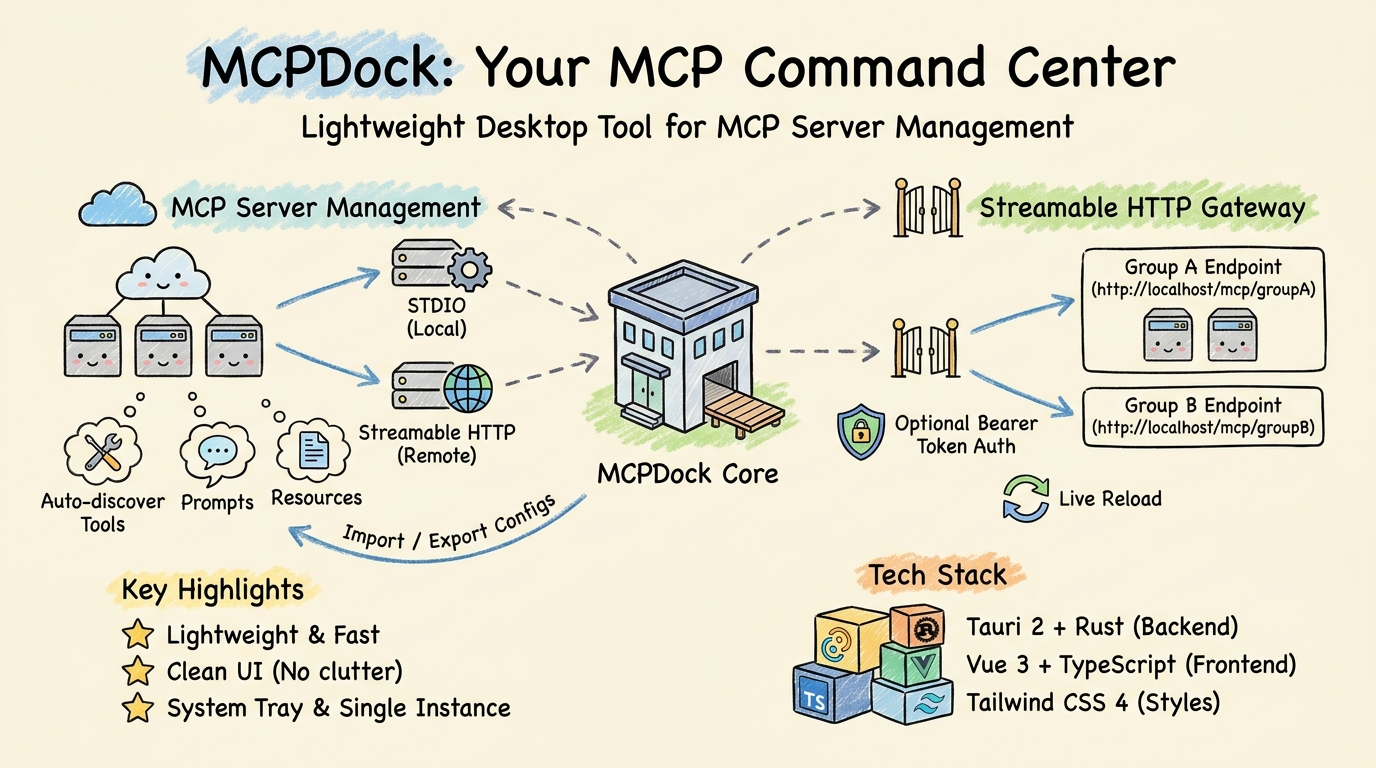
A lightweight, minimal desktop application for managing, monitoring, and exposing MCP (Model Context Protocol) servers. Built with Tauri 2 + Vue 3 + Rust — small footprint, fast startup, clean UI.
What is MCPDock?
MCP is an open protocol that standardizes how applications provide context to LLMs. MCPDock gives you a visual, desktop-native way to:
- Manage all your MCP servers in one place
- Run a local HTTP gateway that aggregates multiple servers into group endpoints
- Discover tools, prompts, and resources automatically
- Import, export, and organize server configurations
Instead of editing JSON files manually, you get a clean, clutter-free UI with system-tray integration, dark mode, and full bilingual support. Designed to stay out of your way.
Overview
Screenshots
macOS
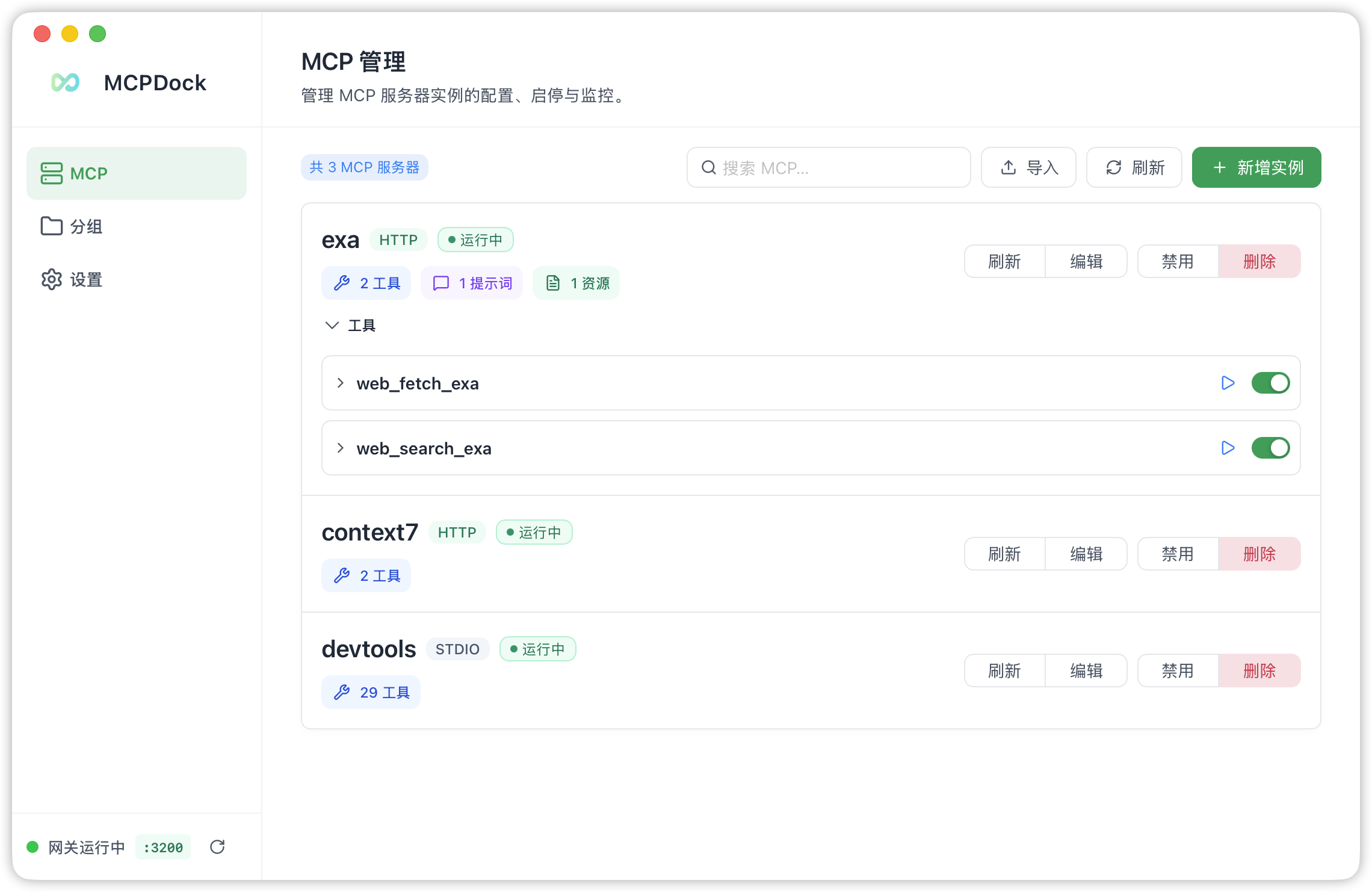
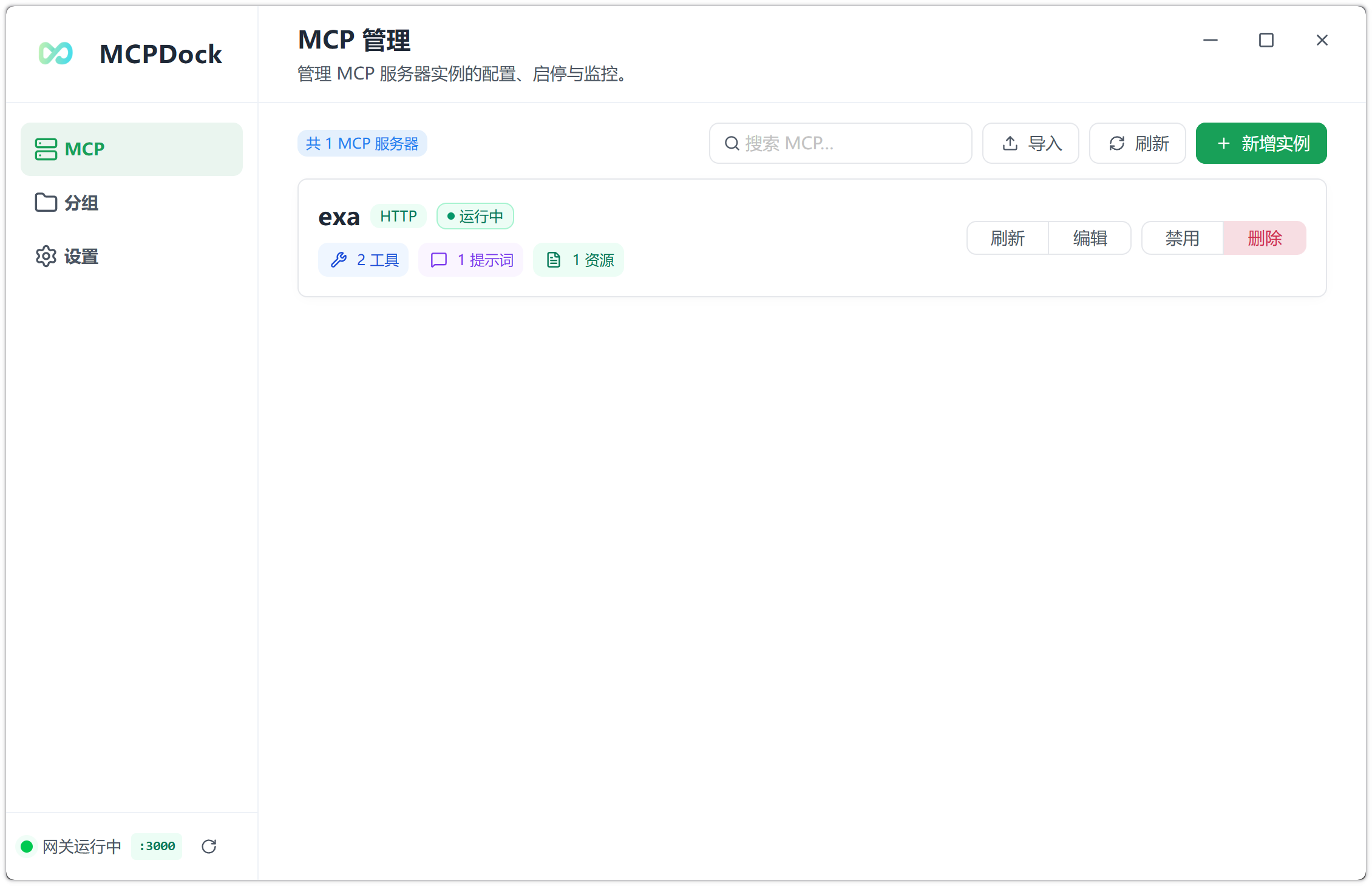
MCP Server Management
Register STDIO and Streamable HTTP servers, connect/disconnect individually, and monitor status in real time.
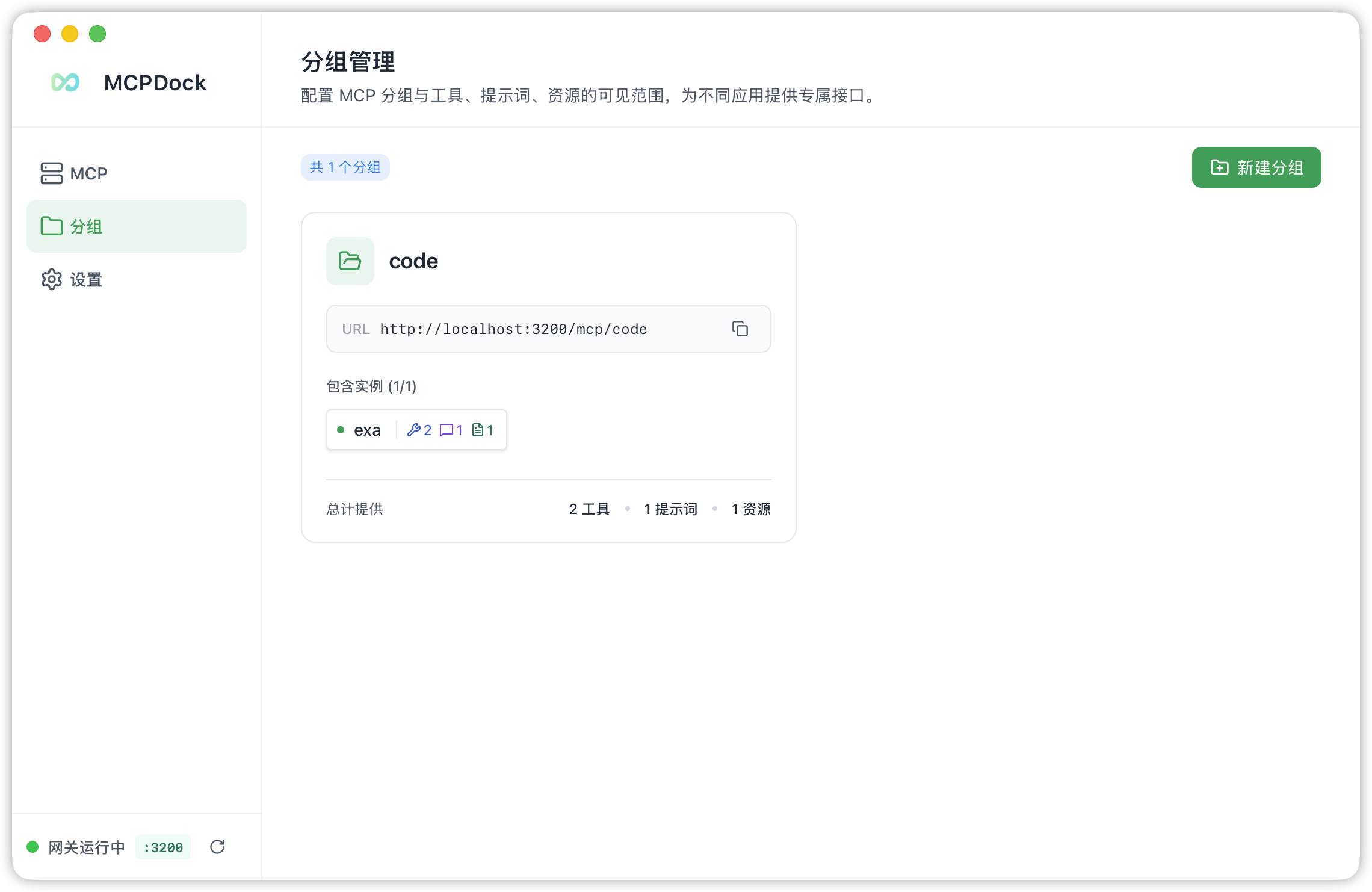
Group & Gateway Management
Create groups, assign servers, and expose them through dedicated Streamable HTTP endpoints with optional Bearer authentication.
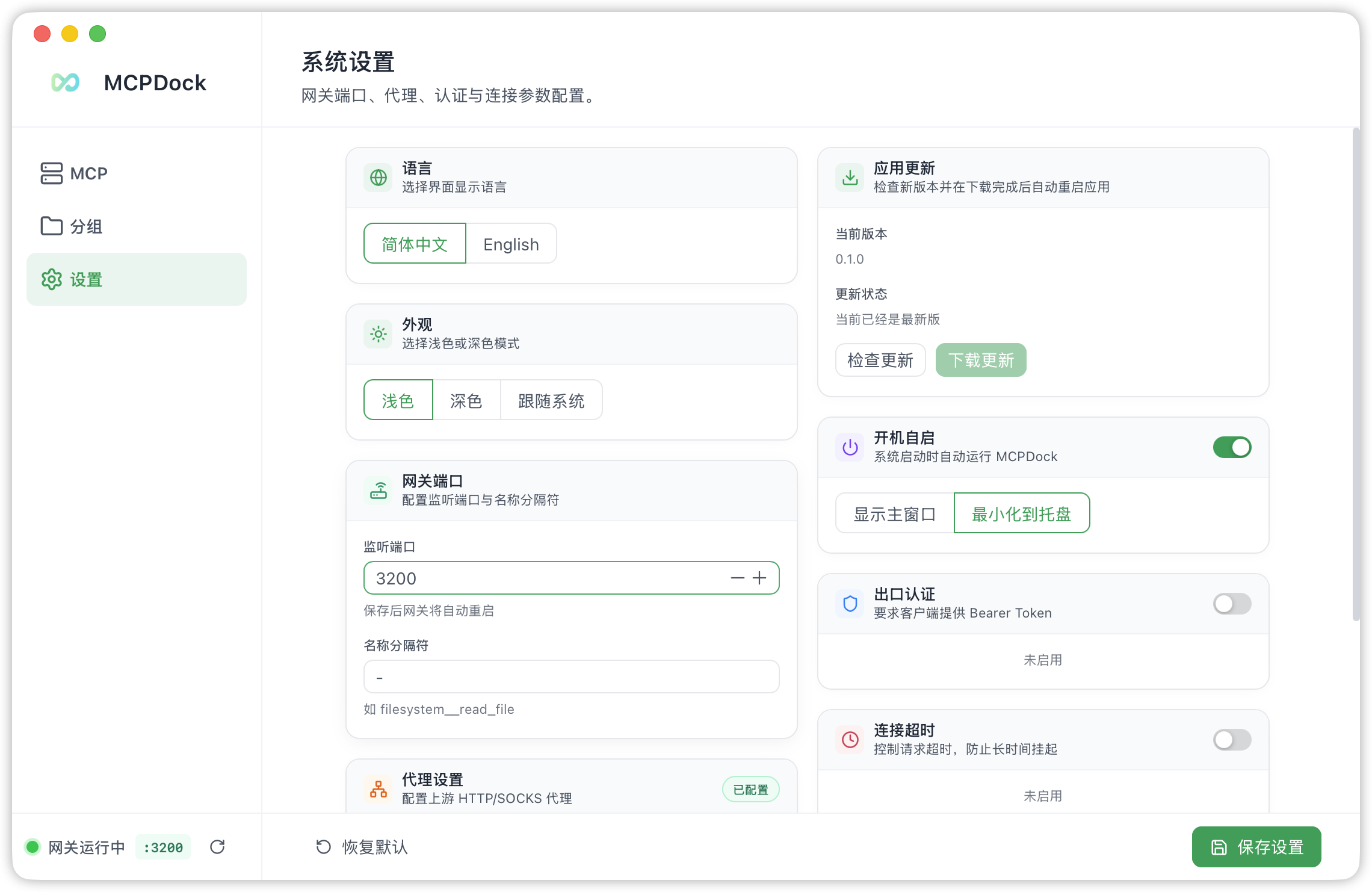
Settings
Configure the gateway port, language, tool-name separator, auth token, proxy, timeout, and keep-alive.
Windows
MCP Server Management on Windows
Highlights
- 🪶 Lightweight — Native desktop app with a tiny footprint thanks to Tauri 2 and Rust
- ⚡ Fast — Near-instant cold start and smooth real-time status updates
- 🧹 Clean UI — No distractions, no bloat. Everything is one click away
- 🌐 Bilingual — Full Chinese and English support with auto-detection
Features
MCP Server Management
- Add & Configure — Register MCP servers via two transport types:
- STDIO — Launch a local child process (e.g.,
npx,python,uvx). Supports command arguments and environment variables. - Streamable HTTP — Connect to a remote MCP server over HTTP. Supports custom request headers.
- STDIO — Launch a local child process (e.g.,
- Connect / Disconnect / Toggle — Start, stop, or enable/disable servers individually. Enabled servers auto-connect on application launch.
- Capability Discovery — After connecting, the app automatically discovers and stores each server's capabilities:
- Tools — invoke from the built-in tool runner
- Prompts — view and call with arguments
- Resources & Resource Templates — static URIs and parameterized URI templates
- Import / Export — Batch import servers from JSON, or export your server list for backup and sharing.
- Search & Filter — Search servers by name with real-time filtering.
- Direct Tool Invocation — Call any discovered tool directly inside the app with a structured input form.
Streamable HTTP Gateway
- Group-based endpoint routing — Each MCP group is exposed as a dedicated Streamable HTTP endpoint at
http://localhost:{port}/mcp/{group_name}. - Optional Bearer Token authentication — Protect all gateway endpoints with a configurable auth token.
- Tool name prefixing — Tools from different servers within a group are prefixed with the server name + configurable separator to avoid naming collisions (e.g.,
server__tool_name). - Configurable port — Choose any available port. Live reloads when settings change or groups are modified.
- CORS support — Built-in cross-origin headers for browser-based clients.
Group Management
- Multi-server aggregation — Create groups, assign member MCP servers, and all member tools/prompts/resources are available through the group endpoint.
- Live reload — Gateway automatically restarts when groups are created, updated, or deleted.
- Member toggle — Quickly add or remove servers from a group without re-creating it.
Settings
| Setting | Description | Default |
|---|---|---|
| Language | UI language (Chinese / English / System) | System |
| Theme | Light / Dark / System | System |
| Gateway Port | HTTP listen port for the gateway | 3100 |
| Separator | Prefix separator for group tool names | __ |
| Auth Token | Bearer token for gateway endpoints | — |
| Request Timeout | Connection / tool-call timeout | 60 s |
| Keep-alive Interval | Periodic ping to keep connections alive | Disabled |
| HTTP Proxy | Proxy for Streamable HTTP servers | — |
| Auto Start | Launch app on system boot | Off |
| Show Window on Start | Show or hide window after auto launch | Off |
System Tray
- Close the window to hide to the system tray rather than exiting.
- Left-click the tray icon or use the tray menu to restore the window.
- macOS: Dock icon hides when window is hidden (Accessory mode).
- Windows: Supports both light and dark tray menu themes.
Single Instance
- Only one application instance runs at a time. Launching again brings the existing window to the foreground.
Internationalization
- Full Chinese (zh-CN) and English (en) UI support via
vue-i18n. - Language auto-detects from the OS or can be switched manually.
Appearance
- Light / Dark / System theme support with Tailwind CSS 4.
- Native title bar on macOS; custom title-less frame on Windows for a cleaner look.
Tech Stack
| Layer | Technology |
|---|---|
| Desktop Framework | Tauri 2 |
| Backend | Rust, axum, tokio, rmcp |
| Database | SQLite (rusqlite, bundled) |
| Frontend | Vue 3, TypeScript |
| UI Components | naive-ui |
| Styling | Tailwind CSS 4 |
| State Management | Pinia |
| Linting / Formatting | Biome |
| Package Manager | pnpm |
Prerequisites
- Rust (latest stable)
- Node.js ≥ 18
- pnpm ≥ 8
- Platform-specific Tauri prerequisites:
- macOS — Xcode Command Line Tools
- Windows — Visual Studio Build Tools or C++ Build Tools
Quick Start
# Clone and enter the project
git clone <repo-url> && cd mcpdock

# Install dependencies
pnpm install

# Run in development mode (with hot-reload)
pnpm tauri dev

# Build for production
pnpm tauri build

# Format / lint
pnpm format
pnpm lint
Installation
macOS (Homebrew)
brew install --cask hsingjui/tap/mcpdock
macOS Note: MCPDock is not currently signed with an Apple Developer certificate. After downloading and moving
MCPDock.appto/Applications, run the following command in Terminal to remove the quarantine attribute:xattr -rd com.apple.quarantine /Applications/MCPDock.app
Architecture
mcpdock
├── src/                        # Vue 3 frontend
│   ├── components/             # Page & layout components
│   │   ├── AppSidebar.vue      # Navigation sidebar
│   │   ├── PageHeader.vue      # Page header with title & description
│   │   ├── GatewayStatus.vue   # Gateway status indicator
│   │   ├── McpManagement.vue   # Main MCP server list & management
│   │   ├── GroupManagement.vue # MCP group management
│   │   ├── SettingsPage.vue    # Application settings
│   │   ├── mcp/                # MCP-related sub-components
│   │   │   ├── McpServerList.vue    # Server list with status dots
│   │   │   ├── McpServerForm.vue    # Add/edit server form
│   │   │   ├── McpImportView.vue    # JSON import/export
│   │   │   └── McpToolRunner.vue    # Direct tool invocation UI
│   │   └── group/              # Group-related sub-components
│   ├── stores/                 # Pinia stores
│   │   ├── mcp.ts              # MCP server state & IPC calls
│   │   ├── group.ts            # Group state & IPC calls
│   │   └── settings.ts         # Settings state & IPC calls
│   ├── types/                  # TypeScript type definitions
│   ├── i18n/                   # i18n setup
│   └── locales/                # Language packs (zh-CN, en)
├── src-tauri/                  # Rust backend
│   ├── src/
│   │   ├── main.rs             # Entry point
│   │   ├── lib.rs              # Tauri builder: setup, tray, single-instance, gateway & MCP initialization
│   │   ├── state.rs            # Global application state (DB, runtimes, clients, settings, gateway)
│   │   ├── commands/           # Tauri IPC command handlers
│   │   │   ├── mcp.rs          # Server CRUD, connect/disconnect, tool call
│   │   │   ├── group.rs        # Group CRUD + gateway restart
│   │   │   ├── settings.rs     # Settings read/write + gateway restart
│   │   │   ├── gateway.rs      # Gateway status query & restart
│   │   │   └── capability.rs   # Capability listing
│   │   ├── mcp/                # MCP client management
│   │   │   ├── runtime.rs      # Runtime state & client holder types
│   │   │   └── manager/        # Connection lifecycle, discovery, transport
│   │   │       ├── mod.rs      # connect, disconnect, refresh, call_tool
│   │   │       ├── transport.rs # STDIO and Streamable HTTP client creation
│   │   │       ├── discovery.rs # Tool/prompt/resource discovery
│   │   │       └── runtime_state.rs # Runtime state helpers & event emission
│   │   ├── gateway/            # Streamable HTTP gateway
│   │   │   ├── server.rs       # Axum server: routes per group, auth middleware, CORS
│   │   │   └── handler/        # GroupHandler: tools, prompts, resources dispatch
│   │   └── db/                 # SQLite database layer
│   │       ├── mod.rs          # Schema initialization
│   │       ├── mcp_server.rs   # MCP server CRUD
│   │       ├── mcp_group.rs    # MCP group CRUD
│   │       ├── mcp_capability.rs # Discovered capabilities storage
│   │       └── app_settings.rs # Settings key-value store
│   ├── icons/                  # App icons (macOS, Windows, tray)
│   └── tauri.conf.json         # Tauri configuration
├── biome.json                  # Biome linter & formatter config
└── package.json                # Node.js project manifest
Data Flow
┌──────────────────────────────────────────────────────────┐
│                    Frontend (Vue 3)                       │
│  McpManagement ──→ Pinia stores ──→ Tauri IPC invoke()   │
└──────────────────────────┬───────────────────────────────┘
                           │ ipc
┌──────────────────────────▼───────────────────────────────┐
│                Backend (Rust / Tauri)                     │
│  commands/*.rs ──→ mcp/manager ──→ rmcp client          │
│                 ──→ gateway/server (axum)                 │
│                 ──→ db/* (rusqlite)                       │
└──────────────────────────────────────────────────────────┘
Gateway Request Flow
Client → POST http://localhost:3100/mcp/my-group (Streamable HTTP)
    → Axum router
    → Auth middleware (Bearer token check)
    → GroupHandler::call_tool
        → Parse prefixed tool name → resolve server
        → Get or connect upstream MCP client
        → Forward call → return result
Community
License
MIT
Installing MCPDock
This server has no published package — it is built from source. Open the repository and follow its README.
▸ github.com/hsingjui/mcpdockFAQ
Is MCPDock MCP free?
Yes, MCPDock MCP is free — one-click install via Unyly at no cost.
Does MCPDock need an API key?
No, MCPDock runs without API keys or environment variables.
Is MCPDock hosted or self-hosted?
Self-hosted: the server runs locally on your machine via the install command above.
How do I install MCPDock in Claude Desktop, Claude Code or Cursor?
Open MCPDock on unyly.org, pick your client tab (Claude Desktop, Claude Code, Cursor) and press Install — the config is generated automatically, no JSON editing.
Related MCPs
GitHub
PRs, issues, code search, CI status
 by GitHub
Filesystem
Secure file operations with configurable access controls.
Memory
Knowledge graph-based persistent memory system.
Template MCP Server
A CLI tool to create a new Model Context Protocol server project with TypeScript support, dual transport options, and an extensible structure
 by mcpdotdirect
Compare MCPDock with
Not sure what to pick?
Find your stack in 60 seconds
Author?
Embed badge for your README
Browse similar
All development MCPs